
Python学习day41-数据库(1)
figure:last-child { margin-bottom: 0.5rem; }
#write ol, #write ul { position: relative; }
img { max-width: 100%; vertical-align: middle; }
button, input, select, textarea { color: inherit; font: inherit; }
input[type="checkbox"], input[type="radio"] { line-height: normal; padding: 0px; }
*, ::after, ::before { box-sizing: border-box; }
#write h1, #write h2, #write h3, #write h4, #write h5, #write h6, #write p, #write pre { width: inherit; }
#write h1, #write h2, #write h3, #write h4, #write h5, #write h6, #write p { position: relative; }
p { line-height: inherit; }
h1, h2, h3, h4, h5, h6 { break-after: avoid-page; break-inside: avoid; orphans: 2; }
p { orphans: 4; }
h1 { font-size: 2rem; }
h2 { font-size: 1.8rem; }
h3 { font-size: 1.6rem; }
h4 { font-size: 1.4rem; }
h5 { font-size: 1.2rem; }
h6 { font-size: 1rem; }
.md-math-block, .md-rawblock, h1, h2, h3, h4, h5, h6, p { margin-top: 1rem; margin-bottom: 1rem; }
.hidden { display: none; }
.md-blockmeta { color: rgb(204, 204, 204); font-weight: 700; font-style: italic; }
a { cursor: pointer; }
sup.md-footnote { padding: 2px 4px; background-color: rgba(238, 238, 238, 0.7); color: rgb(85, 85, 85); border-radius: 4px; cursor: pointer; }
sup.md-footnote a, sup.md-footnote a:hover { color: inherit; text-transform: inherit; text-decoration: inherit; }
#write input[type="checkbox"] { cursor: pointer; width: inherit; height: inherit; }
figure { overflow-x: auto; margin: 1.2em 0px; max-width: calc(100% + 16px); padding: 0px; }
figure > table { margin: 0px !important; }
tr { break-inside: avoid; break-after: auto; }
thead { display: table-header-group; }
table { border-collapse: collapse; border-spacing: 0px; width: 100%; overflow: auto; break-inside: auto; text-align: left; }
table.md-table td { min-width: 32px; }
.CodeMirror-gutters { border-right: 0px; background-color: inherit; }
.CodeMirror-linenumber { user-select: none; }
.CodeMirror { text-align: left; }
.CodeMirror-placeholder { opacity: 0.3; }
.CodeMirror pre { padding: 0px 4px; }
.CodeMirror-lines { padding: 0px; }
div.hr:focus { cursor: none; }
#write pre { white-space: pre-wrap; }
#write.fences-no-line-wrapping pre { white-space: pre; }
#write pre.ty-contain-cm { white-space: normal; }
.CodeMirror-gutters { margin-right: 4px; }
.md-fences { font-size: 0.9rem; display: block; break-inside: avoid; text-align: left; overflow: visible; white-space: pre; background: inherit; position: relative !important; }
.md-diagram-panel { width: 100%; margin-top: 10px; text-align: center; padding-top: 0px; padding-bottom: 8px; overflow-x: auto; }
#write .md-fences.mock-cm { white-space: pre-wrap; }
.md-fences.md-fences-with-lineno { padding-left: 0px; }
#write.fences-no-line-wrapping .md-fences.mock-cm { white-space: pre; overflow-x: auto; }
.md-fences.mock-cm.md-fences-with-lineno { padding-left: 8px; }
.CodeMirror-line, twitterwidget { break-inside: avoid; }
.footnotes { opacity: 0.8; font-size: 0.9rem; margin-top: 1em; margin-bottom: 1em; }
.footnotes + .footnotes { margin-top: 0px; }
.md-reset { margin: 0px; padding: 0px; border: 0px; outline: 0px; vertical-align: top; background: 0px 0px; text-decoration: none; text-shadow: none; float: none; position: static; width: auto; height: auto; white-space: nowrap; cursor: inherit; -webkit-tap-highlight-color: transparent; line-height: normal; font-weight: 400; text-align: left; box-sizing: content-box; direction: ltr; }
li div { padding-top: 0px; }
blockquote { margin: 1rem 0px; }
li .mathjax-block, li p { margin: 0.5rem 0px; }
li { margin: 0px; position: relative; }
blockquote > :last-child { margin-bottom: 0px; }
blockquote > :first-child, li > :first-child { margin-top: 0px; }
.footnotes-area { color: rgb(136, 136, 136); margin-top: 0.714rem; padding-bottom: 0.143rem; white-space: normal; }
#write .footnote-line { white-space: pre-wrap; }
@media print {
body, html { border: 1px solid transparent; height: 99%; break-after: avoid; break-before: avoid; }
#write { margin-top: 0px; padding-top: 0px; border-color: transparent !important; }
.typora-export * { -webkit-print-color-adjust: exact; }
html.blink-to-pdf { font-size: 13px; }
.typora-export #write { padding-left: 32px; padding-right: 32px; padding-bottom: 0px; break-after: avoid; }
.typora-export #write::after { height: 0px; }
}
.footnote-line { margin-top: 0.714em; font-size: 0.7em; }
a img, img a { cursor: pointer; }
pre.md-meta-block { font-size: 0.8rem; min-height: 0.8rem; white-space: pre-wrap; background: rgb(204, 204, 204); display: block; overflow-x: hidden; }
p > .md-image:only-child:not(.md-img-error) img, p > img:only-child { display: block; margin: auto; }
p > .md-image:only-child { display: inline-block; width: 100%; }
#write .MathJax_Display { margin: 0.8em 0px 0px; }
.md-math-block { width: 100%; }
.md-math-block:not(:empty)::after { display: none; }
[contenteditable="true"]:active, [contenteditable="true"]:focus { outline: 0px; box-shadow: none; }
.md-task-list-item { position: relative; list-style-type: none; }
.task-list-item.md-task-list-item { padding-left: 0px; }
.md-task-list-item > input { position: absolute; top: 0px; left: 0px; margin-left: -1.2em; margin-top: calc(1em - 10px); border: none; }
.math { font-size: 1rem; }
.md-toc { min-height: 3.58rem; position: relative; font-size: 0.9rem; border-radius: 10px; }
.md-toc-content { position: relative; margin-left: 0px; }
.md-toc-content::after, .md-toc::after { display: none; }
.md-toc-item { display: block; color: rgb(65, 131, 196); }
.md-toc-item a { text-decoration: none; }
.md-toc-inner:hover { text-decoration: underline; }
.md-toc-inner { display: inline-block; cursor: pointer; }
.md-toc-h1 .md-toc-inner { margin-left: 0px; font-weight: 700; }
.md-toc-h2 .md-toc-inner { margin-left: 2em; }
.md-toc-h3 .md-toc-inner { margin-left: 4em; }
.md-toc-h4 .md-toc-inner { margin-left: 6em; }
.md-toc-h5 .md-toc-inner { margin-left: 8em; }
.md-toc-h6 .md-toc-inner { margin-left: 10em; }
@media screen and (max-width: 48em) {
.md-toc-h3 .md-toc-inner { margin-left: 3.5em; }
.md-toc-h4 .md-toc-inner { margin-left: 5em; }
.md-toc-h5 .md-toc-inner { margin-left: 6.5em; }
.md-toc-h6 .md-toc-inner { margin-left: 8em; }
}
a.md-toc-inner { font-size: inherit; font-style: inherit; font-weight: inherit; line-height: inherit; }
.footnote-line a:not(.reversefootnote) { color: inherit; }
.md-attr { display: none; }
.md-fn-count::after { content: "."; }
code, pre, samp, tt { font-family: var(--monospace); }
kbd { margin: 0px 0.1em; padding: 0.1em 0.6em; font-size: 0.8em; color: rgb(36, 39, 41); background: rgb(255, 255, 255); border: 1px solid rgb(173, 179, 185); border-radius: 3px; box-shadow: rgba(12, 13, 14, 0.2) 0px 1px 0px, rgb(255, 255, 255) 0px 0px 0px 2px inset; white-space: nowrap; vertical-align: middle; }
.md-comment { color: rgb(162, 127, 3); opacity: 0.8; font-family: var(--monospace); }
code { text-align: left; vertical-align: initial; }
a.md-print-anchor { white-space: pre !important; border-width: initial !important; border-style: none !important; border-color: initial !important; display: inline-block !important; position: absolute !important; width: 1px !important; right: 0px !important; outline: 0px !important; background: 0px 0px !important; text-decoration: initial !important; text-shadow: initial !important; }
.md-inline-math .MathJax_SVG .noError { display: none !important; }
.html-for-mac .inline-math-svg .MathJax_SVG { vertical-align: 0.2px; }
.md-math-block .MathJax_SVG_Display { text-align: center; margin: 0px; position: relative; text-indent: 0px; max-width: none; max-height: none; min-height: 0px; min-width: 100%; width: auto; overflow-y: hidden; display: block !important; }
.MathJax_SVG_Display, .md-inline-math .MathJax_SVG_Display { width: auto; margin: inherit; display: inline-block !important; }
.MathJax_SVG .MJX-monospace { font-family: var(--monospace); }
.MathJax_SVG .MJX-sans-serif { font-family: sans-serif; }
.MathJax_SVG { display: inline; font-style: normal; font-weight: 400; line-height: normal; zoom: 90%; text-indent: 0px; text-align: left; text-transform: none; letter-spacing: normal; word-spacing: normal; overflow-wrap: normal; white-space: nowrap; float: none; direction: ltr; max-width: none; max-height: none; min-width: 0px; min-height: 0px; border: 0px; padding: 0px; margin: 0px; }
.MathJax_SVG * { transition: none 0s ease 0s; }
.MathJax_SVG_Display svg { vertical-align: middle !important; margin-bottom: 0px !important; margin-top: 0px !important; }
.os-windows.monocolor-emoji .md-emoji { font-family: "Segoe UI Symbol", sans-serif; }
.md-diagram-panel > svg { max-width: 100%; }
[lang="mermaid"] svg, [lang="flow"] svg { max-width: 100%; height: auto; }
[lang="mermaid"] .node text { font-size: 1rem; }
table tr th { border-bottom: 0px; }
video { max-width: 100%; display: block; margin: 0px auto; }
iframe { max-width: 100%; width: 100%; border: none; }
.highlight td, .highlight tr { border: 0px; }
.CodeMirror { height: auto; }
.CodeMirror.cm-s-inner { background: inherit; }
.CodeMirror-scroll { overflow: auto hidden; z-index: 3; }
.CodeMirror-gutter-filler, .CodeMirror-scrollbar-filler { background-color: rgb(255, 255, 255); }
.CodeMirror-gutters { border-right: 1px solid rgb(221, 221, 221); background: inherit; white-space: nowrap; }
.CodeMirror-linenumber { padding: 0px 3px 0px 5px; text-align: right; color: rgb(153, 153, 153); }
.cm-s-inner .cm-keyword { color: rgb(119, 0, 136); }
.cm-s-inner .cm-atom, .cm-s-inner.cm-atom { color: rgb(34, 17, 153); }
.cm-s-inner .cm-number { color: rgb(17, 102, 68); }
.cm-s-inner .cm-def { color: rgb(0, 0, 255); }
.cm-s-inner .cm-variable { color: rgb(0, 0, 0); }
.cm-s-inner .cm-variable-2 { color: rgb(0, 85, 170); }
.cm-s-inner .cm-variable-3 { color: rgb(0, 136, 85); }
.cm-s-inner .cm-string { color: rgb(170, 17, 17); }
.cm-s-inner .cm-property { color: rgb(0, 0, 0); }
.cm-s-inner .cm-operator { color: rgb(152, 26, 26); }
.cm-s-inner .cm-comment, .cm-s-inner.cm-comment { color: rgb(170, 85, 0); }
.cm-s-inner .cm-string-2 { color: rgb(255, 85, 0); }
.cm-s-inner .cm-meta { color: rgb(85, 85, 85); }
.cm-s-inner .cm-qualifier { color: rgb(85, 85, 85); }
.cm-s-inner .cm-builtin { color: rgb(51, 0, 170); }
.cm-s-inner .cm-bracket { color: rgb(153, 153, 119); }
.cm-s-inner .cm-tag { color: rgb(17, 119, 0); }
.cm-s-inner .cm-attribute { color: rgb(0, 0, 204); }
.cm-s-inner .cm-header, .cm-s-inner.cm-header { color: rgb(0, 0, 255); }
.cm-s-inner .cm-quote, .cm-s-inner.cm-quote { color: rgb(0, 153, 0); }
.cm-s-inner .cm-hr, .cm-s-inner.cm-hr { color: rgb(153, 153, 153); }
.cm-s-inner .cm-link, .cm-s-inner.cm-link { color: rgb(0, 0, 204); }
.cm-negative { color: rgb(221, 68, 68); }
.cm-positive { color: rgb(34, 153, 34); }
.cm-header, .cm-strong { font-weight: 700; }
.cm-del { text-decoration: line-through; }
.cm-em { font-style: italic; }
.cm-link { text-decoration: underline; }
.cm-error { color: red; }
.cm-invalidchar { color: red; }
.cm-constant { color: rgb(38, 139, 210); }
.cm-defined { color: rgb(181, 137, 0); }
div.CodeMirror span.CodeMirror-matchingbracket { color: rgb(0, 255, 0); }
div.CodeMirror span.CodeMirror-nonmatchingbracket { color: rgb(255, 34, 34); }
.cm-s-inner .CodeMirror-activeline-background { background: inherit; }
.CodeMirror { position: relative; overflow: hidden; }
.CodeMirror-scroll { height: 100%; outline: 0px; position: relative; box-sizing: content-box; background: inherit; }
.CodeMirror-sizer { position: relative; }
.CodeMirror-gutter-filler, .CodeMirror-hscrollbar, .CodeMirror-scrollbar-filler, .CodeMirror-vscrollbar { position: absolute; z-index: 6; display: none; }
.CodeMirror-vscrollbar { right: 0px; top: 0px; overflow: hidden; }
.CodeMirror-hscrollbar { bottom: 0px; left: 0px; overflow: hidden; }
.CodeMirror-scrollbar-filler { right: 0px; bottom: 0px; }
.CodeMirror-gutter-filler { left: 0px; bottom: 0px; }
.CodeMirror-gutters { position: absolute; left: 0px; top: 0px; padding-bottom: 30px; z-index: 3; }
.CodeMirror-gutter { white-space: normal; height: 100%; box-sizing: content-box; padding-bottom: 30px; margin-bottom: -32px; display: inline-block; }
.CodeMirror-gutter-wrapper { position: absolute; z-index: 4; background: 0px 0px !important; border: none !important; }
.CodeMirror-gutter-background { position: absolute; top: 0px; bottom: 0px; z-index: 4; }
.CodeMirror-gutter-elt { position: absolute; cursor: default; z-index: 4; }
.CodeMirror-lines { cursor: text; }
.CodeMirror pre { border-radius: 0px; border-width: 0px; background: 0px 0px; font-family: inherit; font-size: inherit; margin: 0px; white-space: pre; overflow-wrap: normal; color: inherit; z-index: 2; position: relative; overflow: visible; }
.CodeMirror-wrap pre { overflow-wrap: break-word; white-space: pre-wrap; word-break: normal; }
.CodeMirror-code pre { border-right: 30px solid transparent; width: fit-content; }
.CodeMirror-wrap .CodeMirror-code pre { border-right: none; width: auto; }
.CodeMirror-linebackground { position: absolute; left: 0px; right: 0px; top: 0px; bottom: 0px; z-index: 0; }
.CodeMirror-linewidget { position: relative; z-index: 2; overflow: auto; }
.CodeMirror-wrap .CodeMirror-scroll { overflow-x: hidden; }
.CodeMirror-measure { position: absolute; width: 100%; height: 0px; overflow: hidden; visibility: hidden; }
.CodeMirror-measure pre { position: static; }
.CodeMirror div.CodeMirror-cursor { position: absolute; visibility: hidden; border-right: none; width: 0px; }
.CodeMirror div.CodeMirror-cursor { visibility: hidden; }
.CodeMirror-focused div.CodeMirror-cursor { visibility: inherit; }
.cm-searching { background: rgba(255, 255, 0, 0.4); }
@media print {
.CodeMirror div.CodeMirror-cursor { visibility: hidden; }
}
:root { --side-bar-bg-color: #fafafa; --control-text-color: #777; }
html { font-size: 16px; }
body { font-family: "Open Sans", "Clear Sans", "Helvetica Neue", Helvetica, Arial, sans-serif; color: rgb(51, 51, 51); line-height: 1.6; }
#write { max-width: 860px; margin: 0px auto; padding: 30px 30px 100px; }
#write > ul:first-child, #write > ol:first-child { margin-top: 30px; }
a { color: rgb(65, 131, 196); }
h1, h2, h3, h4, h5, h6 { position: relative; margin-top: 1rem; margin-bottom: 1rem; font-weight: bold; line-height: 1.4; cursor: text; }
h1:hover a.anchor, h2:hover a.anchor, h3:hover a.anchor, h4:hover a.anchor, h5:hover a.anchor, h6:hover a.anchor { text-decoration: none; }
h1 tt, h1 code { font-size: inherit; }
h2 tt, h2 code { font-size: inherit; }
h3 tt, h3 code { font-size: inherit; }
h4 tt, h4 code { font-size: inherit; }
h5 tt, h5 code { font-size: inherit; }
h6 tt, h6 code { font-size: inherit; }
h1 { padding-bottom: 0.3em; font-size: 2.25em; line-height: 1.2; border-bottom: 1px solid rgb(238, 238, 238); }
h2 { padding-bottom: 0.3em; font-size: 1.75em; line-height: 1.225; border-bottom: 1px solid rgb(238, 238, 238); }
h3 { font-size: 1.5em; line-height: 1.43; }
h4 { font-size: 1.25em; }
h5 { font-size: 1em; }
h6 { font-size: 1em; color: rgb(119, 119, 119); }
p, blockquote, ul, ol, dl, table { margin: 0.8em 0px; }
li > ol, li > ul { margin: 0px; }
hr { height: 2px; padding: 0px; margin: 16px 0px; background-color: rgb(231, 231, 231); border: 0px none; overflow: hidden; box-sizing: content-box; }
li p.first { display: inline-block; }
ul, ol { padding-left: 30px; }
ul:first-child, ol:first-child { margin-top: 0px; }
ul:last-child, ol:last-child { margin-bottom: 0px; }
blockquote { border-left: 4px solid rgb(223, 226, 229); padding: 0px 15px; color: rgb(119, 119, 119); }
blockquote blockquote { padding-right: 0px; }
table { padding: 0px; word-break: initial; }
table tr { border-top: 1px solid rgb(223, 226, 229); margin: 0px; padding: 0px; }
table tr:nth-child(2n), thead { background-color: rgb(248, 248, 248); }
table tr th { font-weight: bold; border-width: 1px 1px 0px; border-top-style: solid; border-right-style: solid; border-left-style: solid; border-top-color: rgb(223, 226, 229); border-right-color: rgb(223, 226, 229); border-left-color: rgb(223, 226, 229); border-image: initial; border-bottom-style: initial; border-bottom-color: initial; margin: 0px; padding: 6px 13px; }
table tr td { border: 1px solid rgb(223, 226, 229); margin: 0px; padding: 6px 13px; }
table tr th:first-child, table tr td:first-child { margin-top: 0px; }
table tr th:last-child, table tr td:last-child { margin-bottom: 0px; }
.CodeMirror-lines { padding-left: 4px; }
.code-tooltip { box-shadow: rgba(0, 28, 36, 0.3) 0px 1px 1px 0px; border-top: 1px solid rgb(238, 242, 242); }
.md-fences, code, tt { border: 1px solid rgb(231, 234, 237); background-color: rgb(248, 248, 248); border-radius: 3px; padding: 2px 4px 0px; font-size: 0.9em; }
code { background-color: rgb(243, 244, 244); padding: 0px 2px; }
.md-fences { margin-bottom: 15px; margin-top: 15px; padding-top: 8px; padding-bottom: 6px; }
.md-task-list-item > input { margin-left: -1.3em; }
@media print {
html { font-size: 13px; }
table, pre { break-inside: avoid; }
pre { overflow-wrap: break-word; }
}
.md-fences { background-color: rgb(248, 248, 248); }
#write pre.md-meta-block { padding: 1rem; font-size: 85%; line-height: 1.45; background-color: rgb(247, 247, 247); border: 0px; border-radius: 3px; color: rgb(119, 119, 119); margin-top: 0px !important; }
.mathjax-block > .code-tooltip { bottom: 0.375rem; }
.md-mathjax-midline { background: rgb(250, 250, 250); }
#write > h3.md-focus::before { left: -1.5625rem; top: 0.375rem; }
#write > h4.md-focus::before { left: -1.5625rem; top: 0.285714rem; }
#write > h5.md-focus::before { left: -1.5625rem; top: 0.285714rem; }
#write > h6.md-focus::before { left: -1.5625rem; top: 0.285714rem; }
.md-image > .md-meta { border-radius: 3px; padding: 2px 0px 0px 4px; font-size: 0.9em; color: inherit; }
.md-tag { color: rgb(167, 167, 167); opacity: 1; }
.md-toc { margin-top: 20px; padding-bottom: 20px; }
.sidebar-tabs { border-bottom: none; }
#typora-quick-open { border: 1px solid rgb(221, 221, 221); background-color: rgb(248, 248, 248); }
#typora-quick-open-item { background-color: rgb(250, 250, 250); border-color: rgb(254, 254, 254) rgb(229, 229, 229) rgb(229, 229, 229) rgb(238, 238, 238); border-style: solid; border-width: 1px; }
.on-focus-mode blockquote { border-left-color: rgba(85, 85, 85, 0.12); }
header, .context-menu, .megamenu-content, footer { font-family: "Segoe UI", Arial, sans-serif; }
.file-node-content:hover .file-node-icon, .file-node-content:hover .file-node-open-state { visibility: visible; }
.mac-seamless-mode #typora-sidebar { background-color: var(--side-bar-bg-color); }
.md-lang { color: rgb(180, 101, 77); }
.html-for-mac .context-menu { --item-hover-bg-color: #E6F0FE; }
#md-notification .btn { border: 0px; }
.dropdown-menu .divider { border-color: rgb(229, 229, 229); }
.ty-preferences .window-content { background-color: rgb(250, 250, 250); }
.ty-preferences .nav-group-item.active { color: white; background: rgb(153, 153, 153); }
-->
Python学习day41-数据库(1)
数据库
概念
首先我们要明白数据的概念,什么是数据呢,宽泛来讲,我们之前所创建的文件,以及各种赋值语句,甚至是计算机上的各种图片,,视频,音乐,其实最后都可以叫做是数据.
那么问题就来了,库,通常来讲库的定义就是一个可以存放很多东西的容器,所以数据库,最简单的定义就是可以存放很多数据的一个库.
我们为什么要用数据库?
试想一下,如果我们在一个比较大的公司,就是那种需要同时和上千万用户进行交互的软件的公司,那么用户和公司软件之间的交互应该是什么样的?
我们不是直接和计算机交互,而应该是服务器,甚至通常是一个服务器的集群.而这些服务器里面装的也不是我们这些常用的win10或者mac系统,而是Linux或者是Windows Server系列,这些系统的界面和与用户的交互性也许没有那么优秀,却足够稳定.而这些系统上通常就只会放一些数据库,仅此而已.
那么我们使用数据库的理由就有了,一方面,我们要用数据库来存储文件,从而实现文件和程序的分离,另外一方面,数据库修改数据的效率比我们直接手动修改,或者是通过Python修改的效率要高的太多太多了.
数据库的分类
数据库按照不同的标准,分类也不尽相同,但一般会有三种标准来进行分类:
关系型与非关系型
关系型:顾名思义,关系型数据库就是其中的表与表之间都有联系,每个表并不是独立存在的,比如MySQL,Oracle,SQLserver等
非关系型:非关系型数据库里面没有表的概念,只有单独的每一行的数据,比如redis,MongoDB等,其优势在于存取速度都比关系型数据库要快,缺点就是逻辑较复杂,脉络不清晰.
内存和硬盘(按照工作的区域来分):
硬盘:可以永久存储,比如MySQL,MongoDB等
内存:数据的存取率极高,比如redis,memcache等
sql与nosql来区分
sql:就是说数据库需要通过sql语句来操控,操控较复杂,但效率很高
nosql:数据库操作是通过直接用key-value的方式进行记录,而不通过sql语句,
数据库的安装与卸载
安装:
首先,如果你从来没有安装过数据库,那么恭喜你,你非常的幸运,你只需要按照下面这个教程来一步一步安装即可,绝对不会出错.教程如下:
Windows版本
mysql的安装、启动和基础配置 —— Windows版本:https://www.cnblogs.com/nickchen121/p/11145124.html
Linux版本
mysql的安装、启动和基础配置 —— Linux版本:https://www.cnblogs.com/nickchen121/p/11145125.html
Mac版本
mysql的安装、启动和基础配置 —— Mac版本:https://www.cnblogs.com/nickchen121/p/11145123.html
以上安装教程均为博客园,nickchen这位大帅比所写,非常的详细,亲测没有任务问题.
卸载:
下面我们要说的是,如果你之前安装过数据库,而且卸载的不是那么彻底,那么就会非常麻烦.其实也没有那么麻烦,只需要做两个步骤就可以了
删除环境变量里数据库的地址
具体为,右键我的电脑-->属性-->高级系统设置-->高级标签页-->环境变量-->找到下面系统变量里面有一个叫path的东西,双击或者编辑,然后从里面所有的环境变量里面找到类似于这样的:

删除即可,顺便把这个路径下的文件夹也删除,整个删除
删除安装过的服务的注册表
注册表的路径比较绕,这里要看自己,首先,打开运行界面
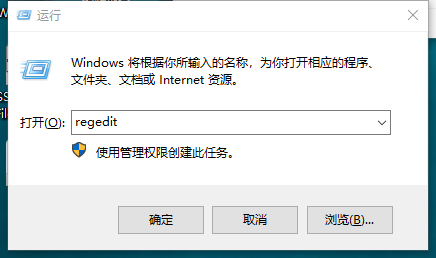
输入上图中的regedit,打开注册表,路径如下:\HKEY_LOCAL_MACHINE\SYSTEM\CurrentControlSet\Services\MySQL
对的,我们要直接删除这个MySQL的文件夹,果断的直接删除
然后,你需要重启机器,记住,这点非常重要,重启完之后,你的电脑就彻底干净了,再也没有之前安装的残余了,然后按照上面的安装步骤安装就可以了.
亲测,十分有效,如果没效果,你来找我
数据库的连接
在正确的安装好数据库之后,我们打开cmd窗口,输入mysql,就可以进入到数据库里了~不过这时候你是以游客方式进入的,并没有任何的修改权.
如果这个时候你报错是这样的:
ERROR 2003 (HY000): Can't connect to MySQL server on 'localhost' (10061)
那么你需要去服务里面把MySQL打开,步骤为:
开始菜单-->搜索框-->服务–>在名称里面找到MySQL,然后右键启动即可,之后就可以用mysql连接上数据库了,当然这是最原始的连接数据库的方法,需要更高级一点的,请看下列网站:
http://www.downxia.com/downinfo/227395.html
xxxxxxxxxx
#1. 直接输入mysql登录就是游客登录,登陆了也不能操作什么
>:mysql
#2. 账号密码登录
>:mysql -uroot -p
# 再输入密码,没有任何提示,没有密码就直接回车
#3. 连接指定服务器的mysql
>:mysql -h ip地址 -P 端口号 -u 对方账号 -p 密码
# 回车后敲入密码
eg:
>:mysql -hlocalhost -P3306 -uroot -p 密码
#4.退出数据库
quit
exit
用户信息查看
我们把信息存到数据库中的目的当然就是为了查看,或者说调用,单纯的存进去没有任何意义.
查看数据库信息的常用命令为以下几个:
xxxxxxxxxx
#1. 查看当前用户
select user():
#2. root权限下可以查看所有用户信息
select * from mysql.user:
select * from mysql.user \G
select user,password,host from mysql.user;
::1ipv6,可以接收所有的ipv6
#3. root登陆下删除游客(重启服务)
delete from mysql.user where user='';
#4. root登陆下,修改密码(重启服务)
update mysql.user set password=password('123456') where host = '127.0.0.1'
mysql> set password for 用户名@localhost = password('新密码');
eg:
mysql> set password for root@localhost = password('123');
#5. 没有登录
musqladmin -uroot -p旧密码 password"新密码"
#6. 创建用户(root登陆下)
grant 权限 on 数据库名.表名 to 用户名@主机名 identified by '密码';
数据库的基本操作
不管是对数据库,还是对表,或者是对记录,我们最常用的操作基本大致都是分四种,增删改查,所以下面我们分别用这四个方向来简单说明一下对于数据库,表和数据记录三者的一些简单操作.
xxxxxxxxxx
# 前提:用户已登录,且有权限对数据库操作
1. 增,即增加,创建数据库,后面为默认的字符编码类型
create database 数据库名[charset='utf8']:
实例如下:
create database db1;
create database db2 charset='utf8'
2. 删,删除数据库,主要用drop
drop database 数据名;
drop database db2
3. 改,即修改,对数据库的修改一般只修改其编码集以及数据库名,但是直接修改数据库名有丢失数据的风险,因为如果之前有些脚本在取数据的话,会丢失数据,所以其实对数据库改名的命令在MySQL5.1.7版本的时候被添加进来,但是5.1.23的时候又去掉了,所以我们了解就好
rename database db1 to db2;(现版本已经没有这个命令)
alter database db1 charset="utf8";# 修改数据库的默认字符集编码
4. 查,不管是什么结构,查都是其重中之重,因为只有你能查到数据,才能把它取出来,才可以做别的操作
show databases;# 可以查看当前机器有的所有的数据库,只显示数据库名
show create database db1;# 可以查看指定数据库的详细信息,包括数据库的名字和其编码格式
表的基本操作
同样是增,删,改,查:
x
# 前提:要知道当前在哪个库下面
1. 增
create table 表名(
(字段 字段类型)
(字段 字段类型)
(字段 字段类型)
);# 创建一个表
create table student(name char(16),age int,gender char(10))
2. 删,表的删除方法和数据库基本一样,都是用drop
drop table 表名;
drop table student;
3. 改,表的修改通常是指修改表名和字段名以及字段属性
alter table 旧表名 rename 新表名;
alter table student rename teacher;
alter table student change 旧字段名 新字段名 新字段属性
alter table student modify 字段名 字段的新属性
4. 查,表的查询通常可以查询三个方面,如下例
show tables;# 查看当前数据库里所有的表名
show create table student;# 查看具体某个表的详细信息
desc student;# 可以查看表字段的结构信息,包括字段名,以及每个字段的类型的定义
字段的基本操作
x
# 前提: 知道操作的是哪个表里面的字段
# 1.增, 添加字段
insert [into][数据库名.]表名 values(值1,...,值n);
insert into t1 (name, age) values ("1", 18),("2", 8);
# 2.查
select * from [数据库名.]表名;
select * from student
select * from owen.student
# 注意一点,其中的*其实是代表所有字段的意思
# 3.改
update [数据库名.]表名 set 字段1=新值1,字段n=新值n where 字段=旧值;
update t1 set age=28 where name="1";
# 4.删,字段的删除用的是delete,不是drop了
delete from [数据库名.]表名 where 条件
delete from t1 where age>8;
Python学习day41-数据库(1)的更多相关文章
- Python学习之数据库初识
9 数据库 9.1 数据库的初识 数据库是可以独立运行的,并且可以对数据的增删改查提供高效便捷方式的工具. 数据库解决的问题: 解决了操作文件的效率和便捷问题 解决了多个服务同时使用数据时 ...
- Python学习之数据库
9.6 表的查询 [结构]select distinct 字段1,字段2 from 表名 where 条件 group by 字段 having 筛选 order by 字段 limit 限制条数 [ ...
- [Python] 学习笔记之MySQL数据库操作
1 Python标准数据库接口DB-API介绍 Python标准数据库接口为 Python DB-API,它为开发人员提供了数据库应用编程接口.Python DB-API支持很多种的数据库,你可以选择 ...
- Python学习系列(七)( 数据库编程)
Python学习系列(七)( 数据库编程) Python学习系列(六)(模块) 一,MySQL-Python插件 Python里操作MySQL数据库,需要Python下安装访 ...
- Python学习笔记(五)之Python操作Redis、mysql、mongodb数据库
操作数据库 一.数据库 数据库类型主要有关系型数据库和菲关系型数据库. 数据库:用来存储和管理数的仓库,数据库是通过依据“数据结构”将数据格式化,以记录->表->库的关系存储.因此数据查询 ...
- python学习--python 连接SQLServer数据库(两种方法)
1. python 学习.安装教程参照: http://www.runoob.com/python/python-tutorial.html 2. 集成开发环境 JetBrains PyCharm C ...
- 【Python学习之十】操作数据库
环境 虚拟机:VMware 10 Linux版本:CentOS-6.5-x86_64 客户端:Xshell4 FTP:Xftp4 python3.6 操作mysql数据库 1.安装pymysql模块p ...
- Python学习笔记9-Python 链接MySql数据库
Python 链接MySql数据库,方法很简单: 首先需要先 安装一个MySql链接插件:MySQL-python-1.2.3.win-amd64-py2.7.exe 下载地址:http://dev. ...
- Python学习--17 访问数据库
实际开发中,我们会经常用到数据库. Python里对数据库的操作API都很统一. SQLite SQLite是一种嵌入式数据库,它的数据库就是一个文件.由于SQLite本身是C写的,而且体积很小,所以 ...
- Python学习笔记_02:使用Tkinter连接MySQL数据库实现登陆注册功能
1 环境搭建 1.1 Python安装 1.2 MySQL环境搭建 1.3安装MySQLdb 2 具体实现 2.1 登陆界面 2.2 注册界面 2.3 具体实现部分代码 1 环境搭建 1.1 P ...
随机推荐
- mysql 需要掌握的重点
1. 安装mysql: google it.2. 新建database,table: create database database_name;create table table_name ...
- iOS开发系列-Shell脚本编译SDK
Library静态库Shell脚本 #!/bin/bash #要build的target名 target_Name="IFlyMSC" #编译模式 Release.Debug bu ...
- 2018-9-29-Roslyn-通过-Nuget-引用源代码-在-VS-智能提示正常但是无法编译
title author date CreateTime categories Roslyn 通过 Nuget 引用源代码 在 VS 智能提示正常但是无法编译 lindexi 2018-09-29 1 ...
- linux 将子文件夹的文件复制到 当前目录中
linux 将子文件夹的文件复制到 当前目录中,如 目录结构大概是 -sh |__ db_backup |___ test |____ 2018_01_01_00_00_00 |_____ 2018_ ...
- ssl checker
ssl checker showThis server is vulnerable to the POODLE attack. If possible, disable SSL 3 t` POODLE ...
- Java集合框架(List,Set,Map)
单列集合基本框架 List接口特点:1. 它是一个元素存取有序的集合.例如,存元素的顺序是11.22.33.那么集合中,元素的存储就是按照11.22.33的顺序完成的). 2. 它是一个带有索引的集合 ...
- WifiManager Wifi 管理器&&知识点
WifiManager 主要使用的技术: SimpleWifi,MahaApp.Metro控件 一 网卡设置 1.获取所有网卡(NetWorkAdapter类) 方法A 通过API SELECT * ...
- csps模拟84Smooth,Six,Walker题解
题面:https://www.cnblogs.com/Juve/articles/11733280.html smooth: 暴力强筛到7e7有60分... 正解: 维护一个队列,存所有的B-光滑数, ...
- Android_Gallery(画廊)
转:http://blog.csdn.net/tianjf0514/article/details/7521398 Gallery是画廊的意思,可以实现图片的浏览功能. 主要内容 Gallery控件的 ...
- Linux课程---12、linux中内存指令(top命令的作用是什么)
Linux课程---12.linux中内存指令(top命令的作用是什么) 一.总结 一句话总结: top实时观察进程.内存和CPU情况 1.电脑出现反应慢情况,最先想到的是什么? 内存 2.linux ...