
[Python]jieba切词 添加字典 去除停用词、单字 python 2020.2.10
源码如下:
 import jieba

 import io

 import re

 #jieba.load_userdict("E:/xinxi2.txt")

 patton=re.compile(r'..')

 #添加字典

 def add_dict():

     f=open("E:/xinxi2.txt","r+",encoding="utf-8")  #百度爬取的字典

     for line in f:

         jieba.suggest_freq(line.rstrip("\n"), True)

     f.close()

 #对句子进行分词

 def cut():

     number=0

     f=open("E:/luntan.txt","r+",encoding="utf-8")   #要处理的内容,所爬信息,CSDN论坛标题

     for line in f:

         line=seg_sentence(line.rstrip("\n"))

         seg_list=jieba.cut(line)

         for i in seg_list:

             print(i) #打印词汇内容

             m=patton.findall(i)

             #print(len(m)) #打印字符长度

             if len(m)!=0:

                 write(i.strip()+" ")

         line=line.rstrip().lstrip()

         print(len(line))#打印句子长度

         if len(line)>1:

             write("\n")

         number+=1

         print("已处理",number,"行")

 #分词后写入

 def write(contents):

     f=open("E://luntan_cut2.txt","a+",encoding="utf-8") #要写入的文件

     f.write(contents)

     #print("写入成功!")

     f.close()

 #创建停用词

 def stopwordslist(filepath):

     stopwords = [line.strip() for line in open(filepath, 'r', encoding='utf-8').readlines()]

     return stopwords

 # 对句子进行去除停用词

 def seg_sentence(sentence):

     sentence_seged = jieba.cut(sentence.strip())

     stopwords = stopwordslist('E://stop.txt')  # 这里加载停用词的路径

     outstr = ''

     for word in sentence_seged:

         if word not in stopwords:

             if word != '\t':

                 outstr += word

                 #outstr += " "

     return outstr

 #循环去除、无用函数

 def cut_all():

     inputs = open('E://luntan_cut.txt', 'r', encoding='utf-8')

     outputs = open('E//luntan_stop.txt', 'a')

     for line in inputs:

         line_seg = seg_sentence(line)  # 这里的返回值是字符串

         outputs.write(line_seg + '\n')

     outputs.close()

     inputs.close()

 if __name__=="__main__":

     add_dict()

     cut()
luntan.txt的来源,地址:https://www.cnblogs.com/zlc364624/p/12285055.html
其中停用词可自行百度下载,或者自己创建一个txt文件夹,自行添加词汇用换行符隔开。
百度爬取的字典在前几期博客中可以找到,地址:https://www.cnblogs.com/zlc364624/p/12289008.html
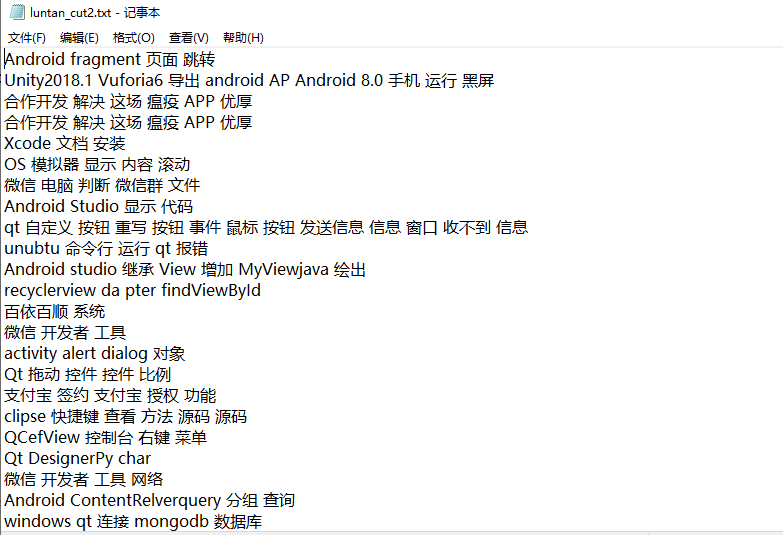
效果如下:
import jieba
import io
import re

#jieba.load_userdict("E:/xinxi2.txt")
patton=re.compile(r'..')

#添加字典
def add_dict():
    f=open("E:/xinxi2.txt","r+",encoding="utf-8")  #百度爬取的字典
for line in f:
        jieba.suggest_freq(line.rstrip("\n"), True)
    f.close()

#对句子进行分词
def cut():
    number=0
f=open("E:/luntan.txt","r+",encoding="utf-8")   #要处理的内容,所爬信息,CSDN论坛标题
for line in f:
        line=seg_sentence(line.rstrip("\n"))
        seg_list=jieba.cut(line)
        for i in seg_list:
            print(i) #打印词汇内容
m=patton.findall(i)
            #print(len(m)) #打印字符长度
if len(m)!=:
                write(i.strip()+" ")
        line=line.rstrip().lstrip()
        print(len(line))#打印句子长度
if len(line)>:
            write("\n")
        number+=1
print("已处理",number,"行")

#分词后写入
def write(contents):
    f=open("E://luntan_cut2.txt","a+",encoding="utf-8") #要写入的文件
f.write(contents)
    #print("写入成功!")
f.close()

#创建停用词
def stopwordslist(filepath):
    stopwords = [line.strip() for line in open(filepath, 'r', encoding='utf-8').readlines()]
    return stopwords

# 对句子进行去除停用词
def seg_sentence(sentence):
    sentence_seged = jieba.cut(sentence.strip())
    stopwords = stopwordslist('E://stop.txt')  # 这里加载停用词的路径
outstr = ''
for word in sentence_seged:
        if word not in stopwords:
            if word != '\t':
                outstr += word
                #outstr += " "
return outstr

#循环去除、无用函数
def cut_all():
    inputs = open('E://luntan_cut.txt', 'r', encoding='utf-8')
    outputs = open('E//luntan_stop.txt', 'a')
    for line in inputs:
        line_seg = seg_sentence(line)  # 这里的返回值是字符串
outputs.write(line_seg + '\n')
    outputs.close()
    inputs.close()

if __name__=="__main__":
    add_dict()
    cut()
[Python]jieba切词 添加字典 去除停用词、单字 python 2020.2.10的更多相关文章
- jieba文本分词,去除停用词,添加用户词
import jieba from collections import Counter from wordcloud import WordCloud import matplotlib.pyplo ...
- python去除停用词(结巴分词下)
python 去除停用词 结巴分词 import jieba #stopwords = {}.fromkeys([ line.rstrip() for line in open('stopword. ...
- (3.1)用ictclas4j进行中文分词,并去除停用词
酒店评论情感分析系统——用ictclas4j进行中文分词,并去除停用词 ictclas4j是中科院计算所开发的中文分词工具ICTCLAS的Java版本,因其分词准确率较高,而备受青睐. 注:ictcl ...
- python利用jieba进行中文分词去停用词
中文分词(Chinese Word Segmentation) 指的是将一个汉字序列切分成一个一个单独的词. 分词模块jieba,它是python比较好用的分词模块.待分词的字符串可以是 unicod ...
- 使用Python中的NLTK和spaCy删除停用词与文本标准化
概述 了解如何在Python中删除停用词与文本标准化,这些是自然语言处理的基本技术 探索不同的方法来删除停用词,以及讨论文本标准化技术,如词干化(stemming)和词形还原(lemmatizatio ...
- python编程基础知识—字典
字典 在python中,字典是一系列键-值对,每个键都与一个值相关联,可使用键来访问相关联的值.与键相关联的值可以是数字.字符串.列表乃至字典,即可将任何python对象用在字典中的值. 在pytho ...
- 如何在java中去除中文文本的停用词
1. 整体思路 第一步:先将中文文本进行分词,这里使用的HanLP-汉语言处理包进行中文文本分词. 第二步:使用停用词表,去除分好的词中的停用词. 2. 中文文本分词环境配置 使用的HanLP-汉 ...
- 词项邻近 & 停用词 & 词干还原
[词项邻近] 邻近操作符(proximity)用于指定查询中的两个词项应该在文档中互相靠近,靠近程度通常采用两者之间的词的个数或者是否同在某个结构单元(如句 子或段落)中出现来衡量. [停用词] 一些 ...
- python jieba分词(添加停用词,用户字典 取词频
中文分词一般使用jieba分词 1.安装 pip install jieba 2.大致了解jieba分词 包括jieba分词的3种模式 全模式 import jieba seg_list = jieb ...
随机推荐
- codewars--js--Human Readable Time—Math对象,parseInt()
问题描述: Write a function, which takes a non-negative integer (seconds) as input and returns the time i ...
- (数据科学学习手札78)基于geopandas的空间数据分析——基础可视化
本文对应代码和数据已上传至我的Github仓库https://github.com/CNFeffery/DataScienceStudyNotes 1 简介 通过前面的文章,我们已经对geopanda ...
- 常用js封装
//获取url参数 function getUrlParams(name, url) { if (!url) url = location.href; name = name.replace(/[\[ ...
- linux 内核模块开发相关的文章搜集和模块开发过程中的小技巧
最近需要开发一些内核模块,进行探究linux内核的一些特征,现在把一些遇到的比较好的文章和知识点,进行简要记录和备忘: 内核模块开发相关链接: https://www.thegeekstuff.com ...
- JN_0019:CMD命令窗口常用操作
1,回到根目录下 cd\ 2,
- python随用随学20200221-生成器中的send(),throw()和close()方法
send()方法 文档定义 generator.send(value) Resumes the execution and "sends" a value into the gen ...
- JS笔记之第二天
一元运算符:++ -- 分为前++和后++ and 前--和后-- 如果++在后面,如:num++ +10参与运算,先参与运算,自身再加1 如果++在前面,如:++num+10参与运算,先自身加1, ...
- [Linux] git add时的注意事项
git add -A 提交所有变化 git add -u 提交被修改(modified)和被删除(deleted)文件,不包括新文件(new) git add . 提交新文件(new)和被修改( ...
- 适合小白的大白话讲解--->Git与Github的区别
本文由 伯乐在线 - 听风 翻译,艾凌风 校稿.未经许可,禁止转载!英文出处:Red Radger.欢迎加入翻译组. 本文旨在使用通俗易懂的文字,讲解版本控制背后的理论,以便你能对程序员们如何工作有个 ...
- BZOJ2005: [Noi2010]能量采集(欧拉函数)
Description 栋栋有一块长方形的地,他在地上种了一种能量植物,这种植物可以采集太阳光的能量.在这些植物采集能量后, 栋栋再使用一个能量汇集机器把这些植物采集到的能量汇集到一起. 栋栋的植物种 ...