
基于TensorFlow的MNIST手写数字识别-深入
构建多层卷积神经网络时需要多组W和偏移项b,我们封装2个方法来产生W和b
初级MNIST中用0初始化W和b,这里用噪声初始化进行对称打破,防止产生梯度0,同时用一个小的正值来初始化b避免dead neurons。
def weight_variable(shape):

    initial = tf.truncated_normal(shape, stddev=0.1)

    return tf.Variable(initial)

def bias_variable(shape):

    initial = tf.constant(0.1, shape=shape)

    return tf.Variable(initial)
tf.truncated_normal()返回truncated normal distribution产生的随机值
def truncated_normal(shape,
                     mean=0.0,
                     stddev=1.0,
                     dtype=dtypes.float32,
                     seed=None,
                     name=None):
stddev:为标准差
mean:为均值
Convolution and Pooling(卷积和池化)
TensorFlow使得convolution和pooling operations具有更多的灵活性,我们怎么处理boundaries,stride size是多少,
这里stride用1,并用0填充使得输入和输出的大小相同。
def conv2d(x, W):

    return tf.nn.conv2d(x, W, strides=[1, 1, 1, 1], padding='SAME')

def max_pool_2x2(x):

    return tf.nn.max_pool(x, ksize=[1, 2, 2, 1], strides=[1, 2, 2, 1], padding='SAME')
卷积函数:
def conv2d(input, filter, strides, padding, use_cudnn_on_gpu=True, data_format="NHWC", name=None):
data_format:string变量,值有 "NHWC", "NCHW"。
    默认为 "NHWC"表示 [batch, height, width, channels]
input:要求为一个4-D Tensor,维度顺序与data_format一样,
    shape为[batch, in_height, in_width, in_channels]
       类型为float32或half
filter:要求为一个4-D Tensor,维度顺序与data_format一样,
shape为[filter_height, filter_width, in_channels, out_channels]
类型与input一样 【 相当于卷积核 】
strides: A list of `ints`或1-D tensor of length 4。对应于input中每一维的滑动窗口
padding:string类型,变量值可取"SAME", "VALID",表示不同的卷积方式
SAME:采用填充的方式
VALID:采用丢弃的方式

具体含义请参考tensorflow conv2d的padding解释以及参数解释
【TensorFlow】tf.nn.conv2d是怎样实现卷积的?
此函数做了哪些事?

1 将filter reshape成2维 [filter_height * filter_weight * in_channels, output_channels]

2 从input中提取image patches,形成虚拟 tensor [batch, out_height, out_width, filter_height * filter_width * in_channels]

3 对于每个batch,右乘 filter matrix和image patch vector

示例:

output[b, i, j, k] =

    sum_{di, dj, q} input[b, strides[1] * i + di, strides[2] * j + dj, q] *

                    filter[di, dj, q, k]

Must have `strides[0] = strides[3] = 1`.  For the most common case of the same

horizontal and vertices strides, `strides = [1, stride, stride, 1]`.
用一个例子来说明:
input的维度为[2, 5, 5, 4]表示batch_size为2, 图片是5 * 5, 输入通道数为 4,
filter的维度为[3, 3, 4, 2]表示卷积核大小为3 * 3,输入通道数为4, 输出通道数为 2
步长为1,padding方式选用VALID
import tensorflow as tf

input = tf.Variable(tf.random_normal([2, 5, 5, 4]))

filter = tf.Variable(tf.random_normal([3, 3, 4, 2]))

op = tf.nn.conv2d(input, filter, strides=[1, 1, 1, 1], padding='VALID')

sess = tf.InteractiveSession()

initializer = tf.global_variables_initializer()

sess.run(initializer)

print(op.shape)

print(sess.run(op))
输出:[batch_size, out_height, out_width, out_channels]
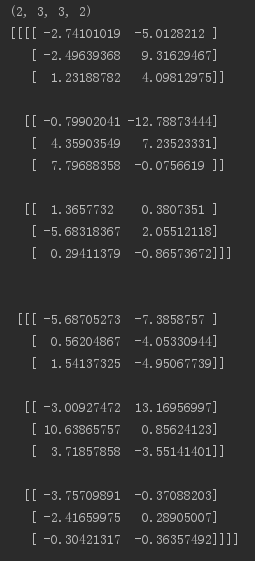
将VALID改为SAME,输出如下:

池化:
pooling通常在convolution 后面,降低卷积层输出的特征向量。
包括max_pool和mean_pool,先介绍max_pool
def max_pool(value, ksize, strides, padding, data_format="NHWC", name=None):
参数介绍:
value:输入通常是feature map(卷积层的输出),依然是一个4-D tensor [batch_size, height, width, channels]
ksize:池化窗口大小,对应value的每一维。一般不在batch_size和channels上池化,所以这2个维度上一般设为1
strides:和卷积类似,窗口在每一个维度上的滑动的步长
padding:和卷积类似,可以取 VALID、SAME
例子说明:
import tensorflow as tf

input = tf.Variable(tf.random_normal([3, 7, 7, 2]))

op = tf.nn.max_pool(input, ksize=[1, 2, 2, 1], strides=[1, 1, 1, 1], padding='VALID')

with tf.Session()as sess:

    sess.run(tf.global_variables_initializer())

    re = sess.run(op)

    print(op.shape)

    print(re)
输出:

以上分别是卷积和池化的介绍,下面开始卷积神经网络的构建。
mnist = input_data.read_data_sets('MNIST_data', one_hot=True)

x = tf.placeholder(tf.float32, shape=(None, 784))

y_ = tf.placeholder(tf.float32, shape=(None, 10))
分别是数据集的下载,以及x,y_的占位
第一层卷积:
卷积会为每5 * 5 patch计算32维的feature
W_conv1 = weight_variable([5, 5, 1, 32])

b_conv1 = bias_variable([32])

x_image = tf.reshape(x, [-1, 28, 28, 1])

h_conv1 = tf.nn.relu(conv2d(x_image, W_conv1) + b_conv1)

h_pool1 = max_pool_2x2(h_conv1)
x_image将x reshape为4-D tensor
max_pool操作将图片size缩为14 * 14
第二层卷积:
为构建深层网络,我们要堆叠多个这种类型的层。第二层每个5 * 5patch有64个feature。
W_conv2 = weight_variable([5, 5, 32, 64])

b_conv2 = bias_variable([64])

h_conv2 = tf.nn.relu(conv2d(h_pool1, W_conv2) + b_conv2)

h_pool2 = max_pool_2x2(h_conv2)
现在图片size为7 * 7
密集连接层
# 密集连接层

W_fcl = weight_variable([7*7*64, 1024])

b_fcl = bias_variable([1024])

h_pool2_flat = tf.reshape(h_pool2, [-1, 7*7*64])

h_fcl = tf.nn.relu(tf.matmul(h_pool2_flat, W_fcl) + b_fcl)
全连接层有1024个神经元,用于处理整个图片
Dropout
请参考理解dropout
为减少过拟合,我们在输出之前应用Dropout,创建一个占位符表示Dropout期间神经元的输出被保留的概率。一般我们可以在training期间打开Dropout,test期间关闭Dropout。
TensorFlow的tf.nn.dropout可以自动缩放神经元的输出并屛蔽它们。
#Dropout层

keep_prob = tf.placeholder(tf.float32)

h_fcl_drop = tf.nn.dropout(h_fcl, keep_prob)
输出层
#输出层

W_fc2 = weight_variable([1024, 10])

b_fc2 = bias_variable([10])

y_conv = tf.matmul(h_fcl_drop, W_fc2) + b_fc2
Train and Evaluate the Model
本节的模型与初级里面的一层softmax网络模型相比有以下不同:
1:用sophisticated ADAM optimizer代替梯度下降法进行优化
2:feed_dict中包含keep_prob来控制丢弃的概率
3:training过程中,每100次迭代输出一次日志
运行:
#loss

cross_entropy = tf.reduce_mean(tf.nn.softmax_cross_entropy_with_logits(logits=y_conv, labels=y_))

train_step = tf.train.AdamOptimizer(1e-4).minimize(cross_entropy)

#eval

correct_prediction = tf.equal(tf.argmax(y_conv, 1), tf.argmax(y_, 1))

accuracy = tf.reduce_mean(tf.cast(correct_prediction, tf.float32))

#run

with tf.Session()as sess:

    sess.run(tf.global_variables_initializer())

    for i in range(20000):

        batch = mnist.train.next_batch(50)

        #train accuracy

        if i % 100 == 0:

            train_accuracy = sess.run(accuracy, feed_dict={x: batch[0], y_: batch[1], keep_prob: 1.0})

            print('step %d,training accuracy %g' % (i, train_accuracy))

        sess.run(train_step, feed_dict={x: batch[0], y_: batch[1], keep_prob: 0.5})

    #test accuracy

    print('test accuracy %g' % sess.run(accuracy, feed_dict={x: mnist.test.images, y_:  mnist.test.labels, keep_prob: 1.0}))
最终test set上的准确率为0.992
完整代码:
from tensorflow.examples.tutorials.mnist import input_data

import tensorflow as tf

mnist = input_data.read_data_sets('MNIST_data', one_hot=True)

x = tf.placeholder(tf.float32, shape=(None, 784))

y_ = tf.placeholder(tf.float32, shape=(None, 10))

def weight_variable(shape):

    initial = tf.truncated_normal(shape, stddev=0.1)

    return tf.Variable(initial)

def bias_variable(shape):

    initial = tf.constant(0.1, shape=shape)

    return tf.Variable(initial)

def conv2d(x, W):

    return tf.nn.conv2d(x, W, strides=[1, 1, 1, 1], padding='SAME')

def max_pool_2x2(x):

    return tf.nn.max_pool(x, ksize=[1, 2, 2, 1], strides=[1, 2, 2, 1], padding='SAME')

# 第一层卷积

W_conv1 = weight_variable([5, 5, 1, 32])

b_conv1 = bias_variable([32])

x_image = tf.reshape(x, [-1, 28, 28, 1])

h_conv1 = tf.nn.relu(conv2d(x_image, W_conv1) + b_conv1)

h_pool1 = max_pool_2x2(h_conv1)

# 第二层卷积

W_conv2 = weight_variable([5, 5, 32, 64])

b_conv2 = bias_variable([64])

h_conv2 = tf.nn.relu(conv2d(h_pool1, W_conv2) + b_conv2)

h_pool2 = max_pool_2x2(h_conv2)

# 密集连接层

W_fcl = weight_variable([7*7*64, 1024])

b_fcl = bias_variable([1024])

h_pool2_flat = tf.reshape(h_pool2, [-1, 7*7*64])

h_fcl = tf.nn.relu(tf.matmul(h_pool2_flat, W_fcl) + b_fcl)

# Dropout层

keep_prob = tf.placeholder(tf.float32)

h_fcl_drop = tf.nn.dropout(h_fcl, keep_prob)

# 输出层

W_fc2 = weight_variable([1024, 10])

b_fc2 = bias_variable([10])

y_conv = tf.matmul(h_fcl_drop, W_fc2) + b_fc2

# loss

cross_entropy = tf.reduce_mean(tf.nn.softmax_cross_entropy_with_logits(logits=y_conv, labels=y_))

train_step = tf.train.AdamOptimizer(1e-4).minimize(cross_entropy)

# eval

correct_prediction = tf.equal(tf.argmax(y_conv, 1), tf.argmax(y_, 1))

accuracy = tf.reduce_mean(tf.cast(correct_prediction, tf.float32))

# run

with tf.Session()as sess:

    sess.run(tf.global_variables_initializer())

    for i in range(20000):

        batch = mnist.train.next_batch(50)

        # train accuracy

        if i % 100 == 0:

            train_accuracy = sess.run(accuracy, feed_dict={x: batch[0], y_: batch[1], keep_prob: 1.0})

            print('step %d,training accuracy %g' % (i, train_accuracy))

        sess.run(train_step, feed_dict={x: batch[0], y_: batch[1], keep_prob: 0.5})

    # test accuracy

    print('test accuracy %g' % sess.run(accuracy, feed_dict={x: mnist.test.images, y_:  mnist.test.labels, keep_prob: 1.0}))
运行结果:
基于TensorFlow的MNIST手写数字识别-深入的更多相关文章
- 基于tensorflow的MNIST手写数字识别(二)--入门篇
http://www.jianshu.com/p/4195577585e6 基于tensorflow的MNIST手写字识别(一)--白话卷积神经网络模型 基于tensorflow的MNIST手写数字识 ...
- 基于TensorFlow的MNIST手写数字识别-初级
一:MNIST数据集 下载地址 MNIST是一个包含很多手写数字图片的数据集,一共4个二进制压缩文件 分别是test set images,test set labels,training se ...
- Android+TensorFlow+CNN+MNIST 手写数字识别实现
Android+TensorFlow+CNN+MNIST 手写数字识别实现 SkySeraph 2018 Email:skyseraph00#163.com 更多精彩请直接访问SkySeraph个人站 ...
- Tensorflow之MNIST手写数字识别:分类问题(1)
一.MNIST数据集读取 one hot 独热编码独热编码是一种稀疏向量,其中:一个向量设为1,其他元素均设为0.独热编码常用于表示拥有有限个可能值的字符串或标识符优点: 1.将离散特征的取值扩展 ...
- Tensorflow实现MNIST手写数字识别
之前我们讲了神经网络的起源.单层神经网络.多层神经网络的搭建过程.搭建时要注意到的具体问题.以及解决这些问题的具体方法.本文将通过一个经典的案例:MNIST手写数字识别,以代码的形式来为大家梳理一遍神 ...
- [Python]基于CNN的MNIST手写数字识别
目录 一.背景介绍 1.1 卷积神经网络 1.2 深度学习框架 1.3 MNIST 数据集 二.方法和原理 2.1 部署网络模型 (1)权重初始化 (2)卷积和池化 (3)搭建卷积层1 (4)搭建卷积 ...
- Tensorflow之MNIST手写数字识别:分类问题(2)
整体代码: #数据读取 import tensorflow as tf import matplotlib.pyplot as plt import numpy as np from tensorfl ...
- TensorFlow——MNIST手写数字识别
MNIST手写数字识别 MNIST数据集介绍和下载:http://yann.lecun.com/exdb/mnist/ 一.数据集介绍: MNIST是一个入门级的计算机视觉数据集 下载下来的数据集 ...
- 持久化的基于L2正则化和平均滑动模型的MNIST手写数字识别模型
持久化的基于L2正则化和平均滑动模型的MNIST手写数字识别模型 觉得有用的话,欢迎一起讨论相互学习~Follow Me 参考文献Tensorflow实战Google深度学习框架 实验平台: Tens ...
随机推荐
- shell正则表达式和cut命令
正则表达式 符号 描述 $ 匹配输入字符串的结尾位置 () 标记一个子表达式的开始和结束位置 * 匹配前面的子表达式零次或多次 + 匹配前面的子表达式一次或多次 . 匹配除换行符(\n)之外的任何单字 ...
- POJ 2456 Aggressive cows (二分)
题目传送门 POJ 2456 Description Farmer John has built a new long barn, with N (2 <= N <= 100,000) s ...
- python封装简介
1.效果图: 对比一: 对比二: 2.学习来源代码: # 封装是面向对象的三大特性之一 # 封装指的是隐藏对象中一些不希望被外部所访问到的属性或方法 # 如何隐藏一个对象中的属性? # - 将对象的属 ...
- Asp.Net Core Identity 隐私数据保护
前言 Asp.Net Core Identity 是 Asp.Net Core 的重要组成部分,他为 Asp.Net Core 甚至其他 .Net Core 应用程序提供了一个简单易用且易于扩展的基础 ...
- 轻松理解 Kubernetes 的核心概念
Kubernetes 迅速成为云环境中软件部署和管理的新标准. 与强大的功能相对应的是陡峭的学习曲线. 本文将提供 Kubernetes 的简化视图,从高处观察其中的重要组件,以及他们的关联. 硬件 ...
- 你在使用什么 Redis 客户端工具?
今天发现一个不错的 Redis 客户端工具:AnotherRedisDesktopManager. 兼容 Windows Mac Linux,号称又快又稳定,加载大量 keys 时也不会崩溃. Git ...
- 使用luabind绑定box2d的lua接口
最近在使用luabind绑定box2d的lua接口,发现不少问题.写在这里与大家分享. 1. body,fixture,joint的userdata.box2d的userdata的数据类型是void* ...
- Windows下安装Hadoop、Spark和HBase
1.Hadoop 安装Hadoop:下载hadoop-2.7.1.tar.gz,并解压到你想要的目录下,我放在D:\Library\hadoop-2.7.1. 配置Hadoop环境变量:HADOOP_ ...
- json的结构和表示方式(对象object、数组array)
json简单说就是javascript中的对象和数组,所以这两种结构就是对象和数组两种结构,通过这两种结构可以表示各种复杂的结构 1.对象:对象在js中表示为“{}”括起来的内容,数据结构为 {key ...
- OpenCV各种绘制调用:线,矩形,圆,椭圆,文字
OpenCV提供了各种绘制接口,可以往图片里画各种东西,这种功能可以为以后在图像上标记一些信息方便调试 // drawcall.cpp: 定义控制台应用程序的入口点. // #include &quo ...