首页 | | 发新文章 | 联系 | 订阅  | 管理

iOS: 在代码中使用Autolayout (2) - intrinsicContentSize和Content Hugging Priority

接上文:iOS: 在代码中使用Autolayout (1) - 按比例缩放和优先级

我们继续来看在代码中使用Autolayout的话题。先说intrinsicContentSize,也就是控件的内置大小。比如UILabel,UIButton等控件,他们都有自己的内置大小。控件的内置大小往往是由控件本身的内容所决定的,比如一个UILabel的文字很长,那么该UILabel的内置大小自然会很长。控件的内置大小可以通过UIView的intrinsicContentSize属性来获取内置大小,也可以通过invalidateIntrinsicContentSize方法来在下次UI规划事件中重新计算intrinsicContentSize。如果直接创建一个原始的UIView对象,显然它的内置大小为0。

继续用代码来写Autolayout,先写一个辅助方法来快速设置UIView的边距限制:

//设置Autolayout中的边距辅助方法

- (void)setEdge:(UIView*)superview
view:(UIView*)view attr:(NSLayoutAttribute)attr
constant:(CGFloat)constant

{

[superview addConstraint:[NSLayoutConstraint constraintWithItem:view attribute:attr relatedBy:NSLayoutRelationEqual toItem:superview attribute:attrmultiplier:1.0 constant:constant]];

}

接下来,创建一个UIView,利用上面的辅助方法快速设置其在父控件的左,上,右边距为20单位。如下代码:

//view1

UIView *view1 = [UIView new];

view1.backgroundColor =
[UIColor yellowColor];

//不允许AutoresizingMask转换成Autolayout

view1.translatesAutoresizingMaskIntoConstraints = NO;

[self.view addSubview:view1];

//设置左,上,右边距为20.

[self setEdge:self.view view:view1 attr:NSLayoutAttributeLeft constant:20];

[self setEdge:self.view view:view1 attr:NSLayoutAttributeTop constant:20];

[self setEdge:self.view view:view1 attr:NSLayoutAttributeRight constant:-20];

但是运行后会发现,界面上不会显示任何东西。原因就是上面讲的,UIView默认是没有intrinsicContentSize的。我们可以通过创建一个自定义的UIView来改写intrinsicContentSize。

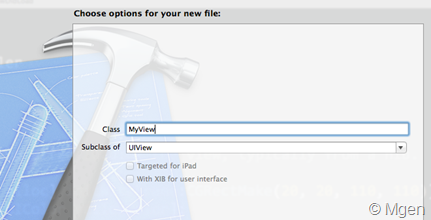
比如,创建一个新的类型:MyView。

然后在.m文件中改写intrinsicContentSize方法,并返回有效值,比如这样:

//改写UIView的intrinsicContentSize

- (CGSize)intrinsicContentSize

{

return CGSizeMake(70, 40);

}

接着修改最上面的代码,把上面view1变量的类型从UIView替换成我们自定义的View:MyView类型:

MyView *view1 = [MyView new];

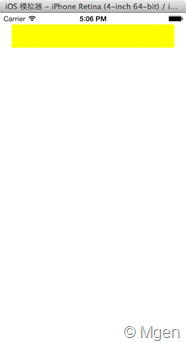
再次运行代码,View会按照要求显示在屏幕上:

接下来,按照同样的方式,在下方添加另一个MyView,要求其距离父控件边距左,下,右各为20,代码:

//view2

MyView *view2 = [MyView new];

view2.backgroundColor =
[UIColor yellowColor];

//不允许AutoresizingMask转换成Autolayout

view2.translatesAutoresizingMaskIntoConstraints = NO;

[self.view addSubview:view2];

//设置左,下,右边距为20.

[self setEdge:self.view view:view2 attr:NSLayoutAttributeLeft constant:20];

[self setEdge:self.view view:view2 attr:NSLayoutAttributeBottom constant:-20];

[self setEdge:self.view view:view2 attr:NSLayoutAttributeRight constant:-20];

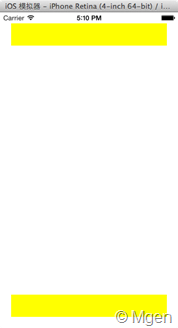
运行后是这样:

接下来,通过代码加入Autolayout中的间距。命令view1和view2上下必须间隔20个单位,注意这里要求view2在view1之下的20单位,所以创建NSLayoutConstraint中view2参数在前面。同时注意,view2的attribute参数是NSLayoutAttributeTop,而view1的attribute参数是NSLayoutAttributeBottom:

//设置两个View上下间距为20

[self.view addConstraint:[NSLayoutConstraint constraintWithItem:view2 attribute:NSLayoutAttributeTop relatedBy:NSLayoutRelationEqual toItem:view1attribute:NSLayoutAttributeBottom multiplier:1.0 constant:20]];

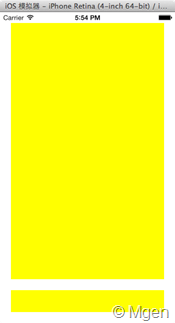
运行结果:

OK,的确,此时view1和view2相互间隔20单位,但是view1被拉伸了。

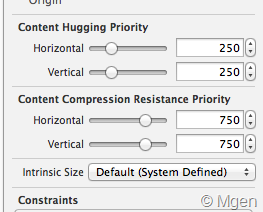
接下来的任务就是做到如何不让view1拉伸,而让view2拉伸呢?这里就需要使用控件的Content Hugging Priority,这个属性在Xcode中的控件属性中很常见,如下图:

Content Hugging Priority代表控件拒绝拉伸的优先级。优先级越高,控件会越不容易被拉伸。

而下面的Content Compression Resistance Priority代表控件拒绝压缩内置空间的优先级。优先级越高,控件的内置空间会越不容易被压缩。而这里的内置空间,就是上面讲的UIView的intrinsicContentSize。

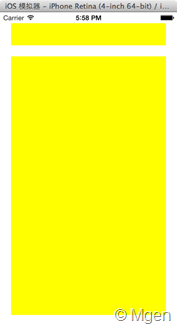
所以,如果我们把view1(上图中被拉伸的,在上面的View)的Content Hugging Priority设置一个更高的值,那么当Autolayout遇到这种决定谁来拉伸的情况时,view1不会被优先拉伸,而优先级稍低的view2才会被拉伸。

可以直接通过UIView的setContentHuggingPriority:forAxis方法来设置控件的Content Hugging Priority,其中forAxis参数代表横向和纵向,本例中只需要设置纵向,所以传入UILayoutConstraintAxisVertical。整句代码:

//提高view1的Content
Hugging Priority

[view1 setContentHuggingPriority:UILayoutPriorityDefaultHigh forAxis:UILayoutConstraintAxisVertical];

运行结果:

作者:Mgen 

出处:www.cnblogs.com/mgen 

其他参考页面:我的软件和工程博客导读

intrinsicContentSize和Content Hugging Priority的更多相关文章

  1. 在代码中使用Autolayout – intrinsicContentSize和Content Hugging Priority

    我们继续来看在代码中使用Autolayout的话题.先说intrinsicContentSize,也就是控件的内置大小.比如UILabel,UIButton等控件,他们都有自己的内置大小.控件的内置大 ...

  2. iOS: 在代码中使用Autolayout (2) – intrinsicContentSize和Content Hugging Priority【转】

    原文:http://www.mgenware.com/blog/?p=491 接上文:iOS: 在代码中使用Autolayout (1) – 按比例缩放和优先级. 我们继续来看在代码中使用Autola ...

  3. AutoLayout学习之理解intrinsicContentSize,Content Hugging Priority,Content Compression Resistance Priority

    TableViewCell的高度计算应该是所有开发者都会使用到的东西,之前都是用代码计算的方法来计算这个高度.最近有时间看了几个计算Cell高度的方法.基本上都用到了AutoLayout,这篇首先介绍 ...

  4. iOS开发之AutoLayout中的Content Hugging Priority和 Content Compression Resistance Priority解析

    本篇博客的内容也不算太复杂,算是AutoLayout的一些高级的用法.本篇博客我们主要通过一些示例来看一下AutoLayout中的Content Hugging Priority以及Content C ...

  5. iOS开发 - Content hugging priority & Content compression resistance priority

    1. 什么是Content hugging priority 你可以把它想象成一根放在视图上的橡皮筋. 这根橡皮筋会组织视图超过它本身的固有大小(intrinsic content size). 它存 ...

  6. 转:AutoLayout中的Content Hugging 和 Content Compression Resistance

    OS6中引入了AutoLayout,极大的方便了UI元素的布局,现在已经过去一年了,并且大部分设备的系统也已经升级到了iOS6,是时候要使用此项技术了. 在AutoLayout的学习中有两个概念官方文 ...

  7. Notes of learning AutoLayout

    在XCode5中,如果我们添加一个Button或者Label,或者其他的什么标准View,而不设置任何constraints,IB会自动生成constraints,而这些constraints是fix ...

  8. 关于instrinsicContentSize, ContentHuggingPriority, ContentcompressionResistancePriority的理解

    ios 关于intrinsic理解 最近由于项目的需要想给MBProgressHUD添加一个自定义的view, 结果花费了一两个小时也没添加上去,添加上去的view没有实际的大小,即使你给他设置了一个 ...

  9. iOS布局之Auto Layout

    学习资源: <iOS6核心编程>自动布局部分 <iOS6范例经典>自动布局部分 Tutorial: iOS 6 Auto Layout versus Springs and S ...

随机推荐

  1. JMeter安装和环境变量搭建

    下载安装Java JDK环境,设置环境变量 elasticsearch for windows:https://www.cnblogs.com/Neeo/articles/10368280.html ...

  2. springboot整合thymeleaf手动渲染

    Thymeleaf手动渲染 为提高页面访问速度,可缓存html页面,客户端请求从缓存获取,获取不到再手动渲染 在spring4下 @Autowired ThymeleafViewResolver th ...

  3. Ubuntu环境下Postgres源码文件编译安装步骤

    step1:官网下载postgres源码 URL:https://www.postgresql.org/ftp/source/ step2:解压源码文件 tar -zxvf postgresql-12 ...

  4. (十七)从UML角度来理解依赖

    UML软件建模 什么是依赖?简单理解就是一个类A用到了类B,但是这种使用关系是偶然性的.临时性的.非常弱的,类B的变化会影响到类A 显示依赖与隐式依赖 依赖倒置:我们要依赖于高层业务,不依赖于低层业务 ...

  5. JS对象 四舍五入round() round() 方法可把一个数字四舍五入为最接近的整数。 语法: Math.round(x)

    四舍五入round() round() 方法可把一个数字四舍五入为最接近的整数. 语法: Math.round(x) 参数说明: 注意: 1. 返回与 x 最接近的整数. 2. 对于 0.5,该方法将 ...

  6. python库之xgboost

    一.安装 https://www.zhihu.com/question/46377605

  7. The linux command 之进程

    ******************查看进程********************* 一.使用ps命令 [me@linuxbox ~]$ ps PID TTY TIME CMD pts/ :: ba ...

  8. PHP算法之两数相加

    给出两个 非空 的链表用来表示两个非负的整数.其中,它们各自的位数是按照 逆序 的方式存储的,并且它们的每个节点只能存储 一位 数字. 如果,我们将这两个数相加起来,则会返回一个新的链表来表示它们的和 ...

  9. hdu6089 Rikka with Terrorist

    题意:n*m的平面内有K个不安全点,Q个询问位置在(x,y)的人能走到多少个点?走到:(x,y)和(x',y')之间的矩形中不包含不安全点. 标程: #include<bits/stdc++.h ...

  10. Python自学:第四章 在for循环中执行更多操作(2)

    # -*- coding: GBK -*- magicians = ['alice', 'david', 'carolina'] for magician in magicians: print(ma ...