
spring cloud深入学习(十一)-----服务网关zuul
前面的文章我们介绍了,Eureka用于服务的注册于发现,Feign支持服务的调用以及均衡负载,Hystrix处理服务的熔断防止故障扩散,Spring Cloud Config服务集群配置中心,似乎一个微服务框架已经完成了。
我们还是少考虑了一个问题,外部的应用如何来访问内部各种各样的微服务呢?在微服务架构中,后端服务往往不直接开放给调用端,而是通过一个API网关根据请求的url,路由到相应的服务。当添加API网关后,在第三方调用端和服务提供方之间就创建了一面墙,这面墙直接与调用方通信进行权限控制,后将请求均衡分发给后台服务端。
为什么需要API Gateway
1、简化客户端调用复杂度
在微服务架构模式下后端服务的实例数一般是动态的,对于客户端而言很难发现动态改变的服务实例的访问地址信息。因此在基于微服务的项目中为了简化前端的调用逻辑,通常会引入API Gateway作为轻量级网关,同时API Gateway中也会实现相关的认证逻辑从而简化内部服务之间相互调用的复杂度。

2、数据裁剪以及聚合
通常而言不同的客户端对于显示时对于数据的需求是不一致的,比如手机端或者Web端又或者在低延迟的网络环境或者高延迟的网络环境。
因此为了优化客户端的使用体验,API Gateway可以对通用性的响应数据进行裁剪以适应不同客户端的使用需求。同时还可以将多个API调用逻辑进行聚合,从而减少客户端的请求数,优化客户端用户体验
3、多渠道支持
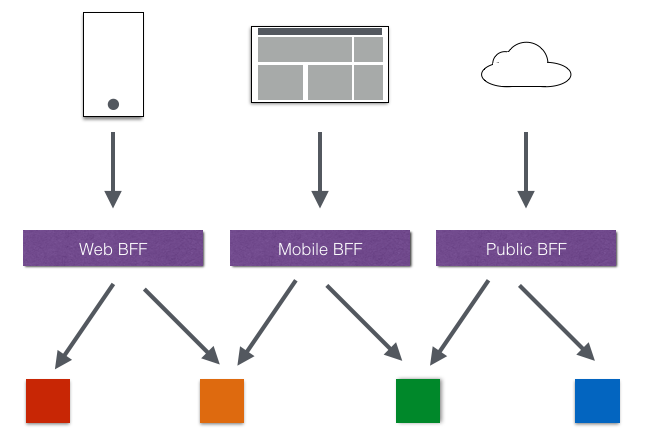
当然我们还可以针对不同的渠道和客户端提供不同的API Gateway,对于该模式的使用由另外一个大家熟知的方式叫Backend for front-end, 在Backend for front-end模式当中,我们可以针对不同的客户端分别创建其BFF。
4、遗留系统的微服务化改造
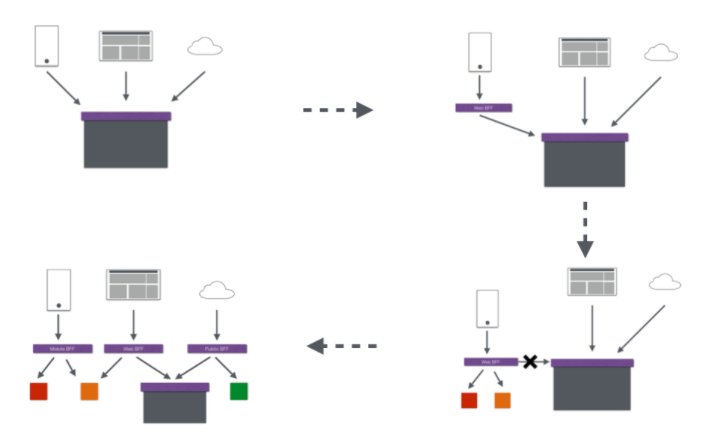
对于系统系统而言进行微服务改造通常是由于原有的系统存在或多或少的问题,比如技术债务,代码质量,可维护性,可扩展性等等。API Gateway的模式同样适用于这一类遗留系统的改造,通过微服务化的改造逐步实现对原有系统中的问题的修复,从而提升对于原有业务响应力的提升。通过引入抽象层,逐步使用新的实现替换旧的实现。
在Spring Cloud体系中, Spring Cloud Zuul就是提供负载均衡、反向代理、权限认证的一个API gateway。
功能
Zuul包含了对请求的路由和过滤两个最主要的功能:其中路由功能负责将外部请求转发到具体的微服务实例上,是实现外部访问统一入口的基础而过滤器功能则负责对请求的处理过程进行干预,是实现请求校验、服务聚合等功能的基础.Zuul和Eureka进行整合,将Zuul自身注册为Eureka服务治理下的应用,同时从Eureka中获得其他微服务的消息,也即以后的访问微服务都是通过Zuul跳转后获得。
注意:Zuul服务最终还是会注册进Eureka 提供=代理+路由+过滤三大功能
Spring Cloud Zuul
Spring Cloud Zuul路由是微服务架构的不可或缺的一部分,提供动态路由,监控,弹性,安全等的边缘服务。Zuul是Netflix出品的一个基于JVM路由和服务端的负载均衡器。
下面我们通过代码来了解Zuul是如何工作的
简单使用
1、添加依赖
<dependency>

    <groupId>org.springframework.cloud</groupId>

    <artifactId>spring-cloud-starter-netflix-zuul</artifactId>

</dependency>
引入spring-cloud-starter-netflix-zuul包
2、配置文件
spring.application.name=gateway-service-zuul
server.port=8888
#这里的配置表示,访问/it/** 直接重定向到http://www.ityouknow.com/**,其中baidu可以随便写,在zuul上面唯一即可;当这里的值=service-id时,service-id可以不写。
zuul.routes.baidu.path=/it/**
#zuul.routes.baidu.serviceId=serviceId,代表/it/**的url定位到serviceId服务上
zuul.routes.baidu.url=http://www.ityouknow.com/
3、启动类
@SpringBootApplication

@EnableZuulProxy

public class GatewayServiceZuulApplication {

    public static void main(String[] args) {

        SpringApplication.run(GatewayServiceZuulApplication.class, args);

    }

}
启动类添加@EnableZuulProxy,支持网关路由。
史上最简单的zuul案例就配置完了
4、测试
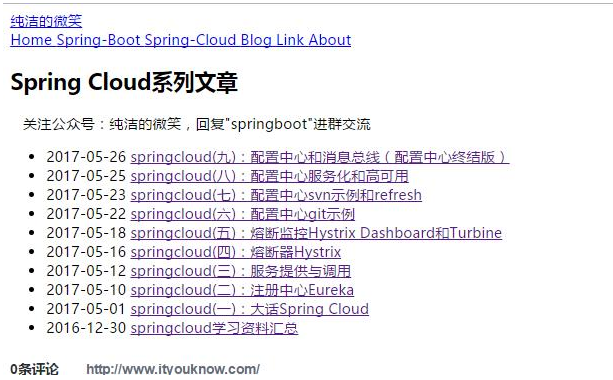
启动gateway-service-zuul-simple项目,在浏览器中访问:http://localhost:8888/it/spring-cloud,看到页面返回了:http://www.ityouknow.com/spring-cloud 页面的信息,如下:
我们以前面文章的示例代码spring-cloud-producer为例来测试请求的重定向,在配置文件中添加:
zuul.routes.hello.path=/hello/**

zuul.routes.hello.url=http://localhost:9000/
启动spring-cloud-producer,重新启动gateway-service-zuul-simple,访问:http://localhost:8888/hello/hello?name=%E5%B0%8F%E6%98%8E,返回:hello 小明,this is first messge
说明访问gateway-service-zuul-simple的请求自动转发到了spring-cloud-producer,并且将结果返回。
服务化
通过url映射的方式来实现zull的转发有局限性,比如每增加一个服务就需要配置一条内容,另外后端的服务如果是动态来提供,就不能采用这种方案来配置了。实际上在实现微服务架构时,服务名与服务实例地址的关系在eureka server中已经存在了,所以只需要将Zuul注册到eureka server上去发现其他服务,就可以实现对serviceId的映射。
我们结合示例来说明,在上面示例项目gateway-service-zuul-simple的基础上来改造。
1、添加依赖
<dependency>

    <groupId>org.springframework.cloud</groupId>

    <artifactId>spring-cloud-starter-netflix-eureka-client</artifactId>

</dependency>
增加spring-cloud-starter-netflix-eureka-client包,添加对eureka的支持。
2、配置文件
配置修改为:
spring.application.name=gateway-service-zuul

server.port=8888

zuul.routes.api-a.path=/producer/**

zuul.routes.api-a.serviceId=spring-cloud-producer

eureka.client.serviceUrl.defaultZone=http://localhost:8000/eureka/
3、测试
依次启动 spring-cloud-eureka、 spring-cloud-producer、gateway-service-zuul-eureka,访问:http://localhost:8888/producer/hello?name=%E5%B0%8F%E6%98%8E,返回:hello 小明,this is first messge
说明访问gateway-service-zuul-eureka的请求自动转发到了spring-cloud-producer,并且将结果返回。
为了更好的模拟服务集群,我们复制spring-cloud-producer项目改为spring-cloud-producer-2,修改spring-cloud-producer-2项目端口为9001,controller代码修改如下:
@RestController

public class HelloController {

    @RequestMapping("/hello")

    public String index(@RequestParam String name) {

        return "hello "+name+",this is two messge";

    }

}
修改完成后启动spring-cloud-producer-2,重启gateway-service-zuul-eureka。测试多次访问http://localhost:8888/producer/hello?name=%E5%B0%8F%E6%98%8E,依次返回:
hello 小明,this is first messge

hello 小明,this is two messge

hello 小明,this is first messge

hello 小明,this is two messge

...
说明通过zuul成功调用了producer服务并且做了均衡负载。
网关的默认路由规则
但是如果后端服务多达十几个的时候,每一个都这样配置也挺麻烦的,spring cloud zuul已经帮我们做了默认配置。默认情况下,Zuul会代理所有注册到Eureka Server的微服务,并且Zuul的路由规则如下:http://ZUUL_HOST:ZUUL_PORT/微服务在Eureka上的serviceId/**会被转发到serviceId对应的微服务。
我们注销掉gateway-service-zuul-eureka项目中关于路由的配置:
#zuul.routes.api-a.path=/producer/**

#zuul.routes.api-a.serviceId=spring-cloud-producer
重新启动后,访问http://localhost:8888/spring-cloud-producer/hello?name=%E5%B0%8F%E6%98%8E,测试返回结果和上述示例相同,说明spirng cloud zuul默认已经提供了转发功能。
问题
不过上述也有问题所在,此时虽然能通过zuul网关访问 spring-cloud-producer服务,但是也能够通过spring-cloud-producer自身的访问路径(例如http:zuulIp:port/spring-cloud-producer/xxx)去访问到,如果需要限制一个大的微服务架构下所有的访问都不能直接访问服务名的方式,可做如下配置:
注:直接访问http://serviceIp:port/xxx则依然是可以访问的
1、单个具体
zuul:

  ignored-services: spring-cloud-producer

  routes:

    api-a.serviceId: spring-cloud-producer

    api-a.path: /producer/**
2、多个
zuul:

  ignored-services: "*"

  routes:

    api-a.serviceId: spring-cloud-producer

    api-a.path: /producer/**
如果希望对整个微服务架构下的微服务做一个统一的访问前缀,也可以如下配置:
zuul:

  prefix: /ty

  ignored-services: "*"

  routes:

    mydept.serviceId: microservicecloud-dept

    mydept.path: /mydept/**
一个完整的application.yml
server:

  port: 9527

spring:

  application:

    name: microservicecloud-zuul-gateway

zuul:

  prefix: /atguigu

  ignored-services: "*"

  routes:

    mydept.serviceId: microservicecloud-dept

    mydept.path: /mydept/**

eureka:

  client:

    service-url:

      defaultZone: http://eureka7001.com:7001/eureka,http://eureka7002.com:7002/eureka,http://eureka7003.com:7003/eureka

  instance:

    instance-id: gateway-9527.com

    prefer-ip-address: true

info:

  app.name: atguigu-microcloud

  company.name: www.atguigu.com

  build.artifactId: $project.artifactId$

  build.version: $project.version$
spring cloud深入学习(十一)-----服务网关zuul的更多相关文章
- Spring Cloud(七)服务网关 Zuul Filter 使用
上一篇文章中,讲了Zuul 转发,动态路由,负载均衡,等等一些Zuul 的特性,这个一篇文章,讲Zuul Filter 使用,关于网关的作用,这里就不再次赘述了,重点是zuul的Filter ,我们可 ...
- Spring Cloud(六)服务网关 zuul 快速入门
服务网关是微服务架构中一个不可或缺的部分.通过服务网关统一向外系统提供REST API的过程中,除了具备服务路由.均衡负载功能之外,它还具备了权限控制等功能.Spring Cloud Netflix中 ...
- Spring Cloud 系列之 Gateway 服务网关(四)
本篇文章为系列文章,未读第一集的同学请猛戳这里: Spring Cloud 系列之 Gateway 服务网关(一) Spring Cloud 系列之 Gateway 服务网关(二) Spring Cl ...
- Spring Cloud 系列之 Gateway 服务网关(二)
本篇文章为系列文章,未读第一集的同学请猛戳这里:Spring Cloud 系列之 Gateway 服务网关(一) 本篇文章讲解 Gateway 网关的多种路由规则.动态路由规则(配合服务发现的路由规则 ...
- Spring Cloud 系列之 Gateway 服务网关(三)
本篇文章为系列文章,未读第一集的同学请猛戳这里: Spring Cloud 系列之 Gateway 服务网关(一) Spring Cloud 系列之 Gateway 服务网关(二) 本篇文章讲解 Ga ...
- Spring Cloud 系列之 Gateway 服务网关(一)
什么是 Spring Cloud Gateway Spring Cloud Gateway 作为 Spring Cloud 生态系统中的网关,目标是替代 Netflix Zuul,其不仅提供统一的路由 ...
- spring cloud深入学习(三)-----服务消费
在上一篇博文中简单实现了eureka-server以及eureka-provider,后面会实现eureka-cosumer,现在针对eureka做进一步的详解. 微服务整体架构 文字再美也没有图片直 ...
- spring cloud深入学习(二)-----服务注册中心spring cloud eureka
服务治理 主要用来实现各个微服务实例的自动化注册与发现,为啥需要这玩意呢?在一开始比如A系统调用B服务,可能通过手工维护B服务的实例,并且还得采用负载均衡等方式,这些全部都得需要手工维护,等后面系统越 ...
- 「 从0到1学习微服务SpringCloud 」10 服务网关Zuul
系列文章(更新ing): 「 从0到1学习微服务SpringCloud 」06 统一配置中心Spring Cloud Config 「 从0到1学习微服务SpringCloud 」07 RabbitM ...
随机推荐
- QT中QString与string的转化,解决中文乱码问题
在QT中,使用QString输出到控件进行显示时,经常会出现中文乱码,网上查了一圈,发现大部分都是针对QT4增加4条语句:</span> [cpp] view plain copy QTe ...
- Spring Boot 实现定时任务的 4 种方式
作者:Wan QingHua wanqhblog.top/2018/02/01/SpringBootTaskSchedule/ 定时任务实现的几种方式: Timer:这是java自带的java.uti ...
- Nginx 教程 1:基本概念
简介 我们会告诉你 Nginx 是如何工作的,其背后的概念有哪些,以及如何优化它以提升应用程序的性能.还会告诉你如何安装,如何启动.运行. 这个教程包括三节: 基础概念——你可以了解命令(direct ...
- java_序列化
import java.io.*; class People implements Serializable { /* * 序列化和反序列化的时候,会抛出就NotSerializableExcepti ...
- Map和Reduce函数
- 【HZOI2015】帕秋莉的超级多项式
题面 题目分析 超级模板题: 多项式乘法 多项式求逆 多项式开根 多项式求导 多项式求积分 多项式求对数 多项式求自然对数为底的指数函数 多项式快速幂 代码实现 #include<iostrea ...
- leetcode-142-环形链表②
题目描述: 方法一:O(n) O(n) # Definition for singly-linked list. # class ListNode(object): # def __init__(se ...
- 「题解」:[线性代数]:relays 奶牛接力跑
问题: relays 奶牛接力跑 时间限制: 1 Sec 内存限制: 256 MB 题面 题目描述 FJ的N(2 <= N <= 1,000,000)头奶牛选择了接力跑作为她们的日常锻炼 ...
- SPOJ 1043 GSS1 - Can you answer these queries I
题目描述 给出了序列A[1],A[2],-,A[N]. (a[i]≤15007,1≤N≤50000).查询定义如下: 查询(x,y)=max{a[i]+a[i+1]+-+a[j]:x≤i≤j≤y}. ...
- 查看pip install *.whl 支持的文件版本
import pip._internalprint(pip._internal.pep425tags.get_supported())[('cp37', 'cp37m', 'manylinux2010 ...