
【CSS3】使用CSS3制作全屏切换效果
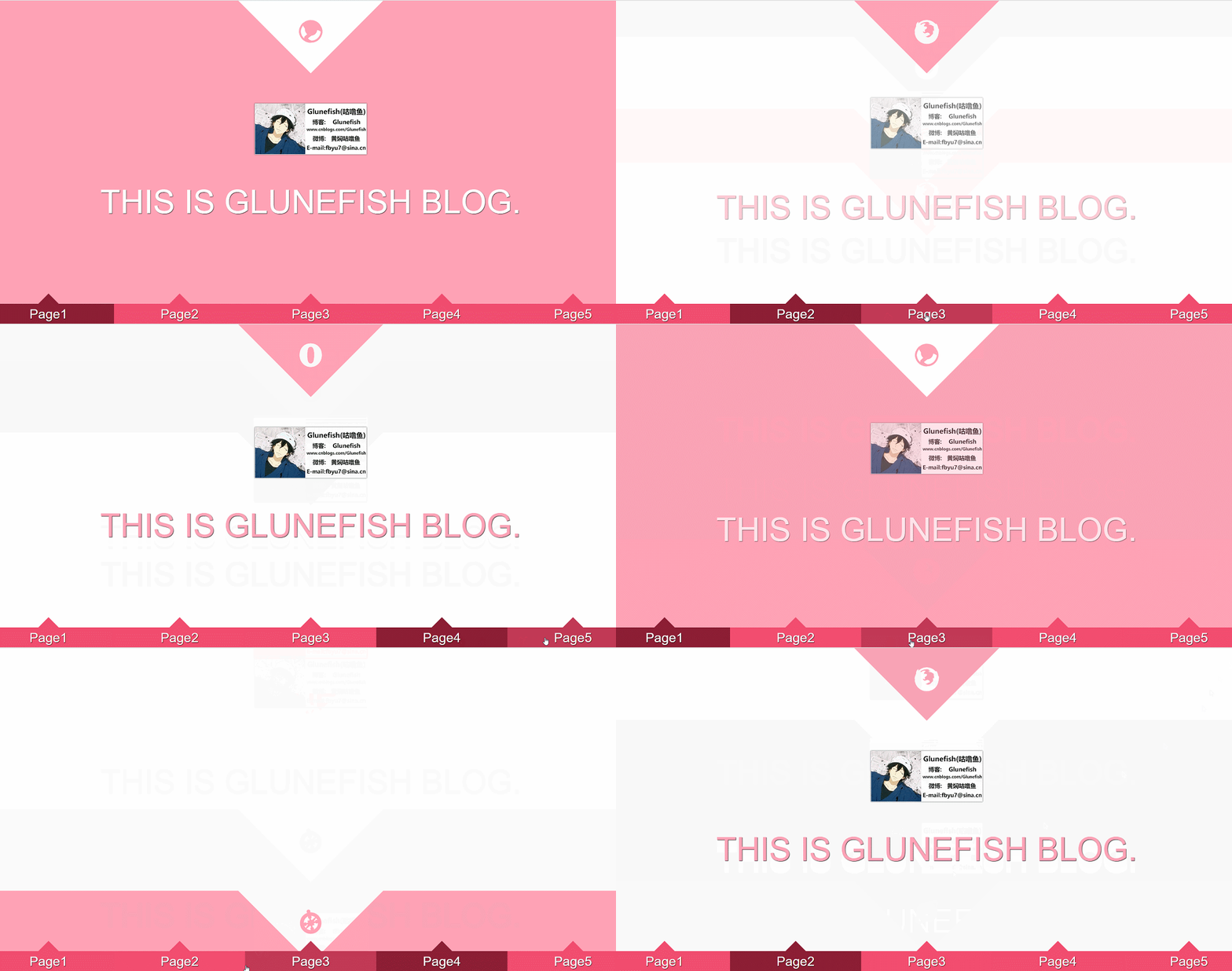
在线演示: DEMO
DEMO中及以下代码并没有写兼容代码,请使用高级浏览器打开,IE版本对CSS3支持并不太友好,IE11打开没有滚屏效果。
兼容代码前缀:
-webkit-
-moz-
-o-
-ms-
直接上代码:
<!DOCTYPE html>

<html lang="en">

<head>

    <meta charset="UTF-8">

    <title>pagaToggle</title>

    <style>

        /* Pre Style */

        * { padding: 0; margin: 0; border: none; outline: none; text-decoration: none; }

        body { overflow: hidden; }

        /* fontface */

        @font-face {

            font-family: "raphaelicons";

            src: url('fonts/raphaelicons-webfont.eot') ,

                 url('fonts/raphaelicons-webfont.svg') ,

                 url('fonts/raphaelicons-webfont.ttf') ,

                 url('fonts/raphaelicons-webfont.woff') ;

            font-weight: normal;

            font-style: normal;

        }

        /* media */

        @media screen and ( max-width: 500px ) {

            .box .pages > section > div { width: 40vw; height: 40vw; }

            .box .pages > section > h2 { font-size: 15vw; top: 5vw; }

        }

        @media screen and ( max-width: 1100px ) {

            .box .pages > section > figure > figcaption > a > span { font-size: 5vw; line-height: 200px; }

        }

        /* Nav Style */

        .box { width: 100%; height: 100%; }

        .box > input, .box > a, .box > a:after { position:  fixed; }

        .box > input { width: 20%; height: 60px; opacity: 0; z-index: 2; cursor: pointer; bottom: 0; }

        .box > a { width: 20%; height: 60px; display: inline-block; text-align: center; color: white; font: 2vw/60px arial; text-shadow: 1px 1px 1px black; background-color: #f14d6f; z-index: 1; bottom: 0; }

        .box > a:after { content: ""; width: 0; height: 0; display: block; border: 40px solid rgba(0,0,0,0); border-bottom-color: #f14d6f; position: absolute; bottom: 100%; left: 50%; transform: translateX(-50%); }

        .box > input:nth-of-type(1),a:nth-of-type(1){ left: 0%; }

        .box > input:nth-of-type(2),a:nth-of-type(2){ left: 20%; }

        .box > input:nth-of-type(3),a:nth-of-type(3){ left: 40%; }

        .box > input:nth-of-type(4),a:nth-of-type(4){ left: 60%; }

        .box > input:nth-of-type(5),a:nth-of-type(5){ left: 80%; }

        .box > input:checked + a { background-color: #8c1e34; }

        .box > input:checked + a:after { border-bottom-color: #8c1e34; }

        .box > input:hover + a { background-color: #c13955; }

        .box > input:hover + a:after { border-bottom-color: #c13955; }

        .box > input:checked:hover + a { background-color: #8c1e34; }

        .box > input:checked:hover + a:after { border-bottom-color: #8c1e34; }

        /* Toggle Style */

        .box > input:nth-of-type(1):checked ~ .pages { transform: translateY(0vh); }

        .box > input:nth-of-type(2):checked ~ .pages { transform: translateY(-100vh); }

        .box > input:nth-of-type(3):checked ~ .pages { transform: translateY(-200vh); }

        .box > input:nth-of-type(4):checked ~ .pages { transform: translateY(-300vh); }

        .box > input:nth-of-type(5):checked ~ .pages { transform: translateY(-400vh); }

        .box > input:nth-of-type(1):checked ~ .pages > section:nth-of-type(1) > figure > img { animation: imgfloat .6s ease-in backwards .4s; }

        .box > input:nth-of-type(2):checked ~ .pages > section:nth-of-type(2) > figure > img { animation: imgfloat .6s ease-in backwards .4s; }

        .box > input:nth-of-type(3):checked ~ .pages > section:nth-of-type(3) > figure > img { animation: imgfloat .6s ease-in backwards .4s; }

        .box > input:nth-of-type(4):checked ~ .pages > section:nth-of-type(4) > figure > img { animation: imgfloat .6s ease-in backwards .4s; }

        .box > input:nth-of-type(5):checked ~ .pages > section:nth-of-type(5) > figure > img { animation: imgfloat .6s ease-in backwards .4s; }

        .box > input:nth-of-type(1):checked ~ .pages > section:nth-of-type(1) > figure > figcaption > a > span { animation: textfloat .6s ease-in backwards .4s; }

        .box > input:nth-of-type(2):checked ~ .pages > section:nth-of-type(2) > figure > figcaption > a > span { animation: textfloat .6s ease-in backwards .4s; }

        .box > input:nth-of-type(3):checked ~ .pages > section:nth-of-type(3) > figure > figcaption > a > span { animation: textfloat .6s ease-in backwards .4s; }

        .box > input:nth-of-type(4):checked ~ .pages > section:nth-of-type(4) > figure > figcaption > a > span { animation: textfloat .6s ease-in backwards .4s; }

        .box > input:nth-of-type(5):checked ~ .pages > section:nth-of-type(5) > figure > figcaption > a > span { animation: textfloat .6s ease-in backwards .4s; }

        @keyframes imgfloat {

            from { opacity: 0; transform: translateY(-40px); }

            to { opacity: 1; }

        }

        @keyframes textfloat {

            from { opacity: 0; transform: translateY(40px); }

            to { opacity: 1; }

        }

        /* Pages Style    */

        .pages { transition: all .6s linear; }

        .pages > section { width: 100vw; height: 100vh; background-color: white; text-align: center; color: #ffa2b5; overflow: hidden; position: relative; }

        .pages > section:nth-of-type(odd) { background-color: #ffa2b5; color: white; }

        .pages > section > div { width: 300px; height: 300px; background: #ffa2b5; margin: 0 auto; text-align: center; transform: translateY(-50%) rotate(45deg); }

        .pages > section:nth-of-type(odd) div { background: white; }

        .pages > section > h2 { font-family: "raphaelicons"; font-size: 120px; color: white; display: inline-block; position: absolute; top: 4vh; left: 50%; transform: translateX(-50%); }

        .pages > section:nth-of-type(odd) > h2 { color: #ffa2b5;  }

        .pages > section > figure > img { box-shadow: 0 0 3px black; opacity: 1; }

        .pages > section > figure > figcaption > a > span { font: 80px/270px arial; text-shadow: 1px 1px 1px black; color: #ffa2b5; }

        .pages > section:nth-of-type(odd) > figure > figcaption > a > span { color: white; }

    </style>

</head>

<body>

    <div class="box">

        <input type="radio" name="page_btn" checked>

        <a href="javascript:;">Page1</a>

        <input type="radio" name="page_btn">

        <a href="javascript:;">Page2</a>

        <input type="radio" name="page_btn">

        <a href="javascript:;">Page3</a>

        <input type="radio" name="page_btn">

        <a href="javascript:;">Page4</a>

        <input type="radio" name="page_btn">

        <a href="javascript:;">Page5</a>

        <div class="pages">

            <section>

                <div></div>

                <h2>g</h2>

                <figure>

                    <img src="img/1.png" alt="pic">

                    <figcaption>

                        <a href="http://www.cnblogs.com/glunefish" target="_blank"><span>THIS IS GLUNEFISH BLOG.</span></a>

                    </figcaption>

                </figure>

            </section>

            <section>

                <div></div>

                <h2>d</h2>

                <figure>

                    <img src="img/1.png" alt="pic">

                    <figcaption>

                        <a href="http://www.cnblogs.com/glunefish" target="_blank"><span>THIS IS GLUNEFISH BLOG.</span></a>

                    </figcaption>

                </figure>

            </section>

            <section>

                <div></div>

                <h2>e</h2>

                <figure>

                    <img src="img/1.png" alt="pic">

                    <figcaption>

                        <a href="http://www.cnblogs.com/glunefish" target="_blank"><span>THIS IS GLUNEFISH BLOG.</span></a>

                    </figcaption>

                </figure>

            </section>

            <section>

                <div></div>

                <h2>f</h2>

                <figure>

                    <img src="img/1.png" alt="pic">

                    <figcaption>

                        <a href="http://www.cnblogs.com/glunefish" target="_blank"><span>THIS IS GLUNEFISH BLOG.</span></a>

                    </figcaption>

                </figure>

            </section>

            <section>

                <div></div>

                <h2>h</h2>

                <figure>

                    <img src="img/1.png" alt="pic">

                    <figcaption>

                        <a href="http://www.cnblogs.com/glunefish" target="_blank"><span>THIS IS GLUNEFISH BLOG.</span></a>

                    </figcaption>

                </figure>

            </section>

        </div>

    </div>

</body>

</html>
【CSS3】使用CSS3制作全屏切换效果的更多相关文章
- Html 全屏切换效果
来源 http://www.imooc.com/learn/374 pageswitch.js (function ($) { var defaults = { 'container': '#cont ...
- jquery简单的大背景banner图片全屏切换
详细内容请点击 这个是我初毕业刚进公司那会帮同事(同时也是同学)写的一个PC端的全屏图片切换效果,对于刚毕业的我来说写出来那会的喜悦之情是无法言表的,那时的我还是什么不懂的小白白,俗称菜鸟.个人网站上 ...
- jQuery插件开发——全屏切换插件
这个插件包含三个部分:HTML结构.CSS代码和JS代码. HTML结构是固定的,结构如下: <!--全屏滚动--> <div class="fullpage-contai ...
- 全屏滚动效果H5FullscreenPage.js
前提: 介于现在很多活动都使用了 类似全屏滚动效果 尤其在微信里面 我自己开发了一个快速构建 此类项目的控件 与市面上大部分控件不同的是此控件还支持元素的动画效果 并提供多种元素效果 基于zepto. ...
- pagePiling.js - 创建漂亮的全屏滚动效果
全屏滚动效果是最近非常流行的网页设计形式,带给用户良好的视觉和交互体验.pagePiling.js 这款 jQuery 插件可以帮助前端开发人员轻松实现这种效果.支持所有的主流浏览器,包括IE8+,支 ...
- 原生JS实现全屏切换以及导航栏滑动隐藏及显示——重构前
思路分析: 向后滚动鼠标滚轮,页面向下全屏切换:向前滚动滚轮,页面向上全屏切换.切换过程为动画效果. 第一屏时,导航栏固定在页面顶部,切换到第二屏时,导航条向左滑动隐藏.切换回第一屏时,导航栏向右滑动 ...
- jQuery鼠标滚动垂直全屏切换代码
体验效果:http://hovertree.com/texiao/jquery/68/ 源码下载:http://hovertree.com/h/bjaf/f643upc4.htm 代码如下: < ...
- js实现网页全屏切换(平滑过渡),鼠标滚动切换
实现效果为页面平滑过渡全屏切换,点击导航和鼠标滚动都可以切换. 效果图: html代码: <!DOCTYPE html> <html> <head lang=" ...
- HTML5实现网页的全屏切换
使用HTML5提供的JavaScript Api可以实现主流浏览器的全屏和退出全屏操作,封装成进入全屏和退出全屏的函数如下: //进入全屏 function enterFullScreen() { v ...
随机推荐
- golang之if
1.if语句 (1)if (2)if else (3)if esle ...else
- Liferay 7:portlet name
总结自: https://web.liferay.com/zh/web/user.26526/blog/-/blogs/proper-portlet-name-for-your-portlet-com ...
- 缺氧debug模式开启及功能
在游戏OxygenNotIncluded_Data文件夹创建一个debug_enable.txt的空文本文档 在缺氧目录下添加debug_enable.txt文件 按删除键就可以开启debug模式 需 ...
- PHP获取用户客户端真实IP的解决方案是怎样呢?
function getIp(){if (getenv("HTTP_CLIENT_IP") && strcasecmp(getenv("HTTP_CLIE ...
- WCF ChannelFactory
public static class WcfExtensions{ public static void Using<T>(this T client, Action<T&g ...
- 【JZOJ4930】【NOIP2017提高组模拟12.18】C
题目描述 给出一个H的行和W列的网格.第i行第j列的状态是由一个字母的A[i][j]表示,如下: "." 此格为空. "o" 此格包含一个机器人. " ...
- Java编程基础23——IO(其他流)&Properties
1_序列流(了解) 1.什么是序列流 序列流可以把多个字节输入流整合成一个, 从序列流中读取数据时, 将从被整合的第一个流开始读, 读完一个之后继续读第二个, 以此类推. 2.使用方式 整合两个: S ...
- objectarx之两条曲线最短距离
double CCommonFuntion::GetLineDistance(AcDbObjectId& Line1, AcDbObjectId& Line2){ AcGeLineSe ...
- PHPCMS快速建站系列之pc:get标签的应用
GET标签使用方式如下: {pc:get sql="SELECT * FROM phpcms_member" cache="3600" page="$ ...
- 使用 docker-compose 安装 MySQL 5.5 记录
使用 docker-compose 安装 MySQL 5.5 记录 安装 Docker-Compose 在 Centos 中安装 Docker 倒是很简单. 但是安装 docker-compose 遇 ...