
JSP-案例-商品增删改
商品的增删改查
1显示
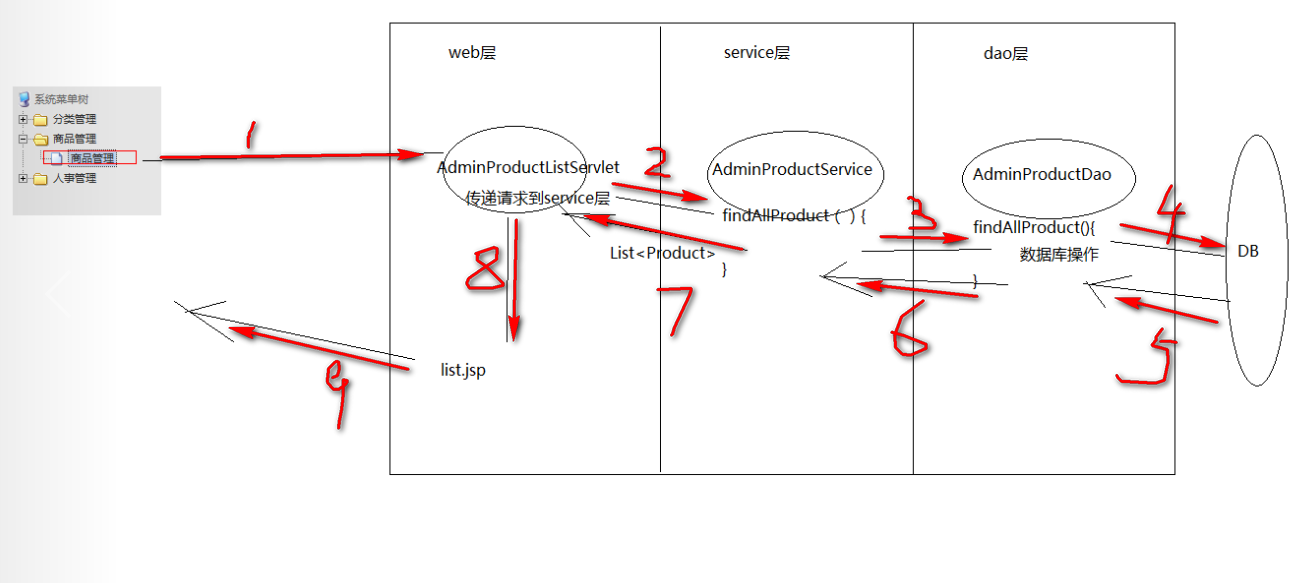
部分代码
Dao
public List<Product> findAllProduct() throws SQLException {

                  QueryRunner runner = new QueryRunner(DataSourceUtils.getDataSource());

                  String sql = "select * from product";

                  List<Product> productList = runner.query(sql, new BeanListHandler<Product>(Product.class));

                  return productList;

         }
Jsp
                                                       <c:forEach items="${productList }" var="pro" varStatus="vs">

                                                                      <tr onmouseover="this.style.backgroundColor = 'white'"

                                                                               onmouseout="this.style.backgroundColor = '#F5FAFE';">

                                                                               <td style="CURSOR: hand; HEIGHT: 22px" align="center"

                                                                                        width="18%">${vs.count }</td>

                                                                               <td style="CURSOR: hand; HEIGHT: 22px" align="center"

                                                                                        width="17%">

                                                                                        <img width="" height="" src="${pageContext.request.contextPath }/${pro.pimage }">

                                                                               </td>

                                                                               <td style="CURSOR: hand; HEIGHT: 22px" align="center"

                                                                                        width="17%">${pro.pname }</td>

                                                                               <td style="CURSOR: hand; HEIGHT: 22px" align="center"

                                                                                        width="17%">${pro.shop_price }</td>

                                                                               <td style="CURSOR: hand; HEIGHT: 22px" align="center"

                                                                                        width="17%">${pro.is_hot==?"是":"否" }</td>

                                                                               <td align="center" style="HEIGHT: 22px"><a

                                                                                        href="${ pageContext.request.contextPath }/adminUpdateProductUI?pid=${pro.pid}">

                                                                                                <img

                                                                                                 src="${pageContext.request.contextPath}/images/i_edit.gif"

                                                                                                border="" style="CURSOR: hand">

                                                                               </a></td>

                                                                               <td align="center" style="HEIGHT: 22px">

                                                                                        <a href="javascript:void(0);" onclick="delProduct('${pro.pid}')">

                                                                                                <img src="${pageContext.request.contextPath}/images/i_del.gif"

                                                                                                width="" height="" border="" style="CURSOR: hand">

                                                                                        </a>

                                                                               </td>

                                                                      </tr>

                                                             </c:forEach>
2 增
先获得分类数据
//获得所有的商品的类别数据

                  AdminProductService service = new AdminProductService();

                  List<Category> categoryList = null;

                  try {

                          categoryList = service.findAllCategory();

                  } catch (SQLException e) {

                          e.printStackTrace();

                  }

                  request.setAttribute("categoryList", categoryList);
在显示类别
                                                         <select name="cid">

                                                             <c:forEach items="${categoryList }" var="category">

                                                                      <option value="${category.cid}">${category.cname }</option>

                                                             </c:forEach>

                                                     </select>
接着做数据库添加操作
public void addProduct(Product product) throws SQLException {

                  QueryRunner runner = new QueryRunner(DataSourceUtils.getDataSource());

                  String sql = "insert into product values(?,?,?,?,?,?,?,?,?,?)";

                  runner.update(sql, product.getPid(),product.getPname(),product.getMarket_price(),

                                            product.getShop_price(),product.getPimage(),product.getPdate(),product.getIs_hot(),

                                            product.getPdesc(),product.getPflag(),product.getCid());

         }
3 删除
分析:你要确定你要删除的是那个,所以你要传参数,来确定你删除的是那个
Pid 来确定
Jsp
                                               <td align="center" style="HEIGHT: 22px">

                                                                                        <a href="javascript:void(0);" onclick="delProduct('${pro.pid}')">

                                                                                                <img src="${pageContext.request.contextPath}/images/i_del.gif"

                                                                                                width="" height="" border="" style="CURSOR: hand">

                                                                                        </a>

                                                                               </td>
JS
       function delProduct(pid){

                                   var isDel = confirm("您确认要删除吗?");

                                   if(isDel){

                                            //要删除

                                            location.href = "${pageContext.request.contextPath}/adminDelProduct?pid="+pid;

                                   }

                          }
4 修改

比较不好处理的点:商品的分类select 里面的option
1在编辑商品时需要向数据库传递你要更改的那个
2 Select里面的option默认显示是那个;
需要option里面的value和category里面的cid进行对比(js或者jq)
                  <script type="text/javascript">

                          $(function(){

                                   //获得当前回显的product的cid

                                   $("#cid option[value='${product.cid }']").prop("selected",true);

                                   //是否热门

                                   $("#is_hot option[value='${product.is_hot }']").prop("selected",true);

                          });

                          //页面加载完毕后 确定那个option被选中

                          /* window.onload = function(){

                                   //获得当前回显的product的cid

                                    var cid = "${product.cid }";

                                   //获得所有的<select name="cid">下的option

                                   var options = document.getElementById("cid").getElementsByTagName("option");

                                   //比较每一个option的value与cid

                                   for(var i=0;i<options.length;i++){

                                            if(cid==options[i].value){

                                                     options[i].selected = true;

                                            }

                                   }

                          } */

                  </script>
Jsp里面的编辑代码
                                              <td align="center" style="HEIGHT: 22px"><a

                                                                                        href="${ pageContext.request.contextPath }/adminUpdateProductUI?pid=${pro.pid}">

                                                                                                <img

                                                                                                 src="${pageContext.request.contextPath}/images/i_edit.gif"

                                                                                                border="" style="CURSOR: hand">

                                                                               </a></td>
5 源代码
源代码:链接:https://pan.baidu.com/s/1J5u4s3emjlluZIWw7TkZmw 密码:cl9b
JSP-案例-商品增删改的更多相关文章
- 最简单的jsp+servlet的增删改查代码
package ceet.ac.cn.dao; import java.sql.Connection; import java.sql.PreparedStatement; import java.s ...
- Hibernate入门案例及增删改查
一.Hibernate入门案例剖析: ①创建实体类Student 并重写toString方法 public class Student { private Integer sid; private I ...
- MyBatis入门案例、增删改查
一.MyBatis入门案例: ①:引入jar包 ②:创建实体类 Dept,并进行封装 ③ 在Src下创建大配置mybatis-config.xml <?xml version="1.0 ...
- idea使用maven搭建ssm框架实现登陆商品增删改查
创建项目->maven->webapp->输入坐标->完成. pom.xml <project xmlns="http://maven.apache.org/P ...
- JSP的一个增删改查例子和总结
总结的几点: 1.在jsp中注意<%! %>声明代码块中的变量只会在项目开始的时候第一次运行jsp的时候执行一遍,有点类似于java类中的static代码块,所以如果是会改变的值不应该声明 ...
- jsp+servlet+mysql增删改查
用的IntelliJ IDEA开发的,jdk1.8 1 首先是项目结构,如下图所示 2看各层的代码 首先是web.xml <?xml version="1.0" encodi ...
- ABP实践(4)-abp前端vue框架之简单商品增删改查(帮助刚入门的新手快速了解怎么才能加入自己的功能并运行起来)
提示:如有不明白的地方请先查看前3篇ABP实践系列的文章 1,下载及启动abp项目前后端分离(netcore+vue) 2,修改abp数据库为mysql 3,商品系列api接口(本文主要依赖在这个商品 ...
- Hibernate-基础入门案例,增删改查
项目结构: 数据库: /* SQLyog Ultimate v12.09 (64 bit) MySQL - 5.5.53 : Database - hibernate01 ************** ...
- JDBC+Servlet+JSP的学生案例增删改查
数据库信息传输到页面实现. 先进行学生信息页面展示: 接口IStudentDao public interface IStudentDao { /** * 保存操作 * @param stu 学生对象 ...
随机推荐
- Vue 中 computed ,watch,methods 的异同
methods,watch和computed都是以函数为基础的. computed 和 watch 都可以观察页面的相应式数据的变化.当处理页面的数据变化时,我们有时候很容易滥用watch, 而通常更 ...
- CSS 实现自适应正方形
在处理移动端页面时,我们有时会需要将banner图做成与屏幕等宽的正方形以获得最佳的体验效果,比如,商品详情页, 方法1.CSS3 vw单位 CSS3 中新增了一组相对于可视区域百分比的长度单位 vw ...
- (转)linux centos 编译luabind-0.9.1 动态库 静态库
编译时:virtual memory exhausted: Cannot allocate memory 一.问题 当安装虚拟机时系统时没有设置swap大小或设置内存太小,编译程序会出现virtual ...
- nginx i.com.conf
server { listen 9090; server_name i.com; root /Users/chong/Documents/www; # Load configuration files ...
- 读《深入PHP 面向对象、模式与实践》笔记
1. include() 和require() 语句的不同在于它们如何处理错误.使用require()调用文件发生错误时,将会停止整个程序;调用include()时遇到相同的错误,则会生成警告并停止执 ...
- It's a Mod, Mod, Mod, Mod World (类欧几里得模板题
https://vjudge.net/contest/317000#problem/F #include <iostream> #include <cstdio> #inclu ...
- Java虚拟机性能管理神器 - VisualVM(5) 监控远程主机上的JAVA应用程序【转】
Java虚拟机性能管理神器 - VisualVM(5) 监控远程主机上的JAVA应用程序[转] 标签: javajvm监控工具性能优化 2015-03-11 18:37 1394人阅读 评论(0) 收 ...
- leetcode--81-搜索旋转排序数组②
题目描述: 33题 方法一: class Solution: def search(self, nums: List[int], target: int) -> bool: l, r = 0, ...
- linux系统添加定时任务
http://linuxtools-rst.readthedocs.io/zh_CN/latest/tool/crontab.html
- Canavs初学
<canvas id="canvas" style="border:1px solid #f00;"></canvas> 公用js: v ...