
NX二次开发-NXOPEN工程图导出CAD图纸DxfdwgCreator *dxfdwgCreator1;
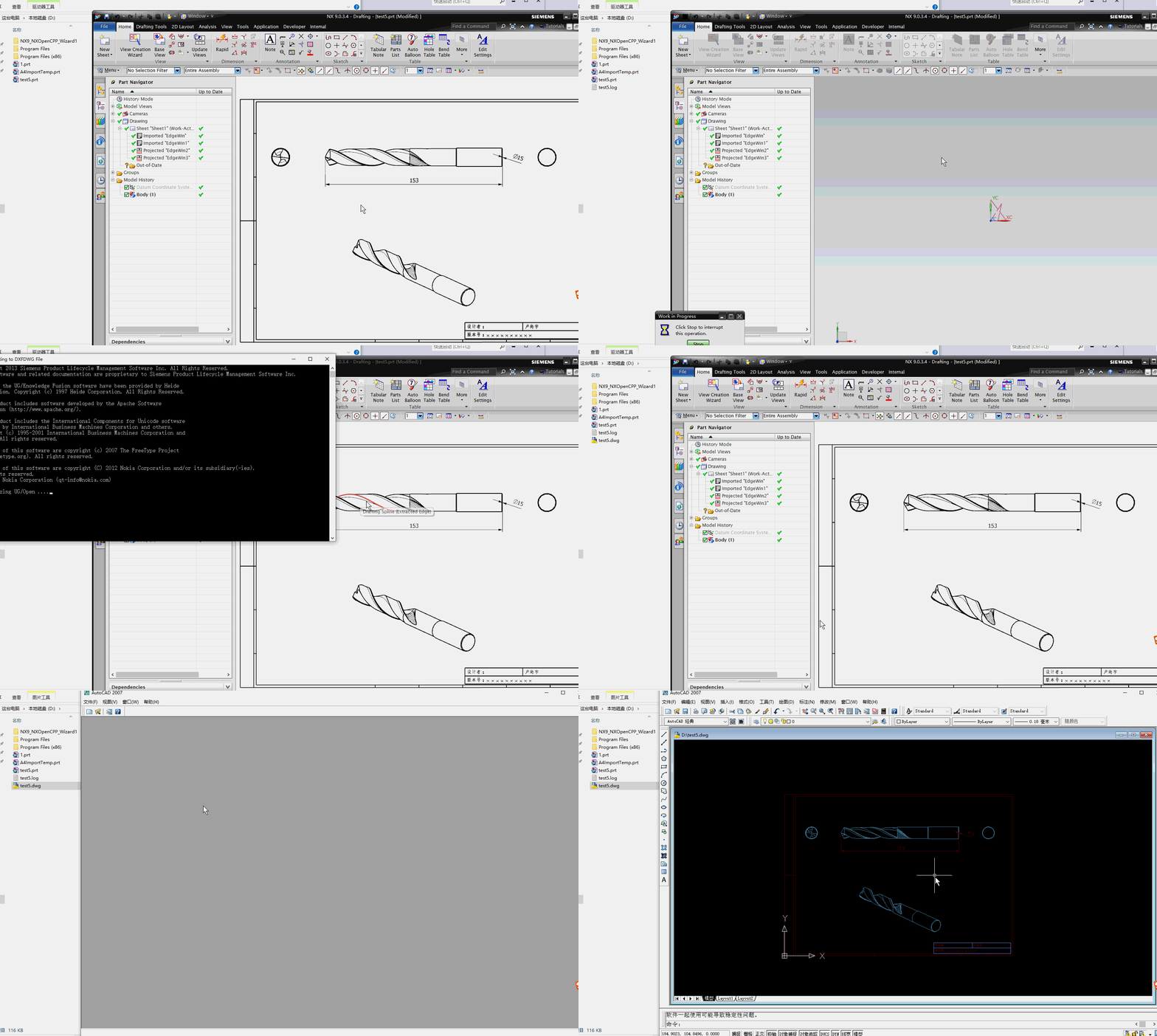
没有什么可以看的,NXOPEN直接录制一下导出CAD就可以了。
录制出来自己挑需要的代码拿过来改一下。
 NX9+VS2012

 #include <NXOpen/Part.hxx>

 #include <NXOpen/PartCollection.hxx>

 #include <NXOpen/Session.hxx>

 #include <NXOpen/DxfdwgCreator.hxx>

 #include <NXOpen/DexManager.hxx>

 DxfdwgCreator *dxfdwgCreator1;

 dxfdwgCreator1 = theSession->DexManager()->CreateDxfdwgCreator();

 dxfdwgCreator1->SetExportData(DxfdwgCreator::ExportDataOptionDrawing);

 dxfdwgCreator1->SetAutoCADRevision(DxfdwgCreator::AutoCADRevisionOptionsR2004);

 dxfdwgCreator1->SetViewEditMode(true);

 dxfdwgCreator1->SetFlattenAssembly(true);

 dxfdwgCreator1->SetExportScaleValue("1:1");

 //dxfdwgCreator1->SetOutputFileType(DxfdwgCreator::OutputFileTypeOptionDxf);//导出DXF

 dxfdwgCreator1->SetOutputFileType(DxfdwgCreator::OutputFileTypeOptionDwg);//导出DWG

 dxfdwgCreator1->SetOutputFile("D:\\test5.dwg");

 dxfdwgCreator1->ObjectTypes()->SetCurves(true);

 dxfdwgCreator1->ObjectTypes()->SetAnnotations(true);

 dxfdwgCreator1->ObjectTypes()->SetStructures(true);

 dxfdwgCreator1->SetInputFile("D:\\test5.prt");

 NXObject *nXObject1;

 nXObject1 = dxfdwgCreator1->Commit();

 dxfdwgCreator1->Destroy();
NX二次开发-NXOPEN工程图导出CAD图纸DxfdwgCreator *dxfdwgCreator1;的更多相关文章
- NX二次开发-NXOPEN自动切换到工程图模块
UFUN的API里是没有切换到工程图的函数的,NXOPEN里是有方法可以用的.不过应该是不支持NX9以下的版本. NX9的不能录制出来,在UI类里有方法 NX9+VS2012 #include < ...
- NX二次开发-将工程图上的每个视图导出PNG图片
大概思路是将每个视图导出PDF,在调另一个项目的EXE(PDF转PNG) //ExportDrawViewPng // Mandatory UF Includes #include <uf.h& ...
- NX二次开发-将工程图视图+尺寸的最大边界导出图片
/***************************************************************************** ** ** ExportPicture.c ...
- NX二次开发-NXOPEN导出STEP Step214Creator *step214Creator1;
没有什么可以看的,NXOPEN直接录制一下导出STEP就可以了.录制出来自己挑需要的代码拿过来改一下. NX9+VS2012 #include <NXOpen/Part.hxx> #inc ...
- NX二次开发-NXOPEN更改工程图视图名字baseView1->SetName("LSY");
NX9+VS2012 #include <uf.h> #include <uf_draw.h> #include <uf_obj.h> #include <u ...
- NX二次开发-NXOPEN设置工程图表格注释字体workPart->Fonts()->AddFont("chinesef_fs", NXOpen::FontCollection::TypeNx);
NX9+VS2012 #include <uf.h> #include <uf_tabnot.h> #include <NXOpen/Part.hxx> #incl ...
- NX二次开发-NXOPEN获取所有工程图和所有视图DrawingSheet,DrawingSheetCollection,DraftingView
NX11+VS2013 #include <NXOpen/Part.hxx> #include <NXOpen/PartCollection.hxx> #include < ...
- NX二次开发-NXOPEN将工程图转成PDF文件
NX9+VS2012 #include <uf.h> #include <uf_draw.h> #include <NXOpen/PrintPDFBuilder.hxx& ...
- NX二次开发-NXOPEN创建工程图表格Annotations::TableSectionBuilder *tableSectionBuilder1;
NX9+VS2012 #include <uf.h> #include <uf_tabnot.h> #include <NXOpen/Part.hxx> #incl ...
随机推荐
- 开启.NET Core 3时代,DevExpress v19.2.5带你全新启航
DevExpress Universal Subscription(又名DevExpress宇宙版或DXperience Universal Suite)是全球使用广泛的.NET用户界面控件套包,De ...
- daragrid 简单认识
@{ ViewBag.Title = "EasyUI"; Layout = null; } <script src="~/jquery-easyui-1.5.5.2 ...
- BulkLoad加载本地文件到HBase表
BulkLoad加载文件到HBase表 1.功能 将本地数据导入到HBase中 2.原理 BulkLoad会将tsv/csv格式的文件编程hfile文件,然后再进行数据的导入,这样可以避免大量数据导入 ...
- 浅谈虚拟机、Docker和Hyper技术
操作系统 我们知道: 完整的操作系统=内核+apps 内核负责管理底层硬件资源,包括CPU.内存.磁盘等等,并向上为apps提供系统调用接口,上层apps应用必须通过系统调用方式使用硬件资源,通常并不 ...
- MFS分布式文件系统【3】存储节点 CHUNK SERVER 部署
[root@ky_hs_252 mfs-1.6.27]# mkdir /usr/local/mfs [root@ky_hs_252 mfs-1.6.27]# useradd mfs -s /sbin/ ...
- Apache配置 PHP 支持
1,在服务区安装PHP 解压 php 到纯英文路径目 2,添加 PHP处理模块 LoadModule php7_module C:/ProgramData/php/php7apache2_4.dl 3 ...
- sed命令详解 (转载)
sed是stream editor的简称,也就是流编辑器.它一次处理一行内容,处理时,把当前处理的行存储在临时缓冲区中,称为“模式空间”(pattern space),接着用sed命令处理缓冲区中的内 ...
- Array.prototype.slice.call()等几种将arguments对象转换成数组对象的方法
网站搬迁,给你带来的不便敬请谅解! http://www.suanliutudousi.com/2017/10/10/array-prototype-slice-call%E7%AD%89%E5%87 ...
- 自定义hive文件和记录格式及文本文件数据编码
(1)一段 建表语句: [ROW FORMAT row_format] [STORED AS file_format] | STORED BY 'storage.handler.class.name' ...
- C# WinfForm 控件之dev报表 XtraReport (一) 初了解
这个控件其实用法和fast也差不了太多但如果没接触过 真有种老虎吃天的感觉 1.这里先不说那些高深的先说最基本的 在窗体中显示一个设计好的 模版 1.1一般设计和这个程序是分着的为了方便我就先把他们合 ...