
Python开发中国象棋实战(附源码)
Pygame 做的中国象棋,一直以来喜欢下象棋,写了 python 就拿来做一个试试,水平有限,电脑走法水平低,需要在下次版本中更新电脑走法,希望源码能帮助大家更好的学习 python。总共分为四个文件,chinachess.py 为主文件,constants.py 数据常量,pieces.py 棋子类,走法,computer.py 电脑走法计算。
PS:另外很多人在学习Python的过程中,往往因为遇问题解决不了或者没好的教程从而导致自己放弃,为此我整理啦从基础的python脚本到web开发、爬虫、django、数据挖掘等【PDF等】需要的可以进Python全栈开发交流.裙 :一久武其而而流一思(数字的谐音)转换下可以找到了,里面有最新Python教程项目可拿,不懂的问题有老司机解决哦,一起相互监督共同进步
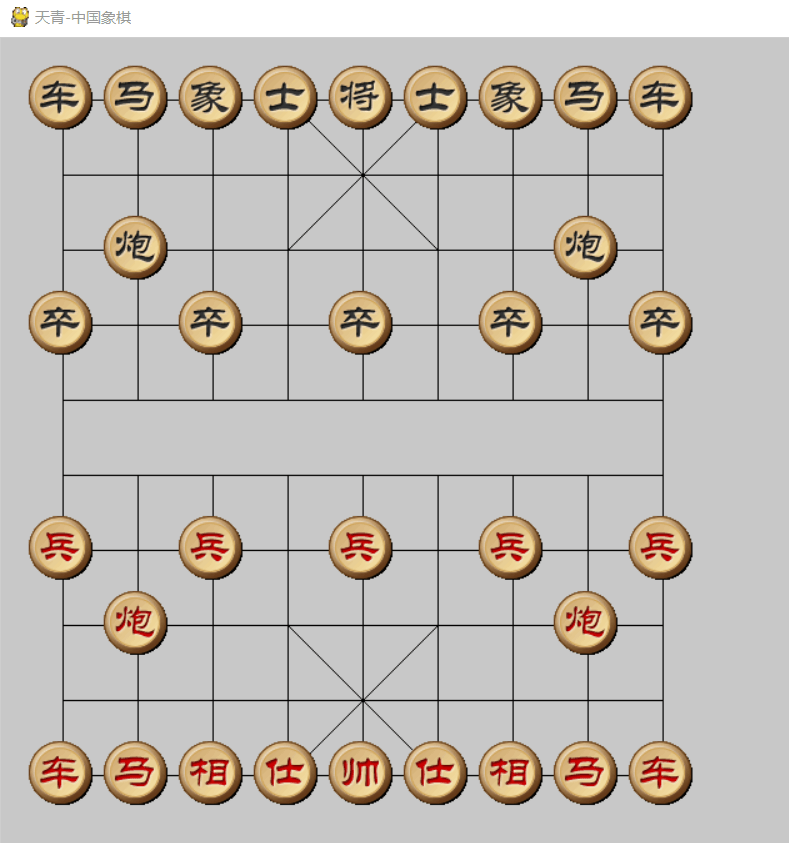
chinachess.py 为主文件
import pygame

import time

import constants

import pieces

import computer

class MainGame():

    window = None

    Start_X = constants.Start_X

    Start_Y = constants.Start_Y

    Line_Span = constants.Line_Span

    Max_X = Start_X + 8 * Line_Span

    Max_Y = Start_Y + 9 * Line_Span

    player1Color = constants.player1Color

    player2Color = constants.player2Color

    Putdownflag = player1Color

    piecesSelected = None

    button_go = None

    piecesList = []

    def start_game(self):

        MainGame.window = pygame.display.set_mode([constants.SCREEN_WIDTH, constants.SCREEN_HEIGHT])

        pygame.display.set_caption("天青-中国象棋")

        MainGame.button_go = Button(MainGame.window, "重新开始", constants.SCREEN_WIDTH - 100, 300)  # 创建开始按钮

        self.piecesInit()

        while True:

            time.sleep(0.1)

            # 获取事件

            MainGame.window.fill(constants.BG_COLOR)

            self.drawChessboard()

            #MainGame.button_go.draw_button()

            self.piecesDisplay()

            self.VictoryOrDefeat()

            self.Computerplay()

            self.getEvent()

            pygame.display.update()

            pygame.display.flip()

    def drawChessboard(self):

        mid_end_y = MainGame.Start_Y + 4 * MainGame.Line_Span

        min_start_y = MainGame.Start_Y + 5 * MainGame.Line_Span

        for i in range(0, 9):

            x = MainGame.Start_X + i * MainGame.Line_Span

            if i==0 or i ==8:

                y = MainGame.Start_Y + i * MainGame.Line_Span

                pygame.draw.line(MainGame.window, constants.BLACK, [x, MainGame.Start_Y], [x, MainGame.Max_Y], 1)

            else:

                pygame.draw.line(MainGame.window, constants.BLACK, [x, MainGame.Start_Y], [x, mid_end_y], 1)

                pygame.draw.line(MainGame.window, constants.BLACK, [x, min_start_y], [x, MainGame.Max_Y], 1)

        for i in range(0, 10):

            x = MainGame.Start_X + i * MainGame.Line_Span

            y = MainGame.Start_Y + i * MainGame.Line_Span

            pygame.draw.line(MainGame.window, constants.BLACK, [MainGame.Start_X, y], [MainGame.Max_X, y], 1)

        speed_dial_start_x =  MainGame.Start_X + 3 * MainGame.Line_Span

        speed_dial_end_x =  MainGame.Start_X + 5 * MainGame.Line_Span

        speed_dial_y1 = MainGame.Start_Y + 0 * MainGame.Line_Span

        speed_dial_y2 = MainGame.Start_Y + 2 * MainGame.Line_Span

        speed_dial_y3 = MainGame.Start_Y + 7 * MainGame.Line_Span

        speed_dial_y4 = MainGame.Start_Y + 9 * MainGame.Line_Span

        pygame.draw.line(MainGame.window, constants.BLACK, [speed_dial_start_x, speed_dial_y1], [speed_dial_end_x, speed_dial_y2], 1)

        pygame.draw.line(MainGame.window, constants.BLACK, [speed_dial_start_x, speed_dial_y2],

                         [speed_dial_end_x, speed_dial_y1], 1)

        pygame.draw.line(MainGame.window, constants.BLACK, [speed_dial_start_x, speed_dial_y3],

                         [speed_dial_end_x, speed_dial_y4], 1)

        pygame.draw.line(MainGame.window, constants.BLACK, [speed_dial_start_x, speed_dial_y4],

                         [speed_dial_end_x, speed_dial_y3], 1)

    def piecesInit(self):

        MainGame.piecesList.append(pieces.Rooks(MainGame.player2Color, 0,0))

        MainGame.piecesList.append(pieces.Rooks(MainGame.player2Color,  8, 0))

        MainGame.piecesList.append(pieces.Elephants(MainGame.player2Color,  2, 0))

        MainGame.piecesList.append(pieces.Elephants(MainGame.player2Color,  6, 0))

        MainGame.piecesList.append(pieces.King(MainGame.player2Color, 4, 0))

        MainGame.piecesList.append(pieces.Knighs(MainGame.player2Color,  1, 0))

        MainGame.piecesList.append(pieces.Knighs(MainGame.player2Color,  7, 0))

        MainGame.piecesList.append(pieces.Cannons(MainGame.player2Color,  1, 2))

        MainGame.piecesList.append(pieces.Cannons(MainGame.player2Color, 7, 2))

        MainGame.piecesList.append(pieces.Mandarins(MainGame.player2Color,  3, 0))

        MainGame.piecesList.append(pieces.Mandarins(MainGame.player2Color, 5, 0))

        MainGame.piecesList.append(pieces.Pawns(MainGame.player2Color, 0, 3))

        MainGame.piecesList.append(pieces.Pawns(MainGame.player2Color, 2, 3))

        MainGame.piecesList.append(pieces.Pawns(MainGame.player2Color, 4, 3))

        MainGame.piecesList.append(pieces.Pawns(MainGame.player2Color, 6, 3))

        MainGame.piecesList.append(pieces.Pawns(MainGame.player2Color, 8, 3))

        MainGame.piecesList.append(pieces.Rooks(MainGame.player1Color,  0, 9))

        MainGame.piecesList.append(pieces.Rooks(MainGame.player1Color,  8, 9))

        MainGame.piecesList.append(pieces.Elephants(MainGame.player1Color, 2, 9))

        MainGame.piecesList.append(pieces.Elephants(MainGame.player1Color, 6, 9))

        MainGame.piecesList.append(pieces.King(MainGame.player1Color,  4, 9))

        MainGame.piecesList.append(pieces.Knighs(MainGame.player1Color, 1, 9))

        MainGame.piecesList.append(pieces.Knighs(MainGame.player1Color, 7, 9))

        MainGame.piecesList.append(pieces.Cannons(MainGame.player1Color,  1, 7))

        MainGame.piecesList.append(pieces.Cannons(MainGame.player1Color,  7, 7))

        MainGame.piecesList.append(pieces.Mandarins(MainGame.player1Color,  3, 9))

        MainGame.piecesList.append(pieces.Mandarins(MainGame.player1Color,  5, 9))

        MainGame.piecesList.append(pieces.Pawns(MainGame.player1Color, 0, 6))

        MainGame.piecesList.append(pieces.Pawns(MainGame.player1Color, 2, 6))

        MainGame.piecesList.append(pieces.Pawns(MainGame.player1Color, 4, 6))

        MainGame.piecesList.append(pieces.Pawns(MainGame.player1Color, 6, 6))

        MainGame.piecesList.append(pieces.Pawns(MainGame.player1Color, 8, 6))

    def piecesDisplay(self):

        for item in MainGame.piecesList:

            item.displaypieces(MainGame.window)

            #MainGame.window.blit(item.image, item.rect)

    def getEvent(self):

        # 获取所有的事件

        eventList = pygame.event.get()

        for event in eventList:

            if event.type == pygame.QUIT:

                self.endGame()

            elif event.type == pygame.MOUSEBUTTONDOWN:

                pos = pygame.mouse.get_pos()

                mouse_x = pos[0]

                mouse_y = pos[1]

                if (

                        mouse_x > MainGame.Start_X - MainGame.Line_Span / 2 and mouse_x < MainGame.Max_X + MainGame.Line_Span / 2) and (

                        mouse_y > MainGame.Start_Y - MainGame.Line_Span / 2 and mouse_y < MainGame.Max_Y + MainGame.Line_Span / 2):

                    # print( str(mouse_x) + "" + str(mouse_y))

                    # print(str(MainGame.Putdownflag))

                    if MainGame.Putdownflag != MainGame.player1Color:

                        return

                    click_x = round((mouse_x - MainGame.Start_X) / MainGame.Line_Span)

                    click_y = round((mouse_y - MainGame.Start_Y) / MainGame.Line_Span)

                    click_mod_x = (mouse_x - MainGame.Start_X) % MainGame.Line_Span

                    click_mod_y = (mouse_y - MainGame.Start_Y) % MainGame.Line_Span

                    if abs(click_mod_x - MainGame.Line_Span / 2) >= 5 and abs(

                            click_mod_y - MainGame.Line_Span / 2) >= 5:

                        # print("有效点:x="+str(click_x)+" y="+str(click_y))

                        # 有效点击点

                        self.PutdownPieces(MainGame.player1Color, click_x, click_y)

                else:

                    print("out")

                if MainGame.button_go.is_click():

                    #self.restart()

                    print("button_go click")

                else:

                    print("button_go click out")

    def PutdownPieces(self, t, x, y):

        selectfilter=list(filter(lambda cm: cm.x == x and cm.y == y and cm.player == MainGame.player1Color,MainGame.piecesList))

        if len(selectfilter):

            MainGame.piecesSelected = selectfilter[0]

            return

        if MainGame.piecesSelected :

            #print("1111")

            arr = pieces.listPiecestoArr(MainGame.piecesList)

            if MainGame.piecesSelected.canmove(arr, x, y):

                self.PiecesMove(MainGame.piecesSelected, x, y)

                MainGame.Putdownflag = MainGame.player2Color

        else:

            fi = filter(lambda p: p.x == x and p.y == y, MainGame.piecesList)

            listfi = list(fi)

            if len(listfi) != 0:

                MainGame.piecesSelected = listfi[0]

    def PiecesMove(self,pieces,  x , y):

        for item in  MainGame.piecesList:

            if item.x ==x and item.y == y:

                MainGame.piecesList.remove(item)

        pieces.x = x

        pieces.y = y

        print("move to " +str(x) +" "+str(y))

        return True

    def Computerplay(self):

        if MainGame.Putdownflag == MainGame.player2Color:

            print("轮到电脑了")

            computermove = computer.getPlayInfo(MainGame.piecesList)

            #if computer==None:

                #return

            piecemove = None

            for item in MainGame.piecesList:

                if item.x == computermove[0] and item.y == computermove[1]:

                    piecemove= item

            self.PiecesMove(piecemove, computermove[2], computermove[3])

            MainGame.Putdownflag = MainGame.player1Color

    #判断游戏胜利

    def VictoryOrDefeat(self):

        txt =""

        result = [MainGame.player1Color,MainGame.player2Color]

        for item in MainGame.piecesList:

            if type(item) ==pieces.King:

                if item.player == MainGame.player1Color:

                    result.remove(MainGame.player1Color)

                if item.player == MainGame.player2Color:

                    result.remove(MainGame.player2Color)

        if len(result)==0:

            return

        if result[0] == MainGame.player1Color :

            txt = "失败!"

        else:

            txt = "胜利!"

        MainGame.window.blit(self.getTextSuface("%s" % txt), (constants.SCREEN_WIDTH - 100, 200))

        MainGame.Putdownflag = constants.overColor

    def getTextSuface(self, text):

        pygame.font.init()

        # print(pygame.font.get_fonts())

        font = pygame.font.SysFont('kaiti', 18)

        txt = font.render(text, True, constants.TEXT_COLOR)

        return txt

    def endGame(self):

        print("exit")

        exit()

if __name__ == '__main__':

    MainGame().start_game()
constants.py 数据常量
import pygame

SCREEN_WIDTH=900

SCREEN_HEIGHT=650

Start_X = 50

Start_Y = 50

Line_Span = 60

player1Color = 1

player2Color = 2

overColor = 3

BG_COLOR=pygame.Color(200, 200, 200)

Line_COLOR=pygame.Color(255, 255, 200)

TEXT_COLOR=pygame.Color(255, 0, 0)

# 定义颜色

BLACK = ( 0, 0, 0)

WHITE = (255, 255, 255)

RED = (255, 0, 0)

GREEN = ( 0, 255, 0)

BLUE = ( 0, 0, 255)

repeat = 0

pieces_images = {

    'b_rook': pygame.image.load("imgs/s2/b_c.gif"),

    'b_elephant': pygame.image.load("imgs/s2/b_x.gif"),

    'b_king': pygame.image.load("imgs/s2/b_j.gif"),

    'b_knigh': pygame.image.load("imgs/s2/b_m.gif"),

    'b_mandarin': pygame.image.load("imgs/s2/b_s.gif"),

    'b_cannon': pygame.image.load("imgs/s2/b_p.gif"),

    'b_pawn': pygame.image.load("imgs/s2/b_z.gif"),

    'r_rook': pygame.image.load("imgs/s2/r_c.gif"),

    'r_elephant': pygame.image.load("imgs/s2/r_x.gif"),

    'r_king': pygame.image.load("imgs/s2/r_j.gif"),

    'r_knigh': pygame.image.load("imgs/s2/r_m.gif"),

    'r_mandarin': pygame.image.load("imgs/s2/r_s.gif"),

    'r_cannon': pygame.image.load("imgs/s2/r_p.gif"),

    'r_pawn': pygame.image.load("imgs/s2/r_z.gif"),

}
pieces.py 棋子类,走法,
import pygame

import constants

class  Pieces():

    def __init__(self, player,  x, y):

        self.imagskey = self.getImagekey()

        self.image = constants.pieces_images[self.imagskey]

        self.x = x

        self.y = y

        self.player = player

        self.rect = self.image.get_rect()

        self.rect.left = constants.Start_X + x * constants.Line_Span - self.image.get_rect().width / 2

        self.rect.top = constants.Start_Y + y * constants.Line_Span - self.image.get_rect().height / 2

    def displaypieces(self,screen):

        #print(str(self.rect.left))

        self.rect.left = constants.Start_X + self.x * constants.Line_Span - self.image.get_rect().width / 2

        self.rect.top = constants.Start_Y + self.y * constants.Line_Span - self.image.get_rect().height / 2

        screen.blit(self.image,self.rect);

        #self.image = self.images

        #MainGame.window.blit(self.image,self.rect)

    def canmove(self, arr, moveto_x, moveto_y):

        pass

    def getImagekey(self):

        return None

    def getScoreWeight(self,listpieces):

        return  None

class Rooks(Pieces):

    def __init__(self, player,  x, y):

        self.player = player

        super().__init__(player,  x, y)

    def getImagekey(self):

        if self.player == constants.player1Color:

            return "r_rook"

        else:

            return "b_rook"

    def canmove(self, arr, moveto_x, moveto_y):

        if self.x == moveto_x and self.y == moveto_y:

            return False

        if arr[moveto_x][moveto_y] ==self.player :

            return  False

        if self.x == moveto_x:

            step = -1 if self.y > moveto_y else 1

            for i in range(self.y +step, moveto_y, step):

                if arr[self.x][i] !=0 :

                    return False

            #print(" move y")

            return True

        if self.y == moveto_y:

            step = -1 if self.x > moveto_x else 1

            for i in range(self.x + step, moveto_x, step):

                if arr[i][self.y] != 0:

                    return False

            return True

    def getScoreWeight(self, listpieces):

        score = 11

        return score

class Knighs(Pieces):

    def __init__(self, player,  x, y):

        self.player = player

        super().__init__(player,  x, y)

    def getImagekey(self):

        if self.player == constants.player1Color:

            return "r_knigh"

        else:

            return "b_knigh"

    def canmove(self, arr, moveto_x, moveto_y):

        if self.x == moveto_x and self.y == moveto_y:

            return False

        if arr[moveto_x][moveto_y] == self.player:

            return False

        #print(str(self.x) +""+str(self.y))

        move_x = moveto_x-self.x

        move_y = moveto_y - self.y

        if abs(move_x) == 1 and abs(move_y) == 2:

            step = 1 if move_y > 0 else -1

            if arr[self.x][self.y + step] == 0:

                return True

        if abs(move_x) == 2 and abs(move_y) == 1:

            step = 1 if move_x >0 else -1

            if arr[self.x +step][self.y] ==0 :

                return  True

    def getScoreWeight(self, listpieces):

        score = 5

        return score

class Elephants(Pieces):

    def __init__(self, player, x, y):

        self.player = player

        super().__init__(player, x, y)

    def getImagekey(self):

        if self.player == constants.player1Color:

            return "r_elephant"

        else:

            return "b_elephant"

    def canmove(self, arr, moveto_x, moveto_y):

        if self.x == moveto_x and self.y == moveto_y:

            return False

        if arr[moveto_x][moveto_y] == self.player:

            return False

        if self.y <=4 and moveto_y >=5 or self.y >=5 and moveto_y <=4:

            return  False

        move_x = moveto_x - self.x

        move_y = moveto_y - self.y

        if abs(move_x) == 2 and abs(move_y) == 2:

            step_x = 1 if move_x > 0 else -1

            step_y = 1 if move_y > 0 else -1

            if arr[self.x + step_x][self.y + step_y] == 0:

                return True

    def getScoreWeight(self, listpieces):

        score = 2

        return score

class Mandarins(Pieces):

    def __init__(self, player,  x, y):

        self.player = player

        super().__init__(player,  x, y)

    def getImagekey(self):

        if self.player == constants.player1Color:

            return "r_mandarin"

        else:

            return "b_mandarin"

    def canmove(self, arr, moveto_x, moveto_y):

        if self.x == moveto_x and self.y == moveto_y:

            return False

        if arr[moveto_x][moveto_y] == self.player:

            return False

        if moveto_x <3 or moveto_x >5:

            return False

        if moveto_y > 2 and moveto_y < 7:

            return False

        move_x = moveto_x - self.x

        move_y = moveto_y - self.y

        if abs(move_x) == 1 and abs(move_y) == 1:

            return True

    def getScoreWeight(self, listpieces):

        score = 2

        return score

class King(Pieces):

    def __init__(self, player, x, y):

        self.player = player

        super().__init__(player, x, y)

    def getImagekey(self):

        if self.player == constants.player1Color:

            return "r_king"

        else:

            return "b_king"

    def canmove(self, arr, moveto_x, moveto_y):

        if self.x == moveto_x and self.y == moveto_y:

            return False

        if arr[moveto_x][moveto_y] == self.player:

            return False

        if moveto_x < 3 or moveto_x > 5:

            return False

        if moveto_y > 2 and moveto_y < 7:

            return False

        move_x = moveto_x - self.x

        move_y = moveto_y - self.y

        if abs(move_x) + abs(move_y) == 1:

            return True

    def getScoreWeight(self, listpieces):

        score = 150

        return score

class Cannons(Pieces):

    def __init__(self, player,  x, y):

        self.player = player

        super().__init__(player, x, y)

    def getImagekey(self):

        if self.player == constants.player1Color:

            return "r_cannon"

        else:

            return "b_cannon"

    def canmove(self, arr, moveto_x, moveto_y):

        if self.x == moveto_x and self.y == moveto_y:

            return False

        if arr[moveto_x][moveto_y] == self.player:

            return False

        overflag = False

        if self.x == moveto_x:

            step = -1 if self.y > moveto_y else 1

            for i in range(self.y + step, moveto_y, step):

                if arr[self.x][i] != 0:

                    if overflag:

                        return False

                    else:

                        overflag = True

            if overflag and arr[moveto_x][moveto_y] == 0:

                return False

            if not overflag and arr[self.x][moveto_y] != 0:

                return False

            return True

        if self.y == moveto_y:

            step = -1 if self.x > moveto_x else 1

            for i in range(self.x + step, moveto_x, step):

                if arr[i][self.y] != 0:

                    if overflag:

                        return False

                    else:

                        overflag = True

            if overflag and arr[moveto_x][moveto_y] == 0:

                return False

            if not overflag and arr[moveto_x][self.y] != 0:

                return False

            return True

    def getScoreWeight(self, listpieces):

        score = 6

        return score

class Pawns(Pieces):

    def __init__(self, player, x, y):

        self.player = player

        super().__init__(player,  x, y)

    def getImagekey(self):

        if self.player == constants.player1Color:

            return "r_pawn"

        else:

            return "b_pawn"

    def canmove(self, arr, moveto_x, moveto_y):

        if self.x == moveto_x and self.y == moveto_y:

            return False

        if arr[moveto_x][moveto_y] == self.player:

            return False

        move_x = moveto_x - self.x

        move_y = moveto_y - self.y

        if self.player == constants.player1Color:

            if self.y > 4  and move_x != 0 :

                return  False

            if move_y > 0:

                return  False

        elif self.player == constants.player2Color:

            if self.y <= 4  and move_x != 0 :

                return  False

            if move_y < 0:

                return False

        if abs(move_x) + abs(move_y) == 1:

            return True

    def getScoreWeight(self, listpieces):

        score = 2

        return score

def listPiecestoArr(piecesList):

    arr = [[0 for i in range(10)] for j in range(9)]

    for i in range(0, 9):

        for j in range(0, 10):

            if len(list(filter(lambda cm: cm.x == i and cm.y == j and cm.player == constants.player1Color,

                               piecesList))):

                arr[i][j] = constants.player1Color

            elif len(list(filter(lambda cm: cm.x == i and cm.y == j and cm.player == constants.player2Color,

                                 piecesList))):

                arr[i][j] = constants.player2Color

    return arr
computer.py 电脑走法计算
import constants

#import time

from pieces import listPiecestoArr

def getPlayInfo(listpieces):

    pieces = movedeep(listpieces ,1 ,constants.player2Color)

    return [pieces[0].x,pieces[0].y, pieces[1], pieces[2]]

def movedeep(listpieces, deepstep, player):

    arr = listPiecestoArr(listpieces)

    listMoveEnabel = []

    for i in range(0, 9):

        for j in range(0, 10):

            for item in listpieces:

                if item.player == player and item.canmove(arr, i, j):

                    #标记是否有子被吃 如果被吃 在下次循环时需要补会

                    piecesremove = None

                    for itembefore in listpieces:

                        if itembefore.x == i and itembefore.y == j:

                            piecesremove= itembefore

                            break

                    if piecesremove != None:

                        listpieces.remove(piecesremove)

                    #记录移动之前的位置

                    move_x = item.x

                    move_y = item.y

                    item.x = i

                    item.y = j

                    #print(str(move_x) + "," + str(move_y) + "," + str(item.x) + "  ,  " + str(item.y))

                    scoreplayer1 = 0

                    scoreplayer2 = 0

                    for itemafter in listpieces:

                        if itemafter.player == constants.player1Color:

                            scoreplayer1 += itemafter.getScoreWeight(listpieces)

                        elif  itemafter.player == constants.player2Color:

                            scoreplayer2 += itemafter.getScoreWeight(listpieces)

                    #print("得分:"+item.imagskey +", "+str(len(moveAfterListpieces))+","+str(i)+","+str(j)+"," +str(scoreplayer1) +"  ,  "+ str(scoreplayer2) )

                    #print(str(deepstep))

                    #如果得子 判断对面是否可以杀过来,如果又被杀,而且子力评分低,则不干

                    arrkill = listPiecestoArr(listpieces)

                    if scoreplayer2 > scoreplayer1 :

                        for itemkill in listpieces:

                            if itemkill.player == constants.player1Color and itemkill.canmove(arrkill, i, j):

                                scoreplayer2=scoreplayer1

                    if deepstep > 0 :

                        nextplayer = constants.player1Color if player == constants.player2Color else constants.player2Color

                        nextpiecesbest= movedeep(listpieces, deepstep -1, nextplayer)

                        listMoveEnabel.append([item, i, j, nextpiecesbest[3], nextpiecesbest[4], nextpiecesbest[5]])

                    else:

                        #print(str(len(listpieces)))

                        #print("得分:" + item.imagskey + ", " + str(len(listpieces)) + "," + str(move_x) + "," + str(move_y) + "," + str(i) + "  ,  " + str(j))

                        if player == constants.player2Color:

                            listMoveEnabel.append([item, i, j, scoreplayer1, scoreplayer2, scoreplayer1 - scoreplayer2])

                        else:

                            listMoveEnabel.append([item, i, j, scoreplayer1, scoreplayer2, scoreplayer2 - scoreplayer1])

                    #print("得分:"+str(scoreplayer1))

                    item.x = move_x

                    item.y = move_y

                    if piecesremove != None:

                        listpieces.append(piecesremove)

    list_scorepalyer1 = sorted(listMoveEnabel, key=lambda tm: tm[5], reverse=True)

    piecesbest = list_scorepalyer1[0]

    if deepstep ==1 :

        print(list_scorepalyer1)

return piecesbest本文的文字及图片来源于网络加上自己的想法,仅供学习、交流使用,不具有任何商业用途,版权归原作者所有,如有问题请及时联系我们以作处理。
Python开发中国象棋实战(附源码)的更多相关文章
- 微信小程序版博客——开发汇总总结(附源码)
花了点时间陆陆续续,拼拼凑凑将我的小程序版博客搭建完了,这里做个简单的分享和总结. 整体效果 对于博客来说功能页面不是很多,且有些限制于后端服务(基于ghost博客提供的服务),相关样式可以参考截图或 ...
- 【原创】使用HTML5+canvas+JavaScript开发的原生中国象棋游戏及源码分享
目前已经实现的功能: V1.0 : 实现棋子的布局,画布及游戏场景的初始化V2.0 : 实现棋子的颜色改变V3.0 :实现所有象棋的走棋规则V4.0 : 实现所有棋子的吃子功能 GItHub源码下载地 ...
- Python接口自动化测试实战-----附源码
目录 1. 接口定义 2. 基本流程 3. 需求分析 4. 用例设计 5. 脚本开发 6. 结果分析 接口定义: 接口普遍有两种意思,一种是API(Application Program Interf ...
- HTML5之中国象棋,附带源码!
好久没写随笔了,好怀恋2013年的日子,因为现在不能回到过去了! 再见了 感谢你为我做的一切! 进入正题:HTML5之中国象棋 很小就会下象棋了, 这是象棋的测试地址:点击我吧 然后点击里面的象 ...
- 3.NetDh框架之缓存操作类和二次开发模式简单设计(附源码和示例代码)
前言 NetDh框架适用于C/S.B/S的服务端框架,可用于项目开发和学习.目前包含以下四个模块 1.数据库操作层封装Dapper,支持多种数据库类型.多库实例,简单强大: 此部分具体说明可参考博客: ...
- cesium 入门开发系列地图鹰眼功能(附源码下载)
前言 cesium 入门开发系列环境知识点了解:cesium api文档介绍,详细介绍 cesium 每个类的函数以及属性等等cesium 在线例子 内容概览 cesium 结合 leaflet 实现 ...
- 基于S2SH开发学生考勤管理系统 附源码
开发环境: Windows操作系统开发工具:Eclipse+Jdk+Tomcat+mysql数据库 运行效果图 源码及原文链接:http://javadao.xyz/forum.php?mod=vie ...
- 基于Struts2+Hibernate开发小区物业管理系统 附源码
开发环境: Windows操作系统开发工具: MyEclipse+Jdk+Tomcat+MySql数据库 运行效果图: 源码及原文链接:https://javadao.xyz/forum.php?mo ...
- 用Python生成组织机构代码,附源码
#!/usr/bin/python import random def haoma(): ww = [3,7,9,10,5,8,4,2]#suan fa yin zi cc = [] dd=0 for ...
随机推荐
- GYCTFblacklist[堆叠注入 ]
考点:堆叠注入 handler语句代替select查询 类似于强网杯随便注 不同是过滤了alter,set等函数,不能通过改变列命或着sql预处理查询表内数据 可以使用handler语句代替selec ...
- Nginx+uWSGI部署flask项目
uwsgi配置 uwsgi安装 安装uwsgi pip install uwsgi 启动uwsgi uwsgin --ini uwsgi.ini # 后台启动 nohup uwsgi --ini uw ...
- 分析器错误消息: Reference.svcmap:未能加载文件
-------------- 缺少了:System.Web.Razor.dll
- H3C 静态路由
一.静态路由简介 静态路由是一种特殊的路由,由管理员手工配置.当网络结构比较简单时,只需配置静态路由就可以使网络正常工作. 静态路由不能自动适应网络拓扑结构的变化.当网络发生故障或者拓扑发生变化后,必 ...
- PP: A multi-horizon quantile recurrent forecaster
2017 NIPS, time series workshop traditional methods: ARIMA. Seq2Seq quantile forecast; RELATED WORK ...
- php 获取header信息
nginx服务器获取header信息: 如:获取token: $_SERVER['HTTP_TOKEN']; 获取自定义的参数采用$_SERVER['参数名'] Apache服务器获取header信息 ...
- Laravel通过用户名和密码查询
一.如果要检查要验证的用户数据是否正确,可以使用: if (Auth::validate($credentials)) { // } 二.但是如果您想通过用户和密码从数据库中获取用户,您可以使用: / ...
- MySQL 8.0.18 在 Windows Server 2019 上的安装(ZIP)公开
AskScuti MySQL : Windows Server 2019 安装 MySQL 8.0 温馨提示:为了展现我最“魅力”的一面,请用谷歌浏览器撩我. 一切就绪,点我开撩
- maven scope 的作用
一: 1.Maven中的依赖作用范围概述 Maven中使用 scope 来指定当前包的依赖范围和依赖的传递性.常见的可选值有:compile, provided, runtime, test, sys ...
- VScode 编辑器快捷键被占用
在家办公这个开发环境实在是让人受不鸟 .mysql .vscode 对连QQ都没有运行还是不行.排查最终发现了这个家伙—搜狗输入法.微软输入法 这两个把系统快捷键占得那个全 我这个全局搜索死活用不了, ...