
EMC NW NMM to restore MS AG database
Following last article, how to restore MS AG database , that is in the following:
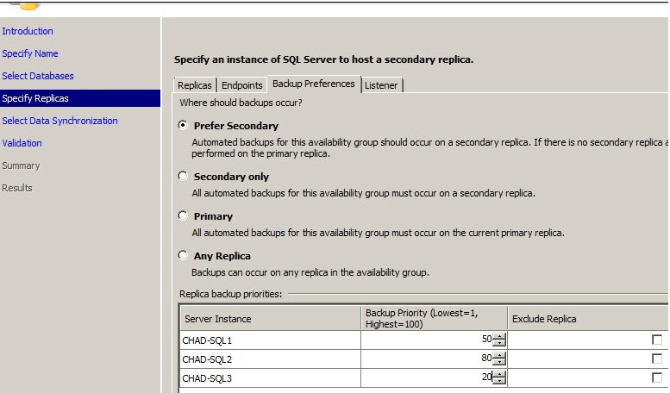
You see ? Cheer up , we will begin our trip now.
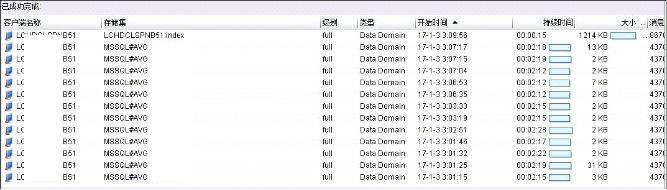
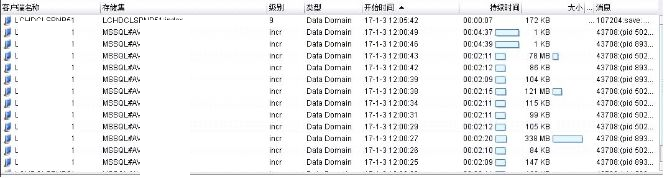
From EMC NW console, we can see backup status.
FULL BACKUP
Incr backup (TLOG backup)
AG different setting:

What interest thing is you see the different choose to make different behavour.
If we choose N4 backup source, we can see all database
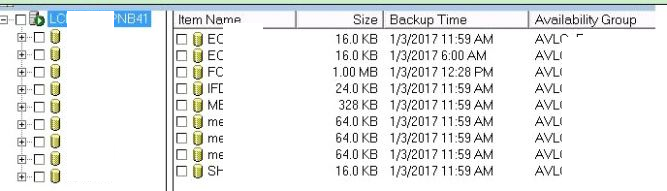
If we choose N5 backup source, we have to select different group by different time.
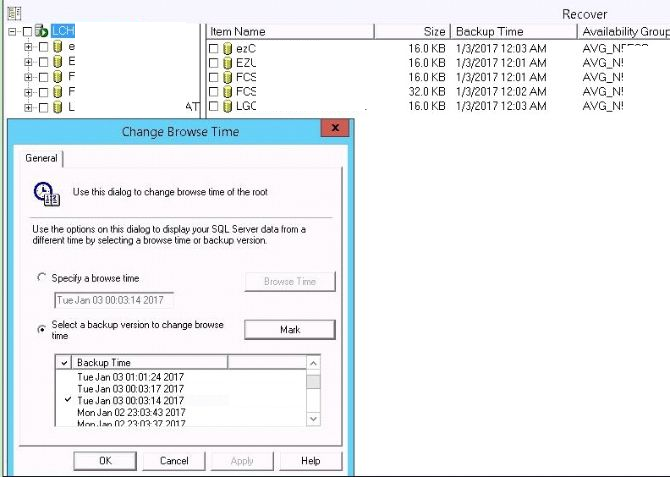
or
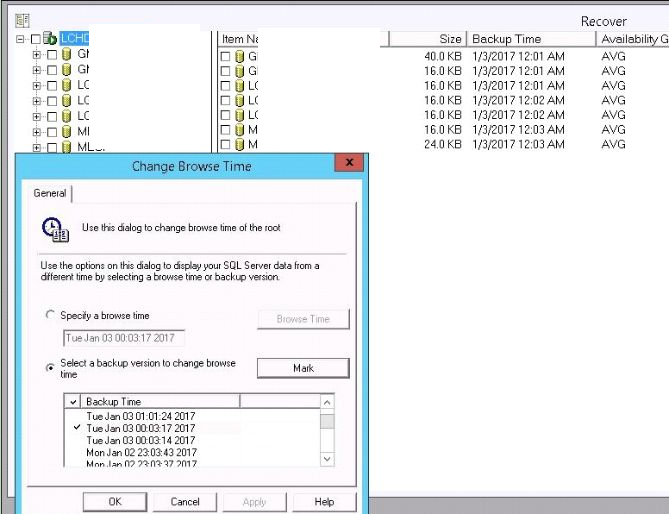
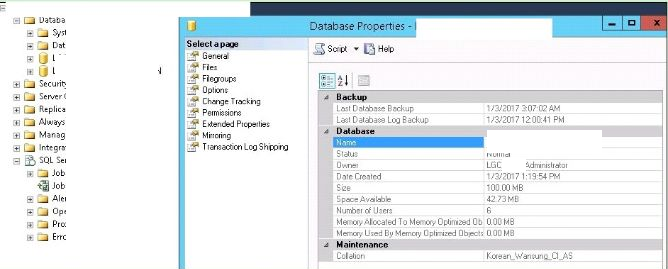
Let us pick one database for an example:
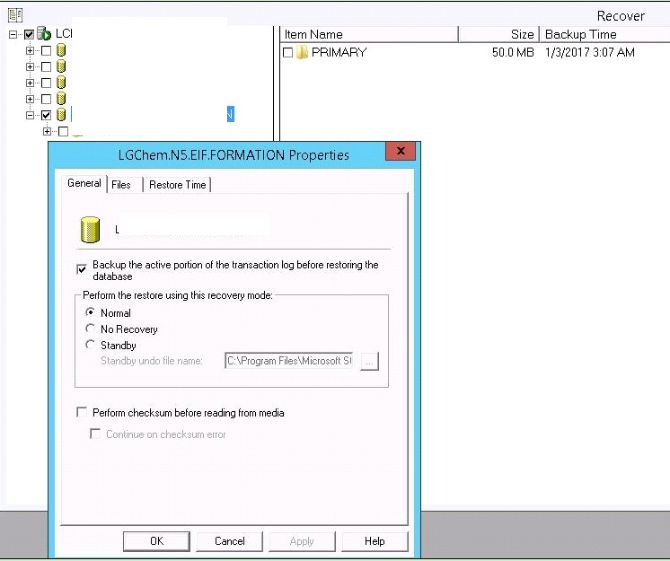
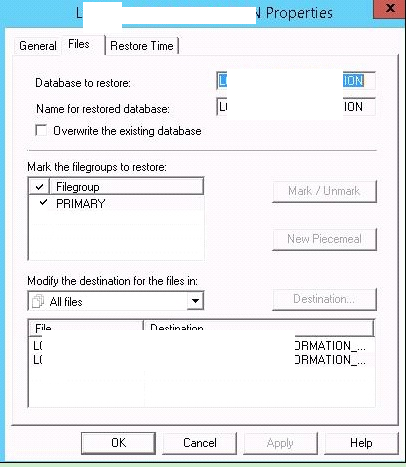

Then all finished, we can see the result.
Here is restore log by EMC NW NMM
Recovering files of client 'LCXXXXXXNB51' from server 'LYYYYH-BACKUP' to client 'ONLINETEST01'.
43708:(pid 5456):Start time: Tue Jan 03 13:17:54 2017
43621:(pid 5456):Computer Name: ONLINETEST01 User Name: administrator
NSR_CLIENT: LCXXXXXXNB51.lgcnjad.net;
NSR_SERVER: LYYYYH-BACKUP;
37725:(pid 5456):Recovering database 'LKKKK.5.E.FOR' into 'LKKKK.5.E.FOR' ...
142468:(pid 5456):[3512]nsr/db_apps/bsmsql/rcstripes.c(222): Finding backup for saveset MSSQL:/LKKKK.5.E.FOR~1.
142468:(pid 5456):[3512]nsr/db_apps/bsmsql/rcstripes.c(222): Finding backup for saveset MSSQL:/LKKKK.5.E.FOR~2.
142468:(pid 5456):[3512]nsr/db_apps/bsmsql/rcstripes.c(222): Finding backup for saveset MSSQL:/LKKKK.5.E.FOR~3.
142468:(pid 5456):[3512]nsr/db_apps/bsmsql/rcstripes.c(222): Finding backup for saveset MSSQL:/LKKKK.5.E.FOR~4.
37839:(pid 5456):Warning: Only 1 tape sessions will be used to restore 4 stripes.
29317:(pid 5456):Data will be restored using SQL removable pipes.
4690:(pid 5456):RESTORE database [LKKKK.5.E.FOR] FROM virtual_device='Legato#c6be8dbb-2e4c-4a85-b7da-1ba4882213b7' WITH move 'LKKKK.5.E.FOR' to 'M:\DATA2\LKKKK.5.E.FOR_LKKKK.5.E.FOR_676.mdf', move 'LKKKK.5.E.FOR_log' to 'M:\DATA2\LKKKK.5.E.FOR_LKKKK.5.E.FOR_log_676.ldf', replace, maxtransfersize = 4194304, norecovery
35866:(pid 5456):The restore of database 'LKKKK.5.E.FOR' completed successfully.
142468:(pid 5456):[3512]nsr/db_apps/bsmsql/rcstripes.c(222): Finding backup for saveset MSSQL:/LKKKK.5.E.FOR.
4690:(pid 5456):RESTORE log [LKKKK.5.E.FOR] FROM virtual_device='Legato#e32caf9a-7120-4309-8c9e-0e6777355f6f' WITH maxtransfersize = 4194304, norecovery
35866:(pid 5456):The restore of database 'LKKKK.5.E.FOR' completed successfully.
142468:(pid 5456):[3512]nsr/db_apps/bsmsql/rcstripes.c(222): Finding backup for saveset MSSQL:/LKKKK.5.E.FOR.
4690:(pid 5456):RESTORE log [LKKKK.5.E.FOR] FROM virtual_device='Legato#c01585c8-5fc2-4076-abcc-ed54bd8daa5a' WITH maxtransfersize = 4194304, norecovery
35866:(pid 5456):The restore of database 'LKKKK.5.E.FOR' completed successfully.
142468:(pid 5456):[3512]nsr/db_apps/bsmsql/rcstripes.c(222): Finding backup for saveset MSSQL:/LKKKK.5.E.FOR.
4690:(pid 5456):RESTORE log [LKKKK.5.E.FOR] FROM virtual_device='Legato#5133eafd-79a9-4662-afa8-1c799b21242e' WITH maxtransfersize = 4194304, norecovery
35866:(pid 5456):The restore of database 'LKKKK.5.E.FOR' completed successfully.
142468:(pid 5456):[3512]nsr/db_apps/bsmsql/rcstripes.c(222): Finding backup for saveset MSSQL:/LKKKK.5.E.FOR.
4690:(pid 5456):RESTORE log [LKKKK.5.E.FOR] FROM virtual_device='Legato#578eb90f-63de-4cdc-bd24-b6249b8fe975' WITH maxtransfersize = 4194304, norecovery
35866:(pid 5456):The restore of database 'LKKKK.5.E.FOR' completed successfully.
142468:(pid 5456):[3512]nsr/db_apps/bsmsql/rcstripes.c(222): Finding backup for saveset MSSQL:/LKKKK.5.E.FOR.
4690:(pid 5456):RESTORE log [LKKKK.5.E.FOR] FROM virtual_device='Legato#c4e8e33a-17a1-436f-9a14-2ce4a05dea3e' WITH maxtransfersize = 4194304, norecovery
35866:(pid 5456):The restore of database 'LKKKK.5.E.FOR' completed successfully.
142468:(pid 5456):[3512]nsr/db_apps/bsmsql/rcstripes.c(222): Finding backup for saveset MSSQL:/LKKKK.5.E.FOR.
4690:(pid 5456):RESTORE log [LKKKK.5.E.FOR] FROM virtual_device='Legato#7ec9679d-303b-47ee-8390-7c8829501391' WITH maxtransfersize = 4194304, norecovery
35866:(pid 5456):The restore of database 'LKKKK.5.E.FOR' completed successfully.
142468:(pid 5456):[3512]nsr/db_apps/bsmsql/rcstripes.c(222): Finding backup for saveset MSSQL:/LKKKK.5.E.FOR.
4690:(pid 5456):RESTORE log [LKKKK.5.E.FOR] FROM virtual_device='Legato#d3fd0e9f-febf-4ed0-9b06-202eac29d724' WITH maxtransfersize = 4194304, norecovery
35866:(pid 5456):The restore of database 'LKKKK.5.E.FOR' completed successfully.
142468:(pid 5456):[3512]nsr/db_apps/bsmsql/rcstripes.c(222): Finding backup for saveset MSSQL:/LKKKK.5.E.FOR.
4690:(pid 5456):RESTORE log [LKKKK.5.E.FOR] FROM virtual_device='Legato#6b7874d9-e3b0-48e9-b1fc-853924ef5bfc' WITH maxtransfersize = 4194304
35866:(pid 5456):The restore of database 'LKKKK.5.E.FOR' completed successfully.
29310:(pid 5456):
Received 17 MB 9 item(s) from NSR server (size information for snapshot(s) is not available).
nsr/db_apps/bsmsql/rcovmain.cpp(442): Entering cleanUp().
nsr/db_apps/bsmsql/rcovmain.cpp(500): Exiting cleanUp().
43709:(pid 5456):Stop time: Tue Jan 03 13:25:31 2017
Restore completion time: Tue Jan 03 13:25:32 2017
Thanks,
Any question , please free to ask,
EMC NW NMM to restore MS AG database的更多相关文章
- EMC NW NMM to backup MS AG
To use EMC NW NMM to backup MS SQL always on database, that is a simple and safe way to protector da ...
- get your sqlserver database back by using EMC NW NMM
Dear all Yes ~ We can backup our sqlserver by EMC NW NMM. That is true and NW is a very very powerfu ...
- EMC networker nmm can restore and recover sqlserver as different name to different location
EMC networker nmm can restore and recover sqlserver as different name to different location That is ...
- How to setup backup by using EMC NW + EMC NMM for sqlserver failover cluster (not always on)
As we said, sqlsever fail over cluster is perviously version of always on. The HA was guarenteed by ...
- why NW NMM backup sqlserver failed and how to solve it
A NW NMM backup sqlserver failed. wow , I realze that maybe I put too many database backup together ...
- 转载:Restore SQL Server database and overwrite existing database
转载自:https://www.mssqltips.com/sqlservertutorial/121/restore-sql-server-database-and-overwrite-existi ...
- 错误1919,配置ODBC数据源MS Access Database时发生错误ODEC错误
WIN7 64位旗舰版安装OFFICE2003 提示:“错误1919,配置ODBC数据源MS Access Database时发生错误ODEC错误” 在64位系统上,32位软件的注册表的信息不是直接在 ...
- Oracle 12c: RMAN restore/recover pluggable database
查看数据库状态 运行在归档模式,可拔插数据库name=pdborcl SQL> archive log list; Database log mode Archive Mode Automati ...
- How to Baskup and Restore a MySQL database
If you're storing anything in MySQL databases that you do not want to lose, it is very important to ...
随机推荐
- 微信生成二维码 PHP
<?php /** * Created by PhpStorm. * User: liyiming * Date: 2019/8/8 * Time: 14:23 */ # 生成二维码 class ...
- 13.利用pymysql创建变量类型的表名解说
在练习爬虫爬取数据时,想将爬取的数据用pymysql存储到数据库中,并且存储时的表名是一个变量,但在写完代码运行后经常出面1064的错误代码,在网上查找相关解决方法,但一直找不到完美的解决方法, 通过 ...
- 密码 | 对称加密 - AES
一.AES 算法简介 高级加密标准(英语:Advanced Encryption Standard,缩写:AES),在密码学中又称Rijndael加密法,是美国联邦政府采用的一种区块加密标准,用来替换 ...
- MySQL数据库(三)
前提要述:参考书籍<MySQL必知必会> 2.1 MySQL简介 2.1.1 什么是MySQL MySQL是一种关系数据库管理系统.负责数据库中数据的存储,检索,管理和处理. 2.1.2 ...
- rsync 服务介绍及相关实验
一.rsync 简介 rsync 是类 unix 系统下的数据镜像备份工具.一款支持快速完全备份和增量备份的工具,支持本 地复制,远程同步等,类似于 scp 命令:rsync 命令在同步文件之前要先登 ...
- php改变时间的方法
1. strtotime date("Y-m-d",strtotime('+1day')) 2. mktime date("Y-m-d",mktime(0,0, ...
- Scala实践12
1.内部类和抽象类型成员作为对象成员 内部类 在Scala中,可以让类将其他类作为成员.这些内部类是封闭类的成员.在Scala中,这样的内部类绑定到外部对象.假设希望编译器在编译时阻止我们混合哪些节点 ...
- rabbitmq系列(三)消息幂等性处理
一.springboot整合rabbitmq 我们需要新建两个工程,一个作为生产者,另一个作为消费者.在pom.xml中添加amqp依赖: <dependency> <groupId ...
- mysql 自增
auto_increment 在创建表的时候,可以设置id为自增 # 查看表现在的自增值 show create table blog \G; # 设置自增值的初始值 alter table blog ...
- 使用 LinkedBlockingQueue 实现简易版线程池
前一阵子在做联系人的导入功能,使用POI组件解析Excel文件后获取到联系人列表,校验之后批量导入.单从技术层面来说,导入操作通常情况下是一个比较耗时的操作,而且如果联系人达到几万.几十万级别,必须拆 ...