
一步一步搭建客服系统 (4) 客户列表 - JS($.ajax)调用WCF 遇到的各种坑
本文以一个生成、获取“客户列表”的demo来介绍如何用js调用wcf,以及遇到的各种问题。
1 创建WCF服务
1.1 定义接口


[ServiceContract]

    interface IQueue

    {

        [OperationContract]

        [WebInvoke(Method = "POST", BodyStyle = WebMessageBodyStyle.Wrapped, RequestFormat = WebMessageFormat.Json, ResponseFormat = WebMessageFormat.Json)]

        void Add(string roomName);

        [OperationContract]

        [WebGet(ResponseFormat=WebMessageFormat.Json)]

        List<string> GetAll();

    }
1.2 接口实现
实现上面的接口,并加上AspNetCompatibilityRequirements 和 JavascriptCallbackBehavior :
.
[AspNetCompatibilityRequirements(RequirementsMode = AspNetCompatibilityRequirementsMode.Allowed)]

    [JavascriptCallbackBehavior(UrlParameterName = "callback")]

    public class Queue : IQueue

    {

        static readonly ObjManager<string, ClientQueue> m_Queues;

        static Queue()

        {

            m_Queues = new ObjManager<string, ClientQueue>();

        }

        public void Add(string roomName)

        {

            m_Queues.Add(roomName, new ClientQueue() { CreateTime = DateTime.Now });

        }

        public List<string> GetAll()

        {

            return m_Queues.GetAllQueues().OrderBy(q => q.Value.CreateTime).Select(q => q.Key).ToList();

        }

    }
.
这里使用了一个静态的构造函数,这样它就只会被调用一次,以免每次调用时都会初始化队列。
1.3 定义服务
添加一个wcf service, 就一行:
<%@ ServiceHost Language="C#" Debug="true" Service="Youda.WebUI.Service.Impl.Queue" CodeBehind="~/Service.Impl/Queue.cs" %>
整体结构如下:
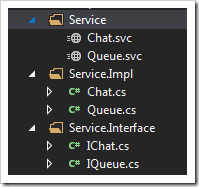
.
2 调用WCF
客户端调用Add方法,创建一组对话:
.
 var data = { 'roomName': clientID };

            $.ajax({

                type: "POST",

                url: "Service/Queue.svc/Add",

                data: JSON.stringify(data),

                contentType: "application/json; charset=utf-8",

                dataType: "json",

                processData: true,

                success: function (msg) {

                    ServiceSucceeded(msg);

                },

                error: ServiceFailed

            });
.
客服端取所有的客户:
.
$.ajax({

                type: "GET",

                url: "Service/Queue.svc/GetAll",

                contentType: "application/json; charset=utf-8",

                dataType: "json",

                processData: true,

                success: function (result) {

                    ServiceSucceeded(result);

                },

                error: ServiceFailed

            });
.
3 配置
webconfig配置如下:
.
<system.serviceModel>

    <serviceHostingEnvironment aspNetCompatibilityEnabled="true" multipleSiteBindingsEnabled="true" minFreeMemoryPercentageToActivateService="" />

    <bindings>

      <webHttpBinding>

        <binding name="HttpBind" openTimeout="00:10:00" sendTimeout="00:10:00"

          maxBufferSize="" maxBufferPoolSize="" maxReceivedMessageSize=""

          crossDomainScriptAccessEnabled="true" />

        <binding name="HttpsBind" sendTimeout="00:10:00" maxBufferSize=""

          maxReceivedMessageSize="" crossDomainScriptAccessEnabled="true">

          <security mode="Transport">

            <transport clientCredentialType="None" />

          </security>

        </binding>

      </webHttpBinding>

    </bindings>

    <behaviors>

      <endpointBehaviors>

        <behavior name="web">

          <webHttp helpEnabled="true" />

        </behavior>

      </endpointBehaviors>

      <serviceBehaviors>

        <behavior name="ServiceBehavior">

          <serviceMetadata httpGetEnabled="true" httpsGetEnabled="true" />

          <serviceDebug includeExceptionDetailInFaults="true" />

        </behavior>

        <behavior name="web">

          <serviceDebug includeExceptionDetailInFaults="true" />

          <serviceMetadata httpGetEnabled="true" httpsGetEnabled="true" />

        </behavior>

      </serviceBehaviors>

    </behaviors>

    <services>

      <service behaviorConfiguration="ServiceBehavior" name="Youda.WebUI.Service.Impl.Queue">

        <endpoint address="" behaviorConfiguration="web" binding="webHttpBinding"

          bindingConfiguration="HttpBind" name="HttpBind" contract="Youda.WebUI.Service.Interface.IQueue" />

        <endpoint behaviorConfiguration="web" binding="webHttpBinding"

          bindingConfiguration="HttpsBind" name="httpsBind" contract="Youda.WebUI.Service.Interface.IQueue" />

      </service>

      <service behaviorConfiguration="ServiceBehavior" name="Youda.WebUI.Service.Impl.Chat">

        <endpoint address="" behaviorConfiguration="web" binding="webHttpBinding"

          bindingConfiguration="HttpBind" name="HttpBind" contract="Youda.WebUI.Service.Interface.IChat" />

        <endpoint behaviorConfiguration="web" binding="webHttpBinding"

          bindingConfiguration="HttpsBind" name="HttpsBind" contract="Youda.WebUI.Service.Interface.IChat" />

      </service>

    </services>

  </system.serviceModel>
.
4 遇到的各种坑
4.1 Status 为 200, status text为 ok, 但报错
http STATUS 是200,但是回调的却是error方法
查了下资料,应该是dataType的原因,dataType为json,但是返回的data不是json格式
于是将ajax方法里把参数dataType:"json"去掉就ok了
4.2 Json 数据请求报错(400 错误 )
详细的错误信息如下:
Service call failed:
status: 400 ; status text: Bad Request ; response text: <?xml version="1.0" encoding="utf-8"?>
The server encountered an error processing the request. The exception message is 'The formatter threw an exception while trying to deserialize the message: There was an error while trying to deserialize parameter http://tempuri.org/:content. The InnerException message was 'There was an error deserializing the object of type System.String. Encountered invalid character…
解决方法是,要用JSON.stringify把data转一下,跟
data: '{"clientID":"' + clientID + '", "serviceID":"' + serviceID + '", "content":"' + content + '"}',
这样与拼是一样的效果,但明显简单多了
参考上面Add方法的调用。
4.3 参数没传进wcf方法里
调试进了这个方法,但参数全为空,发现用的是webget,改成post后就行了
[OperationContract]
[WebInvoke(Method = "POST", RequestFormat = WebMessageFormat.Json, BodyStyle = WebMessageBodyStyle.Wrapped, ResponseFormat = WebMessageFormat.Json)]
List<string> GetMsg(string clientID, int count);
4.4 使用https时遇到了404 、 500的错误
先添加https的binding:
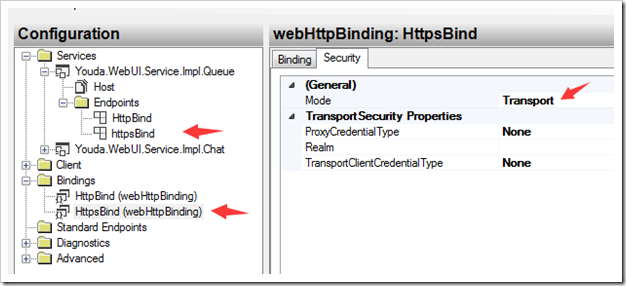
再设置下Service Behaviors:
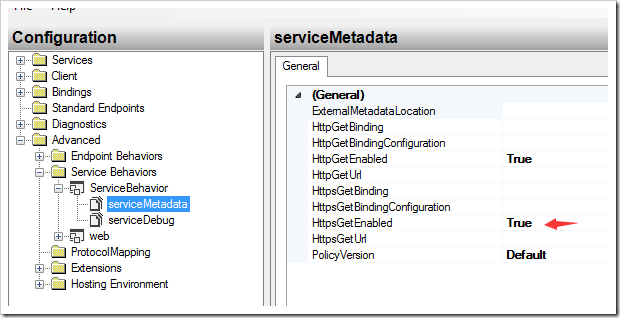
详细的配置,可参考上面的完整文本配置
4.5 其它配置
时间设置长点, size设置大点:
<binding name="HttpBind" openTimeout="00:10:00" sendTimeout="00:10:00"
maxBufferSize="5242880" maxBufferPoolSize="5242880" maxReceivedMessageSize="5242880"
crossDomainScriptAccessEnabled="true" />
使用webHttpBinding 的binding;name和 contract 要写全:
<service behaviorConfiguration="ServiceBehavior" name="Youda.WebUI.Service.Impl.Queue">
<endpoint address="" behaviorConfiguration="web" binding="webHttpBinding"
bindingConfiguration="HttpBind" name="HttpBind" contract="Youda.WebUI.Service.Interface.IQueue" />
一步一步搭建客服系统
.
一步一步搭建客服系统 (4) 客户列表 - JS($.ajax)调用WCF 遇到的各种坑的更多相关文章
- 一步一步搭建客服系统 (2) 如何搭建SimpleWebRTC信令服务器
上次介绍了<3分钟实现网页版多人文本.视频聊天室 (含完整源码)>使用的是default 信令服务器,只是为了方便快速开始而已.SimapleWebRTC官方文档里第一条就讲到,不要在生产 ...
- 一步一步搭建客服系统 (3) js 实现“截图粘贴”及“生成网页缩略图”
最近在做一个客服系统的demo,在聊天过程中,我们经常要发一些图片,而且需要用其它工具截图后,直接在聊天窗口里粘贴,就可以发送:另外用户输入一个网址后,把这个网址先转到可以直接点击的link,并马上显 ...
- 一步一步搭建客服系统 (6) chrome桌面共享
本文介绍了如何在chrome下用webrtc来实现桌面共.因为必要要用https来访问才行,因此也顺带介绍了如何使用SSL证书. 1 chrome扩展程序 先下载扩展程序示例: https://git ...
- 齐博x1客服系统显示客户在哪个页面
如下图所示,要想实现下面的效果,即显示客户给你发消息时,当时处于哪个商品页面.这样方便跟客户针对此商品进行交流. 你的模板如果使用了碎片的话,就可以添加下面的代码index_style/default ...
- 一步一步搭框架(asp.netmvc+easyui+sqlserver)-03
一步一步搭框架(asp.netmvc+easyui+sqlserver)-03 我们期望简洁的后台代码,如下: using System; using System.Collections.Gener ...
- 一步一步搭框架(asp.netmvc+easyui+sqlserver)-02
一步一步搭框架(asp.netmvc+easyui+sqlserver)-02 我们期望简洁带前台代码,如下: <table id="dataGrid" class=&quo ...
- 通过Dapr实现一个简单的基于.net的微服务电商系统(四)——一步一步教你如何撸Dapr之订阅发布
之前的章节我们介绍了如何通过dapr发起一个服务调用,相信看过前几章的小伙伴已经对dapr有一个基本的了解了,今天我们来聊一聊dapr的另外一个功能--订阅发布 目录:一.通过Dapr实现一个简单的基 ...
- 通过Dapr实现一个简单的基于.net的微服务电商系统(三)——一步一步教你如何撸Dapr
目录:一.通过Dapr实现一个简单的基于.net的微服务电商系统 二.通过Dapr实现一个简单的基于.net的微服务电商系统(二)--通讯框架讲解 三.通过Dapr实现一个简单的基于.net的微服务电 ...
- 【新手出发】从搭虚拟机开始,一步一步在CentOS上跑起来.Net Core程序
文章背景 微软6月26号发布core 1.0版本后,园子里关于这方面的文章就更加火爆了,不管是从文章数量还是大家互动的热情来看,绝对是最热门的技术NO.1.我从去年底开始接触.net core到现在也 ...
随机推荐
- Yarn&Mapreduce参数的具体含义和配置参考
Yarn & Mapreduce 参数的具体含义和配置 http://zh.hortonworks.com/blog/how-to-plan-and-configure-yarn-in-hdp ...
- Python自动化 【第七篇】:Python基础-面向对象高级语法、异常处理、Scoket开发基础
本节内容: 1. 面向对象高级语法部分 1.1 静态方法.类方法.属性方法 1.2 类的特殊方法 1.3 反射 2. 异常处理 3. Socket开发基础 1. ...
- zookeeper节点失效重连机制
http://www.blogjava.net/xylz/archive/2011/12/05/365578.html http://blog.csdn.net/tswisdom/article/de ...
- Bootstrap 更改Navbar默认样式
alt+shift+n 新建文件ctrl+shift+/ 注释ctrl+shift+f 重新排版代码ctrl+/ 注释 /* navbar */.navbar-default { background ...
- JDK 环境变量设置
.net转JAVA了.记心不好,记录一下. 安装好jdk(64位)后找到我的电脑(右键)>属性>高级选项卡>环境变量>,里面有管理员的用户变量,有系统变量.我选的是系统变量.点 ...
- 随笔—邀请赛前训— Codeforces Round #330 (Div. 2) Vitaly and Night
题意:给你很多对数,要么是0要么是1.不全0则ans++. 思路即题意. #include<cstdio> #include<cstring> #include<iost ...
- .NET/C#/Oracle数据库操作类
public static class OracleHelper { //数据库连接字符串 private readonly static string connstr = Configuration ...
- Android permission
1. users-permission Users-permission is the permission that this app should acquire, so that the app ...
- Tornado sqlalchemy
上篇文章提到了,最近在用 Python 做一个网站.除了 Tornado ,主要还用到了 SQLAlchemy.这篇就是介绍我在使用 SQLAlchemy 的过程中,学到的一些知识. 首先说下,由于最 ...
- ORA-01439: column to be modified must be empty to change datatype
修改数据库字段类型,但是由于数据表已经存在数据,无法修改: 显示错误: 写道 ORA-01439: column to be modified must be empty to change dat ...