
[转]WPF/MVVM快速开始手册
I will quickly introduce some topics, then show an example that explains or demonstrates each point. Accordingly, I haven't really attempted to make the GUIs pretty, that's not the point of this article (see the bullet points above).
The Basics
- The most important thing about WPF is data binding. In short, you have some data, typically in a collection of some sort, and you want to display it to the user. You can 'bind' your XAML to the data.
- WPF has two parts, the XAML which describes your GUI layout and effects, and the code-behind that is tied to the XAML.
- The neatest and probably most reusable way to organise your code is to use the 'MVVM' pattern: Model, View, ViewModel. This has the aim of ensuring that your View contains minimal (or no) code, and should be XAML-only.
The Key Points You Need to Know
- The collection you should use to hold your data is the
ObservableCollection<>. Not alist, not adictionary, but anObservableCollection. The word 'Observable' is the clue here: the WPF window needs to be able to 'observe' your data collection. This collection class implements certain interfaces that WPF uses. - Every WPF control (including 'Window's) has a '
DataContext' andCollectioncontrols have an 'ItemsSource' attribute to bind to. - The interface '
INotifyPropertyChanged' will be used extensively to communicate any changes in the data between the GUI and your code.
Example 1: INotifyPropertyChanged
public class SongViewModel : INotifyPropertyChanged

    {

        #region Construction

        /// Constructs the default instance of a SongViewModel

        public SongViewModel()

        {

            _song = new Song { ArtistName = "Unknown", SongTitle = "Unknown" };

        }

        #endregion

        #region Members

        Song _song;

        #endregion

        #region Properties

        public Song Song

        {

            get

            {

                return _song;

            }

            set

            {

                _song = value;

            }

        }

        public string ArtistName

        {

            get { return Song.ArtistName; }

            set

            {

                if (Song.ArtistName != value)

                {

                    Song.ArtistName = value;

                    RaisePropertyChanged("ArtistName");

                }

            }

        }

        #endregion

        #region INotifyPropertyChanged Members

        public event PropertyChangedEventHandler PropertyChanged;

        #endregion

        #region Methods

        private void RaisePropertyChanged(string propertyName)

        {

            // take a copy to prevent thread issues

            PropertyChangedEventHandler handler = PropertyChanged;

            if (handler != null)

            {

                handler(this, new PropertyChangedEventArgs(propertyName));

            }

        }

        #endregion

    }
There are several things now happening here. Firstly, we check to see if we are going to really change the property: this improves performance slightly for more complex objects. Secondly, if the value has changed, we raise the PropertyChanged event to any listeners.
So now we have a Model, and a ViewModel. We just need to define our View. This is just our MainWindow:
<Window x:Class="Example2.MainWindow"

        xmlns="http://schemas.microsoft.com/winfx/2006/xaml/presentation"

        xmlns:x="http://schemas.microsoft.com/winfx/2006/xaml"

        xmlns:local="clr-namespace:Example2"

        Title="Example 2"  SizeToContent="WidthAndHeight" ResizeMode="NoResize"

        Height="350" Width="525">

    <Window.DataContext>

        <!-- Declaratively create an instance of our SongViewModel -->

        <local:SongViewModel />

    </Window.DataContext>

    <Grid>

        <Grid.RowDefinitions>

            <RowDefinition Height="Auto" />

            <RowDefinition Height="Auto" />

            <RowDefinition Height="Auto" />

        </Grid.RowDefinitions>

        <Grid.ColumnDefinitions>

            <ColumnDefinition Width="Auto" />

            <ColumnDefinition Width="Auto" />

        </Grid.ColumnDefinitions>

        <Label Grid.Column="0" Grid.Row="0" Content="Example 2 - this works!" />

        <Label Grid.Column="0" Grid.Row="1" Content="Artist:  " />

        <Label Grid.Column="1" Grid.Row="1" Content="{Binding ArtistName}" />

        <Button Grid.Column="1" Grid.Row="2" Name="ButtonUpdateArtist"

        Content="Update Artist Name" Click="ButtonUpdateArtist_Click" />

    </Grid>

</Window>
To test the databinding, we can take the traditional approach and create a button and wire to its OnClick event, so the XAML above has a button, and Click event, giving the code behind:
public partial class MainWindow : Window

    {

        #region Members

        SongViewModel _viewModel;

        int _count = ;

        #endregion

        public MainWindow()

        {

            InitializeComponent();

            //  We have declared the view model instance declaratively in the xaml.

            //  Get the reference to it here, so we can use it in the button click event.

            _viewModel = (SongViewModel)base.DataContext;

        }

        private void ButtonUpdateArtist_Click(object sender, RoutedEventArgs e)

        {

            ++_count;

            _viewModel.ArtistName = string.Format("Elvis ({0})", _count);

        }

    }
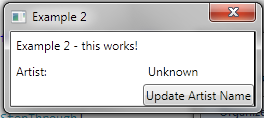
Example 2: Commands
Binding to GUI events is problematic. WPF offers you a better way. This is ICommand. Many controls have a Command attribute. These obey binding in the same way as Content and ItemsSource, except you need to bind it to a *property* that returns an ICommand. For the trivial example that we are looking at here, we just implement a trivial class called 'RelayCommand' that implements ICommand.
ICommand requires the user to define two methods: bool CanExecute, and void Execute. The CanExecute method really just says to the user, can I execute this command? This is useful for controlling the context in which you can perform GUI actions. In our example, we don't care, so we return true, meaning that the framework can always call our 'Execute' method. It could be that you have a situation where you have a command bound to button, and it can only execute if you have selected an item in a list. You would implement that logic in the 'CanExecute' method.
Since we want to reuse the ICommand code, we use the RelayCommand class that contains all the repeatable code we do not want to keep writing.
To show how easy it is to reuse the ICommand, we bind the Update Artist command to both a button and a menu item. Notice that we no longer bind to Button specific Click event, or Menu specific Click event.

更多内容在本文转载出处:http://www.codeproject.com/Articles/165368/WPF-MVVM-Quick-Start-Tutorial
[转]WPF/MVVM快速开始手册的更多相关文章
- WPF/MVVM 快速开始指南(译)(转)
WPF/MVVM 快速开始指南(译) 本篇文章是Barry Lapthorn创作的,感觉写得很好,翻译一下,做个纪念.由于英文水平实在太烂,所以翻译有错或者译得不好的地方请多指正.另外由于原文是针对W ...
- WPF/MVVM Quick Start Tutorial - WPF/MVVM 快速入门教程 -原文,翻译及一点自己的补充
转载自 https://www.codeproject.com/articles/165368/wpf-mvvm-quick-start-tutorial WPF/MVVM Quick Start T ...
- WPF/MVVM 快速开发
http://www.codeproject.com/Articles/165368/WPF-MVVM-Quick-Start-Tutorial 这篇文章醍醐灌顶,入门良药啊! Introductio ...
- WPF/MVVM快速指引
简介 最近微软推出了UWA,又是一波新的C#+xaml学习热.好多小伙伴都对MVVM感觉很好奇,但是有些地方也有点难以理解.特意写了这边文章,希望对你有帮助. 这边文章会很长,所以我会用几个例子的形式 ...
- WPF MVVM UI分离之《交互与数据分离》 基础才是重中之重~delegate里的Invoke和BeginInvoke 将不确定变为确定系列~目录(“机器最能证明一切”) 爱上MVC3系列~全局异常处理与异常日志 基础才是重中之重~lock和monitor的区别 将不确定变成确定~我想监视我的对象,如果是某个值,就叫另一些方法自动运行 将不确定变成确定~LINQ DBML模型可以对
WPF MVVM UI分离之<交互与数据分离> 在我们使用WPF过程中,不可避免并且超级喜欢使用MVVM框架. 那么,使用MVVM的出发点是视觉与业务逻辑分离,即UI与数据分离 诸如下 ...
- WPF MVVM 验证
WPF MVVM(Caliburn.Micro) 数据验证 书接前文 前文中仅是WPF验证中的一种,我们暂且称之为View端的验证(因为其验证规是写在Xaml文件中的). 还有一种我们称之为Model ...
- Github快速入门手册
最近在试用Github,开源的思想也让人觉得把一些经验分享出来是非常好的事情.附件是doc文件,如有需要请注意查收.希望能对你有帮助. GITHUB基于互联网的版本控制快速入门手册 如有不妥,欢迎指正 ...
- WPF MVVM初体验
首先MVVM设计模式的结构, Views: 由Window/Page/UserControl等构成,通过DataBinding与ViewModels建立关联: ViewModels:由一组命令,可以绑 ...
- WPF MVVM实现TreeView
今天有点时间,做个小例子WPF MVVM 实现TreeView 只是一个思路大家可以自由扩展 文章最后给出了源码下载地址 图1 图2 模版加上了一个checkbox,选中父类的checkb ...
随机推荐
- mysql输入密码后闪退怎么办?
第一: 首先需要想到的是mysql的服务可能没开,首先打开mysql的服务 第二: 打开Mysql的命令行输入密码即可 第三: 登录成功 第四: 顺便验证自己安装的mysql是否成功 输入显示所有数据 ...
- python解析json
JSON(JavaScript Object Notation) 是一种轻量级的数据交换格式. 引用 import json 编码:把一个Python对象编码转换成Json字符串 json.dumps ...
- JS变量的作用域
深入理解JavaScript变量的作用域 1.JavaScript的作用域链 2.函数体内部,局部变量的优先级比同名的全局变量高. 3.JavaScript没有块级作用域. 4.函数中声明的变量在 ...
- android: 服务的基本用法
9.3 服务的基本用法 了解了 Android 多线程编程的技术之后,下面就让我们进入到本章的正题,开始对服务 的相关内容进行学习.作为 Android 四大组件之一,服务也少不了有很多非常重要的 ...
- android: Android Notification
Notification即通知,用于在通知栏显示提示信息. 在较新的版本中(API level > 11),Notification类中的一些方法被Android声明deprecated(弃用 ...
- 吐槽C++:C++ 类成员变量初始化 之 初始化带有参数的构造函数 的类成员变量。
本来我想写这样的代码: class MatchManager{ public: MatchManager() { } class OnTimerRunFuncHelper{ public: OnTim ...
- 让JNLP应用程序从Firefox浏览器启动起来
- [C/C++] zltabout(带缩进的格式化输出)v1.0。能以相同的代码绑定到 C FILE 或 C++流
作者:zyl910 一.缘由 在写一些生成文本的程序时,经常需要使用带缩进的格式化输出的功能.以前为此写过不少类似的函数,可惜它们的可重用性很差. 这是因为——1) C语言的FILE*不支持重定向到自 ...
- [转] Python 代码性能优化技巧
选择了脚本语言就要忍受其速度,这句话在某种程度上说明了 python 作为脚本的一个不足之处,那就是执行效率和性能不够理想,特别是在 performance 较差的机器上,因此有必要进行一定的代码优化 ...
- quick -- 创建精灵和动作
local imgBg = display.newSprite("666666.jpg") :pos(display.cx, display.cy) :addTo(self) , ...