
Windows 服务开发框架介绍 - Topshelf
关于 TopShelf
Topshelfis a framework for hosting services written using the .NET framework. The creation of services is simplified, allowing developers to create a simple console application that can be installed as a service using Topshelf. The reason for this is simple: It is far easier to debug a console application than a service. And once the application is tested and ready for production, Topshelf makes it easy to install the application as a service.
示例
第一步:新建一个 C# 控制台应用程序。
第二步:用 Nuget 引用 TopShelf 和 Log4net。
第三步:贴出下面的代码。
using System;

using System.Collections.Generic;

using System.Linq;

using System.Text;

using System.Threading.Tasks;

using System.Timers;

using Topshelf;

using Topshelf.Builders;

using Topshelf.Configurators;

using Topshelf.HostConfigurators;

namespace TopshelfStudy

{

    public sealed class TimeReporter

    {

        private readonly Timer _timer;

        public TimeReporter()

        {

            _timer = new Timer() { AutoReset = true };

            _timer.Elapsed += (sender, eventArgs) => Console.WriteLine("当前时间:{0}", DateTime.Now);

        }

        public void Start() { _timer.Start(); }

        public void Stop() { _timer.Stop(); }

    }

    class Program

    {

        static void Main(string[] args)

        {

            HostFactory.Run(x =>

            {

                x.Service<TimeReporter>(s =>

                {

                    s.ConstructUsing(settings => new TimeReporter());

                    s.WhenStarted(tr => tr.Start());

                    s.WhenStopped(tr => tr.Stop());

                });

                x.RunAsLocalSystem();

                x.SetDescription("定时报告时间");

                x.SetDisplayName("时间报告器");

                x.SetServiceName("TimeReporter");

            });

        }

    }

}
第四步:编译、Release 生成。把 Release 文件夹 Copy 到 C 盘。
第五步:以管理员身份运行 cmd,安装、启动。
SampleWindowsService.exe install
启动
SampleWindowsService.exe start
如果要卸载也很方便
SampleWindowsService.exe uninstall
效果如下:
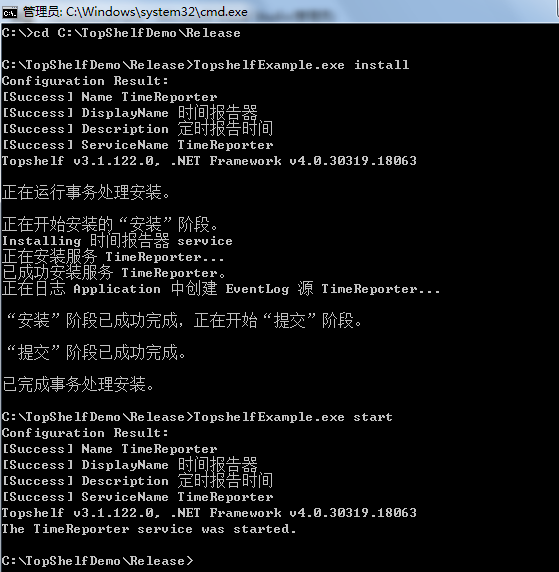
最后 Windows Service 没有 Console.WriteLine,我们可以把输出信息输出到文件。
StreamWriter sw = new StreamWriter("e:\\temp\\log.log");

sw.AutoFlush = true;

Console.SetOut(sw);
参考网站:
http://www.cnblogs.com/shanyou/archive/2011/05/04/2037008.html
http://www.cnblogs.com/happyframework/p/3601995.html
http://www.cnblogs.com/chenxizhang/archive/2010/04/21/1716773.html
谢谢浏览!
Windows 服务开发框架介绍 - Topshelf的更多相关文章
- 一款非常好用的 Windows 服务开发框架,开源项目Topshelf
Topshelf是一个开发windows服务的比较好的框架之一,以下演示如何开发Topshelf服务. 1.首先打开你的vs.新建一个TopshelfStudy控制台程序,如下图所示: 这是我用vs2 ...
- [Solution] Microsoft Windows 服务(2) 使用Topshelf创建Windows服务
除了通过.net提供的windows服务模板外,Topshelf是创建Windows服务的另一种方法. 官网教程:http://docs.topshelf-project.com/en/latest/ ...
- .NET Core Generic Host Windows服务部署使用Topshelf
此文源于前公司在迁移项目到.NET Core的过程中,希望使用Generic Host来管理定时任务程序时,没法部署到Windows服务的问题,而且官方也没给出解决方案,只能关注一下官方issue # ...
- Topshelf:一款非常好用的 Windows 服务开发框架
背景 多数系统都会涉及到“后台服务”的开发,一般是为了调度一些自动执行的任务或从队列中消费一些消息,开发 windows service 有一点不爽的是:调试麻烦,当然你还需要知道 windows s ...
- Topshelf:一款非常好用的 Windows 服务开发框架 转发https://www.cnblogs.com/happyframework/p/3601995.html
背景 多数系统都会涉及到“后台服务”的开发,一般是为了调度一些自动执行的任务或从队列中消费一些消息,开发 windows service 有一点不爽的是:调试麻烦,当然你还需要知道 windows s ...
- 使用Topshelf组件构建简单的Windows服务
很多时候都在讨论是否需要了解一个组件或者一个语言的底层原理这个问题,其实我个人觉得,对于这个问题,每个人都有自己的看法,个人情况不同,选择的方式也就会不同了.我个人觉得无论学习什么,都应该尝试着去了解 ...
- C#开发Windows服务详细流程
1.Windows服务简单介绍 Windows服务程序是在Windows操作系统下能完成特定功能的可执行的应用程序,主要用于长时间运行的功能或者执行定时任务.一般情况下,用户不能通过用户界面来安装和启 ...
- Windows服务 + Quartz.NET
服务基础 安装管理员打开cmd cd C:\Windows\Microsoft.NET\Framework\v4.0.30319 InstallUtil.exe Path_WinSvc.exe 或者 ...
- C#创建、安装一个Windows服务
关于WIndows服务的介绍,之前写过一篇: http://blog.csdn.net/yysyangyangyangshan/article/details/7295739.可能这里对如何写一个服务 ...
随机推荐
- paip.log4j 日志系统 参数以及最佳实践
paip.log4j 日志系统 参数以及最佳实践 %d{yyyy-MM-dd HH:mm:ss} [thrd:%t] %5p loger:%c (%C.%M.%L) - %m%n 201 ...
- 使用bee自动生成api文档
beego中的bee工具可以方便的自动生成api文档,基于数据库字段,自动生成golang版基于beego的crud代码,方法如下: 1.进入到gopath目录的src下执行命令: bee api a ...
- Factory模式
使用new的Code都违反了DIP. 但是,依赖于稳定的具体类,是无害的.例如string. 另一方面,对于正在开发中的APP,很多具体类是易变的.此时应该依赖于抽象接口. Factory模式:只依赖 ...
- 解决stackoverflow打开慢不能注册登录
http://blog.csdn.net/dream_an/article/details/50280977 解决stackoverflow打开慢不能注册登录 标签: stack overflowfi ...
- FGPA 双向 IO 自动方向控制
Using a Virtex Device to Drive 5V CMOS-Level Signals Voltage Level-Shifter Output Waveform
- 【Android】 Android-wifi 直连 wifi direct wifi p2p
现在,Android的支持Wi -Fi的直接点对点点对点(P2P)Android系统的供电设备和其他类型的设备,没有一个热点或互联网连接之间的连接.Android框架提供了一套Wi - Fi的P2P的 ...
- 用CSS box-shadow画画
原理:找一幅画,每隔5 pixel取一个点的RGB,在CSS中用box-shadow描绘出这个点 Python from PIL import Image if __name__ == '__main ...
- Python 内置彩蛋
The Zen of Python, by Tim Peters Beautiful is better than ugly.Explicit is better than implicit.Simp ...
- [界面开发新秀]免费的AYUI,开发360领航版系列教程[2/40]
<界面开发风AYUI-基于WPF By AY> 大家好! 距离上篇博客发布有10天了,因为我在开发AYUI4.X效果更惊艳 我是AY,很高兴,终于可以写自己的作品的,网络博 ...
- 仿iOS Segmented Control样式"
同步发表于http://avenwu.net/2015/02/05/styled_radiogroup_segmented_control Fork on github https://github. ...