
ICO图标在线生成,php生成ICO图标在线制作源码
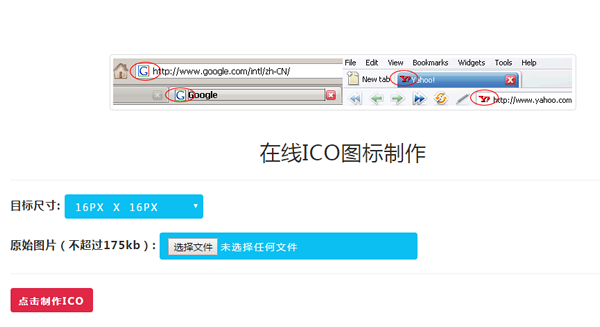
我们做web系统的时候,每个浏览器的tab这里都会有一个图标,这个图标叫favicon图标,favicon.ico文件放在系统的根目录
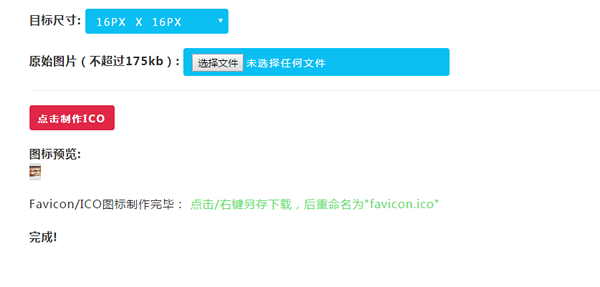
如果程序员没有ICO制作工具,那么要如何生成图标呢?可以用程序来实现生成啊!也可以把图标裁剪好,选择在线生成,在线生成测试地址:www.vsoyo.com/ico
下面和大家一起探讨下,php生成ICO图标在线制作源码,很简单的原理,请看如下代码
下面是ICO图标在线生成的主要代码
<?php

if(!function_exists("generate_favicon")){

function generate_favicon(){

    // Create favicon.

    $postvars = array(

        "image"             => trim($_FILES["image"]["name"]),

        "image_tmp"            => $_FILES["image"]["tmp_name"],

        "image_size"        => (int)$_FILES["image"]["size"],

        "image_dimensions"    => (int)$_POST["image_dimensions"]);

    // Provide valid extensions and max file size

    $valid_exts = array("jpg","jpeg","gif","png");

    $max_file_size = 179200; // 175kb

    $filenameParts = explode(".",$postvars["image"]);

    $ext = strtolower(end($filenameParts));

    $directory = "./favicon/"; // Directory to save favicons. Include trailing slash.

    $rand = rand(1000,9999);

    $filename = $rand.$postvars["image"];

    // Check not larger than max size.

    if($postvars["image_size"] <= $max_file_size){

        // Check is valid extension.

        if(in_array($ext,$valid_exts)){

            if($ext == "jpg" || $ext == "jpeg"){

                $image = imagecreatefromjpeg($postvars["image_tmp"]);

            }

            else if($ext == "gif"){

                $image = imagecreatefromgif($postvars["image_tmp"]);

            }

            else if($ext == "png"){

                $image = imagecreatefrompng($postvars["image_tmp"]);

            }

            if($image){

                list($width,$height) = getimagesize($postvars["image_tmp"]);

                $newwidth = $postvars["image_dimensions"];

                $newheight = $postvars["image_dimensions"];

                $tmp = imagecreatetruecolor($newwidth,$newheight);

                // Copy the image to one with the new width and height.

                imagecopyresampled($tmp,$image,0,0,0,0,$newwidth,$newheight,$width,$height);

                // Create image file with 100% quality.

                if(is_dir($directory)){

                    if(is_writable($directory)){

                        imagejpeg($tmp,$directory.$filename,100) or die('Could not make image file');

                        if(file_exists($directory.$filename)){

                            // Image created, now rename it to its

                            $ext_pos = strpos($rand.$postvars["image"],"." . $ext);

                            $strip_ext = substr($rand.$postvars["image"],0,$ext_pos);

                            // Rename image to .ico file

                            rename($directory.$filename,$directory.$strip_ext.".ico");

                            return '<strong>图标预览:</strong><br/>

                            <img src="'.$directory.$strip_ext.'.ico" border="0" title="Favicon 完毕预览" style="padding: 4px 0px 4px 0px;background-color:#e0e0e0" /><br/>

                            Favicon/ICO图标制作完毕: <a href="'.$directory.$strip_ext.'.ico" target="_blank" name="右键另存为下载!">点击/右键另存下载,后重命名为"favicon.ico"</a>';

                        } else {

                            "File was not created.";

                        }

                    } else {

                        return 'The directory: "'.$directory.'" is not writable.';

                    }

                } else {

                    return 'The directory: "'.$directory.'" is not valid.';

                }

                imagedestroy($image);

                imagedestroy($tmp);

            } else {

                return "Could not create image file.";

            }

        } else {

            return "图标过大,不能超过175KB";

        }

    } else {

        return "图片格式只能是后面几种 (jpg, jpeg, gif, png).";

    }

}

}

?>
需要进一步技术交流的朋友 ,请加我微信吧:15889726201
ICO图标在线生成,php生成ICO图标在线制作源码的更多相关文章
- Linq生成操作之DefautIfEmpty,Empty,Range,Repeat源码分析
Linq生成操作之DefautIfEmpty,Empty,Range,Repeat源码分析 Linq的四种生成运算 DefautIfEmpty,Empty,Range,Repeat 也就是给我们初始化 ...
- C#使用Xamarin开发可移植移动应用进阶篇(8.打包生成安卓APK并精简大小),附源码
前言 系列目录 C#使用Xamarin开发可移植移动应用目录 源码地址:https://github.com/l2999019/DemoApp 可以Star一下,随意 - - 说点什么.. 嗯,前面讲 ...
- 一个web图片热点生成工具(winform开发) 附源码
给图片加热点是web开发中经常用到的一个功能.这方面的工具也不少. 为了更好的满足自己的需求,写了一个winform程序. 可以方便的给图片加热点,更方便灵活! 源码下载 http://downloa ...
- JAVA WEB项目中生成验证码及验证实例(附源码及目录结构)
[我是一个初学者,自己总结和网上搜索资料,代码是自己敲了一遍,亲测有效,现将所有的目录结构和代码贴出来分享给像我一样的初学者] 作用 验证码为全自动区分计算机和人类的图灵测试的缩写,是一种区分用户是计 ...
- MYSQL在线注释文档--- 在gdb中显示源码(gdbtui使用方法)----赖明星的个人博客
http://mingxinglai.com/cn/2013/07/gdbtui/ MySQL源码注释与类图 http://mingxinglai.com/cn/2015/08/mysql-annot ...
- uSurvival 1.41多人在线生存逃杀吃鸡类游戏源码
uSurvival - the new Multiplayer Survival Asset from the creator of uMMORPG. Features:* Kill Zombies ...
- Mybatis Generator的model生成中文注释,支持oracle和mysql(通过修改源码的方式来实现)
在看本篇之前,最好先看一下上一篇通过实现CommentGenerator接口的方法来实现中文注释的例子,因为很多操作和上一篇基本是一致的,所以本篇可能不那么详细. 首先说一下上篇通过实现Comment ...
- favicon.ico显示,favicon显示,favicon图标显示
favicon.ico显示,favicon显示,favicon图标显示 >>>>>>>>>>>>>>>> ...
- VS2013 更改MFC标题栏图标和生成的执行文件图标
创建一个新工程,可以什么都不加.打开.rc, 创建或打开Icon资源(以下都以Icon为例). 单击工程窗口的资源视图标签,选中资源ID为IDR_MAINFRAME图标资源,然后按Delet ...
随机推荐
- 如何在本地运行查看github上的开源项目
看中了一款很多星星的github的项目,想把这个项目拉到自己的电脑上运行查看项目效果,该怎么做?示例:我们今天要看的 github项目地址:https://github.com/lzxb/vue-cn ...
- BigQuery分析GitHub上的C#
BigQuery分析GitHub上的C# 一年多以前,Google 在GitHub中提供了BigQuery用于查询的GitHub上的开源代码(open source code on GitHub av ...
- 硬件——STM32 , 录音
战舰V3的录音程序解析 上一章,我们实现了一个简单的音乐播放器,本章我们将在上一章的基础上,实现一个简单的录音机,实现WAV录音.本章分为如下几个部: 50.1 WAV简介 50.2 硬件设计 50. ...
- 四种卸载Mac软件的方法
从 Mac 电脑上卸载已经安装的应用程序可能是你知道的操作系统里面最简单的一种了.而如果你是一名新买了 Mac 电脑的用户,那么你可能比较困惑:怎么没有控制面板中的相应板块来卸载它们呢?但是其实你想不 ...
- MAVEN Error: Using platform encoding (GBK actually) to copy filtered resources.....
环境:Maven3.2.5+MyEclipse 2015CI 现象:在Maven编译过程中出现错误信息:Using platform encoding (GBK actually) to copy f ...
- Caffe 安装 Ubuntu14.04+CUDA7.0/7.5(亲测有效)
自己安装Caffe的过程中,参考了很多资料,但由于版本或者其他原因,安装过程中总是遇到这样或者那样的问题,因此留做记录,方便之后查看,也希望对遇到相似麻烦的朋友们提供帮助. 下面我们开始安装吧: 硬 ...
- 【SPOJ QTREE】树链剖分模板
用线段树求解,这里注意因为求的是路径最大值,注意一下细节. #include<cstdio> #include<cstring> #include<algorithm&g ...
- 线程堆栈大小 pthread_attr_setstacksize 的使用
pthread_create 创建线程时,若不指定分配堆栈大小,系统会分配默认值,查看默认值方法如下: # ulimit -s8192# 上述表示为8M:单位为KB. 也可以通过# ulimit -a ...
- YUV与RGB格式转换
YUV格式具有亮度信息和色彩信息分离的特点,但大多数图像处理操作都是基于RGB格式. 因此当要对图像进行后期处理显示时,需要把YUV格式转换成RGB格式. RGB与YUV的变换公式如下: YUV(25 ...
- ios开发网络学习十:利用文件句柄实现大文件下载
#import "ViewController.h" @interface ViewController ()<NSURLSessionDataDelegate> @p ...