
基于SpringMVC+Bootstrap+DataTables实现表格服务端分页、模糊查询
前言
基于SpringMVC+Bootstrap+DataTables实现数据表格服务端分页、模糊查询(非DataTables Search),页面异步刷新。
说明:sp:message标签是使用了SpringMVC国际化
效果
DataTable表格
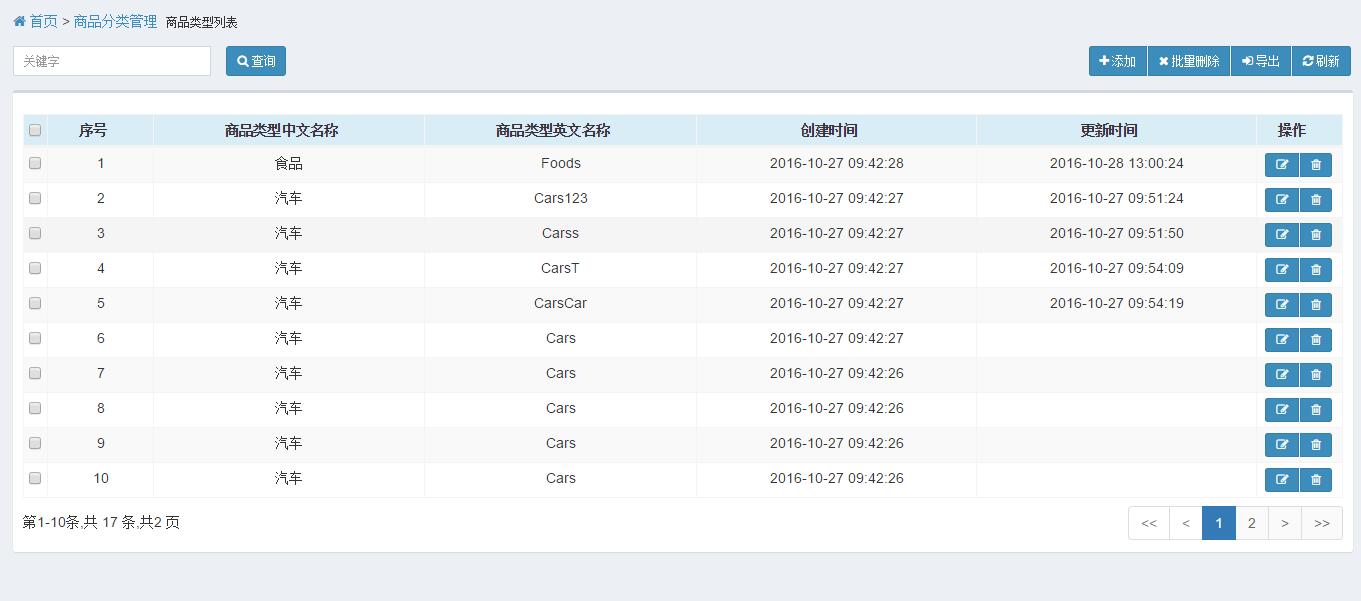
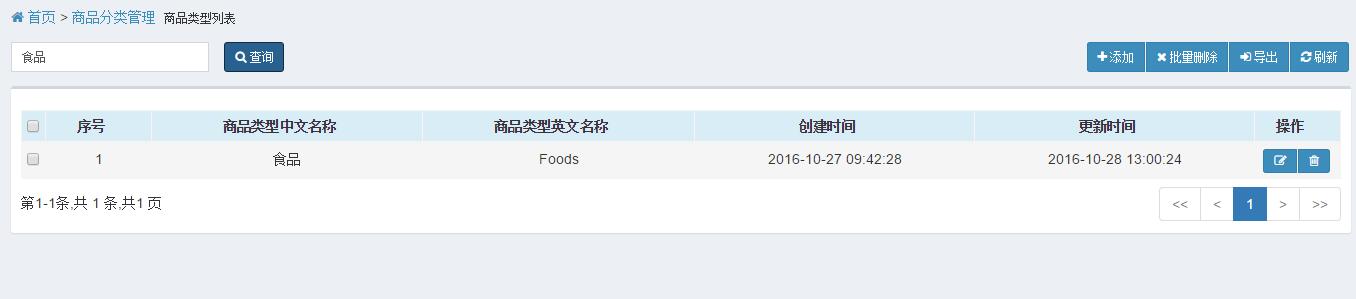
关键字查询
自定义关键字查询,非DataTable Search
代码
HTML代码
查询条件代码
<!-- 查询、添加、批量删除、导出、刷新 -->

<div class="row-fluid">

    <div class="pull-right">

        <div class="btn-group">

            <button type="button" class="btn btn-primary btn-sm" id="btn-add">

                <i class="fa fa-plus"></i> <sp:message code="sys.add"/>

            </button>

            <button type="button" class="btn btn-primary btn-sm" id="btn-delAll">

                <i class="fa fa-remove"></i> <sp:message code="sys.delAll"/>

            </button>

            <button type="button" class="btn btn-primary btn-sm" id="btn-export">

                <i class="fa fa-sign-in"></i> <sp:message code="sys.export"/>

            </button>

            <button type="button" class="btn btn-primary btn-sm" id="btn-re">

                <i class="fa fa-refresh"></i> <sp:message code="sys.refresh"/>

            </button>

        </div>

    </div>

    <div class="row">

        <form id="queryForm" action="<%=path%>/goodsType/list" method="post">

            <div class="col-xs-2">

                <input type="text" id="keyword" name="keyword" class="form-control input-sm"

                    placeholder="<sp:message code="sys.keyword"/>">

            </div>

            <button type="button" class="btn btn-primary btn-sm" id="btn-query">

                <i class="fa fa-search"></i> <sp:message code="sys.query"/>

            </button>

        </form>

    </div>

</div>
数据table代码
<table id="dataTable" class="table table-striped table-bordered table-hover table-condensed" align="center">

    <thead>

        <tr class="info">

            <td><input type="checkbox" id="checkAll"></td>

            <th><sp:message code="sys.no"/></th>

            <th><sp:message code="goods.type.name.cn"/></th>

            <th><sp:message code="goods.type.name.en"/></th>

            <th><sp:message code="sys.create.time"/></th>

            <th><sp:message code="sys.update.time"/></th>

            <th><sp:message code="sys.oper"/></th>

        </tr>

    </thead>

</table>
JS代码
DataTables初始化、服务端数据请求、查询条件封装
<!-- page script -->

<script>

    $(function () {

        //添加、修改异步提交地址

        var url = "";

        var tables = $("#dataTable").dataTable({

            serverSide: true,//分页,取数据等等的都放到服务端去

            processing: true,//载入数据的时候是否显示“载入中”

            pageLength: 10,  //首次加载的数据条数

            ordering: false, //排序操作在服务端进行,所以可以关了。

            pagingType: "full_numbers",

            autoWidth: false,

            stateSave: true,//保持翻页状态,和comTable.fnDraw(false);结合使用

            searching: false,//禁用datatables搜索

            ajax: {

                type: "post",

                url: "<%=path%>/goodsType/getData",

                dataSrc: "data",

                   data: function (d) {

                       var param = {};

                       param.draw = d.draw;

                       param.start = d.start;

                       param.length = d.length;

                       var formData = $("#queryForm").serializeArray();//把form里面的数据序列化成数组

                       formData.forEach(function (e) {

                           param[e.name] = e.value;

                       });

                        return param;//自定义需要传递的参数。

                },

            },

            columns: [//对应上面thead里面的序列

                {"data": null,"width":"10px"},

                {"data": null},

                {"data": 'typeNameCn' },

                {"data": 'typeNameEn' },

                  {"data": 'createTime',

                    "render":function(data,type,full,callback) {

                        return data.substr(0,19)

                    }

                },

                {"data": 'updateTime', defaultContent: "",

                    "render":function(data,type,full,callback) {

                        if(data != null && data != ""){

                            return data.substr(0,19)

                        }else{

                            return data;

                        }

                    }

                },

                    {"data": null,"width":"60px"}

            ],

            //操作按钮

            columnDefs: [

                {

                 targets: 0,

                 defaultContent: "<input type='checkbox' name='checkList'>"

             },

             {

                 targets: -1,

                 defaultContent: "<div class='btn-group'>"+

                                "<button id='editRow' class='btn btn-primary btn-sm' type='button'><i class='fa fa-edit'></i></button>"+

                                "<button id='delRow' class='btn btn-primary btn-sm' type='button'><i class='fa fa-trash-o'></i></button>"+

                                "</div>"

             }

            ],

            language: {

                lengthMenu: "",

                processing: "<sp:message code='sys.load'/>",

                paginate: {

                    previous: "<",

                    next: ">",

                    first: "<<",

                    last: ">>"

                },

                zeroRecords: "<sp:message code='sys.nodata'/>",

                info: "<sp:message code='sys.pages'/>",

                infoEmpty: "",

                infoFiltered: "",

                sSearch: "<sp:message code='sys.keyword'/>:",

            },

            //在每次table被draw完后回调函数

            fnDrawCallback: function(){

                var api = this.api();

                //获取到本页开始的条数

                var startIndex= api.context[0]._iDisplayStart;

                api.column(1).nodes().each(function(cell, i) {

                    cell.innerHTML = startIndex + i + 1;

               });

            }

           });

        //查询按钮

        $("#btn-query").on("click", function () {

            tables.fnDraw();//查询后不需要保持分页状态,回首页

        });

        //添加

        $("#btn-add").on("click", function () {

            url = "<%=path%>/goodsType/add";

            $("input[name=typeId]").val(0);

            $("input[name=typeNameCn]").val("");

            $("input[name=typeNameEn]").val("");

            $("#editModal").modal("show");

        });

        //批量删除

        $("#btn-delAll").on("click", function () {

        });

        //导出

        $("#btn-export").on("click", function () {

        });

        //刷新

        $("#btn-re").on("click", function () {

            tables.fnDraw(false);//刷新保持分页状态

        });

        //checkbox全选

        $("#checkAll").on("click", function () {

            if ($(this).prop("checked") === true) {

                $("input[name='checkList']").prop("checked", $(this).prop("checked"));

                //$("#dataTable tbody tr").addClass('selected');

                $(this).hasClass('selected')

            } else {

                $("input[name='checkList']").prop("checked", false);

                $("#dataTable tbody tr").removeClass('selected');

            }

        });


        //修改

        $("#dataTable tbody").on("click", "#editRow", function () {

            var data = tables.api().row($(this).parents("tr")).data();

            $("input[name=typeId]").val(data.typeIdStr);

            $("input[name=typeNameCn]").val(data.typeNameCn);

            $("input[name=typeNameEn]").val(data.typeNameEn);

            url = "<%=path%>/goodsType/update";

            $("#editModal").modal("show");

        });

        $("#btn-submit").on("click", function(){

            $.ajax({

              cache: false,

              type: "POST",

              url: url,

              data:$("#editForm").serialize(),

              async: false,

              error: function(request) {

                  showFail("Server Connection Error...");

              },

              success: function(data) {

                if(data.status == 1){

                    $("#editModal").modal("hide");

                    showSuccess("<sp:message code='sys.oper.success'/>");

                    tables.fnDraw();

                }else{

                    showFail("<sp:message code='sys.oper.fail'/>");

                }

              }

          });

        });

        //删除

        $("#dataTable tbody").on("click", "#delRow", function () {

            var data = tables.api().row($(this).parents("tr")).data();

            if(confirm("是否确认删除这条信息?")){

                $.ajax({

                    url:'<%=path%>/goodsType/del/'+data.typeIdStr,

                    type:'delete',

                    dataType: "json",

                    cache: "false",

                    success:function(data){

                        if(data.status == 1){

                            showSuccess("<sp:message code='sys.oper.success'/>");

                            tables.api().row().remove().draw(false);

                        }else{

                            showFail("<sp:message code='sys.oper.fail'/>");

                        }

                    },

                    error:function(err){

                        showFail("Server Connection Error...");

                    }

                });

            }

        });

    });

</script>
Java代码
Controller处理方法,负责查询页面需要表格数据,格式化Json后返回。
@RequestMapping(value="/goodsType/getData", produces = "text/json;charset=UTF-8")

@ResponseBody

public String getData(HttpServletRequest request, QueryCondition query) {

    DatatablesView<GoodsType> dataTable = goodsTypeService.getGoodsTypeByCondition(query);

    dataTable.setDraw(query.getDraw());

    String data = JSON.toJSONString(dataTable);

    return data;

}
返回Json数据格式
{

    "data": [{

        "createTime": "2016-10-27 09:42:28.0",

        "typeId": 96824775296417986,

        "typeIdStr": "96824775296417986",

        "typeNameCn": "食品",

        "typeNameEn": "Foods",

        "updateTime": "2016-10-28 13:00:24.0"

    },

    {

        "createTime": "2016-10-27 09:42:27.0",

        "typeId": 96824775296417979,

        "typeIdStr": "96824775296417979",

        "typeNameCn": "汽车",

        "typeNameEn": "Cars123",

        "updateTime": "2016-10-27 09:51:24.0"

    }],

    "draw": 1,

    "recordsFiltered": 17,

    "recordsTotal": 17

}
DatatablesView,根据DataTables需要格式定义
public class DatatablesView<T> {

    private List<T> data; //data 与datatales 加载的“dataSrc"对应

    private int recordsTotal;

    private int recordsFiltered;

    private int draw;

    public DatatablesView() {

    }

    public int getDraw() {

        return draw;

    }

    public void setDraw(int draw) {

        this.draw = draw;

    }

    public List<T> getData() {

        return data;

    }

    public void setData(List<T> data) {

        this.data = data;

    }

    public int getRecordsTotal() {

        return recordsTotal;

    }

    public void setRecordsTotal(int recordsTotal) {

        this.recordsTotal = recordsTotal;

        this.recordsFiltered = recordsTotal;

    }

    public int getRecordsFiltered() {

        return recordsFiltered;

    }

    public void setRecordsFiltered(int recordsFiltered) {

        this.recordsFiltered = recordsFiltered;

    }

}
Service业务处理类,主要根据查询条件统计记录数量,查询当前页数据列表
public DatatablesView<GoodsType> getGoodsTypeByCondition(QueryCondition query) {

    DatatablesView<GoodsType> dataView = new DatatablesView<GoodsType>();

    //构建查询条件

    WherePrams where = goodsTypeDao.structureConditon(query);

    Long count = goodsTypeDao.count(where);

    List<GoodsType> list = goodsTypeDao.list(where);

    dataView.setRecordsTotal(count.intValue());

    dataView.setData(list);

    return dataView;

}
Dao层就是基本的数据库查询操作,这里省略…
结尾
查询条件这里只使用了关键字模糊查询,根据业务需要,可以动态加入其他查询条件,后台需要做相应处理。
基于SpringMVC+Bootstrap+DataTables实现表格服务端分页、模糊查询的更多相关文章
- jquery.dataTables的探索之路-服务端分页配置
最近闲来无事想研究下数据表格,因为之前接触过layui和bootstrap的数据表格,本着能学多少学多少的学习态度,学习下dataTables的服务端分页配置.特与同学们一块分享下从中遇到的问题和解决 ...
- BootStrap table服务端分页
涉及到的内容: 1.bootstrap-table插件: 2.mybatisplus分页查询: 3.spring封装对象匹配bootstrap-table插件格式: 4.sql查询隐藏手机号中间四位. ...
- asp.net mvc bootstrap datatable 服务端分页
datatable 服务端分页 因项目需求变动,需处理大量数据,更改成服务端分页,自己两天的学习笔记 先上图[ jqueryui风格] 前端代码: @{ Layout = null;} <!DO ...
- asp.net mvc bootstrap datatable 服务端分页 更新槽糕的代码【1】
datatable 服务端分页 因项目需求变动,需处理大量数据,更改成服务端分页,自己两天的学习笔记 datatable 1.10.7 百度云下载 密码:0ea1 先上图[ jqueryui风格] ...
- BootStrap Table和Mybatis Plus实现服务端分页
一.后台java代码(Mybatis Plus分页) (1)Mybatis Plus分页的配置,在mybatis的xml文件中增加如下配置(Mybatis Plus官方文档:http://baomid ...
- 基于开源SuperSocket实现客户端和服务端通信项目实战
一.课程介绍 本期带给大家分享的是基于SuperSocket的项目实战,阿笨在实际工作中遇到的真实业务场景,请跟随阿笨的视角去如何实现打通B/S与C/S网络通讯,如果您对本期的<基于开源Supe ...
- .net平台 基于 XMPP协议的即时消息服务端简单实现
.net平台 基于 XMPP协议的即时消息服务端简单实现 昨天抽空学习了一下XMPP,在网上找了好久,中文的资料太少了所以做这个简单的例子,今天才完成.公司也正在准备开发基于XMPP协议的即时通讯工具 ...
- 基于TCP协议套接字,服务端实现接收客户端的连接并发
基于TCP协议套接字,服务端实现接收客户端的连接并发 服务端 import socket from multiprocessing import Process server=socket.socke ...
- 写一个基于TCP协议套接字,服务端实现接收客户端的连接并发
''' 写一个基于TCP协议套接字,服务端实现接收客户端的连接并发 ''' client import socket import time client = socket.socket() clie ...
随机推荐
- 小学生绞尽脑汁也学不会的python(面对对象-----类与类之间的关系)
小学生绞尽脑汁也学不会的python(面对对象-----类与类之间的关系 1. 依赖关系. 最轻的一种关系 在方法中引入另一个类的对象 class Elephant: def __init__(sel ...
- noip复习之拓扑排序
之前很多很多紫书上的东西我都忘了…… 抄题解的后果…… 做了一下裸题 https://vjudge.net/problem/UVA-10305 拓扑排序还可以来判环 #include<bits/ ...
- 引入拦截器及swagger支持及解决redis无法初始化问题
Springboot引入拦截器 自定义的拦截器类 Interceptor package cn.zytao.taosir.auth.config; import javax.annotation.Re ...
- Unity 代码集锦之图片处理
1.将Texture2D保存为jpg void TestSaveImageToJPG(Texture2D buffer) { File.WriteAllBytes("F:/output.jp ...
- 【henuacm2016级暑期训练-动态规划专题 C】Little Girl and Maximum XOR
[链接] 我是链接,点我呀:) [题意] 在这里输入题意 [题解] 考虑r最后的二进制形式为 1xxxxx 那么我们肯定想让第一个最高位的1保留. 因此我们选取的另外一个数字 一定是 0xxxxx的形 ...
- php学习之道:php empty()和isset()的差别
在使用 php 编写页面程序时,我常常使用变量处理函数推断 php 页面尾部參数的某个变量值是否为空,開始的时候我习惯了使用 empty() 函数,却发现了一些问题,因此改用 isset() 函数,问 ...
- word2vec词向量训练及中文文本类似度计算
本文是讲述怎样使用word2vec的基础教程.文章比較基础,希望对你有所帮助! 官网C语言下载地址:http://word2vec.googlecode.com/svn/trunk/ 官网Python ...
- hdu 1722 Cake 数学yy
题链:http://acm.hdu.edu.cn/showproblem.php? pid=1722 Cake Time Limit: 1000/1000 MS (Java/Others) Me ...
- [IOS]mac远程window全屏显示
在mac自带着一个远程window的软件.这让我们远程起来很方便. 其步骤和window远程也很相似. 输入ip地址: 输入username以及password: 然后点击确定就可以. 只是.这时就出 ...
- hdu 2604 Queuing (矩阵高速幂)
Queuing Time Limit: 10000/5000 MS (Java/Others) Memory Limit: 32768/32768 K (Java/Others) Total S ...