
Windows Azure之Mobile Service
我建个android app和Windows Azure的Mobile Service配合,以实现会员注册的功能,实际十分简单,微软家的东西真心好用
首先新建个Mobile Service
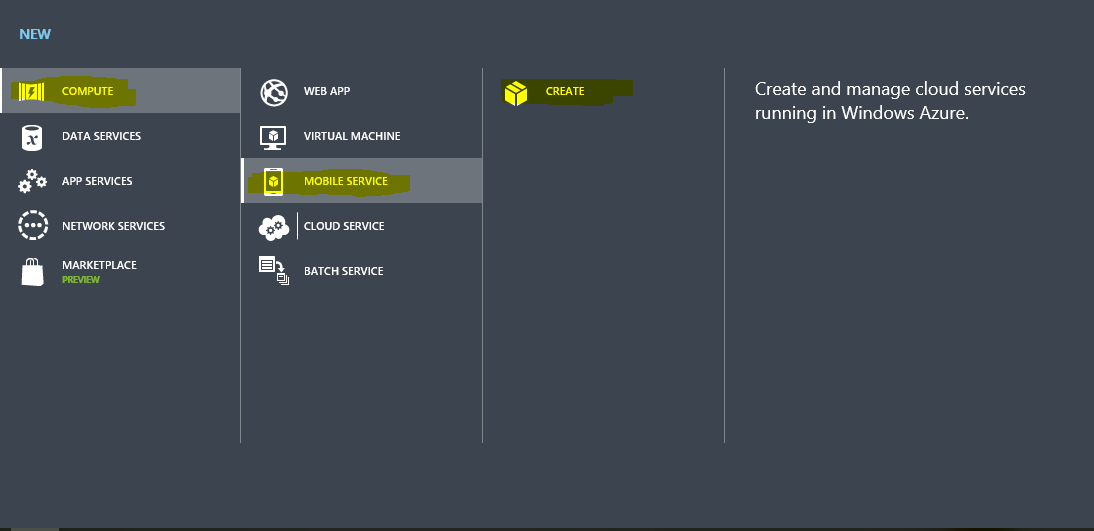
New->Mobile Service->Create之后弹出下图的对话框

URL就自定义一个,如果有人注册了会报错,换个就好,database新建还是使用已存在的都可以,新建之后会多一步让你输入要新建的数据库的名称和密码,backend就选Javascript,点击箭头下一步

使用现存的会让你输入密码,建立完成,点击主界面左侧的Mobile service,出现下图
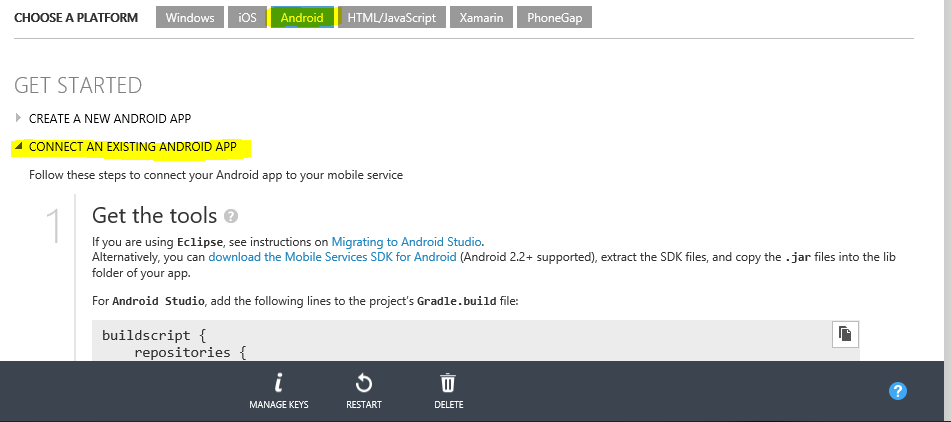
我这里选“连接一个已存在的android app”,其实现在下面微软的教程就放在那里了
在自己的android app中确保build.gradle(project:你自己的工程名)里面有:
repositories {

        jcenter()

    }
build.gradle(project:Model:app)中添加windows azure sdk,就是把这几句添加到dependencies里去:
   compile 'com.google.code.gson:gson:2.3'

    compile 'com.google.guava:guava:18.0'

    compile 'com.microsoft.azure:azure-mobile-services-android-sdk:2.0.3'

    compile (group: 'com.microsoft.azure', name: 'azure-notifications-handler', version: '1.0.1', ext: 'jar')
在自己的实现MobileService功能代码中添加:
private MobileServiceClient mClient;
private ProgressBar mprogressBar;
  try {

            mClient=new MobileServiceClient("你的URL",

                    "你的KEY",

                    this).withFilter(new ProgressFilter());

            mStudentTable=mClient.getTable(Student.class);

        } catch (MalformedURLException e) {

            e.printStackTrace();

            createAndShowDialog(new Exception("移动服务发生错误,检查URL和Key试试"), "Error");

        }
private class ProgressFilter implements ServiceFilter {

        @Override

        public ListenableFuture<ServiceFilterResponse> handleRequest(

                ServiceFilterRequest request, NextServiceFilterCallback next) {

            runOnUiThread(new Runnable() {

                @Override

                public void run() {

                    if (mprogressBar != null) mprogressBar.setVisibility(ProgressBar.VISIBLE);

                }

            });

            SettableFuture<ServiceFilterResponse> result = SettableFuture.create();

            try {

                ServiceFilterResponse response = next.onNext(request).get();

                result.set(response);

            } catch (Exception exc) {

                result.setException(exc);

            }

            dismissProgressBar();

            return result;

        }

    }
private void dismissProgressBar() {

        runOnUiThread(new Runnable() {

            @Override

            public void run() {

                if (mprogressBar != null) mprogressBar.setVisibility(ProgressBar.GONE);

            }

        });

    }
上面代码中的“你的URL”和“你的KEY”替换成你自己新建的Mobile Service的URL和KEY,其实在现在向导里面有的,没有单击上面的“DASHBOARD”,你的URL和key如图
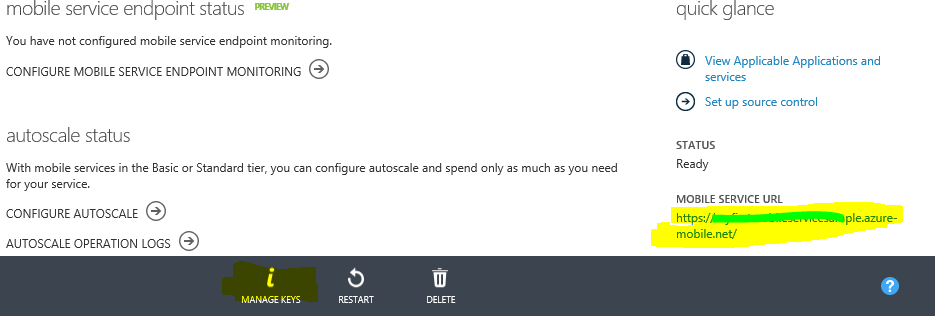
关于KEY,点击MANAGE KEYS,等一秒,复制那个Application key。
接下来,定义那个要传送的实体类Student
import com.google.gson.annotations.SerializedName;

import java.util.Objects;

/**

 * Created by chen on 2015/9/19.

 */

public class Student {

    @SerializedName("id")

    private String mID;

    @SerializedName("stuid")

    private String mStuID;

    @SerializedName("name")

    private String mName;

    @SerializedName("sex")

    private String mSex;

    @SerializedName("qq")

    private String mQQ;

    //Constructor

    public Student(){

    }

    public Student(String id,String stuid,String name,String sex){

        this.setID(id);

        this.setStuID(stuid);

        this.setName(name);

        this.setSex(sex);

    }

    public void setID(String id) {

        this.mID = id;

    }

    public void setName(String name) {

        this.mName=name;

    }

    public void setSex(String sex) {

        this.mSex = sex;

    }

    public void setStuID(String stuID) {

        this.mStuID = stuID;

    }

    public void setStuQQ(String stuQQ){this.mQQ=stuQQ;}

    @Override

    public String toString(){return getName();}

    public String getName(){return mName;}

    public String getID(){return mID;}

    public String getStuID(){return mName;}

    public String getSex(){return mSex;}

}
注意:实体类中类似@SerializedName("id")里面的“id”要和接下在azure管理中定义的Column名字一致,官方文档中说,只要一致mobile service就会自己解析json并将其对应存储到数据库中。
下面就定义数据库,如图,在azure的管理界面上,如图点DATA,选自己的数据库,新建张表,表中的Column要和上面的实体类一致,最终的效果应该这样
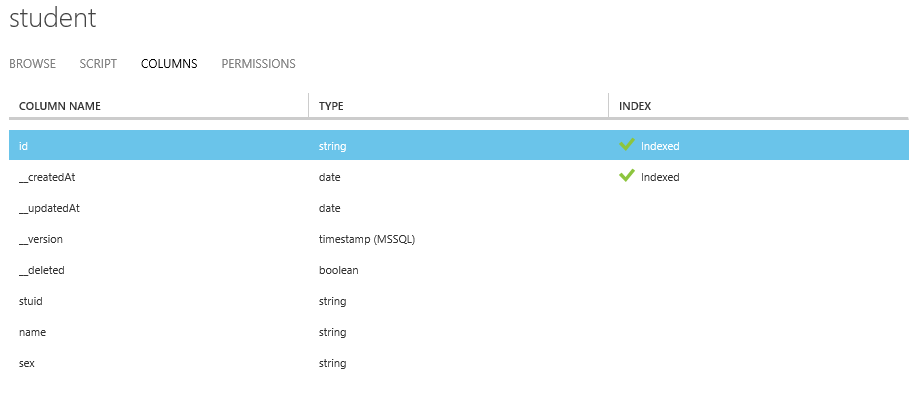
运行安卓客户端,success!
Windows Azure之Mobile Service的更多相关文章
- [Windows Azure] How to use the Windows Azure Blob Storage Service in .NET
How to use the Windows Azure Blob Storage Service in .NET version 1.7 version 2.0 This guide will de ...
- 跟我学Windows Azure 四 Cloud Service中的WebRole与WorkRole,及他们之间的通信
Cloud Service 中WebRole就相当与我们的WebSite,而WorkRole相当与我们在服务器上写了个Windows Service,站在高可用的角度上来讲,Cloud Service ...
- [iOS]使用Windows Azure來做iOS的推播通知 (转帖)
這一篇我們用Windows Azure 的Mobile Service 來實作iOS的推播通知,底下我們分成三個階段來探討如何實作推播通知的服務: 第一階段: 開啓你的Windows Aure服務 ...
- Windows Azure Service Bus Topics实现系统松散耦合
前言 Windows Azure中的服务总线(Service Bus)提供了多种功能, 包括队列(Queue), 主题(Topic),中继(Relay),和通知中心(Notification Hub) ...
- Windows Azure Service Bus Notification Hub推送通知
前言 随着Windows Azure 在中国的正式落地,相信越来越多的人会体验到Windows Azure带来的强大和便利.在上一篇文章中, 我们介绍了如何利用Windows Azure中的Servi ...
- Windows Azure Service Bus (1) 基础
<Windows Azure Platform 系列文章目录> 我们在基于Windows Azure进行云端开发的时候,云端的软件通常都需要与其他软件进行交互.这些其他软件可能包括其他In ...
- windows azure Vm、cloud service、web application 如何选择可用的服务
windows azure 的web应用和虚拟机都经常用.我们经常把我们的网站部署上去.一般选择web应用或者开一个虚拟机.开一个虚拟机就会按照虚拟机的使用时间进行计费. 那么我们选择web部署在哪里 ...
- [Windows Azure] How to use the Queue Storage Service
How to use the Queue Storage Service version 1.7 version 2.0 This guide will show you how to perform ...
- [Windows Azure] How to use the Table Storage Service
How to use the Table Storage Service version 1.7 version 2.0 This guide will show you how to perform ...
随机推荐
- Expression Blend 的点滴(2)--利用可视化状态创建神奇翻转动画
原文:Expression Blend 的点滴(2)--利用可视化状态创建神奇翻转动画 首先,来看下实现后的效果: 关于VisulaState VisualState 指定控件处于特定状态时的外观.例 ...
- Eclipse Che安装入门和使用(一)
Eclipse Che序列博文如下: 安装和调试篇:Eclipse Che安装入门和使用(一) Web进阶篇:Eclipse Che开发Spring Web应用(入门) (二) 本文摘要: Eclip ...
- 一起学Python: 多线程-共享全局变量问题
多线程-共享全局变量问题 多线程开发可能遇到的问题 假设两个线程t1和t2都要对全局变量g_num(默认是0)进行加1运算,t1和t2都各对g_num加10次,g_num的最终的结果应该为20. 但是 ...
- opencc 繁体简体互转 (C++)
繁体字通常采用BIG5编码,简体字通常采用GBK或者GB18030编码,这种情况下,直接使用iconv(linux下有对应的命令,也有对应的C API供编程调用)就行.对于默认采用utf-8 ...
- WPF 高性能笔
原文:WPF 高性能笔 本文告诉大家WPF的INK的实现,和如何做一个高性能的笔. 高性能的笔迹在 WPF 包含两个部分,一个是就是输入,第二个就是渲染. 如果需要经过路由事件才收到输入,如果有人在路 ...
- How to configure spring boot through annotations in order to have something similar to <jsp-config> in web.xml?
JSP file not rendering in Spring Boot web application You will need not one but two dependencies (ja ...
- numpy 下的数据结构与数据类型的转换(np.array vs. np.asarray)
1. np.asarray -- numpy 风格的类型转换 从已有多维数组创建新的多维数组,数据类型可重新设置 >> B = np.asarray(A, dtype='int32') 2 ...
- e.target e.currenttarget
概述 当事件穿过 DOM 时,识别事件的当前目标对象(Identifies the current target for the event, as the event traverses the D ...
- Redis实战:如何构建类微博的亿级社交平台
微博及 Twitter 这两大社交平台都重度依赖 Redis 来承载海量用户访问.本文介绍如何使用 Redis 来设计一个社交系统,以及如何扩展 Redis 让其能够承载上亿用户的访问规模. 虽然单台 ...
- java中 8进制 10进制 2进制 16进制 相互转换
十进制转成十六进制: Integer.toHexString(int i) 十进制转成八进制 Integer.toOctalString(int i) 十进制转成二进制 Integer.toBinar ...