
AngularJS之WebAPi上传(十)
前言
前面一系列我们纯粹是讲AngularJS,在讲一门知识时我们应该结合之前所学综合起来来做一个小的例子,前面我们讲了在MVC中上传文件的例子,在本节我们讲讲如何利用AngularJS在WebAPi中如何上传,来巩固下WebAPi并结合AngularJS中对应的一些组件学习下。
AngularJS Upload Files for WebAPi
(一)在WebAPi中我们如何获得上传本地文件的物理路径呢?需要实现此类: MultipartFormDataStreamProvider ,从该类中获取上传文件的物理路径并返回。如下:
    public class UploadMultipartFormProvider : MultipartFormDataStreamProvider

    {

        public UploadMultipartFormProvider(string rootPath) : base(rootPath) { }

        public override string GetLocalFileName(HttpContentHeaders headers)

        {

            if (headers != null &&

                headers.ContentDisposition != null)

            {

                return headers

                    .ContentDisposition

                    .FileName.TrimEnd('"').TrimStart('"');

            }

            return base.GetLocalFileName(headers);

        }

    }
(二)为避免有些浏览器不支持多个文件上传我们通过实现 ActionFilterAttribute 特性来加以判断,如下:
    public class MimeMultipart : ActionFilterAttribute

    {

        public override void OnActionExecuting(HttpActionContext actionContext)

        {

            if (!actionContext.Request.Content.IsMimeMultipartContent())

            {

                throw new HttpResponseException(

                    new HttpResponseMessage(

                        HttpStatusCode.UnsupportedMediaType)

                );

            }

        }

        public override void OnActionExecuted(HttpActionExecutedContext actionExecutedContext)

        {

        }

    }
以上两个类为我们在WebAPi中上传提供一个保障。接下来我们需要的是如何利用AngularJS来上传。
在AngularJS中上传需要用到 ng-file-upload 组件,而非 angularFileUpload 组件,在此之前一直是利用angularFileUpload组件,但是后来逐步迁移并且命名为ng-file-upload组件。同时为了一些加载效果如在github中顶部有加载线的过程,决定也在这里实现一下看看【说明:上传过程用到angular-loading-bar(加载)和ng-file-upload(上传)组件】。
脚本
(1)为了重用,我们将加载组件进行封装。
 //common.load.js
(function () {

    'use strict';

    angular

        .module('common.load', [

            'angular-loading-bar',

            'ngAnimate'

        ]);

})();
(2)启动加载线。
//loadBarCtrl.js
(function (app) {

    "use strict";

    app.controller("loadCtrl", loadCtrl);

    function loadCtrl(cfpLoadingBar) {

        cfpLoadingBar.start();

    }

})(angular.module("common.load"));
(3)上传文件代码
 //fileUploadCtrl.js
(function (app) {

    'use strict';

    app.controller('fileUploadCtrl', fileUploadCtrl);

    fileUploadCtrl.$inject = ['$scope', '$http', '$timeout', 'Upload'];

    function fileUploadCtrl($scope, $http, $timeout, Upload, cfpLoadingBar) {

        $scope.upload = [];

        $scope.UploadedFiles = [];

        $scope.startUploading = function ($files) {

            for (var i = 0; i < $files.length; i++) {

                var $file = $files[i];

                (function (index) {

                    $scope.upload[index] = Upload.upload({

                        url: "/api/upload",

                        method: "POST",

                        file: $file,

                        withCredentials: false

                    }).progress(function (evt) {

                    }).success(function (data, status, headers, config) {

                        $scope.UploadedFiles.push({ FileName: data.FileName, FilePath: data.LocalFilePath, FileLength: data.FileLength });

                        cfpLoadingBar.complete();

                    }).error(function (data, status, headers, config) {

                    });

                })(i);

            }

        }

    }

})(angular.module("common.load"));
(4)加载主模块以及依赖模块。
 //app.js
(function () {

    'use strict';

    angular

        .module('angularUploadApp', [

            'ngRoute',

            'ngFileUpload',

            'common.load'

        ])

        .config(config)

    config.$inject = ['$routeProvider'];

    function config($routeProvider) {

        $routeProvider

      .when('/', {

          templateUrl: '../../app/templates/fileUpload.html',

          controller: 'fileUploadCtrl'

      })

      .otherwise({

          redirectTo: '/'

      });

    }

})();
界面
@{

    Layout = null;

}

<!DOCTYPE html>

<html>

<head>

    <meta charset="utf-8" />

    <title></title>

    <link href="~/Content/bootstrap.min.css" rel="stylesheet" />

    <link href="~/Content/loading-bar.min.css" rel="stylesheet" media="all" />

</head>

<body ng-app="angularUploadApp" ng-controller="loadCtrl">

    <nav class="navbar navbar-default" role="navigation">

        <div class="navbar-header">

            <button type="button" class="navbar-toggle collapsed" data-toggle="collapse" data-target="#navbar" aria-expanded="false" aria-controls="navbar">

                <span class="sr-only">Toggle navigation</span>

                <span class="icon-bar"></span>

                <span class="icon-bar"></span>

                <span class="icon-bar"></span>

            </button>

            <a class="navbar-brand" href="http://www.cnblogs.com/createmyself">Angular File WebAPi Upload by <i style="color:#2da12d;font-weight:bolder;">xpy0928</i></a>

        </div>

        <div id="navbar" class="navbar-collapse collapse">

        </div>

    </nav>

    <div class="container">

        <div ng-include src="'../../app/templates/fileUpload.html'"></div>

    </div>

    <script src="../../Scripts/jquery-1.10.2.min.js"></script>

    <script src="../../Scripts/angular.min.js"></script>

    <script src="../../Scripts/angular-animate.min.js"></script>

    <script src="../../Scripts/angular-route.js"></script>

    <script src="../../app/plugins/loading-bar.min.js"></script>

    <script src="../../app/modules/common.load.js"></script>

    <script src="../../Scripts/ng-file-upload.min.js"></script>

    <script src="../../app/app.js"></script>

    <script src="../../app/controllers/loadBarCtrl.js"></script>

    <script src="../../app/controllers/fileUploadCtrl.js"></script>

</body>

</html>
模板页:
<div class="row" ng-controller="fileUploadCtrl">

    <div class="col-xs-3">

        <div>

            <input type="file" accept="images/*" ngf-pattern="'.png,.jpg,.gif'" ngf-select="startUploading($files)" multiple>

        </div>

    </div>

    <div class="col-xs-9">

        <div class="panel-body">

            <div class="panel panel-default" ng-repeat="uploadedFile in UploadedFiles track by $index">

                <div class="panel-heading">

                    <strong>{{uploadedFile.FileName}}</strong>

                </div>

                <div class="panel-body">

                    <div class=" media">

                        <a class="pull-left" href="#">

                            <img class="media-object" width="100" ng-src="../uploadimages/{{uploadedFile.FileName}}" />

                        </a>

                        <div class="media-body">

                            <div class="lead" style="font-size:14px;color: crimson;width:500px;word-wrap:break-word">{{uploadedFile.FilePath}}</div>

                        </div>

                    </div>

                </div>

                <div class="panel-footer">

                    图片总字节: <span style="color:black">{{uploadedFile.FileLength}}</span>

                </div>

            </div>

        </div>

    </div>

</div>
后台api服务:
    [RoutePrefix("api/upload")]

    public class FileUploadController : ApiController

    {

        [Route("")]

        [MimeMultipart]

        public async Task<FileUploadResult> Post()

        {

            var uploadPath = HttpRuntime.AppDomainAppPath + "UploadImages";

            if (!Directory.Exists(uploadPath))

                Directory.CreateDirectory(uploadPath);

            var multipartFormDataStreamProvider = new UploadMultipartFormProvider(uploadPath);

            await Request.Content.ReadAsMultipartAsync(multipartFormDataStreamProvider);

            string _localFileName = multipartFormDataStreamProvider

                .FileData.Select(multiPartData => multiPartData.LocalFileName).FirstOrDefault();

            return new FileUploadResult

            {

                LocalFilePath = _localFileName,

                FileName = Path.GetFileName(_localFileName),

                FileLength = new FileInfo(_localFileName).Length

            };

        }

    }
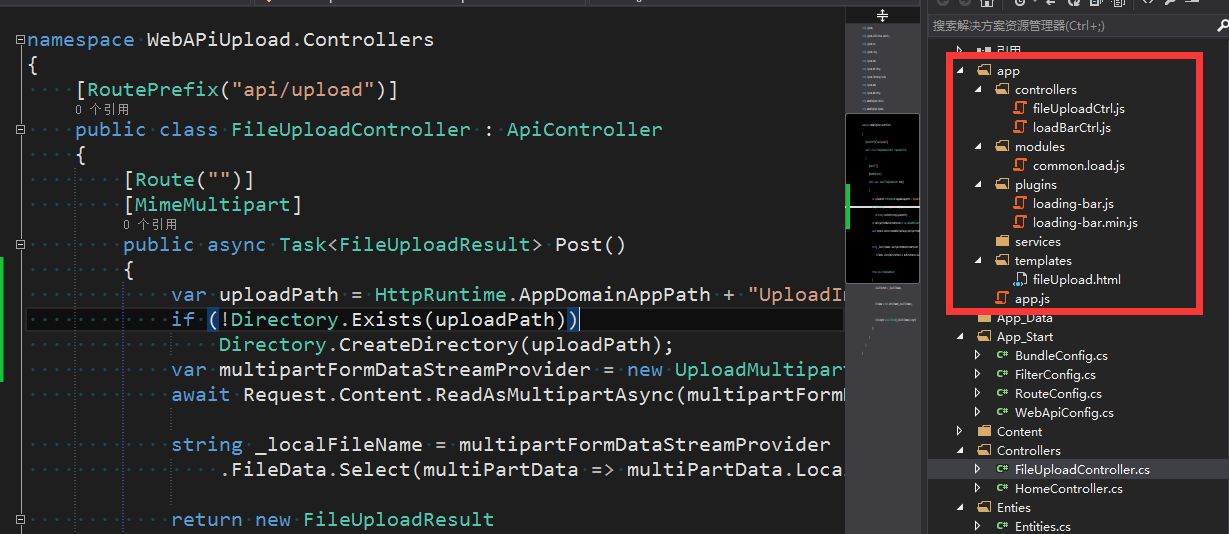
首先我们来看看例子搭建的结构:
生成界面效果:

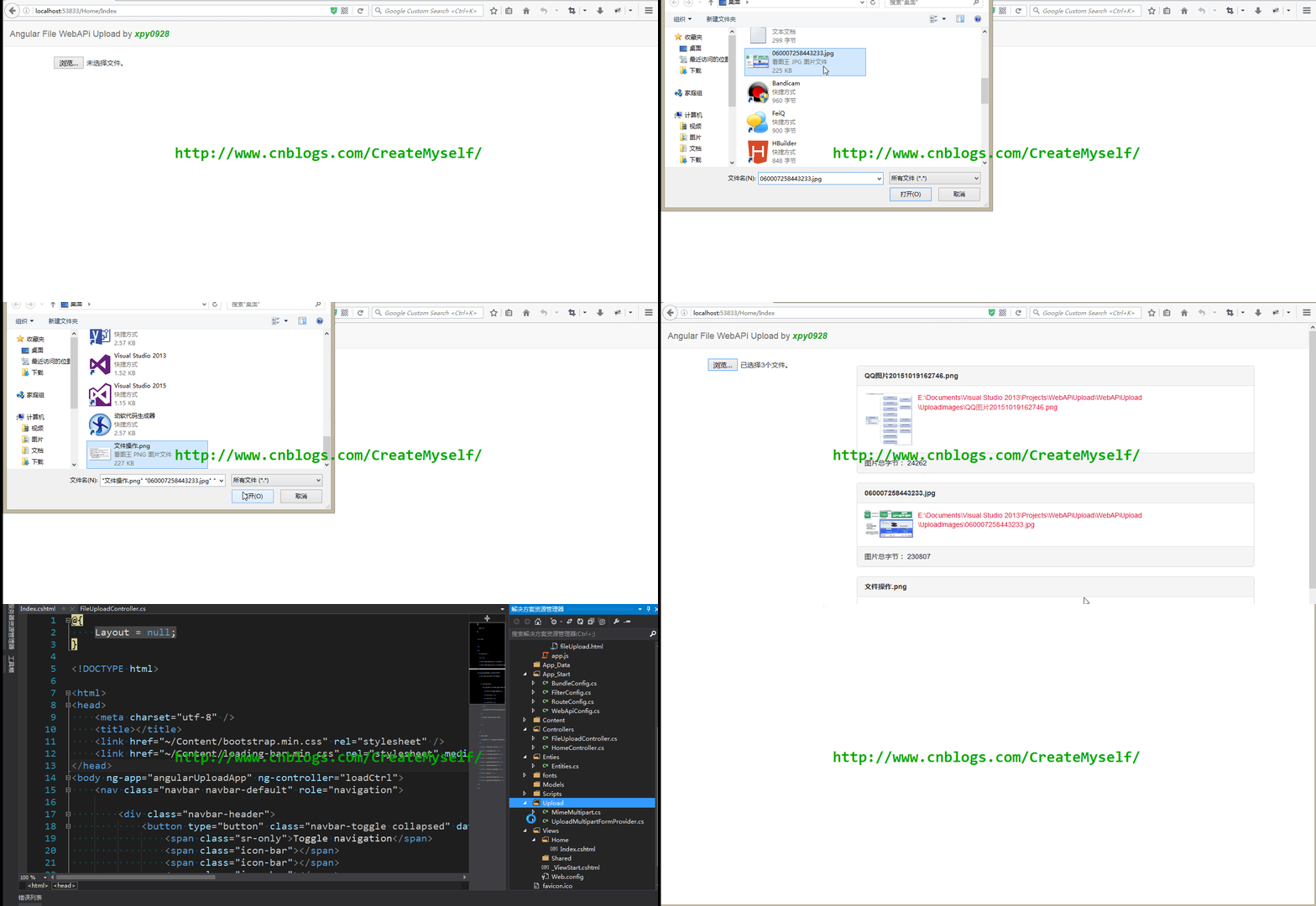
下面我们来演示下最终效果:
总结
(1)在WebAPi中用到路由特性时,若在控制器中如 [RoutePrefix("api/upload")] 此时在方法中若未有 [Route("")] 此时在上传的url必须显示添加Post如: url: "/api/upload/post" 若添加则不用显示添加方法名。
(2)在angular中加载模板为
 <div ng-include src="''"></div> 【注】:src中要加单引号,否则出错

或者

 <div ng-include></div>
(3)对于在WebAPi中上传可以参看此链接,更加详细。
WebAPi:https://github.com/stewartm83/angular-fileupload-sample
对于AngularJS组件中的加载和上传还有更多用法,可以参看如下链接:
ng-file-upload:https://github.com/danialfarid/ng-file-upload
angular-loading-bar:https://github.com/chieffancypants/angular-loading-bar
AngularJS之WebAPi上传(十)的更多相关文章
- AngularJS之WebAPi上传
AngularJS之WebAPi上传(十) 前言 前面一系列我们纯粹是讲AngularJS,在讲一门知识时我们应该结合之前所学综合起来来做一个小的例子,前面我们讲了在MVC中上传文件的例子,在本节 ...
- Owin WebAPI上传文件
Owin是微软出了几年的东东了,一直没时间学习.大概了解了下,是一个脱离IIS环境,快速搭建WebAPI服务的东西. 刚好想尝试下尽量脱离IIS创建简单快捷配置的项目,就是用了Nginx+Owin的模 ...
- webApi上传服务,可重命名,可创建文件夹
webApi上传服务,根据FileName重命名,根据Path创建文件夹 /// <summary> /// 上传文件 /// </summary> /// <retur ...
- webApi上传下载文件
上传文件通过webApi html端调用时包含(form提交包含 enctype="multipart/form-data",才可以启作用获取到文件) public class U ...
- WebAPI上传大文件
今天在研究WebAPI的上传与下载,作为Rest的框架,更多是面向资源,就其本身来说,是不会涉及也不应该涉及到大文件的处理,具体多大呢,也就是ASP.NET的限值2G. ASP.NET的pipelin ...
- Asp.Net Core WebApi 和Asp.Net WebApi上传文件
public class UpLoadController : ControllerBase { private readonly IHostingEnvironment _hostingEnviro ...
- webAPI 上传文件 404错误(转载)
webAPI文件上传时文件过大404错误的问题 来源:https://www.cnblogs.com/dzhengyang/p/9149157.html 背景:最近公司有个需求,外网希望自动保存数据 ...
- .Net Core2.2 WebApi上传文件
基于.net core2.2的webapi程序,接收客户端上传的文件.按照以下写法,file的值永远是null [HttpPost] public void Post([FromForm] IForm ...
- 通过AngularJS实现图片上传及缩略图展示
从项目中截出的代码 HTML部分: <section> <img src="image/user-tuijian/tuijian_banner.png" /> ...
随机推荐
- 在VS2012下静态链接MFC的问题
1>------ 已启动生成: 项目: MFCApplication1, 配置: Debug Win32 ------1>uafxcwd.lib(afxctrlcontainer2.obj ...
- 分布式数据库的四分结构设计 BCDE
首先,对关系型数据库的表进行四种分类定义: Basis 根基,Content 内容, Description 说明, Extension 扩展. Basis:Baisis 表是唯一的,为了实现标准而得 ...
- cookie的基本用法案例
注:cookie必须在服务器环境下有效. 步骤讲解: 1,引入cookie文件: 2,设置过期时间: var date = new Date(); date.setTime(date.getTime( ...
- centos 创建swap 交换分区
阿里云的服务器是没有交换分区的,如 [www-data@iZbp1ivdq1ie5lmrhp13kjZ ~]$ free -m total used free shared buff/cache av ...
- jquery基本
对于jquery属性的访问: //对于bool值的属性,元素标签中如果写了这个属性,attr能够获取到,如果没有写,就获取不到. 如:<input type="checkbox&quo ...
- 【实战Java高并发程序设计 7】让线程之间互相帮助--SynchronousQueue的实现
[实战Java高并发程序设计 1]Java中的指针:Unsafe类 [实战Java高并发程序设计 2]无锁的对象引用:AtomicReference [实战Java高并发程序设计 3]带有时间戳的对象 ...
- NLP常用工具
1.统计类工具:可参见[统计学习常用Python扩展包] 2.linux自带工具:可参见[[整理]Linux常用文本处理命令] 3.简繁转换工具:opencc Open Chinese Convert ...
- Java演算法之堆排序(HeapSort)
import java.util.Arrays; publicclass HeapSort { inta[]={49,38,65,97,76,13,27,49,78,34,12,64,5,4,62,9 ...
- 程序员的经济学系列——你不可不知的生存智慧——第一篇:小X是要成为IT精英的男人!
21世纪,不懂经济学就是耍流氓!如何才能生活得更好?作为程序员你一定也思考过这个问题.今天我们就来从经济学中寻找这问题的答案吧! 一·PPF与机会成本 1.PPF综述 首先为大家介绍第一个最简单的经济 ...
- 送干货,实用内联gulp插件——gulp-embed
现在npm上有很多gulp内联工具,用于把脚本和样式内嵌到HTML页面上,之前搞项目我也在这些插件中寻觅许久,但均不满足公司项目的一个需求—— HTML上同时插入了开发(dev版,src文件夹下,比如 ...