
Spring MVC -- UEditor 编辑器整合入门
仅作为入门测试。。。。。。
使用maven项目
<!-- 上传文件的支持 -->

    <dependency>

      <groupId>commons-fileupload</groupId>

      <artifactId>commons-fileupload</artifactId>

      <version>1.3.1</version>

    </dependency>

    <dependency>

      <groupId>commons-io</groupId>

      <artifactId>commons-io</artifactId>

      <version>2.4</version>

    </dependency>

    <dependency>

      <groupId>commons-codec</groupId>

      <artifactId>commons-codec</artifactId>

      <version>1.10</version>

    </dependency>

    <!-- org.json -->

    <!--JSON is a light-weight, language independent, data interchange format. See http://www.JSON.org/-->

    <dependency>

      <groupId>org.json</groupId>

      <artifactId>json</artifactId>

      <version>20160212</version>

    </dependency>

在此我将它们都放在/webapp/static/UEditor-jsp目录下,进行搞事情,毕竟需要弄清楚路径的配置。
新增jsp页面
<script src="/static/UEditor-jsp/ueditor.config.js"></script>

<script src="/static/UEditor-jsp/ueditor.all.min.js"></script>

<script src="/static/UEditor-jsp/lang/zh-cn/zh-cn.js"></script>

<script id="container" name="content" type="text/plain">测试编辑器。。。</script>

<script type="text/javascript">

    var editor = UE.getEditor('container');

</script>
修改 ueditor.config.js 服务器请求接口路径

默认请求地址为jsp/controller.jsp
<%@ page language="java" contentType="text/html; charset=UTF-8"

	import="com.baidu.ueditor.ActionEnter"

    pageEncoding="UTF-8"%>

<%@ page trimDirectiveWhitespaces="true" %>

<%

    request.setCharacterEncoding( "utf-8" );

	response.setHeader("Content-Type" , "text/html");

	String rootPath = application.getRealPath( "/" );

	out.write( new ActionEnter( request, rootPath ).exec() );

%>
请求地址改为springMVC的请求路径,基本完全照搬翻译。
@Controller

@RequestMapping("/uEditor")

public class UEditorController {

    @RequestMapping(value = "/config")

    public void config(HttpServletRequest request, HttpServletResponse response) {

        response.setContentType("application/json");

   //     String rootPath = request.getSession()

                .getServletContext().getRealPath("/");  修改如下

        String rootPath = request.getSession()

                .getServletContext().getRealPath("/static/UEditor-jsp");

        try {

            String exec = new ActionEnter(request, rootPath).exec();

            PrintWriter writer = response.getWriter();

            writer.write(exec);

            writer.flush();

            writer.close();

        } catch (IOException e) {

            e.printStackTrace();

        }

    }

}
如下是获取config.json 配置的方式
ConfigManager

跟踪代码
String exec = new ActionEnter(request, rootPath).exec();

----->

this.configManager = ConfigManager.getInstance( this.rootPath, this.contextPath, request.getRequestURI() );

----->

private ConfigManager ( String rootPath, String contextPath, String uri ) throws FileNotFoundException, IOException {

	rootPath = rootPath.replace( "\\", "/" );

	this.rootPath = rootPath;

	this.contextPath = contextPath;

// 路径会稍有不一样,请各自调试查看

	if ( contextPath.length() > 0 ) {

		this.originalPath = this.rootPath + uri.substring( contextPath.length() );

	} else {

		this.originalPath = this.rootPath + uri;

	}

	this.initEnv();

}

------>

initEnv()

------>

private void initEnv () throws FileNotFoundException, IOException {

	File file = new File( this.originalPath );

	if ( !file.isAbsolute() ) {

		file = new File( file.getAbsolutePath() );

	}

	this.parentPath = file.getParent();

	String configContent = this.readFile( this.getConfigPath() );

// 此处再次进行路径更改获取到的是 parent

	try{

		JSONObject jsonConfig = new JSONObject( configContent );

		this.jsonConfig = jsonConfig;

	} catch ( Exception e ) {

		this.jsonConfig = null;

	}

}
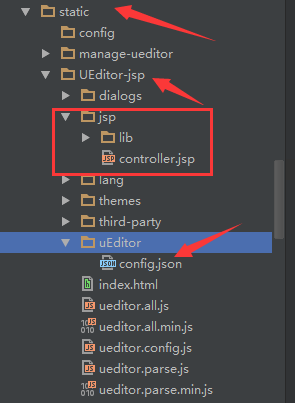
最后根据返回的路径将config,json 移动到相应的目录,此处根据个人情况特殊进行操作。
在此就可以进行图片的上传了。
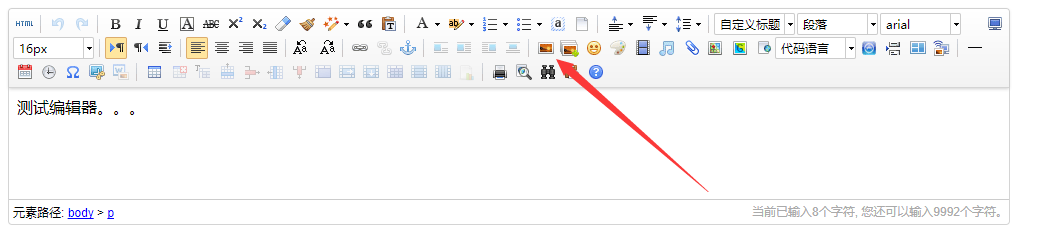
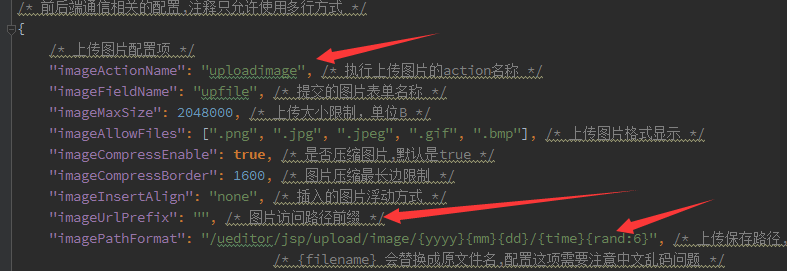
不过还需要修改配置中的路径配置,否则会上传成功却不能显示。

默认路径:
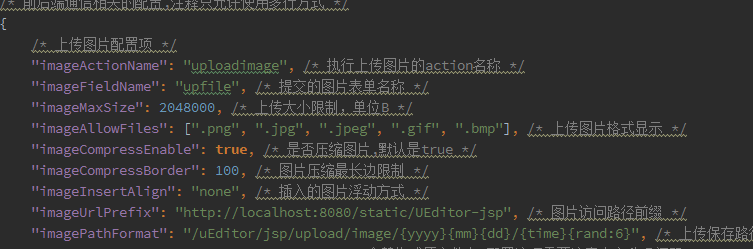
修改如下,主要修改 imageUrlPrefix imagePathFormat
Spring MVC -- UEditor 编辑器整合入门的更多相关文章
- Spring MVC -- UEditor 编辑器整合 上传图片至外部文件夹(非项目文件夹)
上传图片到外部储存,回显图片 下载全部UEditor资源源码 config.json配置 config.json中添加如下属性 (一定要添加此属性): "physicsPath": ...
- 【FreeMarker】Spring MVC与FreeMarker整合(二)
前一篇介绍了FreeMarker的基本使用,本例介绍Spring MVC与FreeMarker整合 不熟悉项目搭建,可参考 [FreeMarker]FreeMarker快速入门(一) 整合 1.新建S ...
- 转载 Spring、Spring MVC、MyBatis整合文件配置详解
Spring.Spring MVC.MyBatis整合文件配置详解 使用SSM框架做了几个小项目了,感觉还不错是时候总结一下了.先总结一下SSM整合的文件配置.其实具体的用法最好还是看官方文档. ...
- Spring MVC、MyBatis整合文件配置详解
Spring:http://spring.io/docs MyBatis:http://mybatis.github.io/mybatis-3/ Building a RESTful Web Serv ...
- 调试SPRING MVC(或者整合SSH)的时候遇到了org/objectweb/asm/Type
调试SPRING MVC(或者整合SSH)的时候遇到了org/objectweb/asm/Type 解决方法1: 原因是Spring中的cglib-nodep-2.x.x.jar与Hibernate中 ...
- Mybaits-从零开始-Spring、Spring MVC、MyBatis整合(未万待续)
Spring.Spring MVC.MyBatis整合(未万待续)
- spring mvc:ueditor跨域多图片上传失败解决方案
公司在开发一个后台系统时需要使用百度的UEditor富文本编辑器,应用的场景如下: UEditor的所有图片.js等静态资源在一个专有的静态服务器上: 图片上传在另外一台服务器上: 因为公司内部会使用 ...
- spring mvc 自定义编辑器
起始知识: Java标准的PropertyEditor的核心功能是将一个字符串转换为一个Java对象,以便根据界面的输入或配置文件中的配置字符串构造出一个JVM内部的java对象. 如何注册自定义的属 ...
- Spring + Spring MVC + MyBatis框架整合
---恢复内容开始--- 一.Maven Web项目创建 如有需要,请参考:使用maven创建web项目 二.Spring + Spring MVC + MyBatis整合 1.Maven引入需要的J ...
随机推荐
- 关于Jwt的一些思考
在使用jwt的过程中发现了两个问题续期和退出的问题. 续期 因为jwt的token在签发之后是有过期时间的,所以就存在管理这个过期时间的问题.我看网上有提出解决方案的大致有下面几个 每次更新过期时间, ...
- vue非父子组件间传参问题
最近在使用vue进行开发,遇到了组件之间传参的问题,此处主要是针对非父子组件之间的传参问题进行总结,方法如下:一.如果两个组件用友共同的父组件,即 FatherComponent.vue代码 < ...
- pandas 7 合并 merge 水平合并,数据会变宽
pd.merge( df1, df2, on=['key1', 'key2'], left_index=True, right_index=True, how=['left', 'right', 'o ...
- sqoop从mysql导入到hdfs出现乱码问题
最近把hive元数据库的快照数据导入到hdfs中,以便对历史的元数据进行查询. 命令如下: sqoop import -D mapred.job.queue.name=do.production -- ...
- linux+apache+mysql+php平台构建及环境配置
1.我使用的centos6.安装时已经选择安装apach.mysql,事实上在运行下列两行命令的时候又对其进行了更新.所以说装的时候能够不安装,免得浪费时间. yum install php-mysq ...
- STL源代码学习(vector篇)
#include <concept_checks.h> #include<stl_allocate.h> /// The vector base class's constru ...
- ListView中嵌套GridView点击事件
做一个项目时,需要在ListView中嵌套GridView,因为ListView的每个条目中不一定出现GridView,那么问题来了,添加GridView的Item的点击事件后,有GridView出现 ...
- 爬虫--BeautifulSoup使用
解析库 解析器 使用方法 优势 劣势 Python标准库 BeautifulSoup(markup, "html.parser") Python的内置标准库.执行速度适中 .文档容 ...
- UI Framework-1: Aura Overview
Aura Overview From the perspective of the user, Aura provides Window and Event types, as well as a ...
- selenium自动化框架介绍------unittest版本
首先说下unittest的两个问题:1.未实现失败重跑 2.未实现远程的分布式(即多线程呼起多台远程计算机,并行进行用例的执行), 为什么要使用框架: 比较方便,只需要写用例就行,而不用考虑结构.还 ...