
Spring MVC -- UEditor 编辑器整合入门
仅作为入门测试。。。。。。
使用maven项目
<!-- 上传文件的支持 -->

    <dependency>

      <groupId>commons-fileupload</groupId>

      <artifactId>commons-fileupload</artifactId>

      <version>1.3.1</version>

    </dependency>

    <dependency>

      <groupId>commons-io</groupId>

      <artifactId>commons-io</artifactId>

      <version>2.4</version>

    </dependency>

    <dependency>

      <groupId>commons-codec</groupId>

      <artifactId>commons-codec</artifactId>

      <version>1.10</version>

    </dependency>

    <!-- org.json -->

    <!--JSON is a light-weight, language independent, data interchange format. See http://www.JSON.org/-->

    <dependency>

      <groupId>org.json</groupId>

      <artifactId>json</artifactId>

      <version>20160212</version>

    </dependency>

在此我将它们都放在/webapp/static/UEditor-jsp目录下,进行搞事情,毕竟需要弄清楚路径的配置。
新增jsp页面
<script src="/static/UEditor-jsp/ueditor.config.js"></script>

<script src="/static/UEditor-jsp/ueditor.all.min.js"></script>

<script src="/static/UEditor-jsp/lang/zh-cn/zh-cn.js"></script>

<script id="container" name="content" type="text/plain">测试编辑器。。。</script>

<script type="text/javascript">

    var editor = UE.getEditor('container');

</script>
修改 ueditor.config.js 服务器请求接口路径

默认请求地址为jsp/controller.jsp
<%@ page language="java" contentType="text/html; charset=UTF-8"

	import="com.baidu.ueditor.ActionEnter"

    pageEncoding="UTF-8"%>

<%@ page trimDirectiveWhitespaces="true" %>

<%

    request.setCharacterEncoding( "utf-8" );

	response.setHeader("Content-Type" , "text/html");

	String rootPath = application.getRealPath( "/" );

	out.write( new ActionEnter( request, rootPath ).exec() );

%>
请求地址改为springMVC的请求路径,基本完全照搬翻译。
@Controller

@RequestMapping("/uEditor")

public class UEditorController {

    @RequestMapping(value = "/config")

    public void config(HttpServletRequest request, HttpServletResponse response) {

        response.setContentType("application/json");

   //     String rootPath = request.getSession()

                .getServletContext().getRealPath("/");  修改如下

        String rootPath = request.getSession()

                .getServletContext().getRealPath("/static/UEditor-jsp");

        try {

            String exec = new ActionEnter(request, rootPath).exec();

            PrintWriter writer = response.getWriter();

            writer.write(exec);

            writer.flush();

            writer.close();

        } catch (IOException e) {

            e.printStackTrace();

        }

    }

}
如下是获取config.json 配置的方式
ConfigManager

跟踪代码
String exec = new ActionEnter(request, rootPath).exec();

----->

this.configManager = ConfigManager.getInstance( this.rootPath, this.contextPath, request.getRequestURI() );

----->

private ConfigManager ( String rootPath, String contextPath, String uri ) throws FileNotFoundException, IOException {

	rootPath = rootPath.replace( "\\", "/" );

	this.rootPath = rootPath;

	this.contextPath = contextPath;

// 路径会稍有不一样,请各自调试查看

	if ( contextPath.length() > 0 ) {

		this.originalPath = this.rootPath + uri.substring( contextPath.length() );

	} else {

		this.originalPath = this.rootPath + uri;

	}

	this.initEnv();

}

------>

initEnv()

------>

private void initEnv () throws FileNotFoundException, IOException {

	File file = new File( this.originalPath );

	if ( !file.isAbsolute() ) {

		file = new File( file.getAbsolutePath() );

	}

	this.parentPath = file.getParent();

	String configContent = this.readFile( this.getConfigPath() );

// 此处再次进行路径更改获取到的是 parent

	try{

		JSONObject jsonConfig = new JSONObject( configContent );

		this.jsonConfig = jsonConfig;

	} catch ( Exception e ) {

		this.jsonConfig = null;

	}

}
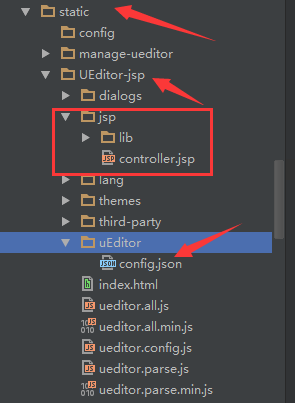
最后根据返回的路径将config,json 移动到相应的目录,此处根据个人情况特殊进行操作。
在此就可以进行图片的上传了。
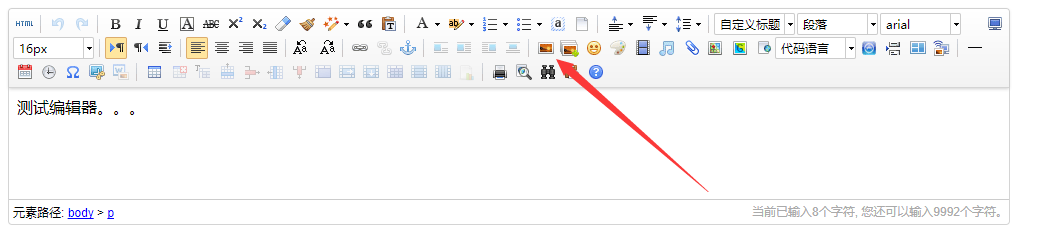
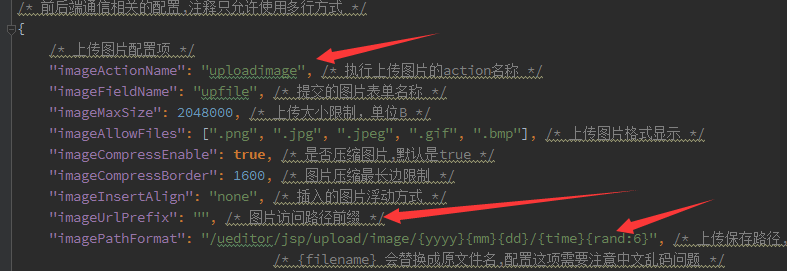
不过还需要修改配置中的路径配置,否则会上传成功却不能显示。

默认路径:
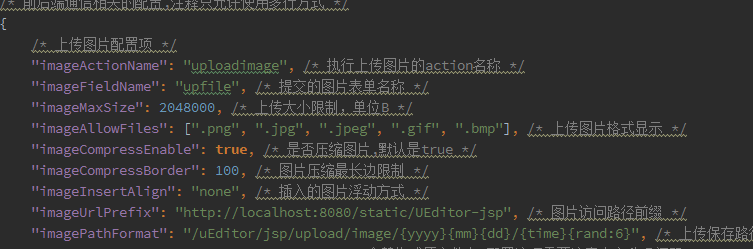
修改如下,主要修改 imageUrlPrefix imagePathFormat
Spring MVC -- UEditor 编辑器整合入门的更多相关文章
- Spring MVC -- UEditor 编辑器整合 上传图片至外部文件夹(非项目文件夹)
上传图片到外部储存,回显图片 下载全部UEditor资源源码 config.json配置 config.json中添加如下属性 (一定要添加此属性): "physicsPath": ...
- 【FreeMarker】Spring MVC与FreeMarker整合(二)
前一篇介绍了FreeMarker的基本使用,本例介绍Spring MVC与FreeMarker整合 不熟悉项目搭建,可参考 [FreeMarker]FreeMarker快速入门(一) 整合 1.新建S ...
- 转载 Spring、Spring MVC、MyBatis整合文件配置详解
Spring.Spring MVC.MyBatis整合文件配置详解 使用SSM框架做了几个小项目了,感觉还不错是时候总结一下了.先总结一下SSM整合的文件配置.其实具体的用法最好还是看官方文档. ...
- Spring MVC、MyBatis整合文件配置详解
Spring:http://spring.io/docs MyBatis:http://mybatis.github.io/mybatis-3/ Building a RESTful Web Serv ...
- 调试SPRING MVC(或者整合SSH)的时候遇到了org/objectweb/asm/Type
调试SPRING MVC(或者整合SSH)的时候遇到了org/objectweb/asm/Type 解决方法1: 原因是Spring中的cglib-nodep-2.x.x.jar与Hibernate中 ...
- Mybaits-从零开始-Spring、Spring MVC、MyBatis整合(未万待续)
Spring.Spring MVC.MyBatis整合(未万待续)
- spring mvc:ueditor跨域多图片上传失败解决方案
公司在开发一个后台系统时需要使用百度的UEditor富文本编辑器,应用的场景如下: UEditor的所有图片.js等静态资源在一个专有的静态服务器上: 图片上传在另外一台服务器上: 因为公司内部会使用 ...
- spring mvc 自定义编辑器
起始知识: Java标准的PropertyEditor的核心功能是将一个字符串转换为一个Java对象,以便根据界面的输入或配置文件中的配置字符串构造出一个JVM内部的java对象. 如何注册自定义的属 ...
- Spring + Spring MVC + MyBatis框架整合
---恢复内容开始--- 一.Maven Web项目创建 如有需要,请参考:使用maven创建web项目 二.Spring + Spring MVC + MyBatis整合 1.Maven引入需要的J ...
随机推荐
- BZOJ 2342 [Shoi2011]双倍回文(manacher+堆+set)
题意 N<=500000 题解 维护一个set可以用堆来解决. #include<iostream> #include<cstring> #include<cstd ...
- codeforces 914 D Bash and a Tough Math Puzzle
#include<iostream> #include<cstring> #include<cstdio> #include<algorithm> #i ...
- [LeetCode] 455. 分发饼干 assign-cookies(贪心算法)
思路: 尽量先将小饼干分配给胃口小的孩子,故而饼干和孩子胃口都应该先排序. python中,a.sort()只能用于a为list, sort()是可变对象的方法,无参数,无返回值,但会影响改变对象. ...
- securefx连接linux后文件夹中文乱码问题解决
首先在选项中设置字符编码为UTF-8 然后在全局选项中找到Securefx的配置文件 进入到该目录中,选择“Sessions”: 在“Sessions”中找到链接地址的ini文件,并用文本编辑器打开: ...
- mac和iphone处理视频
今天在微信上面发现有视频打不开,也无法下载到相册 而到电脑上可以打开 搜了一下,发现格式不对,mp4有很多格式,有的是苹果支持不了的. 要下载一个转换器,我下载了“超级转霸”,然后把视频转成了ipho ...
- Android ADB工具-截图和录制视频(五)
Android ADB工具-截图和录制视频(五) 标签(空格分隔): Android ADB 7. 截图和录制视 命令 功能 adb shell screencap –p <path/file& ...
- [React] Use React Fragments to make your DOM tree cleaner
In this lesson, we will look at Fragments and how they are useful in achieving a cleaner DOM structu ...
- Linux经常使用命令(九) - cat
cat命令的用途是连接文件或标准输入并打印.这个命令经常使用来显示文件内容,或者将几个文件连接起来显示,或者从标准输入读取内容并显示,它常与重定向符号配合使用. 1. 命令格式: cat [选项] 文 ...
- 【Android应用开发技术:基础构建】命令行下的Android应用开发
作者:郭孝星 微博:郭孝星的新浪微博 邮箱:allenwells@163.com 博客:http://blog.csdn.net/allenwells github:https://github.co ...
- codeforces@281 B
shui #include<iostream> #include<cstdio> #include<cstring> #include<algorithm&g ...