
初识Scrapy——1—scrapy简单学习,伯乐在线实战、json数据保存
Scrapy——1
目录
什么是Scrapy框架?
- Scrapy是用纯Python实现一个为了爬取网站数据、提取结构性数据而编写的应用框架,用途非常广泛。多用于抓取大量静态页面。
- 框架的力量,用户只需要定制开发几个模块就可以轻松的实现一个爬虫,用来抓取网页内容以及各种图片,非常方便。
- Scrapy使用了Twisted[‘twistid](其主要对手是Toronto)异步网络框架来处理网络通讯,可以加快我们的下载速度,不用自己去实现异步框架,并且包含了各种中间件接口,可以灵活的完成各种需求。
Scrapy的安装
- Windows安装
pip install Scrapy
Windows使用Scrapy需要很多的依赖环境,根据个人的电脑的情况而定,在cmd的安装下,缺少的环境会报错提示,在此网站下搜索下载,通过wheel方法安装即可。如果不懂wheel法安装的,可以参考我之前的随笔,方法雷同
- 虚拟机Ubuntu的安装
通过如下代码安装依赖环境,最后也是通过pip install Scrapy进行安装
sudo apt-get install python-dev python-pip libxml2-dev libxslt1-dev zlib1g-dev libffi-dev libssl-dev
Scrapy的运行流程
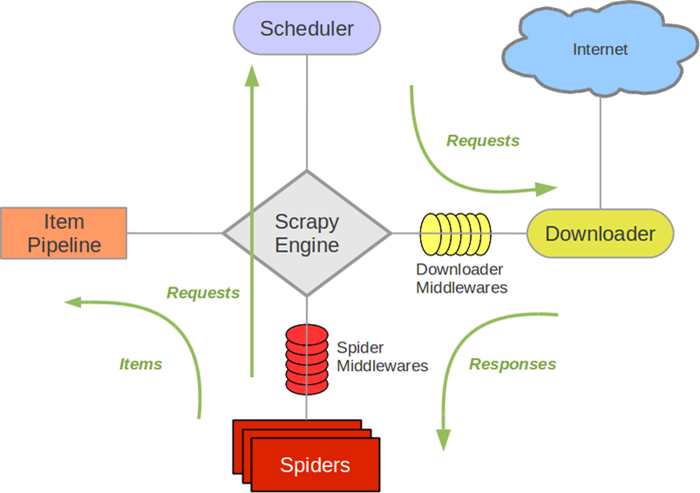
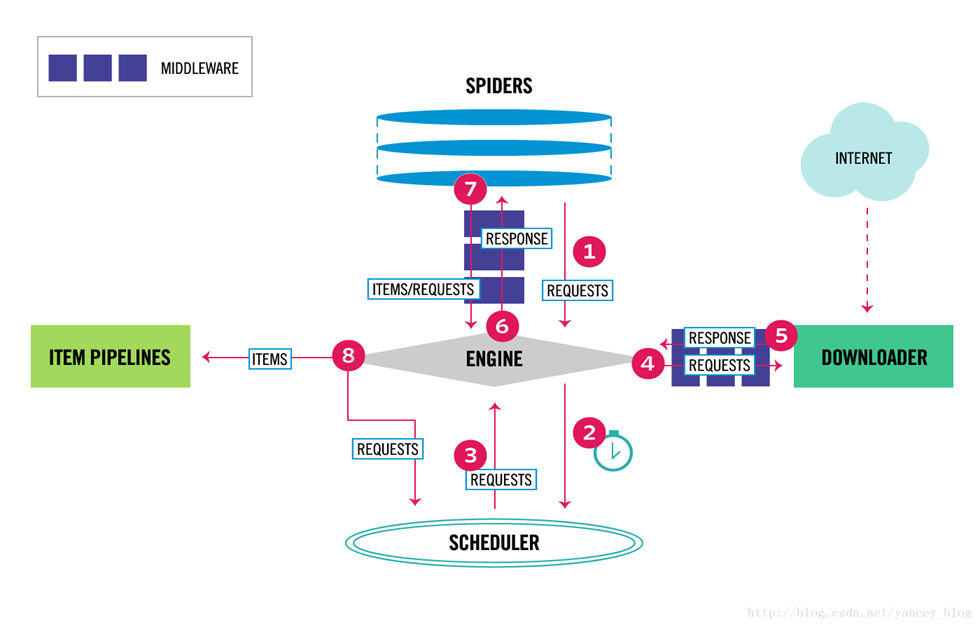
- Scrapy Engine(引擎):负责Spider、ItemPipeline、Downloader、Schedule中间件,信号,数据传递等
- Schedule(调度器):它负责接收引擎发送过来的Requests请求,并按照一定的方式进行排序,入队,当引擎需要时,交还给引擎
- Downloader(下载器):负责下载负责下载Scrapy Engine(引擎)发送的所有Requests请求,并将其获取到的Responses交还给Scrapy Engine(引擎),由引擎交给Spider来处理
- Spider(爬虫):他负责处理所有的Response,从中分析提取数据,获取Item字段需要的数据,并将需要跟进的URL提交给引擎,再次进入Schedule来处理
- ItemPipeline(管道):它负责处理Spider中获取到的Item,并进行后期的处理(详细分析、过滤、存储等)的地方
- Downloader Middlewares(下载器中间件):可以当作是一个可以自定义下载功能的组件
- Spider Middlewares(Spider中间件):可以理解为是一个可以自定义扩展和操作引擎和Spider中间件通信的功能组件(比如进入Spider的Response;和从Spider出去的Requests)
Scrapy的使用
- 在虚拟机中用命令行输入
scrapy startproject project_name
- 根据提示,cd到创建的项目中,再创建根爬虫(spider_name是爬虫程序的文件名,spider_url是所要爬取的网站域名)
scrapy genspider spider_name spider_url(scrapy genspider spider tanzhouedu.com)
会相应生成如下文件
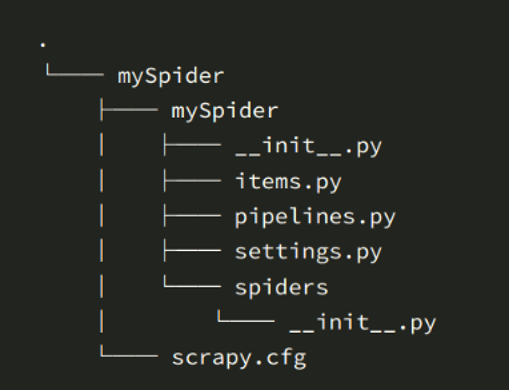
- scrapy.cfg:项目的配置文件
- mySpider/: 项目的Python模块,将会从这里引入代码
- mySpider/items.py :项目的目标文件
- mySpider/pipelines.py :项目的管道文件
- mySpider/settings.py :项目的设置文件
- mySpider/spiders/ :存储爬虫代码目录
Scrapy知识点介绍
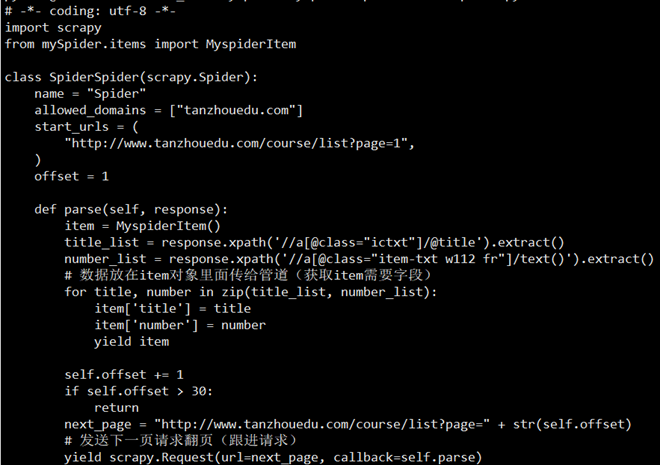
- 制作爬虫(spiders/xxspider.py)
- 存储内容(pipelines.py):设计管道存储数据
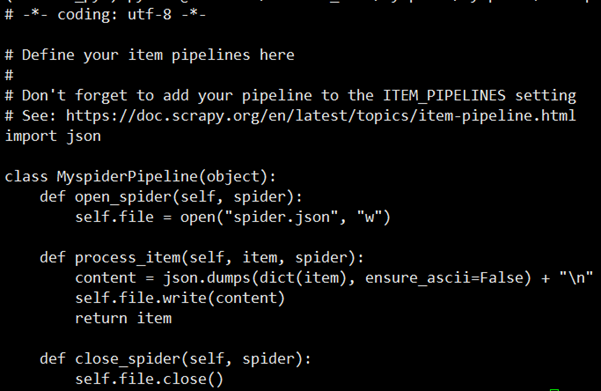
- mySpider/settings.py里面的注册管道

- 程序的运行:在虚拟机中相应文件夹下,输入scrapy list ,他会显示可以运行的scrapy程序,然后输入scrapy crawl scrapy_name开始运行
实战:伯乐在线案例(json文件保存)
创建项目
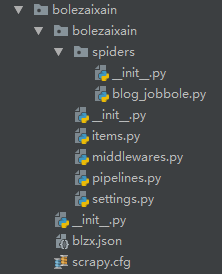
- bolezaixain\bolezaixain\items.py 设置需要的数据
# -*- coding: utf-8 -*-

# Define here the models for your scraped items

#

# See documentation in:

# https://doc.scrapy.org/en/latest/topics/items.html

import scrapy

class BolezaixainItem(scrapy.Item):

    # define the fields for your item here like:

    # name = scrapy.Field()

    title = scrapy.Field()

    url = scrapy.Field()

    time = scrapy.Field()
- bolezaixain\bolezaixain\settings.py 激活管道

- bolezaixain\bolezaixain\spiders\blog_jobbole.py 编写爬虫代码
# -*- coding: utf-8 -*-

import scrapy

from ..items import BolezaixainItem #导入本文件夹外的items文件

class BlogJobboleSpider(scrapy.Spider):

    name = 'blog.jobbole'

    allowed_domains = ['blog.jobbole.com/all-posts/']

    start_urls = ['http://blog.jobbole.com/all-posts/']

    def parse(self, response):

        title = response.xpath('//div[@class="post-meta"]/p/a[1]/@title').extract()

        url = response.xpath('//div[@class="post-meta"]/p/a[1]/@href').extract()

        times = response.xpath('//div[@class="post floated-thumb"]/div[@class="post-meta"]/p[1]/text()').extract()

        time = [time.strip().replace('\r\n', '').replace('·', '') for time in times if '/' in time]

        for title, url, time in zip(title, url, time):

            blzx_items = BolezaixainItem() # 实例化管道

            blzx_items['title'] = title

            blzx_items['url'] = url

            blzx_items['time'] = time

            yield blzx_items

        # 翻页

        next = response.xpath('//a[@class="next page-numbers"]/@href').extract_first()

        # next = http://blog.jobbole.com/all-posts/page/2/

        yield scrapy.Request(url=next, callback=self.parse) # 回调
- bolezaixain\bolezaixain\pipelines.py 保存数据
# -*- coding: utf-8 -*-

# Define your item pipelines here

#

# Don't forget to add your pipeline to the ITEM_PIPELINES setting

# See: https://doc.scrapy.org/en/latest/topics/item-pipeline.html

import pymysql

import json

class BolezaixainPipeline(object):

    def __init__(self):

        pass

        print('======================')

        self.f = open('blzx.json', 'w', encoding='utf-8')

    def open_spider(self, spider):

        pass

    def process_item(self, item, spider):

        s = json.dumps(dict(item), ensure_ascii=False) + '\n'

        self.f.write(s)

        return item

    def close_spider(self, spider):

        pass

        self.f.close()
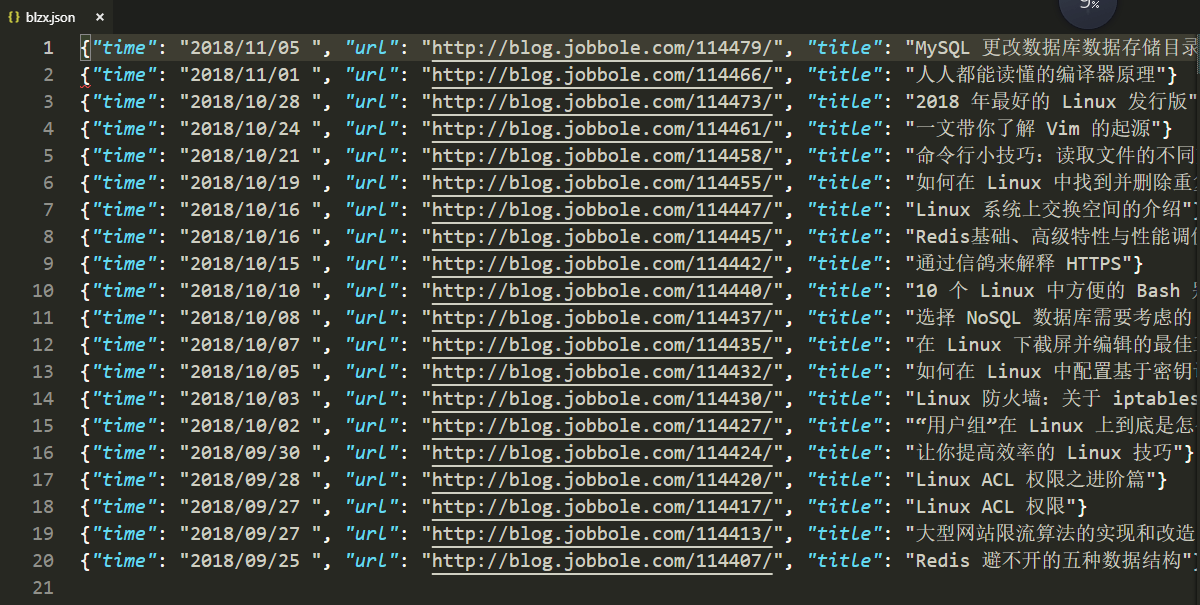
时间,url, 标题
幸苦码字,转载请附链接
初识Scrapy——1—scrapy简单学习,伯乐在线实战、json数据保存的更多相关文章
- (1-1)入门—最简单的树(使用json数据)
1.<!DOCTYPE html>是必须的. 2.zTree 的容器 className 别忘了设置为 "ztree". 使用ztree创建树,首先要引用ztree相关 ...
- 吴裕雄--天生自然python学习笔记:Python3 JSON 数据解析
JSON (JavaScript Object Notation) 是一种轻量级的数据交换格式.它基于ECMAScript的一个子集. Python3 中可以使用 json 模块来对 JSON 数据进 ...
- PHP学习(五)----jQuery和JSON数据
对于jQuery: jQuery 是一个 JavaScript 库. jQuery 极大地简化了 JavaScript 编程.
- 2018百度之星开发者大赛-paddlepaddle学习(二)将数据保存为recordio文件并读取
paddlepaddle将数据保存为recordio文件并读取 因为有时候一次性将数据加载到内存中有可能太大,所以我们可以选择将数据转换成标准格式recordio文件并读取供我们的网络利用,接下来记录 ...
- Android学习笔记之JSON数据解析
转载:Android学习笔记44:JSON数据解析 JSON(JavaScript Object Notation)是一种轻量级的数据交换格式,采用完全独立于语言的文本格式,为Web应用开发提供了一种 ...
- Android(java)学习笔记208:Android中操作JSON数据(Json和Jsonarray)
1.Json 和 Xml JSON(JavaScript Object Notation) 是一种轻量级的数据交换格式.它基于ECMAScript的一个子集. JSON采用完全独立于语言的 ...
- Android(java)学习笔记151:Android中操作JSON数据(Json和Jsonarray)
1.Json 和 Xml JSON(JavaScript Object Notation) 是一种轻量级的数据交换格式.它基于ECMAScript的一个子集. JSON采用完全独立于语言的 ...
- 爬虫实战——Scrapy爬取伯乐在线所有文章
Scrapy简单介绍及爬取伯乐在线所有文章 一.简说安装相关环境及依赖包 1.安装Python(2或3都行,我这里用的是3) 2.虚拟环境搭建: 依赖包:virtualenv,virtualenvwr ...
- Scrapy分布式爬虫打造搜索引擎- (二)伯乐在线爬取所有文章
二.伯乐在线爬取所有文章 1. 初始化文件目录 基础环境 python 3.6.5 JetBrains PyCharm 2018.1 mysql+navicat 为了便于日后的部署:我们开发使用了虚拟 ...
随机推荐
- Ubuntu 16.04 安装CodeBlocks
首先将软件源添加进来,就是运行以下命令 sudo add-apt-repository ppa:damien-moore/codeblocks-stable sudo apt-get update 完 ...
- 【POJ 3714】 Raid
[题目链接] http://poj.org/problem?id=3714 [算法] 分治求平面最近点对 [代码] #include <algorithm> #include <bi ...
- pandas删除满足特定列信息的行记录
#!/usr/bin/python import pandas as pd df = pd.read_excel('c:\data\zichan.xlsx') df_sn = pd.read_exce ...
- Java - HashTable、HashMap和LinkedHashMap的区别
一般情况下,我们用的最多的是HashMap,在Map 中插入.删除和定位元素,HashMap 是最好的选择.但如果您要按自然顺序或自定义顺序遍历键,那么TreeMap会更好.如果需要输出的顺序和输入的 ...
- PCB 所建不凡 AWS 技术峰会2018 • 深圳站 2018.9.20
在去[AWS 技术峰会2018 • 深圳站]之提前并没有AWS提前做功课,主要PCB这行业基本自己搭服务器搭应用,不会买云服务器.由于没用过企业级的云服务器,对云这方面还是了解还是非常有限的. 市面上 ...
- P1272 重建道路(树形dp)
P1272 重建道路 题目描述 一场可怕的地震后,人们用N个牲口棚(1≤N≤150,编号1..N)重建了农夫John的牧场.由于人们没有时间建设多余的道路,所以现在从一个牲口棚到另一个牲口棚的道路是惟 ...
- centos语言设置
. echo $LANG可以查看当前使用的系统语言 . 在终端输入 locale命令,如有zh cn 表示已经安装了中文 . 安装中文语言包yum groupinstall chinese-suppo ...
- 【洛谷4770/UOJ395】[NOI2018]你的名字(后缀数组_线段树合并)
题目: 洛谷4770 UOJ395 分析: 一个很好的SAM应用题-- 一句话题意:给定一个字符串\(S\).每次询问给定字符串\(T\)和两个整数\(l\).\(r\),求\(T\)有多少个本质不同 ...
- asp.net MVC 给Controler传一个JSon集合,后台通过List<Model>接收
需求情景 View层经常需要通过Ajax像后台发送一个json对象的集合,但是在后台通过List<Model>无法接收,最后只能通过妥协的方式,在后台获取一个json的字符串,然后通过Js ...
- ansj --词性说明
背景 Ansj 是一个开源的 Java 中文分词工具,基于中科院的 ICTCLAS 中文分词算法,比其他常用的开源分词工具(如mmseg4j)的分词准确率更高.工具支持词性标注,所以就可以依据词性进行 ...