
Spring MVC-集成(Integration)-Hibernate验证器示例(转载实践)
以下内容翻译自:https://www.tutorialspoint.com/springmvc/springmvc_hibernate_validator.htm
说明:示例基于Spring MVC 4.1.6。
以下示例显示如何使用Spring Web MVC框架在窗体中使用错误处理和验证程序。首先,让我们使用Eclipse IDE,并按照以下步骤使用Spring Web Framework开发基于动态窗体的Web应用程序:
| 步骤 | 描述 |
|---|---|
| 1 | 创建一个名为TestWeb的项目,在一个包com.tutorialspoint下,如Spring MVC - Hello World Example章节所述。 |
| 2 | 在com.tutorialspoint包下创建一个Java类Student,StudentController和StudentValidator。 |
| 3 | 创建一个视图文件addStudent.jsp,result.jsp中下JSP子文件夹中。 |
| 4 | 下载Hibernate验证程序库Hibernate Validator。提取hibernate-validator-5.3.4.Final.jar和下载的zip文件所需文件夹下所需的依赖项。把它们放在你的CLASSPATH中。 |
| 5 | 在src文件夹下创建一个属性文件messages.properties。 |
| 6 | 最后一步是创建所有源和配置文件的内容并导出应用程序,如下所述。 |
Student.java
package com.tutorialspoint;

import org.hibernate.validator.constraints.NotEmpty;

import org.hibernate.validator.constraints.Range;

public class Student {

   @Range(min = 1, max = 150)

   private Integer age;

   @NotEmpty

   private String name;

   private Integer id;

   public void setAge(Integer age) {

      this.age = age;

   }

   public Integer getAge() {

      return age;

   }

   public void setName(String name) {

      this.name = name;

   }

   public String getName() {

      return name;

   }

   public void setId(Integer id) {

      this.id = id;

   }

   public Integer getId() {

      return id;

   }

}
StudentController.java
package com.tutorialspoint;

import org.springframework.stereotype.Controller;

import org.springframework.ui.Model;

import org.springframework.validation.BindingResult;

import org.springframework.validation.annotation.Validated;

import org.springframework.web.bind.annotation.ModelAttribute;

import org.springframework.web.bind.annotation.RequestMapping;

import org.springframework.web.bind.annotation.RequestMethod;

import org.springframework.web.servlet.ModelAndView;

@Controller

public class StudentController {

   @RequestMapping(value = "/addStudent", method = RequestMethod.GET)

   public ModelAndView student() {

      return new ModelAndView("addStudent", "command", new Student());

   }

   @ModelAttribute("student")

   public Student createStudentModel() {

      return new Student();

   }

   @RequestMapping(value = "/addStudent", method = RequestMethod.POST)

   public String addStudent(@ModelAttribute("student") @Validated Student student, BindingResult bindingResult, Model model) {

      if (bindingResult.hasErrors()) {

         return "addStudent";

      }

      model.addAttribute("name", student.getName());

      model.addAttribute("age", student.getAge());

      model.addAttribute("id", student.getId());

      return "result";

   }

}
messages.properties
NotEmpty.student.name = Name is required!

Range.student.age = Age value must be between 1 and 150!
这里的键值对是<Annotation>.<object-name>.<attribute>,值是要显示的消息。
TestWeb-servlet.xml
<beans xmlns="http://www.springframework.org/schema/beans"

   xmlns:context="http://www.springframework.org/schema/context"

   xmlns:mvc="http://www.springframework.org/schema/mvc"

   xmlns:xsi="http://www.w3.org/2001/XMLSchema-instance"

   xsi:schemaLocation="

   http://www.springframework.org/schema/beans

   http://www.springframework.org/schema/beans/spring-beans-3.0.xsd

   http://www.springframework.org/schema/context

   http://www.springframework.org/schema/context/spring-context-3.0.xsd

   http://www.springframework.org/schema/mvc

   http://www.springframework.org/schema/mvc/spring-mvc-3.0.xsd">

   <context:component-scan base-package="com.tutorialspoint" />

   <mvc:annotation-driven />

   <bean class="org.springframework.context.support.ResourceBundleMessageSource" id="messageSource">

      <property name="basename" value="messages" />

   </bean>

   <bean class="org.springframework.web.servlet.view.InternalResourceViewResolver">

      <property name="prefix" value="/WEB-INF/jsp/" />

      <property name="suffix" value=".jsp" />

   </bean>

</beans>
这里第一个服务方法student(),我们已经在ModelAndView对象中传递了一个空白的Student对象,名称为“command”,因为如果您在JSP中使用<form:form>标签,Spring框架会期望一个名为“command”的对象文件。所以当调用student()方法时,返回addStudent.jsp视图。
将在HelloWeb/addStudent URL 上针对POST方法调用第二个服务方法addStudent()。您将根据提交的信息准备您的模型对象。最后,将从服务方法返回“result”视图,这将导致渲染result.jsp。如果使用验证器生成错误,则返回相同视图“addStudent”,Spring会自动从BindingResult注入错误消息。
addStudent.jsp
<%@taglib uri="http://www.springframework.org/tags/form" prefix="form"%>

<html>

<head>

    <title>Spring MVC Form Handling</title>

</head>

<style>

.error {

   color: #ff0000;

}

.errorblock {

   color: #000;

   background-color: #ffEEEE;

   border: 3px solid #ff0000;

   padding: 8px;

   margin: 16px;

}

</style>

<body>

<h2>Student Information</h2>

<form:form method="POST" action="/TestWeb/addStudent" commandName="student">

   <form:errors path="*" cssClass="errorblock" element="div" />

   <table>

    <tr>

        <td><form:label path="name">Name</form:label></td>

        <td><form:input path="name" /></td>

        <td><form:errors path="name" cssClass="error" /></td>

    </tr>

    <tr>

        <td><form:label path="age">Age</form:label></td>

        <td><form:input path="age" /></td>

        <td><form:errors path="age" cssClass="error" /></td>

    </tr>

    <tr>

        <td><form:label path="id">id</form:label></td>

        <td><form:input path="id" /></td>

    </tr>

    <tr>

        <td colspan="2">

            <input type="submit" value="Submit"/>

        </td>

    </tr>

</table>

</form:form>

</body>

</html>
这里我们使用带有path =“*”的<form:errors />标签来显示错误消息。例如
<form:errors path="*" cssClass="errorblock" element="div" />
它将为所有输入验证提供错误消息。
而且我们使用路径=“name”的<form:errors />标签来显示名称字段的错误消息。例如
<form:errors path="name" cssClass="error" />

<form:errors path="age" cssClass="error" />
它会显示名称和年龄字段验证的错误消息。
result.jsp
<%@taglib uri="http://www.springframework.org/tags/form" prefix="form"%>

<html>

<head>

    <title>Spring MVC Form Handling</title>

</head>

<body>

<h2>Submitted Student Information</h2>

   <table>

    <tr>

        <td>Name</td>

        <td>${name}</td>

    </tr>

    <tr>

        <td>Age</td>

        <td>${age}</td>

    </tr>

    <tr>

        <td>ID</td>

        <td>${id}</td>

    </tr>

</table>

</body>

</html>
完成创建源文件和配置文件后,导出应用程序。右键单击应用程序,然后使用Export > WAR File选项,并将您的HelloWeb.war文件保存在Tomcat的webapps文件夹中。
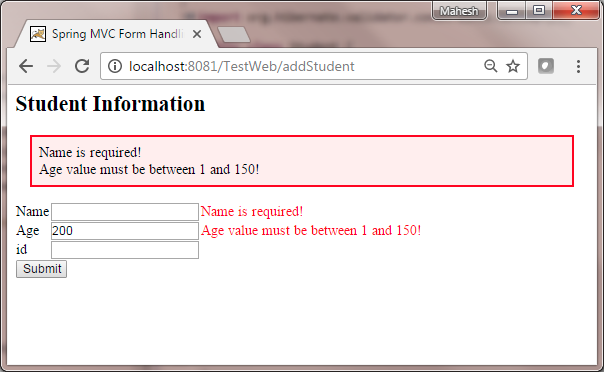
现在启动您的Tomcat服务器,并确保您可以使用标准浏览器从webapps文件夹访问其他网页。现在尝试URL http://localhost:8080/TestWeb/addStudent,如果输入了无效值,您应该会看到以下结果:
Maven示例:
https://github.com/easonjim/5_java_example/tree/master/springmvc/tutorialspoint/test26
Spring MVC-集成(Integration)-Hibernate验证器示例(转载实践)的更多相关文章
- Spring MVC(十四)--SpringMVC验证表单
在Spring MVC中提供了验证器可以进行服务端校验,所有的验证都必须先注册校验器,不过校验器也是Spring MVC自动加载的,在使用Spring MVC校验器之前首先要下载相关的jar包,下面是 ...
- spring mvc: Hibernate验证器(字段不能为空,在1-150自己)
spring mvc: Hibernate验证器(字段不能为空,在1-150自己) 准备: 下载Hibernate Validator库 - Hibernate Validator.解压缩hibern ...
- 通用后台管理系统(ExtJS 4.2 + Spring MVC 3.2 + Hibernate)
通用后台管理系统(ExtJS 4.2 +Spring MVC 3.2 + Hibernate) 开发语言JAVA 成品成品 前端技术extjs 数据库mysql,sql server,oracle 系 ...
- spring mvc集成freemarker使用
freemarker作为视图技术出现的比velocity早,想当年struts风靡一时,freemarker作为视图层也风光了一把.但现在velocity作为后起之秀的轻量级模板引擎,更容易得到青睐. ...
- spring mvc集成velocity使用
目前流行的三大页面视图神器是:老牌大哥jsp.后起之秀freemarker和velocity.这里不详细比较这三者的优劣,总体来说,jsp是标配,但后面两个更严格的执行了视图与业务的分离,页面里是不允 ...
- Spring MVC资源绑定视图解析器
ResourceBundleViewResolver使用属性文件中定义的视图bean来解析视图名称. 以下示例显示如何使用Spring Web MVC框架中的ResourceBundleViewRes ...
- spring mvc 集成freemarker模板
主要使用到的jar 文件:spring mvc +freemarker.jar 第一步:spring mvc 集成 freemarker <!-- 定义跳转的文件的前后缀 ,视图模式配置--&g ...
- Spring MVC集成slf4j-logback
转自: Spring MVC集成slf4j-logback 1. Spring MVC集成slf4j-log4j 关于slf4j和log4j的相关介绍和用法,网上有很多文章可供参考,但是关于logb ...
- Hibernate验证器
第 4 章 Hibernate验证器 http://hibernate.org/validator/documentation/getting-started/#applying-constrain ...
随机推荐
- Linux学习大纲
- Elasticsearch之CURL命令的mget查询
我这里, 再,创建一个zhouls2的索引库. [hadoop@master elasticsearch-]$ curl -XPUT 'http://master:9200/zhouls2/' {]$ ...
- Unity Android交互过坑指南
Unity Android交互过坑指南 介于网上看过很多unity和Android交互的教程,都或多或少的漏掉了一些部分,导致编译过程中出现各种问题,特此整理一份教程,仅供参考 介绍 本次实现的是在游 ...
- Android 微信网址分享添加网络图片
public static void share(String CustomEventData,String title,String titlle_detail,String imgUrl)thro ...
- JavaScript的相关知识
Oject.assign() // Cloning an object var obj = { a: 1 }; var copy = Object.assign({}, obj); conso ...
- mac中显示隐藏文件和.开头的文件
在控制台中执行一下命令,即可在finder中看到此类文件: defaults write com.apple.Finder AppleShowAllFiles YES killall Finder
- SQL基本操作——存储过程
存储过程类似于C#中的方法. --创建存储过程 create proc usp_TwoNumberAdd @num1 int, @num2 int as begin select @num1+@num ...
- eclipse安装python开发pydev插件
eclipse安装python开发pydev插件 下载eclipse的python开发插件pydev http://pan.baidu.com/s/1qXHt8pI 下载python.exe,并安装. ...
- 12、scala函数式编程集合
1.Scala的集合体系结构 2.List 3.LikedList 4.Set 5.集合的函数式编程 6.函数式编程综合案例:统计单词总数 1.Scala的集合体系结构 Scala中集合体系主要包括: ...
- 脚本添加删除nginx配置中的内容
[root@nodejs script]# more editnginx.sh #!/bin/bash # function back_check(){ # 备份配置和覆盖配置文件 cp -rf /e ...