
Mono.Cecil - 0.6
项目地址:Mono.Cecil
项目描述:In simple English, with Cecil, you can load existing managed assemblies, browse all the contained types, modify them on the fly and save back to the disk the modified assembly.
类似项目:Microsoft CCI
Common Compiler Infrastructure: Metadata API
Common Compiler Infrastructure: Code Model and AST API
Common Compiler Infrastructure: Sample applications
Common Compiler Infrastructure - Contrib
对比评价:来自StackOverflow
Mono.Cecil has better, more understandable and easy in use object model. However, I had an ugly bug when used it in my program (reference to the wrong method was saved in the assembly; I think there was some bug with metadata tokens handling)
Microsoft.CCI has an ugly, utterly over-designed object model in the same time lacking many simple features; however, it's more mature than Mono.Cecil. Finally, I abandoned Mono.Cecil and used Microsoft.CCI for my program.
基本示例
Cecil是对已编译生成IL的程序集进行操作,所以先写一个简单的Console exe程序,这里项目名称使用Cecil.Program:
using System;

using System.Reflection;

namespace Cecil.Program

{

    class Program

    {

        static void Main(string[] args)

        {

            TestType tt = new TestType();

            tt.SayHello();

            tt.AboutMe();

            Console.ReadKey();

        }

    }

    public class TestType

    {

        [Obsolete]

        public void SayHello()

        {

            Console.WriteLine("\tHello Cecil !");

        }

        public void AboutMe()

        {

            Type type = typeof(TestType);

            MethodInfo method = type.GetMethod("SayHello");

            if (method.IsVirtual)

                Console.WriteLine("\tI'm a virtual method");

            else

                Console.WriteLine("\tI'm a non-virtual method");

            object[] attributes = method.GetCustomAttributes(false);

            if (attributes != null && attributes.Length > 0)

            {

                Console.WriteLine("\tI have the following attributes:");

                foreach (object attr in attributes)

                    Console.WriteLine("\t\t" + attr.GetType().Name);

            }

        }

    }

}
这个程序集的运行结果如下:
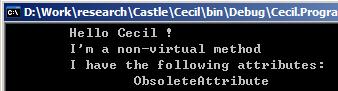
方法SayHello的IL代码如下:
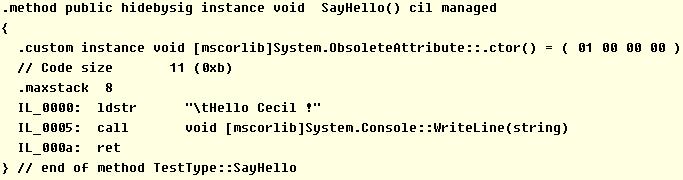
接下来使用另外一个Console exe程序来修改Cecil.Program.exe,项目名称使用Cecil:
using Mono.Cecil;

using Mono.Cecil.Cil;

AssemblyDefinition assembly = AssemblyFactory.GetAssembly("Cecil.Program.exe");

TypeDefinition type = assembly.MainModule.Types["Cecil.Program.TestType"];

MethodDefinition sayHello = null;

foreach (MethodDefinition md in type.Methods)

    if (md.Name == "SayHello") sayHello = md;

//Console.WriteLine(string value)方法

MethodInfo writeLine = typeof(Console).GetMethod("WriteLine"

    , new Type[] { typeof(string) });

//Console.WriteLine方法导入MainModule,并返回在AssemblyDefinition中的引用方式

MethodReference writeLineRef = assembly.MainModule.Import(writeLine);

//在SayHello方法开始位置插入一条trace语句

//  Console.WriteLine(">>Intercepting ");

//如果插入的语句需要使用函数入参,则必须插入在OpCodes.Ldarg等指令之后

CilWorker worker = sayHello.Body.CilWorker;

Instruction ldstr = worker.Create(OpCodes.Ldstr, ">>Intercepting " + sayHello.Name);

Instruction call = worker.Create(OpCodes.Call, writeLineRef);

Instruction first = sayHello.Body.Instructions[0];

worker.InsertBefore(first, call);

worker.InsertBefore(call, ldstr);

//在SayHello方法结束位置插入一条trace语句

//  Console.WriteLine(">>Intercepted ");

//语句必须插入在OpCodes.Ret指令的前面

int offset = sayHello.Body.Instructions.Count - 1;

Instruction last = sayHello.Body.Instructions[offset--];

while (last.OpCode == OpCodes.Nop || last.OpCode == OpCodes.Ret)

    last = sayHello.Body.Instructions[offset--];

ldstr = worker.Create(OpCodes.Ldstr, ">>Intercepted " + sayHello.Name);

worker.InsertAfter(last, ldstr);

worker.InsertAfter(ldstr, call);

//把SayHello方法改为虚方法

sayHello.IsVirtual = true;

//给SayHello方法添加一个SerializableAttribute

CustomAttribute attribute = new CustomAttribute(

    assembly.MainModule.Import(

        typeof(SerializableAttribute).GetConstructor(Type.EmptyTypes)

));

sayHello.CustomAttributes.Add(attribute);

AssemblyFactory.SaveAssembly(assembly, "Cecil.Program.modified.exe");

Console.WriteLine("Assembly modified successfully!");

Console.ReadKey();
编译生成Cecil.exe,然后把Cecil.Program.exe拷贝到这个目录下,运行Cecil.exe,便会在当前目录生成Cecil.Program.modified.exe,运行Cecil.Program.modified.exe结果如下:
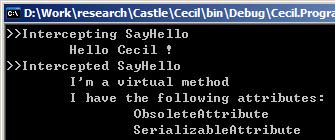
修改后的方法SayHello的IL代码如下:
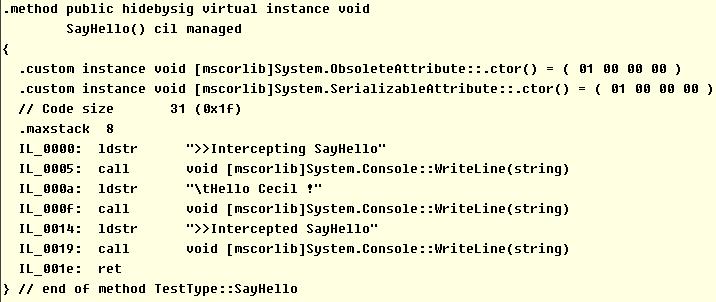
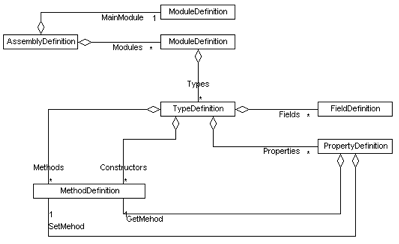
从上面的基本使用方法可以看出,Cecil的确是易于使用,对象模型结构非常实用,这里是官方网站的一个主要对象结构图:
IL指令的复杂性
在assembly、type、method级别上对程序集做修改是非常简单的,但是如果要修改方法体的IL代码,则可能会遇到一些较麻烦的事情,需要细致的处理
例如上面的SayHello方法如果是这样:
public void SayHello(bool print)

{

    if (print)

        Console.WriteLine("\tHello Cecil !");

}
测试代码这样来调用:
TestType2 tt2 = new TestType2();

tt2.SayHello(true);

tt2.SayHello(false);

Console.ReadKey();
其运行结果只会输出一条Hello Cecil !消息,仍然使用Cecil.exe来修改这个程序集,其运行结果如下图:
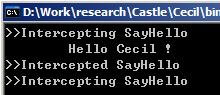
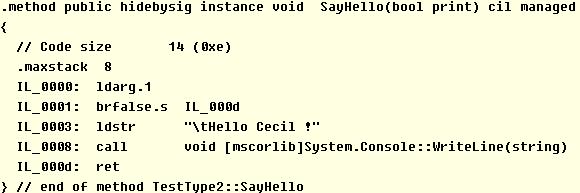
调用tt2.SayHello(false);时,应该也会有一个>>Intercepted SayHello消息,但是没有输出,对比一下IL代码就清楚了:
修改后的IL代码如下:
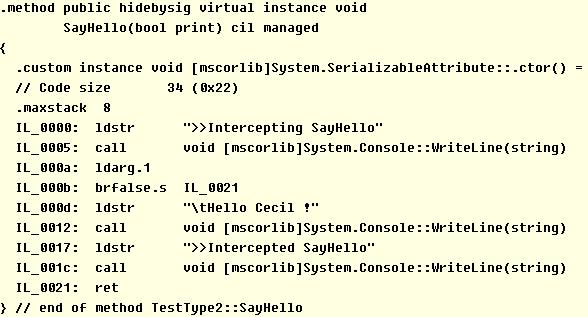
IL_000b那一句,为false时就直接跳转到IL_0021这个返回指令上了,不会输出Intercepted的消息
使用Mono.Cecil也可以修改这个跳转地址,例如:
//得到指令brfalse.s

Instruction jmp = sayHello.Body.Instructions[1];

....

//把跳转的目标地址改成IL_0017 ldstr指令位置

jmp.Operand = ldstr;
Mono.Cecil - 0.6的更多相关文章
- 运用Mono.Cecil 反射读取.NET程序集元数据
CLR自带的反射机智和API可以很轻松的读取.NET程序集信息,但是不能对程序集进行修改.CLR提供的是只读的API,但是开源项目Mono.Cecil不仅仅可以读取.NET程序集的元数据,还可以进行修 ...
- Mono.Cecil 初探(一):实现AOP
序言 本篇文章介绍基于Mono.Cecil实现静态AOP的两种方式:无交互AOP和交互式AOP. 概念介绍 Mono.Cecil:一个可加载并浏览现有程序集并进行动态修改并保存的.NET框架. AOP ...
- 基于Mono.Cecil的静态注入
Aop注入有2种方式:动态注入和静态注入,其中动态注入有很多实现了 动态注入有几种方式: 利用Remoting的ContextBoundObject或MarshalByRefObject. 动态代理( ...
- 使用Mono Cecil 动态获取运行时数据 (Atribute形式 进行注入 用于写Log) [此文报考 xxx is declared in another module and needs to be imported的解决方法]-摘自网络
目录 一:普通写法 二:注入定义 三:Weave函数 四:参数构造 五:业务编写 六:注入调用 7. 怎么调用别的程序集的方法示例 8. [is declared in another module ...
- 利用Mono.Cecil动态修改程序集来破解商业组件(仅用于研究学习)
原文 利用Mono.Cecil动态修改程序集来破解商业组件(仅用于研究学习) Mono.Cecil是一个强大的MSIL的注入工具,利用它可以实现动态创建程序集,也可以实现拦截器横向切入动态方法,甚至还 ...
- 教你怎么用Mono Cecil - 动态注入 (注意代码的注释)
原文 教你怎么用Mono Cecil - 动态注入 (注意代码的注释) 使用 Mono Cecil 进行反编译:using Mono.Cecil; using Mono.Cecil.Cil; //.. ...
- Add a try-catch with Mono Cecil
Adding exception handlers with Mono.Cecil is not difficult, it just requires you to know how excepti ...
- Mono 4.0 Mac上运行asp.net mvc 5.2.3
Mono 4.0 已经发布,二进制包已经准备好,具体的发布说明参见:http://www.mono-project.com/docs/about-mono/releases/4.0.0/. 今天在Ma ...
- Mono 3.0.12 支持可移植类库
Mono 3.0.12已于6月19日发布.对跨平台开发者而言,对可移植类库的支持可能是该版本最重要的变化.该技术可以使一个DLL支持.NET.Windows Store.Windows Phone.S ...
随机推荐
- python request get
import requests from urllib import parse # 返回response resp = requests.get("https://www.baidu.co ...
- 【28.57%】【codeforces 711E】ZS and The Birthday Paradox
time limit per test2 seconds memory limit per test256 megabytes inputstandard input outputstandard o ...
- C# Color结构的各属性颜色对照表(转)
转自:http://blog.sina.com.cn/s/blog_454dc49501016q2p.html Color.AliceBlue 240,248,255 Color.LightSalmo ...
- 关闭Wind XP/Vista/Win7的DEP数据执行保护汇总(转)
数据执行保护 (DEP) 是一种Windows安全机制,从Windows版本顺序上看是从Windows XP SP2开始引入,通过监视程序以确保它们使用的系统内存是安全的,帮助防止操作系统受到病毒和其 ...
- Optimizing concurrent accesses in a directory-based coherency protocol
In one embodiment, the present invention includes a directory to aid in maintaining control of a cac ...
- onload 事件
定义和用法 onload 事件会在页面或图像加载完成后立即发生. 语法 onload="SomeJavaScriptCode" 参数 描述 SomeJavaScriptCode 必 ...
- 「两」创建一个带 ssh 镜座服务(修订版)--采用 Dockerfile 创
创建目录 首先,创建一个叫做 sshd_ubuntu 的目录,用于存放我们的 Dockerfile .脚本文件.以及其它文件. $ mkdir sshd_ubuntu $ ls sshd_ubuntu ...
- Linux Sed技巧
删除行首空格 sed 's/^[ ]*//g' filename sed 's/^*//g' filename sed 's/^[[:space:]]*//g' filename 匹配行前或后添加空白 ...
- Virtualization of iSCSI storage
This invention describes methods, apparatus and systems for virtualization of iSCSI storage. Virtual ...
- 重设windows10中的sub linux系统用户密码
原文:重设windows10中的sub linux系统用户密码 版权声明:本文为博主原创文章,转载请注明出处. https://blog.csdn.net/haiyoung/article/detai ...