
WPF使用DynamicDataDisplay.dll显示CPU及内存使用曲线
原文:WPF使用DynamicDataDisplay.dll显示CPU及内存使用曲线
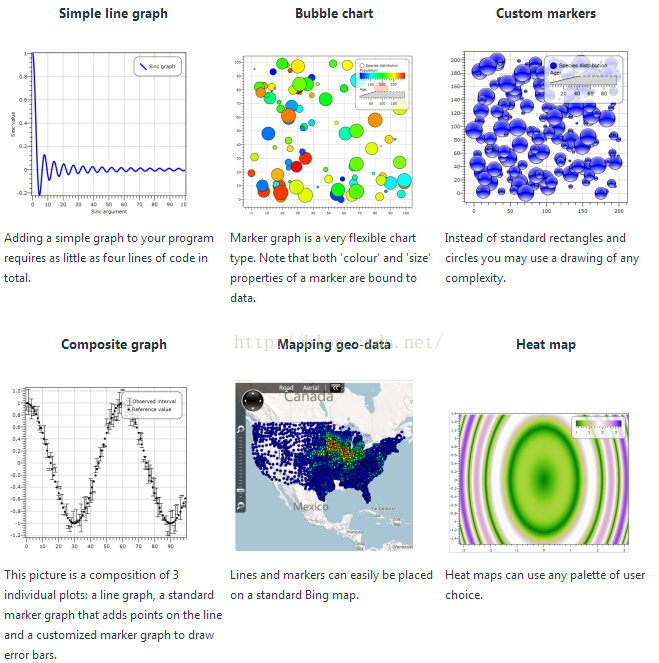
DynamicDataDisplay.dll是一个添加动态数据到您的Silverlight或WPF应用程序交互的可视化控件。它允许创建线图,气泡图,热图和其他复杂的二维图,这是非常常见的科学软件。
DynamicDataDisplay sample charts:
下载地址如下:
http://dynamicdatadisplay.codeplex.com/
首先创建一个WPF工程,在引用上右键选择“添加引用”,找到下载好的DynamicDataDisplay.dll;
其次在.cs文件中加入引用集:
using Microsoft.Research.DynamicDataDisplay;

using Microsoft.Research.DynamicDataDisplay.DataSources;
private ObservableDataSource dataSource = new ObservableDataSource(); // 动态存储图表坐标点
private PerformanceCounter cpuPerformance = new PerformanceCounter(); //表示Windows NT的性能组件
private DispatcherTimer timer = new DispatcherTimer();//创建一个定时器
定义一个函数用于获取CPU和内存的数据:
private void AnimatedPlot(object sender, EventArgs e)
{
cpuPerformance.CategoryName = "Processor";
cpuPerformance.CounterName = "% Processor Time";
cpuPerformance.InstanceName = "_Total";
double
x = i;
//调试的时候,无法调用NextValue()函数,需要把y赋一个固定的值
double y = cpuPerformance.NextValue();
if (maxCpu < y)
{
maxCpu = y;
}
//double y = 12;
double MemoryUse = Process.GetCurrentProcess().PrivateMemorySize64 / 1024.0 / 1024.0;
//获取使用内存
Point point = new Point(x, y);
dataSource.AppendAsync(base.Dispatcher, point);
cpuUsageText.Text
= String.Format("{0:0}%", y); //cpuUsageText为TextBlock控件,显示CPU使用率
cpuMaxText.Text = String.Format("{0:0}%", maxCpu);//cpuMaxText为TextBlock控件,显示CPU最大使用率
memoryUsageText.Text = MemoryUse.ToString("F02");//memoryUsageText为TextBlock控件,显示占用内存大小
i++;
}
注意:在VS调试代码的过程中,NextValue()函数会报错!!需要将y赋值为常数。
接下来就是显示图像了:
public void StartCpuShow()
{
plotter.AddLineGraph(dataSource, Colors.Green, 2, "Percentage"); //设置图像中线的相关信息
timer.Interval = TimeSpan.FromSeconds(1);
timer.Tick += new EventHandler(AnimatedPlot);
timer.IsEnabled = true; plotter.Viewport.FitToView();
}
在xaml文件中添加命名空间:
xmlns:d3="http://research.microsoft.com/DynamicDataDisplay/1.0"
通过<d3:ChartPlotter> 创建一个图表框架;
在其中添加两条整型坐标轴:
X轴:<d3:HorizontalIntegerAxis>
Y轴:<d3:VerticalIntegerAxis>
<d3:Header> 用来设置图表名称
<d3:VerticalAxisTitle> 用来设置Y轴名称。
<d3:ChartPlotter
x:Name="plotter" Margin="10,10,33,10" Grid.Row="1" Background="Transparent" Foreground="#FF00DBE7">
<d3:ChartPlotter.VerticalAxis>
<d3:VerticalIntegerAxis
Foreground="#FF00DBE7"/>
</d3:ChartPlotter.VerticalAxis>
<d3:ChartPlotter.HorizontalAxis
>
<d3:HorizontalIntegerAxis
Foreground="#FF00DBE7"/>
</d3:ChartPlotter.HorizontalAxis>
<d3:Header
Content="CPU Performance History" Foreground="#FF00DBE7"/>
</d3:ChartPlotter>
最后需要注意的是,很多系统无法运行该程序。注意是需要重建性能计数器才可以使用查看CPU等功能
重建方法如下:
运行cmd 命令行
输入 lodctr/R
等待重建性能计数器
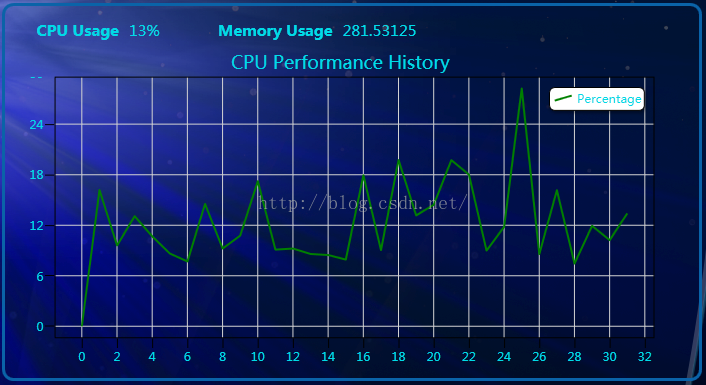
最后上效果图:
如有疑问 wangshubo1989@126.com
WPF使用DynamicDataDisplay.dll显示CPU及内存使用曲线的更多相关文章
- lunix脚本进程挂掉时显示cpu和内存信息及挂掉的时间
#!/bin/shwhile [ true ]; do #查询是否有8899正在运行的进程netstat -an|grep 8899if [ $? -ne 0 ]thennowtime=$(date ...
- Ubuntu 16.04 标题栏实时显示上下行网速、CPU及内存使用率--indicator-sysmonitor
---------------------------------------------------------------------------- 原文地址:http://blog.csdn.N ...
- Ubuntu 16.04 标题栏实时显示上下行网速、CPU及内存使用率
有时感觉网络失去响应,就通过Ubuntu 14.04自带的系统监视器程序来查看当前网速,但是这样很不方便,遂打算让网速显示在标题栏,那样就随时可直观的看到.一番搜索尝试后,成功实现!同时也实现了CPU ...
- 用户登陆显示cpu、负载、内存信息
#用户登陆显示cpu.负载.内存信息 #!/bin/bash # hostip=`ifconfig eth0 |awk -F" +|:" '/Bcast/{print $4}'` ...
- iOS开发 - 在状态栏显示FPS,CPU和内存信息
原理 FPS的计算 CoreAnimation有一个很好用的类CADisplayLink,这个类会在每一帧绘制之前调用,并且可以获取时间戳.于是,我们只要统计出,在1s内的帧数即可. - (void) ...
- CPU与内存的那些事
下面是网上看到的一些关于内存和CPU方面的一些很不错的文章. 整理如下: 转: CPU的等待有多久? 原文标题:What Your Computer Does While You Wait 原文地址: ...
- 转:CPU与内存的那些事
下面是网上看到的一些关于内存和CPU方面的一些很不错的文章. 整理如下: 转: CPU的等待有多久? 原文标题:What Your Computer Does While You Wait 原文地址: ...
- CPU与内存(经典问答)
原文:http://www.cnblogs.com/xkfz007/archive/2012/10/08/2715163.html 下面是网上看到的一些关于内存和CPU方面的一些很不错的文章. 整理如 ...
- 【转】CPU与内存的那些事
下面是网上看到的一些关于内存和CPU方面的一些很不错的文章. 整理如下: 转: CPU的等待有多久? 原文标题:What Your Computer Does While You Wait 原文地址: ...
随机推荐
- Java中关键字throw和throws的区别
==========================================题外话===================================================== 今 ...
- 自己写的关于生产者与消费者模式,还有定时任务的demo
为了加深对生产者消费者模式的理解,特意写了这个demo,里面还包含了一个自己写的定时任务.代码下载地址:http://download.csdn.net/detail/li_yan_fei/98115 ...
- [Http] Understand what an HTTP Request is
Let's look at several HTTP requests to learn the basic structure of these messages, and how the vari ...
- libevent源码分析-介绍、安装、使用
Libevent介绍 安装 样例 Libevent介绍 在include\event2\event.h中有关于Libevent的介绍,这里简单翻译介绍一下: Libevent是以事件为驱动的开发可扩展 ...
- 自定义控件三部曲之动画篇(一)——alpha、scale、translate、rotate、set的xml属性及用法
前言:这几天做客户回访,感触很大,用户只要是留反馈信息,总是一种恨铁不成钢的心态,想用你的app,却是因为你的技术问题,让他们不得不放弃,而你一个回访电话却让他们尽释前嫌,当最后把手机号留给他们以便随 ...
- js,jquery遍历数组,对象
each的用法 1.数组中的each 复制代码 var arr = [ "one", "two", "three", "four ...
- 在ArcEngine中使用Geoprocessing工具-执行工具
转自原文在ArcEngine中使用Geoprocessing工具-执行工具 来解析一下Geoprocessor类的Execute方法,他有两种重载,Execute(IGPProcess, ITrack ...
- [Compose] 12. Two rules about Funtors
We learn the formal definition of a functor and look at the laws they obey. Any Functor should follo ...
- iOS writeTofile 和对象的序列化
前言:做了一个图片浏览的小demo,支持随意添加.删除图片,图片放大.缩小,带矩形框的截图.随后几篇博客都会详细讲解在此过程中遇到的各种问题.这篇主要讲,在做添加.删除这个功能时,遇到的存文件的问题. ...
- js中的style与jQuery中的css
使用jQuery选择器时,可以直接使用css函数(注意不能使用$("p")[1].css()) $("p").css("background-colo ...