
Swing-JList选择事件监听器ListSelectionListener-入门
当JList中的元素被选中时,选择事件将被触发。对于JTable也是一样,你可以把它看做是多个并列的JList。那么,如果程序需要对该事件做出响应,需要以下步骤:
(1)创建一个实现了 ListSelectionListener的监听器;
(2)使用JList或selectionModel的addListSelectionListener添加监听器;
(3)在监听器的valueChanged方法添加响应代码。
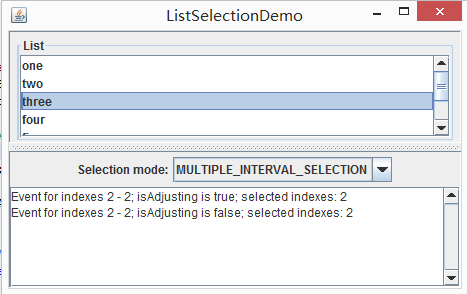
在响应代码中需要注意的是getValueIsAdjusting值的判断。测试表明,每当我们进行选择时,valueChanged方法都会被激活多次,其中,在最后的鼠标操作中,getValueIsAdjusting值为false,而在一系列中间操作中,该值均为true。比如说,用鼠标连续划过一串元素时,会有一系列getValueIsAdjusting为true的valueChanged方法激活,且最后一次为false。而我们对选择事件的判定一般是以最后接触为准,因此这里对getValueIsAdjusting值进行一个判断。
常用方法如下:
getLeadSelectionIndex()
返回当前选中的元素的index。
getMinSelectionIndex()
返回选中的多个元素中index的最小值,如果选择为空在返回-1。
getMaxSelectionIndex()
原理同上。
isSelectedIndex(int index)
判断指定index是否被选中。
clearSelection()
清除选中。
getSelectedIndex()
返回被选中的所有元素中最小的index。
getSelectedIndices()
返回一个整型数组,包含被选中的所有index。
getSelectedValue()
返回被选中的,index最小的元素值。
getSelectedValues()
返回一个object数组,包含被选中的所有元素对象。
getSelectedValuesList()
返回一个objectList,包含被选中的所有元素对象。
下面的demo来自于ListSelectionDemo.java
/*

 * Copyright (c) 1995, 2008, Oracle and/or its affiliates. All rights reserved.

 *

 * Redistribution and use in source and binary forms, with or without

 * modification, are permitted provided that the following conditions

 * are met:

 *

 *   - Redistributions of source code must retain the above copyright

 *     notice, this list of conditions and the following disclaimer.

 *

 *   - Redistributions in binary form must reproduce the above copyright

 *     notice, this list of conditions and the following disclaimer in the

 *     documentation and/or other materials provided with the distribution.

 *

 *   - Neither the name of Oracle or the names of its

 *     contributors may be used to endorse or promote products derived

 *     from this software without specific prior written permission.

 *

 * THIS SOFTWARE IS PROVIDED BY THE COPYRIGHT HOLDERS AND CONTRIBUTORS "AS

 * IS" AND ANY EXPRESS OR IMPLIED WARRANTIES, INCLUDING, BUT NOT LIMITED TO,

 * THE IMPLIED WARRANTIES OF MERCHANTABILITY AND FITNESS FOR A PARTICULAR

 * PURPOSE ARE DISCLAIMED.  IN NO EVENT SHALL THE COPYRIGHT OWNER OR

 * CONTRIBUTORS BE LIABLE FOR ANY DIRECT, INDIRECT, INCIDENTAL, SPECIAL,

 * EXEMPLARY, OR CONSEQUENTIAL DAMAGES (INCLUDING, BUT NOT LIMITED TO,

 * PROCUREMENT OF SUBSTITUTE GOODS OR SERVICES; LOSS OF USE, DATA, OR

 * PROFITS; OR BUSINESS INTERRUPTION) HOWEVER CAUSED AND ON ANY THEORY OF

 * LIABILITY, WHETHER IN CONTRACT, STRICT LIABILITY, OR TORT (INCLUDING

 * NEGLIGENCE OR OTHERWISE) ARISING IN ANY WAY OUT OF THE USE OF THIS

 * SOFTWARE, EVEN IF ADVISED OF THE POSSIBILITY OF SUCH DAMAGE.

 */

package Swing;

/*

 * ListSelectionDemo.java requires no other files.

 */

import javax.swing.*;

import javax.swing.event.*;

import javax.swing.table.*;

import java.util.*;

import java.awt.*;

import java.awt.event.*;

public class ListSelectionDemo extends JPanel {

    JTextArea output;

    JList list;

    JTable table;

    String newline = "\n";

    ListSelectionModel listSelectionModel;

    public ListSelectionDemo() {

        super(new BorderLayout());

        String[] listData = { "one", "two", "three", "four",

                              "five", "six", "seven" };

        String[] columnNames = { "French", "Spanish", "Italian" };

        list = new JList(listData);

        listSelectionModel = list.getSelectionModel();

        listSelectionModel.addListSelectionListener(

                new SharedListSelectionHandler());

        JScrollPane listPane = new JScrollPane(list);

        JPanel controlPane = new JPanel();

        String[] modes = { "SINGLE_SELECTION",

                           "SINGLE_INTERVAL_SELECTION",

                           "MULTIPLE_INTERVAL_SELECTION" };

        final JComboBox comboBox = new JComboBox(modes);

        comboBox.setSelectedIndex(2);

        comboBox.addActionListener(new ActionListener() {

            public void actionPerformed(ActionEvent e) {

                String newMode = (String)comboBox.getSelectedItem();

                if (newMode.equals("SINGLE_SELECTION")) {

                    listSelectionModel.setSelectionMode(

                        ListSelectionModel.SINGLE_SELECTION);

                } else if (newMode.equals("SINGLE_INTERVAL_SELECTION")) {

                    listSelectionModel.setSelectionMode(

                        ListSelectionModel.SINGLE_INTERVAL_SELECTION);

                } else {

                    listSelectionModel.setSelectionMode(

                        ListSelectionModel.MULTIPLE_INTERVAL_SELECTION);

                }

                output.append("----------"

                              + "Mode: " + newMode

                              + "----------" + newline);

            }

        });

        controlPane.add(new JLabel("Selection mode:"));

        controlPane.add(comboBox);

        //Build output area.

        output = new JTextArea(1, 10);

        output.setEditable(false);

        JScrollPane outputPane = new JScrollPane(output,

                         ScrollPaneConstants.VERTICAL_SCROLLBAR_ALWAYS,

                         ScrollPaneConstants.HORIZONTAL_SCROLLBAR_AS_NEEDED);

        //Do the layout.

        JSplitPane splitPane = new JSplitPane(JSplitPane.VERTICAL_SPLIT);

        add(splitPane, BorderLayout.CENTER);

        JPanel topHalf = new JPanel();

        topHalf.setLayout(new BoxLayout(topHalf, BoxLayout.LINE_AXIS));

        JPanel listContainer = new JPanel(new GridLayout(1,1));

        listContainer.setBorder(BorderFactory.createTitledBorder(

                                                "List"));

        listContainer.add(listPane);

    topHalf.setBorder(BorderFactory.createEmptyBorder(5,5,0,5));

        topHalf.add(listContainer);

        //topHalf.add(tableContainer);

        topHalf.setMinimumSize(new Dimension(100, 50));

        topHalf.setPreferredSize(new Dimension(100, 110));

        splitPane.add(topHalf);

        JPanel bottomHalf = new JPanel(new BorderLayout());

        bottomHalf.add(controlPane, BorderLayout.PAGE_START);

        bottomHalf.add(outputPane, BorderLayout.CENTER);

        //XXX: next line needed if bottomHalf is a scroll pane:

        //bottomHalf.setMinimumSize(new Dimension(400, 50));

        bottomHalf.setPreferredSize(new Dimension(450, 135));

        splitPane.add(bottomHalf);

    }

    /**

     * Create the GUI and show it.  For thread safety,

     * this method should be invoked from the

     * event-dispatching thread.

     */

    private static void createAndShowGUI() {

        //Create and set up the window.

        JFrame frame = new JFrame("ListSelectionDemo");

        frame.setDefaultCloseOperation(JFrame.EXIT_ON_CLOSE);

        //Create and set up the content pane.

        ListSelectionDemo demo = new ListSelectionDemo();

        demo.setOpaque(true);

        frame.setContentPane(demo);

        //Display the window.

        frame.pack();

        frame.setVisible(true);

    }

    public static void main(String[] args) {

        //Schedule a job for the event-dispatching thread:

        //creating and showing this application's GUI.

        javax.swing.SwingUtilities.invokeLater(new Runnable() {

            public void run() {

                createAndShowGUI();

            }

        });

    }

    class SharedListSelectionHandler implements ListSelectionListener {

        public void valueChanged(ListSelectionEvent e) {

            ListSelectionModel lsm = (ListSelectionModel)e.getSource();

            //System.out.printf("LeadSelectionIndex is %s%n",lsm.getLeadSelectionIndex());

            output.append("LeadSelectionIndex is " + lsm.getLeadSelectionIndex() + "\n");

            int firstIndex = e.getFirstIndex();

            int lastIndex = e.getLastIndex();

            boolean isAdjusting = e.getValueIsAdjusting();

            output.append("Event for indexes "

                          + firstIndex + " - " + lastIndex

                          + "; isAdjusting is " + isAdjusting

                          + "; selected indexes:");

            if (lsm.isSelectionEmpty()) {

                output.append(" <none>");

            } else {

                // Find out which indexes are selected.

                int minIndex = lsm.getMinSelectionIndex();

                int maxIndex = lsm.getMaxSelectionIndex();

                for (int i = minIndex; i <= maxIndex; i++) {

                    if (lsm.isSelectedIndex(i)) {

                        output.append(" " + i);

                    }

                }

            }

            output.append(newline);

            output.setCaretPosition(output.getDocument().getLength());

        }

    }

}
Swing-JList选择事件监听器ListSelectionListener-入门的更多相关文章
- 第13章 Swing程序设计----常用事件监听器
组件本身并不带有任何功能.这时需要为这些组件添加特定事件监听器. Swing中常用的两个事件监听器,即动作事件监听器和焦点事件监听器.
- 【Swing】理解Swing中的事件与线程
talk is cheap , show me the code. Swing中的事件 事件驱动 所有的GUI程序都是事件驱动的.Swing当然也是. GUI程序不同于Command Line程序,一 ...
- Java基础之处理事件——实现低级事件监听器(Sketcher 2 implementing a low-level listener)
控制台程序. 定义事件监听器的类必须实现监听器接口.所有的事件监听器接口都扩展了java.util.EventListener接口.这个接口没有声明任何方法,仅仅用于表示监听器对象.使用EventLi ...
- Hibernate拦截器(Interceptor)与事件监听器(Listener)
拦截器(Intercept):与Struts2的拦截器机制基本一样,都是一个操作穿过一层层拦截器,每穿过一个拦截器就会触发相应拦截器的事件做预处理或善后处理. 监听器(Listener):其实功能与拦 ...
- 以JTextPanel为例Swing的鼠标事件详解
如下界面可以通过该界面研究一下Swing的鼠标事件: 图中用红粗线圈起来的为JtextPanel,该Panel添加了鼠标事件监听器,鼠标事件监听器有三种,分别为MouseWheelListener,M ...
- [转]Java事件处理机制- 事件监听器的四种实现方式
原文来自http://stefan321.iteye.com/blog/345221 自身类作为事件监听器 外部类作为事件监听器 匿名内部类作为事件监听器 内部类作为事件监听器 自身类作为事件监听器: ...
- Java事件监听器的四种实现方式
自身类作为事件监听器 外部类作为事件监听器 匿名内部类作为事件监听器 内部类作为事件监听器 自身类作为事件监听器: import javax.swing.*; import java.awt.*; i ...
- Java事件处理机制- 事件监听器的四种实现方式
自身类作为事件监听器 外部类作为事件监听器 匿名内部类作为事件监听器 内部类作为事件监听器 自身类作为事件监听器: import javax.swing.*; import java.awt.*; i ...
- 【转】转帖并注释:Java中的事件处理机制--事件监听器的四种实现方式
原文地址:http://blog.sina.com.cn/s/blog_4b650d650100nqws.html Java中四种事件监听器的实现方式分别为: 自身类做为事件监听器 外部类作为事件监听 ...
随机推荐
- 53. Maximum Subarray【leetcode】
53. Maximum Subarray[leetcode] Find the contiguous subarray within an array (containing at least one ...
- Loadrunner常见错误处理方法
1.错误 -26601: 解压缩函数(wgzMemDecompressBuffer)失败,返回代码=-5 (Z_BUF_ERROR).inSize=0.inUse=0.outUse=0 用LR做压力测 ...
- cornerstone 使用报错 working copy ... is too old(format 10 created by subversion 1.6)
1.....本来正常使用的cornerstone 突然出现这个问题 图片如下 2....解决方案,,,,也搜集了方法,,但是最后竟然就这样解决了,,完全搞不懂的解决方案啊 如图 3......如有错误 ...
- C++新建Dialog程序
1.新建: IDE VS2013 新建项目|C++|MFC,选择“基于对话框” 2.为Dialog添加类 在Dialog(界面)上右键,选择“添加类”,然后再弹出界面输入类名即可. 为什么要添加类? ...
- 开源一款iOS中国地图行政区控件(含一级与二级行政区)
开源一款iOS版中国省市级地图行政区的控件,该组件可以支持拖动.缩放以及全国省和市级行政区的点选,主要适用于iPad,如果要在iPhone上使用,一些细节可能得做相关调整. 该地图组件实现起来不难,数 ...
- 音频软件开发中的debug方法和工具
本文系作者原创.如转载,请注明出处. 谢谢! 音频软件开发同其他软件开发一样,都需要去调试.音频软件调试同其他软件调试方法有相同的地方,也有不同的地方,同时调试时还需要借助一些专门的工具,有了这些方法 ...
- iOS绘图框架CoreGraphics分析
由于CoreGraphics框架有太多的API,对于初次接触或者对该框架不是十分了解的人,在绘图时,对API的选择会感到有些迷茫,甚至会觉得iOS的图形绘制有些繁琐.因此,本文主要介绍一下iOS的绘图 ...
- php基础。php与js的不同
1 . PHP拼字符串用的是点. js用+号. 2. php文件要放在wamp文件里面的www里面. 3. php与js的嵌入方式相同,只是嵌入的标记不一样. 4. php输出语法用echo.可 ...
- 编译器报错:'IHTMLControlElement' : redefinition
由于我安装了platform SDK,编译导致错误: error C2367: 'IHTMLControlElement' : redefinition; different uuid specifi ...
- Tuple元组 C#
使用元组, 一些简单的结构或对象就不需要新建一个类了. https://msdn.microsoft.com/zh-cn/library/system.tuple.aspx