
Java-Properties用法-入门
对于应用程序的配置,通常的做法是将其保存在独立的配置文件中,程序启动时加载,修改时保存。Java中Properties类就提供了这样一种机制,配置项以Key-Value的数据结构存储在文本文件中,扩展名为".properties"。Properties的用法很简单,使用load(FileInputStream in)进行读取;使用getProperty(String key)来读取键值;使用put(String key, String value)添加键值对,使用store(FileOutputStream out)方法进行保存。
有时,配置文件只存储了关键项目,其余参数并没有存储在文件中,调用时需要给一个默认值。对于这种情况,Properties提供了两种解决办法:
(1)getProperty(String key, String defaultValue) 当指定key不存在时,返回默认值。
(2)Properties(Properties defaultProperties) 使用默认Properties进行构造,则defaultProperties提供了所有的默认值。
示例代码如下:
PropertiesDemo.java
package ConfigByPropertiesDemo;

import java.awt.event.ActionEvent;

import java.awt.event.ActionListener;

import java.io.File;

import java.io.IOException;

import java.util.Properties;

import javax.swing.*;

/*

 * 功能:演示Properties的用法,实现JFrame窗体参数的设置和恢复

 * 版本:20150805

 * 结构:PropertiesDemo[主窗体],PreferencesDialog,PropertiesHelper

 */

public class PropertiesDemo extends JFrame {

    private String configDir;//配置文件目录

    private File configPropertiesFile;//配置文件

    private Properties configProperties;//配置内容

    public PropertiesDemo() {

        // 加载配置

        loadSettings();

        // 设置窗体属性

        initFrame();

    }

    public void loadSettings() {

        /*

         * 如果配置文件不存在,则加载默认配置

         */

        // 获取当前用户主目录

        String userDir = System.getProperty("user.home");

        //config路径如果不存在则新建

        configDir = userDir + "\\config";

        File configDirFile = new File(configDir);

        if (!configDirFile.exists()) {

            configDirFile.mkdirs();

        }

        // 如果配置文件不存在,则配置内容由默认配置文件导入

        configPropertiesFile = new File(configDir + "\\config.properties");

        if (configPropertiesFile.exists()) {

            configProperties = PropertiesHelper.loadProperties(configPropertiesFile);

        } else {

            try {

                configPropertiesFile.createNewFile();

                configProperties = loadDefaultConfig();//生成默认配置并装载

                storeConfigProperties();//保存配置

            } catch (IOException e) {

                // TODO Auto-generated catch block

                e.printStackTrace();

            }

        }

    }

    public void updateConfigProperties(String key, String value){

        /*

         * 功能:更新configProperties的内容

         */

        if(configProperties.containsKey(key)){

            configProperties.setProperty(key, value);

        }

        else {

            configProperties.put(key, value);

        }

    }

    public String getConfigPropertiesValue(String key){

        /*

         * 功能:根据key获取configProperties中对应的value

         */

        return configProperties.getProperty(key);

    }

    public void storeConfigProperties() {

        //保存配置文件

        PropertiesHelper.storeProperties(configProperties, configPropertiesFile, "main properties");

    }

    private Properties loadDefaultConfig() {

        /*

         * 加载默认配置

         */

        Properties defaultConfig = new Properties();

            defaultConfig.put("left", "0");

            defaultConfig.put("top", "0");

            defaultConfig.put("width", "300");

            defaultConfig.put("height", "200");

        return defaultConfig;

    }

    public void restoreDefaultConfig() {

        /*

         * 恢复默认配置

         */

        configProperties = loadDefaultConfig();

    }

    public void initFrame() {

        int left = Integer.parseInt(configProperties.getProperty("left"));

        int top = Integer.parseInt(configProperties.getProperty("top"));

        int width = Integer.parseInt(configProperties.getProperty("width"));

        int height = Integer.parseInt(configProperties.getProperty("height"));

        String title = configProperties.getProperty("title", "default title");//如果不存在则取默认值

        JMenuBar menubar = new JMenuBar();

        JMenu windowMenu = new JMenu("Window");

        windowMenu.setMnemonic('W');

        JMenuItem preferencesItem = new JMenuItem("Preferences");

        preferencesItem.setMnemonic('P');

        preferencesItem.addActionListener(new ActionListener() {

            @Override

            public void actionPerformed(ActionEvent e) {

                // TODO Auto-generated method stub

                PreferencesDialog optionsDialog = new PreferencesDialog(PropertiesDemo.this);

                optionsDialog.setVisible(true);

            }

        });

        setJMenuBar(menubar);

        menubar.add(windowMenu);

        windowMenu.add(preferencesItem);

        setBounds(left, top, width, height);

        setTitle(title);

        setDefaultCloseOperation(EXIT_ON_CLOSE);

    }

    public String getConfigDir() {

        return configDir;

    }

    public static void main(String[] args) {

        // TODO Auto-generated method stub

        PropertiesDemo propertiesDemo = new PropertiesDemo();

        propertiesDemo.setVisible(true);

    }

}
PreferencesDialog.java
package ConfigByPropertiesDemo;

import java.awt.*;

import java.awt.event.*;

import javax.swing.*;

/*

 * @功能:修改配置对话框

 * @版本:20150805

 */

class PreferencesDialog extends JDialog{

    PropertiesDemo propertiesDemo;//父窗体

    private JTextField xField;

    private JTextField yField;

    private JTextField widthField;

    private JTextField heightField;

    private JTextField titleField;

    private JButton saveButton ;//保存

    private JButton cancelButton ;//取消

    private JButton restoreDefaultsButton ;//恢复默认

    public PreferencesDialog(PropertiesDemo parent){

        super(parent, true);

        propertiesDemo = parent;

        //提取主配置信息,作为控件的默认值

        String  xPosition = propertiesDemo.getConfigPropertiesValue("left");

        String  yPosition = propertiesDemo.getConfigPropertiesValue("top");

        String width = propertiesDemo.getConfigPropertiesValue("width");

        String height = propertiesDemo.getConfigPropertiesValue("height");

        String title = propertiesDemo.getConfigPropertiesValue("title");

        //本UI包含2个panel

        JPanel inputPanel = new JPanel();

        JPanel buttonPanel = new JPanel();

        //构造inputPanel

        inputPanel.setLayout(new GridLayout());

        inputPanel.add(new JLabel("xPosition:"));

        xField = (JTextField) inputPanel.add(new JTextField(xPosition));

        inputPanel.add(inputPanel.add(new JLabel("yPosition:")));

        yField = (JTextField) inputPanel.add(new JTextField(yPosition));

        inputPanel.add(inputPanel.add(new JLabel("witdh:")));

        widthField = (JTextField) inputPanel.add(new JTextField(width));

        inputPanel.add(inputPanel.add(new JLabel("height:")));

        heightField = (JTextField) inputPanel.add(new JTextField(height));

        inputPanel.add(inputPanel.add(new JLabel("title:")));

        titleField = (JTextField) inputPanel.add(new JTextField(title));

        inputPanel.setBorder(BorderFactory.createEmptyBorder(10, 5, 10, 5));

        //构造buttonPanel

        saveButton = new JButton("save");

        saveButton.addActionListener(new ActionListener() {

            @Override

            public void actionPerformed(ActionEvent e) {

                propertiesDemo.updateConfigProperties("left", xField.getText().trim());

                propertiesDemo.updateConfigProperties("top", yField.getText().trim());

                propertiesDemo.updateConfigProperties("width",widthField.getText().trim());

                propertiesDemo.updateConfigProperties("height",heightField.getText().trim());

                propertiesDemo.updateConfigProperties("title",titleField.getText().trim());

                propertiesDemo.storeConfigProperties();//保存默认配置

                JOptionPane.showMessageDialog(null, "保存成功");

                setVisible(false);

                //更新主窗体

                propertiesDemo.initFrame();

                propertiesDemo.validate();

            }

        });

        restoreDefaultsButton = new JButton("restore defaults");

        restoreDefaultsButton.addActionListener(new ActionListener() {

            @Override

            public void actionPerformed(ActionEvent e) {

                propertiesDemo.restoreDefaultConfig();

                propertiesDemo.storeConfigProperties();

                JOptionPane.showMessageDialog(null, "恢复成功");

                setVisible(false);

                propertiesDemo.initFrame();

                propertiesDemo.validate();

            }

        });

        cancelButton = new JButton("Cancel");

        cancelButton.addActionListener(new ActionListener() {

            @Override

            public void actionPerformed(ActionEvent e) {

                // TODO Auto-generated method stub

                setVisible(false);

            }

        });

        buttonPanel.add(restoreDefaultsButton);

        buttonPanel.add(saveButton);

        buttonPanel.add(cancelButton);

        buttonPanel.setBorder(BorderFactory.createEmptyBorder(10, 5, 10, 5));

        //构造主框架

        getContentPane().setLayout(new BorderLayout());

        getContentPane().add(inputPanel, BorderLayout.CENTER);

        getContentPane().add(buttonPanel, BorderLayout.SOUTH);

        //设置窗体属性

        setTitle("更改主窗体配置");

        setLocationRelativeTo(inputPanel);

        setDefaultCloseOperation(DISPOSE_ON_CLOSE);

        pack();

    }

}
PropertiesHelper.java
package ConfigByPropertiesDemo;

import java.io.File;

import java.io.FileInputStream;

import java.io.FileOutputStream;

import java.util.Properties;

/*

 * 功能:对Properties进行封装,简化加载或保存Properties的步骤

 * 版本:20150805

 */

public class PropertiesHelper {

    /*

     * @功能根据文件名导入配置

     */

    public static Properties loadProperties(File file) {

        Properties properties = new Properties();

        try {

            FileInputStream in = new FileInputStream(file);

            properties.load(in);

        } catch (Exception e) {

            // TODO: handle exception

            e.printStackTrace();

        }

        return properties;

    }

    /*

     * @将配置及其备注导出到文件

     */

    public static void storeProperties(Properties properties, File file,

            String comments) {

        try {

            FileOutputStream out = new FileOutputStream(file);

            properties.store(out, comments);

        } catch (Exception e) {

            e.printStackTrace();

        }

    }

}
运行效果如下:
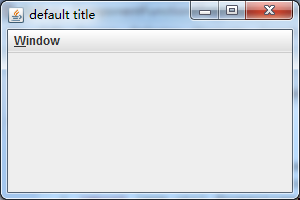
初始界面,位置为(0,0)

配置修改界面

修改配置后,窗体参数发生变化
Java-Properties用法-入门的更多相关文章
- Java关于Properties用法的总结(一)
最近项目中有一个这样的需求,要做一个定时任务功能,定时备份数据库的操表,将表数据写入txt文件.因为文件的读写路径可能需要随时改动,所以写死或者写成静态变量都不方便,就考虑使用配置文件,这里总结些配置 ...
- JAVA WEB快速入门之从编写一个基于SpringBoot+Mybatis快速创建的REST API项目了解SpringBoot、SpringMVC REST API、Mybatis等相关知识
JAVA WEB快速入门系列之前的相关文章如下:(文章全部本人[梦在旅途原创],文中内容可能部份图片.代码参照网上资源) 第一篇:JAVA WEB快速入门之环境搭建 第二篇:JAVA WEB快速入门之 ...
- JAVA WEB快速入门之从编写一个基于SpringMVC框架的网站了解Maven、SpringMVC、SpringJDBC
接上篇<JAVA WEB快速入门之通过一个简单的Spring项目了解Spring的核心(AOP.IOC)>,了解了Spring的核心(AOP.IOC)后,我们再来学习与实践Maven.Sp ...
- Java入门-浅析Java学习从入门到精通【转】
一. JDK (Java Development Kit) JDK是整个Java的核心,包括了Java运行环境(Java Runtime Envirnment),一堆Java工具和Java基础的类库 ...
- Java Web快速入门——全十讲
Java Web快速入门——全十讲 这是一次培训的讲义,就是我在给学生讲的过程中记录下来的,非常完整,原来发表在Blog上,我感觉这里的学生可能更需要. 内容比较长,你可以先收藏起来,慢慢看. 第一讲 ...
- 【JAVA零基础入门系列】Day4 变量与常量
这一篇主要讲解Java中的变量,什么是变量,变量的作用以及如何声明,使用变量. 那么什么是变量?对于初学者而言,可以将变量理解为盒子,这些盒子可以用来存放数据,不同类型的数据需要放在对应类型的盒子里. ...
- 【JAVA零基础入门系列】Day5 Java中的运算符
运算符,顾名思义就是用于运算的符号,比如最简单的+-*/,这些运算符可以用来进行数学运算,举个最简单的栗子: 已知长方形的长为3cm,高为4cm,求长方形的面积. 好,我们先新建一个项目,命名为Rec ...
- 【JAVA零基础入门系列】Day8 Java的控制流程
什么是控制流程?简单来说就是控制程序运行逻辑的,因为程序一般而言不会直接一步运行到底,而是需要加上一些判断,一些循环等等.举个栗子,就好比你准备出门买个苹果,把这个过程当成程序的话,可能需要先判断一下 ...
- 【JAVA零基础入门系列】Day7 Java输入与输出
[JAVA零基础入门系列](已完结)导航目录 Day1 开发环境搭建 Day2 Java集成开发环境IDEA Day3 Java基本数据类型 Day4 变量与常量 Day5 Java中的运算符 Day ...
- JAVA WEB快速入门之通过一个简单的Spring项目了解Spring的核心(AOP、IOC)
接上篇<JAVA WEB快速入门之从编写一个JSP WEB网站了解JSP WEB网站的基本结构.调试.部署>,通过一个简单的JSP WEB网站了解了JAVA WEB相关的知识,比如:Ser ...
随机推荐
- GDB教程
GDB是一个由GNU开源组织发布的.UNIX/LINUX操作系统下的.基于命令行的.功能强大的程序调试工具. GDB中的命令固然很多,但我们只需掌握其中十个左右的命令,就大致可以完成日常的基本的程序调 ...
- C/C++ 知识点---sizeof使用规则及陷阱分析(网摘)
C/C++ 知识点---sizeof使用规则及陷阱分析 原文出处:[胖奇的专栏] 1.什么是sizeof 首先看一下sizeof在msdn上的定义: The sizeof keyword gi ...
- Linux下C的线程同步机制
C里提供了保证线程安全性的三种方法: (添加头文件#include<pthread.h>,pthread 库不是 Linux 系统默认的库,连接时需要使用静态库 libpthread.a, ...
- mysql为什么范围查询(>,<,between,%like,like%)之后的索引无效
因为使用了范围索引,所以会使用满足范围的所有的值,也就是说存储引擎在这个时候会提取出满足之后条件的所有值,并遍历获取满足之后条件的值. http://www.itpub.net/thread-1901 ...
- 一个基于JRTPLIB的轻量级RTSP客户端(myRTSPClient)——实现篇:(三)用户接口层之RTSP命令
截至版本1.2.3,myRtspClient函数库共支持以下6个RTSP命令: (1)OPTIONS (2)DESCRIBE (3)SETUP (4)PLAY (5)PAUSE (6)TEARDOWN ...
- SpringMVC过程中@RequestBody接收Json的问题 总是报415
在SpringMVC中用@RequestBody接收Json的问题,总是报415,经过一翻查找 前台js的post: var postdata = '{"title":" ...
- ARM处理器架构的Thumb指令集中关于IT指令的使用
在ARMv6T2以及ARMv7架构扩展了Thumb指令集,其中加入了IT指令,进一步增强了代码的紧凑性. Thumb中有一个比较有意思的指令--IT,这条指令用于根据指定的条件来执行后面相继的四条指令 ...
- Notepad++使用图解
Notepad++使用图解.. Notepad++的安装部分 -------------- -------------- --------------- -------------- -------- ...
- texlive、
0.1 卸载 texlive2007 如果系统没有安装过texlive,则跳过第0步. 可以在终端中使用如下命令查询本机已经安装的tex和latex版本: [She@She LaTex_test]$ ...
- linux(九)之网络基础
一.ping命令 1.1.作用 用于检测主机.执行ping指令会使用ICMP传输协议,发出要求回应的信息,若远端主机的网络功能没有问题,就会回应该信息,因而得知该主机运作正常. 1.2.命令说明 pi ...