
Bootstrap文本排版基础--Bootsrap
1、排版前的基础
(1)移动设备优先
<meta name="viewport" content="width=device-width, initial-scale=1">
(2)响应式图片
CSS:img-responsive
demo.html:
<!DOCTYPE html>
<html lang="en">
<head>
<meta charset="UTF-8">
<title>Title</title>
<link href="css/bootstrap.min.css" type="text/css" rel="stylesheet">
<meta name="viewport" content="width=device-width, initial-scale=1">
</head>
<body>
<div class="container">
<div class="row">
<div class="col-sm-12">
<img class="img-responsive" src="data:images/river.jpg" height="768" width="1366"/>
</div>
</div>
</div>
</body>
</html>
Effect Picture:

2、标题
CSS:class="h1"、"h2"、"h3"、"h4"、"h5"、"h6"
h1 36px margin-top:20px margin-bottom:10px;
h2 30px margin-top:20px margin-bottom:10px;
h3 24px margin-top:20px margin-bottom:10px;
h4 18px margin-top:10px margin-bottom:10px;
h5 14px margin-top:10px margin-bottom:10px;
h6 12px margin-top:10px margin-bottom:10px;
demo.html:
<!DOCTYPE html>
<html lang="en">
<head>
<meta charset="UTF-8">
<title>Title</title>
<link href="css/bootstrap.min.css" type="text/css" rel="stylesheet">
<meta name="viewport" content="width=device-width, initial-scale=1">
</head>
<body>
<div class="container">
<div class="row">
<div class="col-sm-4">
<img class="img-responsive" src="data:images/river.jpg" height="768" width="1366"/>
</div>
<div class="col-sm-8">
<h1>第一个标题样式<small>小字体</small></h1><!--h标签里可以使用small标签,small标签文字大小在h1~3占h标签的65%,4~6占h75%-->
<h2>第一个标题样式<small>小字体</small></h2>
<h3>第一个标题样式<small>小字体</small></h3>
<h4>第一个标题样式<small>小字体</small></h4>
<h5>第一个标题样式<small>小字体</small></h5>
<h6>第一个标题样式<small>小字体</small></h6>
<p class="h1">第一个标题样<small>小字体</small>式<small>小字体</small></p>
<p class="h2">第一个标题样式<small>小字体</small></p>
<p class="h3">第一个标题样式<small>小字体</small></p>
<p class="h4">第一个标题样式<small>小字体</small></p>
<p class="h5">第一个标题样式<small>小字体</small></p>
<p class="h6">第一个标题样式<small>小字体</small></p>
</div>
</div>
</div>
</body>
</html>
Effect Picture:

3、页面主题
body全局样式:Background-color:white;font-size:14px margin:0; 行间距:20px
p全局样式:font-size:14px
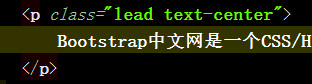
强调<p>标签里的内容,可以给p标签里加类选择器class="lead"
Before:

After:

对齐方式:class="text-center"

4、强调文本
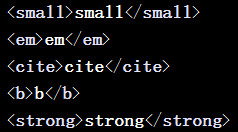
small、em、cite(引用网址)、b、strong相关

5、缩略语abbr
<abbr title="Bootstrap">Bootstrap</abbr>
<abbr title="Bootstrap" class="initialism">Bootstrap</abbr>
initialism类选择器定义的字母是原来的90%,并且会使小写字母转换为大写字母

6、地址元素address
.address {
margin-bottom: 20px;
font-style: normal;
line-height: 1.42857143;
}
<address>
<strong>地址:</strong><br/>
<a href="mailto:#">qikeyishu123@163.com</a>
</address>
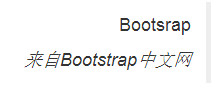
(7)引用 blockquote,引用里面最好设有p标签
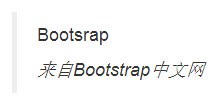
<blockquote>
<p>Bootsrap</p>
<cite>来自<em>Bootstrap中文网</em></cite>
</blockquote>
<blockquote class="pull-right">
<p>Bootsrap</p>
<cite>来自<em>Bootstrap中文网</em></cite>
</blockquote>
扩展:Botstrap使用第三方库Normalize.css,Normalize是一个专门用于将不同浏览器的默认css效果特征统一的css库
Bootstrap文本排版基础--Bootsrap的更多相关文章
- iOS阅读器实践系列(一)coretext纯文本排版基础
前言:之前做了公司阅读类的App,最近有时间来写一下阅读部分的实现过程,供梳理逻辑,计划会写一个系列希望能涉及到尽量多的方面与细节,欢迎大家交流.吐槽.拍砖,共同进步. 阅读的排版用的是coretex ...
- ③bootstrap文本使用基础案例
<!DOCTYPE html> <html lang="en"> <head> <meta charset="UTF-8&quo ...
- 响应式开发(六)-----Bootstrap CSS----------Bootstrap文本排版
Bootstrap 使用 Helvetica Neue. Helvetica. Arial 和 sans-serif 作为其默认的字体栈.使用 Bootstrap 的排版特性,您可以创建标题.段落.列 ...
- 文字如何实现完美UI?文本排版设计告诉你
一部手机,电量充足,网络通畅,就足以让我们打发一天的时光,尽情沉浸在手机时代的缤纷世界里.这个信息资源无穷尽的手机网络世界,是设计师和开发者们在不停的探索中一路一步精心打造.如何进一步美化这个世界,优 ...
- bootstrap之排版类
bootstrap之排版类
- 【笔记-前端】div+css排版基础,以及错误记录
现在的网站对于前端的排版已经逐渐不使用<table>,而是使用div+css. 使用这种方法的最大好处就在于在维护页面时,可以只维护css而不去改动html. 可是这种方式对于初学者来说可 ...
- AngularJs + angular-ui-router + bootstrap 实现blog基础导航功能
AngularJs + angular-ui-router + bootstrap 实现blog基础导航功能 核心代码如下 1.index.html <!DOCTYPE html> < ...
- Bootstrap -- 文本,背景,其他样式
Bootstrap -- 文本,背景,其他样式 1. 文本样式:展示了不同的文本颜色 使用文本样式: <!DOCTYPE html> <html> <head> & ...
- WPF 排版基础
一.WPF 排版基础 WPF使用控制面板来进行排版,控制面板实际上是一种可以放入WPF界面元素的容器.当用户把界面元素放入控制面板后,WPF会自动把这些界面元素放在它认为合适的地方.WPF开发人员需要 ...
随机推荐
- 初入PHP,(for循环~水仙花数)
找出100-999之间的所有"水仙花数".所谓水仙花数是指一个三位 数,各位数字的立方和等于该数本身.(如153次方=1的3次方+5的3次方+3的3次方)并输出这些数字 想想153 ...
- 团队作业4——第一次项目冲刺(ALpha版本)第三天
一.Daily Scrum Meeting照片 二.燃尽图 三.项目进展 1.界面 完成了前端的HTML页面设计 2.功能 完成了后端数据处理的全部基本功能: 数据结构设计及数据交互操作 博客页面数据 ...
- 201521123010 《Java程序设计》第7周学习总结
1. 本周学习总结 以你喜欢的方式(思维导图或其他)归纳总结集合相关内容. 参考资料: XMind 2. 书面作业 ①ArrayList代码分析 1.1 解释ArrayList的contains源代码 ...
- Python[小甲鱼007了不起的分支和循环]
加载背景音乐播放背景音乐(设置单曲循环)我方飞机诞生interval = 0while True:if 用户是否点击关闭按钮退出程序breakinterval += 1if interval = 50 ...
- 深入浅出数据结构C语言版(17)——希尔排序
在上一篇博文中我们提到:要令排序算法的时间复杂度低于O(n2),必须令算法执行"远距离的元素交换",使得平均每次交换减少不止1逆序数. 而希尔排序就是"简单地" ...
- linux系统命令<二>----du的使用方法
1> 要显示一个目录树及其每个子树的磁盘使用情况 du /home/linux 这在/home/linux目录及其每个子目录中显示了磁盘块数. 2> 要通过以1024字节为单位显示一个目录 ...
- 排查Linux机器是否已经被入侵
随着开源产品的越来越盛行,作为一个Linux运维工程师,能够清晰地鉴别异常机器是否已经被入侵了显得至关重要,个人结合自己的工作经历,整理了几种常见的机器被黑情况供参考 背景信息:以下情况是在CentO ...
- Java中数组的概念
1.什么是二维数组?有几种表达方式?分别是什么? 答:多维数组即数组的数组,即数组的元素也是数组. 例:int[] [] a = {{1},{1,2},{1,2,3}}; 有三种方式 1).int [ ...
- python 实现登录程序
本文介绍一个用python 实现的登录程序.python新手们可以参考一下. 用户信息存放于一个文件中,需要引入文件,校验输入的用户名.密码是否跟用户列表中的用户名密码相匹配,如果匹配,这登录成功,否 ...
- RocketMQ之双Master方式部署以及简单使用
1.1.服务器环境 192.168.100.24 root nameServer1,brokerServer1 Master1 192.168.100.25 root nameServer2,brok ...