一、搭建spring boot环境

  maven工程

      pom文件内容

<project xmlns="http://maven.apache.org/POM/4.0.0" xmlns:xsi="http://www.w3.org/2001/XMLSchema-instance" xsi:schemaLocation="http://maven.apache.org/POM/4.0.0 http://maven.apache.org/xsd/maven-4.0.0.xsd">
  <modelVersion>4.0.0</modelVersion>
  <groupId>com.qm.demo</groupId>
  <artifactId>springbootDemo</artifactId>
  <version>0.0.1-SNAPSHOT</version>

<parent>
        <groupId>org.springframework.boot</groupId>
        <artifactId>spring-boot-starter-parent</artifactId>
        <version>1.4.2.RELEASE</version>
    </parent>
    <dependencies>
        <dependency>
            <groupId>org.springframework.boot</groupId>
            <artifactId>spring-boot-starter-web</artifactId>
        </dependency>
    <dependency>
        <groupId>org.springframework.boot</groupId>
        <artifactId>spring-boot-starter-data-jpa</artifactId>
    </dependency>
        <dependency>
            <groupId>junit</groupId>
            <artifactId>junit</artifactId>
        </dependency>
    <dependency>
       <groupId>MySQL</groupId>
       <artifactId>mysql-connector-Java</artifactId>
       <version>5.0.8</version>
    </dependency>
    <dependency>
        <groupId>com.alibaba</groupId>
        <artifactId>druid</artifactId>
        <version>1.0.9</version>
    </dependency>
    <dependency>
    <groupId>org.antlr</groupId>
    <artifactId>antlr4-runtime</artifactId>
    <version>4.1</version>
</dependency>
    <dependency>  
        <groupId>org.springframework.boot</groupId>  
        <artifactId>spring-boot-devtools</artifactId>  
        <optional>true</optional><!-- optional=true,依赖不会传递,该项目依赖devtools;之后依赖myboot项目的项目如果想要使用devtools,需要重新引入 -->  
    </dependency>
    <dependency>
        <groupId>org.springframework.boot</groupId>
        <artifactId>spring-boot-starter-tomcat</artifactId>
        <scope>provided</scope>
</dependency>  
  </dependencies>
  <!-- <build>
      <plugins>
        java编译插件
        <plugin>
            <groupId>org.apache.maven.plugins</groupId>
            <artifactId>maven-compiler-plugin</artifactId>
            <version>3.2</version>
            <configuration>
                <source>1.7</source>
                <target>1.7</target>
                <encoding>UTF-8</encoding>
            </configuration>
        </plugin>
        <plugin>
                <groupId>org.apache.tomcat.maven</groupId>
                <artifactId>tomcat7-maven-plugin</artifactId>
                <configuration>
                    <port>8080</port>
                    <path>/</path>
                    
                    <url>http://192.168.25.135:8080/manager/text</url>
                    用户名
                    <username>tomcat</username>
                    密码
                    <password>tomcat</password>
                </configuration>
            </plugin>
      </plugins>
  </build>
             -->
</project>

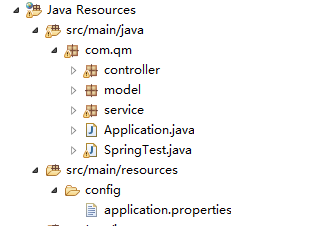
项目目录结构

  其中springTest类是spring boot内部tomcat启动时要运行的类

其中内容如下

package com.qm;

import org.springframework.boot.SpringApplication;
import org.springframework.boot.autoconfigure.EnableAutoConfiguration;
import org.springframework.boot.autoconfigure.SpringBootApplication;
import org.springframework.boot.web.servlet.ServletComponentScan;
import org.springframework.data.jpa.repository.config.EnableJpaRepositories;

import com.qm.controller.UserController;

@SpringBootApplication
public class SpringTest {
    
    public static void main(String[] args) {
        SpringApplication.run(SpringTest.class, args);
    }
}

Application类的作用是外部服务器启动spring boot所要做的一些事。内容如下

package com.qm;

import org.springframework.boot.SpringApplication;
import org.springframework.boot.autoconfigure.SpringBootApplication;
import org.springframework.boot.builder.SpringApplicationBuilder;
import org.springframework.boot.web.support.SpringBootServletInitializer;
import org.springframework.context.annotation.ComponentScan;

@SpringBootApplication
@ComponentScan
public class Application extends SpringBootServletInitializer{
     /**
     * 实现SpringBootServletInitializer可以让spring-boot项目在web容器中运行
     */  
    @Override  
    protected SpringApplicationBuilder configure(SpringApplicationBuilder builder) {  
        builder.sources(this.getClass());  
        return super.configure(builder);  
    }  
      
    public static void main(String[] args) {  
        SpringApplication.run(Application.class, args);  
          
    }  
}

application.properties文件内容如下

server.port=8080
spring.datasource.url=jdbc:mysql://localhost:3309/springbootdemo
spring.datasource.driver-class-name=com.mysql.jdbc.Driver
spring.datasource.username=root
spring.datasource.password=123456
spring.jpa.show-sql=true
spring.jpa.hibernate.ddl-auto=update
spring.devtools.livereload.enabled=true

//热部署,需要提供的路径
spring.devtools.restart.additional-paths=src\\main\\java\\com\\qm
spring.thymeleaf.cache=false

踩过的坑

坑一,

一开始以为文件目录,可以随便放,经过坑一的教训,才知道代码文件存放有一定的顺序

如上项目结构图,其中springtest类和application类一定要放在最外面的包里,如com.qm  当启动spring boot时,它会去加载com.qm包及其子包下的所有类,

当你不按顺序时,且代码中有@Autowired注解注入bean时,会报以下错误

Description:

Field userService in com.qm.controller.UserController required a bean of type 'com.qm.service.UserService' that could not be found.

Action:

Consider defining a bean of type 'com.qm.service.UserService' in your configuration.
,即bean找不到。,这是应该注意代码顺序。

坑二

补齐坑一后,在service层的接口继承jpa,然后在controller层使用注入的service方法会报以下错误

Error creating bean with name 'dataController': Unsatisfied dependency expressed through field 'personRepository'; nested exception is org.springframework.beans.factory.BeanCreationException: Error creating bean with name 'personRepository': Invocation of init method failed; nested exception is org.springframework.data.mapping.PropertyReferenceException: No property auto found for type Person!

这是因为hibernate版本的问题,

只要加上

<dependency>
    <groupId>org.antlr</groupId>
    <artifactId>antlr4-runtime</artifactId>
    <version>4.1</version>

这个依赖即可

添加之后,若maven仓库中有该jar包,最好删掉,编译时重新下载


若spring boot正常启动,而地址栏访问不到controller,则此时应该注意,spring boot启动时,未扫描到controller类,

在spring boot入口类上再添加一个注解

@ComponentScan("要扫描的包名")

以上就是我在学spring boot时遇到过得一些坑。


初学spring boot踩过的坑的更多相关文章

  1. 部署spring boot + Vue遇到的坑(权限、刷新404、跨域、内存)

    部署spring boot + Vue遇到的坑(权限.刷新404.跨域.内存) 项目背景是采用前后端分离,前端使用vue,后端使用springboot. 工具 工欲善其事必先利其器,我们先找一个操作L ...

  2. Spring Boot踩坑之路一

    Takes an opinionated view of building production-ready Spring applications. Spring Boot favors conve ...

  3. Spring Boot 踩坑之路之 Configuration Annotation Proessor not found in classpath

    1. 出现spring boot Configuration Annotation Proessor not found in classpath的提示是在用了@ConfigurationProper ...

  4. spring boot踩坑记

    Resolved exception caused by handler execution: org.springframework.http.converter.HttpMessageNotWri ...

  5. 初学 Spring boot 报错 Whitelabel Error Page 404

    按照教程,写了个最简单的 HelloWorld,尼玛报错 -->Whitelabel Error Page 404. 网上99%都是项目结构不对,说什么 Application放在父级 pack ...

  6. 记录初学Spring boot中使用GraphQL编写API的几种方式

    Spring boot+graphql 一.使用graphql-java-tools方式 <dependency> <groupId>com.graphql-java-kick ...

  7. spring boot 枚举使用的坑3

    上一篇说到spring boot 使用jackson在枚举enum序列化和反序列化的问题, 再来说说在JPA中实体entity使用枚举的问题. 还是这个枚举: @Getter @AllArgsCons ...

  8. spring boot 枚举使用的坑

    java 枚举的功能挺多,但是坑更多,使用的时候要注意.如下面这个枚举. @Getter @AllArgsConstructor public enum EnumExpenseType impleme ...

  9. Spring Boot 学习填的坑一

    1.关于springBoot自动扫描规则: SpringBoot项目的Bean装配默认规则是根据Application类所在的包位置从上往下扫描! "Application"类是指 ...

随机推荐

  1. PHP中的运算符

    一.算术运算符   运算符 名称 描述 实例 结果 x + y 加 x 和 y 的和 2 + 2 4 x - y 减 x 和 y 的差 5 - 2 3 x * y 乘 x 和 y 的积 5 * 2 1 ...

  2. Struts2 Handle 404 error page and wrong action

    1. To handle 404 not found yourself, just add this code to your web.xml <error-page> <error ...

  3. phpmyadmin上传sql文件大小限制问题解决方案

    近几天在学生做项目时,需要使用phpmyadmin把本地数据库导入到线上数据库,有许多学生遇到了因为文件过大而上传失败的问题.今天给大家整理一下使用phpmyadmin遇到因为文件过大而导致上传失败问 ...

  4. OOP中this指向详解

    谁调用了函数,this就指向谁 >>> this指向的永远只可能是对象!!! >>> this指向谁,永远不取决于this写在哪,而是取决于函数在哪调用!!! &g ...

  5. 低版本eclipse导入高版本eclipse创建项目报错问题

    例如用高版本eclipse创建的项目,会默认使用的是jdk1.8版本, 低版本eclipse创建项目,会默认使用的是jdk1.7版本. 此时导入高版本eclipse项目时会报错(文件夹中会出现红色!) ...

  6. laravel中的多对多关系详解

    数据表之间是纵横交叉.相互关联的,laravel的一对一,一对多比较好理解,官网介绍滴很详细了,在此我就不赘述啦,重点我记下多对多的关系 一种常见的关联关系是多对多,即表A的某条记录通过中间表C与表B ...

  7. SpringBoot学习helloworld

    这几天开始学习springBoot记录一下(Hello World) pom.xml <project xmlns="http://maven.apache.org/POM/4.0.0 ...

  8. Dojo初探之5:dojo的request(请求)操作、请求过程事件绑定和隐藏数据data()操作(基于dojo1.11.2版本)

    前言: 上一章详细阐述了dojo的事件绑定操作,本章将讲解dojo的请求操作 注:dojo的请求操作与js和jquery完全不同! 1.dojo的请求 dojo通过request.get()/.put ...

  9. HTML/XML/XPATH基础

    Html超文本标记语言 网页上单击右键→查看源文件/查看源代码 Html基本结构 <html>               为文档根元素,所有元素都在内部进行 <head>   ...

  10. JAVAEE学习——struts2_03:OGNL表达式、OGNL与Struts2的结合和练习:客户列表

    一.OGNL表达式 1.简介 OGNL:对象视图导航语言.  ${user.addr.name} 这种写法就叫对象视图导航. OGNL不仅仅可以视图导航.支持比EL表达式更加丰富的功能. 2.使用OG ...