
Junit基本使用
Junit基本用法
1.创建Junit Test Case
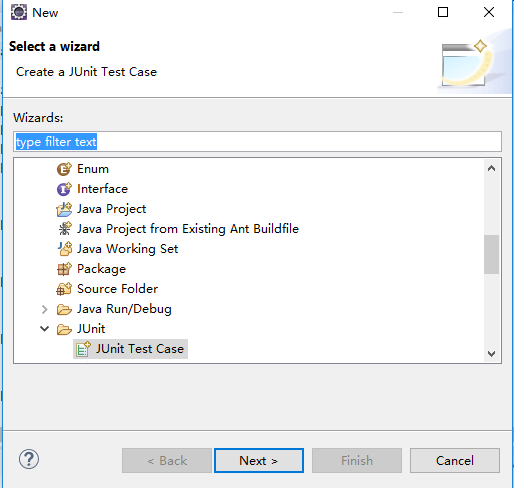
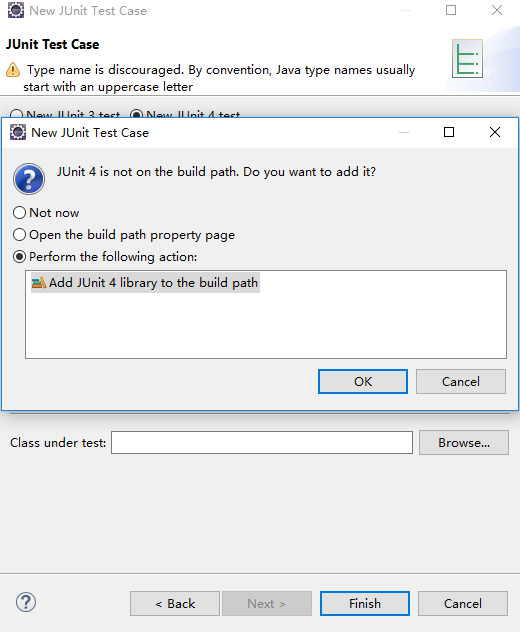
2.基本使用(以oracle数据库操作为例)
package com.csit.adminsystem1.tests;

import static org.junit.Assert.*;

import java.sql.Connection;

import java.sql.DriverManager;

import java.sql.PreparedStatement;

import java.sql.ResultSet;

import java.sql.SQLException;

import java.sql.Statement;

import java.util.ArrayList;

import java.util.List;

import java.util.Properties;

import org.junit.After;

import org.junit.Before;

import org.junit.Test;

import com.csit.adminsystem1.domains.TProduct;

import com.csit.adminsystem1.domains.TUser;

public class JdbcTest {

	Connection conn;

	//每次执行测试时调用,在这里为数据库连接操作

	@Before

	public void init() throws ClassNotFoundException, SQLException{

		System.out.println("数据库初始化中...");

		Class.forName("oracle.jdbc.driver.OracleDriver");

		Properties po = new Properties();

		po.put("user", "yourUsername");

		po.put("password", "yourPassword");

		conn = DriverManager.getConnection("jdbc:oracle:thin:127.0.0.1:1521:orcl", po);

	}

	//此处为调试内容,点击函数名,右键run as Junit Test

	@Test

	public void select() throws SQLException {

		Statement ste = conn.createStatement();

		ResultSet rs = ste.executeQuery("select * from t_product");

		List<TProduct> users = new ArrayList<TProduct>();

		while (rs.next()) {

			TProduct user = new TProduct();

			user.setProductId(rs.getInt("product_id"));

			user.setProductName(rs.getString("product_name"));

			user.setProductPrice(rs.getDouble("product_price"));

			users.add(user);

		}

		System.out.println(users);

	}

	@Test

	public void insert() throws SQLException {

		Statement ste = conn.createStatement();

		TProduct product = new TProduct(0, "可口可乐", 3.0);

		StringBuffer sbf = new StringBuffer("insert into t_product (product_id,product_name,product_price) values(");

		sbf.append(product.getProductId()).append(",");

		sbf.append("'").append(product.getProductName() ).append("'").append(",");

		sbf.append(product.getProductPrice()).append(")");

		try{

			ste.execute(sbf.toString());

		}catch(Exception e) {

			System.out.println("insert fail!"+e.getMessage());

			throw e;

		}

		System.out.println("insert successful!");

	}

	@Test

	public void delete() throws SQLException {

		String sql = "delete from t_product where product_id = ?";

		PreparedStatement ste = conn.prepareStatement(sql);

		ste.setInt(1, 0);

		try{

			ste.execute();

		}catch(Exception e) {

			System.out.println("delete fail!"+e.getMessage());

			throw e;

		}

		System.out.println("delete successful!");

	}

	//执行完毕后调用,关闭数据库

	@After

	public void end() throws SQLException {

		conn.close();

		System.out.println("over...");

	}

}
分别执行查询,插入,查询,删除,查询操作后执行结果如下图:





Junit基本使用的更多相关文章
- 记一个mvn奇怪错误: Archive for required library: 'D:/mvn/repos/junit/junit/3.8.1/junit-3.8.1.jar' in project 'xxx' cannot be read or is not a valid ZIP file
我的maven 项目有一个红色感叹号, 而且Problems 存在 errors : Description Resource Path Location Type Archive for requi ...
- 「译」JUnit 5 系列:条件测试
原文地址:http://blog.codefx.org/libraries/junit-5-conditions/ 原文日期:08, May, 2016 译文首发:Linesh 的博客:「译」JUni ...
- AndroidStudio — Error:Failed to resolve: junit:junit:4.12错误解决
原博客:http://blog.csdn.net/u013443865/article/details/50243193 最近使用AndroidStudio出现以下问题: 解决:打开app下的buil ...
- 「译」JUnit 5 系列:环境搭建
原文地址:http://blog.codefx.org/libraries/junit-5-setup/ 原文日期:15, Feb, 2016 译文首发:Linesh 的博客:环境搭建 我的 Gith ...
- [深入JUnit] 测试运行的入口
阅读前提 了解JUnit 对JUnit的内部实现有兴趣 不妨看看[深入JUnit] @Before, @After, @Test的秘密] 代码版本: junit 4.12代码搜索工具: http:// ...
- 「译」JUnit 5 系列:扩展模型(Extension Model)
原文地址:http://blog.codefx.org/design/architecture/junit-5-extension-model/ 原文日期:11, Apr, 2016 译文首发:Lin ...
- 「译」JUnit 5 系列:架构体系
原文地址:http://blog.codefx.org/design/architecture/junit-5-architecture/ 原文日期:29, Mar, 2016 译文首发:Linesh ...
- 「译」JUnit 5 系列:基础入门
原文地址:http://blog.codefx.org/libraries/junit-5-basics/ 原文日期:25, Feb, 2016 译文首发:Linesh 的博客:JUnit 5 系列: ...
- 新手入门JUnit单元测试
首先将JUnit插件安装到Eclipse或myeclipse里面,编写完一个模块或者实体类的时候,直接右击,new一个JUnit项目,选择你想测试的实体类(模块),然后会自动生成一个类,这个类,我们将 ...
- [Android]使用自定义JUnit Rules、annotations和Resources进行单元测试(翻译)
以下内容为原创,欢迎转载,转载请注明 来自天天博客:http://www.cnblogs.com/tiantianbyconan/p/5795091.html 使用自定义JUnit Rules.ann ...
随机推荐
- 201521123052 《Java程序设计》 第14周学习总结
1. 本周学习总结 2. 书面作业 1. MySQL数据库基本操作 建立数据库,将自己的姓名.学号作为一条记录插入.(截图,需出现自己的学号.姓名) 在自己建立的数据库上执行常见SQL语句(截图) - ...
- 201521123079《java程序设计》第13周学习总结
1. 本周学习总结 1.以你喜欢的方式(思维导图.OneNote或其他)归纳总结多网络相关内容. (1)netassist可以用来链接IP端口 (2)accept方法可以用来监听端口,当没有客户端连接 ...
- PHP连接数据_insert_id介绍
对于自增长的主键列不好取值的情况,php提供了一个变量来取值,insert_id $db = new MySQLi("localhost","root",&qu ...
- Java:设计类的继承关系时的技巧
继承设计的技巧: (1)将公共操作和域放置在超类 (2)不要使用受保护的域 有些程序员认为,将大多数的实例域定义为protected是一个不错的主意,只有这样,子类才能够在需要的时候直接访问他们.然而 ...
- “.Net 社区大会”(dotnetConf) 2017 Day 1 Keynote: .NET Everywhere
8月份已经发布了.NET Core 2.0, 大会Keynote 一开始花了大量的篇幅回顾.NET Core 2.0的发布,社区的参与度已经非常高.大会的主题是.NET 无处不在: NET Core ...
- [03] Servlet继承关系和生命周期
1.Servlet的继承关系 假如现有我们自定义的一个Servlet,继承HttpServlet,那么实际上它的继承链如下图: 可以看到,核心的部分在于: 两个顶级接口 Servlet Servl ...
- JFrame的层次结构以及背景颜色设置问题
JFrame的层次结构: JFrame:窗体,也就是窗口的框架.默认为不可见.不透明的(可以使用isVisible和isOpaque来验证).创建窗口时,最后一步需要调用setVisible(true ...
- 管中窥豹——从OVS看SDN
网络虚拟化是当前云计算最重要的特点之一,打通租户网络之间互通以及访问控制策略,最重要的是满足租户之间的网络隔离,这才是云计算网络的特点.而SDN的产生则是在网络虚拟化中,将控制面和业务面分离,控制面只 ...
- C#下的两种加密方式MD5和DEC
md5加密 /// <summary> /// MD5加密 /// </summary> /// <param name="toCryStri ...
- 电脑IP地址被占用如何释放?
回车后,关机,等待5分钟左右再开机,就释放掉了.