
Redux源码分析之applyMiddleware
Redux 最为经典我觉得就是compose 和 applyMiddleware 了。
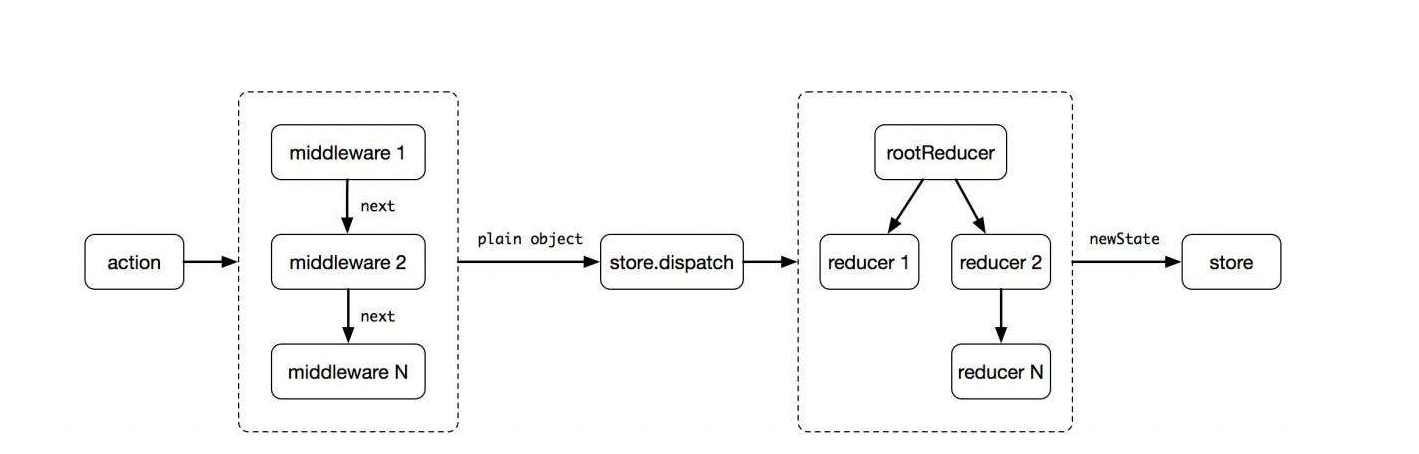
还是先借一张图,描述的非常准确,
- 中间件是通过next来进入下一个中间件的,执行完毕后,会调用最原始的store.disptach,reducer执行完毕后,该次操作并没有完毕, 还会依次返回到中间件。
- 任何一个中间件不next ,其后面的中间件都不会执行,(不等于return next(action),return next(action)一般情况都是返回原始的action, 只要你调用了next(action)就行),redux-thunk就是这么干的(检查到action是函数的时候,没有执行next())
那么我们还是来看一个简单的例子,这里我把redux-thunk的核心代码直接copy过来,放在一起了。
// thunk 中间件

let thunk = ({ dispatch, getState }) => next => action => {

    if (typeof action === 'function') {

        return action(dispatch, getState)

    }

    return next(action)

}

// logger中间件

let logger = ({ dispatch, getState }) => next => action => {

    console.log('next:之前state', getState())

    let result = next(action)

    console.log('next:之前state', getState())

    return result

}

let { createStore, applyMiddleware } = self.Redux

let todoList = [] // 默认值

let todoReducer = function (state = todoList, action) {

    switch (action.type) {

        case 'add':

            return [...state, action.todo]

        case 'delete':

            return state.filter(todo => todo.id !== action.id)

        default:

            return state

    }

}

let addAsync = content => (dispatch) => {

    setTimeout(function () {

        dispatch({

            type: 'add',

            todo: {

                id: new Date().getTime(),

                content

            }

        })

    }, )

}

let store = createStore(todoReducer, applyMiddleware(logger)),

    subscribe1Fn = function () {

        console.log(store.getState())

    }

// 订阅

let sub = store.subscribe(subscribe1Fn)

store.dispatch(addAsync('异步添加的todo哦'))

store.dispatch({

    type: 'add',

    todo: {

        id: ,

        content: '学习redux'

    }

})
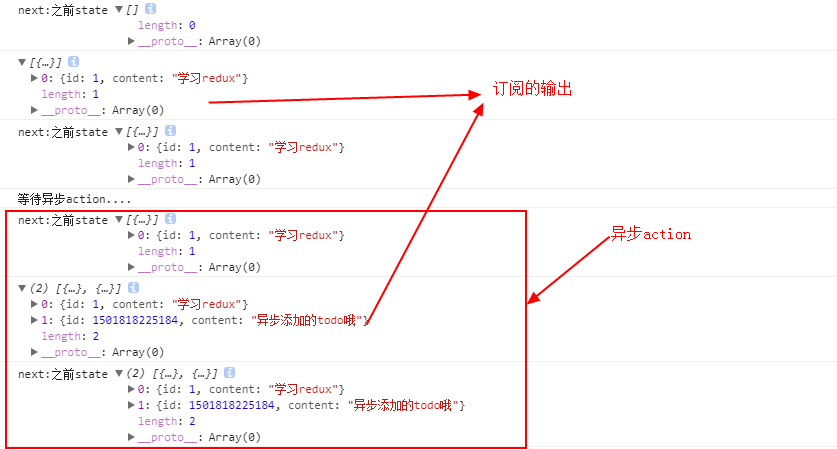
从上面的例子,我们总结一下
- 除了有效的更新数据,还通过中间件达到了额外的操作,比如输出日志,能够发异步的action,这就是中间件的神奇之处
- 这里有异步action,这就是中间件(redux-thunk)的力量
- 中间件的格式一般都是 ({ dispatch, getState }) => next => action => {......}, 为什是这样先不做分析
- 执行顺序 中间件 =>订阅=>中间件
回归源码,applyMiddleware.js,先删除一些代码,很容易理解
- 创建一个store
- 返回一个改写过dispatch方法的store
export default function applyMiddleware(...middlewares) {

  return (createStore) => (reducer, preloadedState, enhancer) => {

    const store = createStore(reducer, preloadedState, enhancer)

    let dispatch = store.dispatch  // 存旧的dispatch
     .........
     /生成新的dispatch

    dispatch = compose(...chain)(store.dispatch)

    // 返回改写过disptach的store

    return {

      ...store,

      dispatch

    }

  }

}
applyMiddleware 并不神奇,其他地方都很理解,内外层的参数传递都是围绕着 createStore来的。
那我们也不难理解应该怎么调用这个方法,应该像如下这样
- 传入 thunk, logger等等各种中间件,
- 接着传入我们创建store的方法createStore
- 最后传入reducer,preloadState,enhancer
let store = applyMiddleware(thunk, logger)(createStore)(todoReducer),
可是回头看看我们的代码
let store = createStore(todoReducer, applyMiddleware(thunk,logger)),
那我们再回来看看createStore方法
export default function createStore(reducer, preloadedState, enhancer) {

  if (typeof preloadedState === 'function' && typeof enhancer === 'undefined') {

    enhancer = preloadedState

    preloadedState = undefined

  }

  if (typeof enhancer !== 'undefined') {

    if (typeof enhancer !== 'function') {

      throw new Error('Expected the enhancer to be a function.')

    }

    return enhancer(createStore)(reducer, preloadedState)

  }

 .......

}
- 如果 preloadState是函数,并且enhancer为空, enhancer =preloadState
- 接着,如果有enhancer ,那么 return enhancer(createStore)(reducer, preloadedState)
结合我们的调用分析一下
createStore(todoReducer, applyMiddleware(thunk,logger))
- preloadState是函数,并且enhancer为空, enhancer = applyMiddleware(thunk,logger)
- return enhancer(createStore)(reducer, preloadedState) = return applyMiddleware(thunk,logger)(createStore)(reducer, preloadedState)
所以嘛,createStore(todoReducer, applyMiddleware(thunk,logger)) 只是一种变体,更加方便调用而已,这里也正式了 applyMiddleware(thunk,logger) 也是store的一个增强函数
我们最后在看看看我们忽略的代码
export default function applyMiddleware(...middlewares) {

  return (createStore) => (reducer, preloadedState, enhancer) => {  // createStore就是redux公布的方法creatStore,

    const store = createStore(reducer, preloadedState, enhancer)

    let dispatch = store.dispatch  // 存旧的dispatch

    let chain = []

      /*

      中间件标准格式

      let logger1 = ({ dispatch, getState }) => next => action => {

        ...

        let result = next(action)

        ...

        return result

      }

      */

    //构建参数 ({dispatch, getState})

    const middlewareAPI = {

      getState: store.getState,

      dispatch: (action) => dispatch(action)

    }

    /*

      middleware(middlewareAPI)之后是这样的格式

      let m =  next => action => {

        ...

        let result = next(action)

        ...

        return result

      }

    */

    chain = middlewares.map(middleware => middleware(middlewareAPI))

    //生成新的dispatch

    dispatch = compose(...chain)(store.dispatch)

   // 返回改写过disptach的store

    return {

      ...store,

      dispatch

    }

  }

}
我滴个神,就三句,第一句,不多说了,给所有的中间件,初始化参数,
这也就是为什么,所有中间件的格式都是第一层参数都是 {disptach,getState}这个样子
({dispatch, getState} ) => next => action => {......}
第二句就是把每个middleware传入参数,初始化一下,这里的最大作用就是利用闭包,让每个middleware拥有同一份disptach和getState的引用。
执行后,每个middleware返回的函数式这个样子的, chain保存着这种函数的集合
next => action => {

    ...

    let result = next(action)

    ...

     return result

}
剩下最核心的一句
dispatch = compose(...chain)(store.dispatch)
compose之前已经详细的解读过了,就是生成链式的调用,是把 f,g,h 变成 (...args) => f(g(h(...args))),现在f,g,h的格式如下,
next => action => {

    ...

    let result = next(action)

    ...

     return result

}
可想而知,这样的函数是整个作为前面一个函数的next参数存在的,所以你每次next(action)实际上就是进入下一个中间件的执行体,
接着把 store.dispatch 作为next参数传入,作为了最内层,也是最后一个中间件的next,返回的函数格式就是下面这个样子了,我们替换一下参数
action => {

    ...

    let result = next(action)

    ...

     return result

}

等于

action => {
    ...

    let result = store.dispatch(action)  // 真正的dispatch action

    ...

     return result

}
这个最后庞大的函数被赋值给了store,替换掉了原来的dispatch。整体就是这个样子拉。
Redux源码分析之applyMiddleware的更多相关文章
- Redux源码分析之createStore
接着前面的,我们继续,打开createStore.js, 直接看最后, createStore返回的就是一个带着5个方法的对象. return { dispatch, subscribe, getSt ...
- Redux源码分析之基本概念
Redux源码分析之基本概念 Redux源码分析之createStore Redux源码分析之bindActionCreators Redux源码分析之combineReducers Redux源码分 ...
- Redux源码分析之bindActionCreators
Redux源码分析之基本概念 Redux源码分析之createStore Redux源码分析之bindActionCreators Redux源码分析之combineReducers Redux源码分 ...
- Redux源码分析之combineReducers
Redux源码分析之基本概念 Redux源码分析之createStore Redux源码分析之bindActionCreators Redux源码分析之combineReducers Redux源码分 ...
- Redux源码分析之compose
Redux源码分析之基本概念 Redux源码分析之createStore Redux源码分析之bindActionCreators Redux源码分析之combineReducers Redux源码分 ...
- 正式学习React(四) ----Redux源码分析
今天看了下Redux的源码,竟然出奇的简单,好吧.简单翻译做下笔记: 喜欢的同学自己可以去github上看:点这里 createStore.js import isPlainObject from ' ...
- 史上最全的 Redux 源码分析
前言 用 React + Redux 已经一段时间了,记得刚开始用Redux 的时候感觉非常绕,总搞不起里面的关系,如果大家用一段时间Redux又看了它的源码话,对你的理解会有很大的帮助.看完后,在回 ...
- redux源码学习笔记 - applyMiddleware
在创建store时,createStore(reducer, preloadedState, enhancer),除了reducer函数,初始状态,还可以传入enhancer.这个enhancer在c ...
- redux源码图解:createStore 和 applyMiddleware
在研究 redux-saga时,发现自己对 redux middleware 不是太了解,因此,便决定先深入解读一下 redux 源码.跟大多数人一样,发现 redux源码 真的很精简,目录结构如下: ...
随机推荐
- 将数据库从服务器移到浏览器--indexedDB基本操作封装
数据库是属于服务器的,这是天经地义的事,但是有时候数据也许并非需要存储在服务器,但是这些数据也是一条一条的记录,怎么办?今天来带领你领略一下H5的一个新特性--indexedDB的风骚.你会情不自禁的 ...
- 再谈AbstractQueuedSynchronizer:独占模式
关于AbstractQueuedSynchronizer JDK1.5之后引入了并发包java.util.concurrent,大大提高了Java程序的并发性能.关于java.util.concurr ...
- Kafka 源代码分析之Log
这里分析Log对象本身的源代码. Log类是一个topic分区的基础类.一个topic分区的所有基本管理动作.都在这个对象里完成.类源代码文件为Log.scala.在源代码log目录下. Log类是L ...
- 【Android Developers Training】 108. 使用模拟定位进行测试
注:本文翻译自Google官方的Android Developers Training文档,译者技术一般,由于喜爱安卓而产生了翻译的念头,纯属个人兴趣爱好. 原文链接:http://developer ...
- 【案例分享】SequoiaDB+Spark搭建医院临床知识库系统
1.背景介绍 从20世纪90年代数字化医院概念提出到至今的20多年时间,数字化医院(Digital Hospital)在国内各大医院飞速的普及推广发展,并取得骄人成绩.不但有数字化医院管理信息系统(H ...
- IOS开发基础环境搭建
一.目的 本文的目的是windows下IOS开发基础环境搭建做了对应的介绍,大家可根据文档步骤进行mac环境部署: 二.安装虚拟机 下载虚拟机安装文件绿色版,点击如下文件安装 获取安装包: ...
- VBS连接远程Oracle
原文链接:http://hi.baidu.com/coo_boi/item/5a2e1860ded285136995e6a7 连接方式还是用的ADO,驱动是MSDAORA. 使用oracle前,ora ...
- Chrome浏览器扩展开发系列之十七:扩展中可用的chrome.events API
chrome.events中定义了一些常见的事件类型,可以供Chrome浏览器扩展程序发出对应的事件对象. 对于关注的事件,首先要通过addListener()在对应的事件上注册监听器,示例如下: c ...
- 总结两种动态代理jdk代理和cglib代理
动态代理 上篇文章讲了什么是代理模式,为什么用代理模式,从静态代理过渡到动态代理. 这里再简单总结一下 什么是代理模式,给某个对象提供一个代理对象,并由代理对象控制对于原对象的访问,即客户不直接操控原 ...
- Linux常见命令语句
查看当前目录: pwd 查看文件具体大小: ls -l 返回上一级: cd.. 返回根目录: cd / 创建一个隐藏文件 vim .test 显示隐藏文件:ls -a 编辑文件: 1.vim 文件名 ...