
Spring配置文件的xsd知识点
今天在Spring配置文件中配置如下事务属性时,提示<tx is not bound(不受约束的),估计是配置文件的xsd没配置好。
<!-- 2.配置事务属性 -->

<tx:advice id="txAdvice" transaction-manager="transactionManager">

<tx:attributes>

<tx:method name="get*" read-only="true"></tx:method>

<tx:method name="*"></tx:method>

</tx:attributes>

</tx:advice>
在xsi:schemaLocation=中增加:
http://www.springframework.org/schema/tx

http://www.springframework.org/schema/tx/spring-tx-3.0.xsd
错误就消失了。
网上查阅了相关资料,现总结如下:
xml文档要有格式,为了Spring的配置文件增加的节点(比如<tx:advice)能符合要求、合法,必须通过引入校验该xml格式的文件,也就是xsd文件。Spring通过配置可以联网引入xsd文件,也可以在断网下使用本地xsd文件校验xml文件。
xsi:schemaLocation 属性提供一种方法来查找在 XML 实例文档中定义的命名空间的 XML 架构定义。它的值是用空白分隔的统一资源标识符 (URI) 对的列表,其中的每一对 URI 都依次包含一个命名空间以及该命名空间的 XML 架构定义(通常为 .xsd 文件)的位置。
xsi:schemaLocation 提供了xml的namespace到对应的xsd文件的映射,从下列配置可以看出xsi:schemaLocation 里面配置的字符串都是成对的,前面是namespace的URI,后面是xsd文件的URI。
    xsi:schemaLocation="

           http://www.springframework.org/schema/beans

           http://www.springframework.org/schema/beans/spring-beans-4.1.xsd

           http://www.springframework.org/schema/context

           http://www.springframework.org/schema/context/spring-context-3.0.xsd

           http://www.springframework.org/schema/jee

           http://www.springframework.org/schema/jee/spring-jee-3.0.xsd

           http://www.springframework.org/schema/tx

           http://www.springframework.org/schema/tx/spring-tx-3.0.xsd

           http://www.springframework.org/schema/aop

           http://www.springframework.org/schema/aop/spring-aop-3.0.xsd
Spring在启动时默认要加载xsd文件来验证XML文件的,在浏览器中输入复制的xmlns:tx的链接,也就是http://www.springframework.org/schema/tx,可以看到如下页面:

以上都是可选的tx的xsd版本,而xsi:schemaLocation的http://www.springframework.org/schema/tx/spring-tx-3.0.xsd 在用浏览器访问是该版本xsd对应内容的页面:
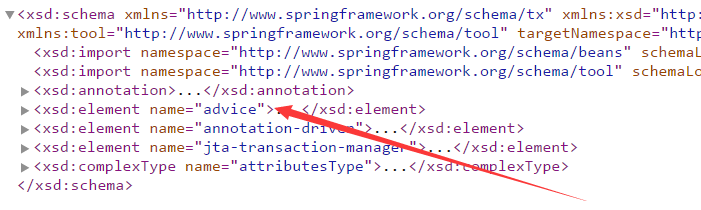
箭头指的就是对<tx:advice进行xml校验的部分,从上面代码看出,tx还可以添加<tx:annotation-driven,<tx:jta-transaction-manager 节点,这个与xml中的提示是一致的:

advice部分的具体代码如下:
 <xsd:element name="advice">

 <xsd:complexType>

 <xsd:annotation>

 <xsd:documentation source="java:org.springframework.transaction.interceptor.TransactionInterceptor">

 <![CDATA[

 Defines the transactional semantics of the AOP advice that is to be executed. That is, this advice element is where the transactional semantics of any    number of methods are defined (where transactional semantics includes the propagation settings, the isolation level, the rollback rules, and suchlike).

 ]]>

 </xsd:documentation>

 <xsd:appinfo>

 <tool:annotation>

 <tool:exports type="org.springframework.transaction.interceptor.TransactionInterceptor"/>

 </tool:annotation>

 </xsd:appinfo>

 </xsd:annotation>

 <xsd:complexContent>

 <xsd:extension base="beans:identifiedType">

 <xsd:sequence>

 <xsd:element name="attributes" type="attributesType" minOccurs="0" maxOccurs="1"/>

 </xsd:sequence>

 <xsd:attribute name="transaction-manager" type="xsd:string" default="transactionManager">

 <xsd:annotation>

 <xsd:documentation source="java:org.springframework.transaction.PlatformTransactionManager">

 <![CDATA[

 The bean name of the PlatformTransactionManager that is to be used to drive transactions. This attribute is not required, and only needs to be specified explicitly if the bean name of the desired PlatformTransactionManager is not 'transactionManager'.

 ]]>

 </xsd:documentation>

 <xsd:appinfo>

 <tool:annotation kind="ref">

 <tool:expected-type type="org.springframework.transaction.PlatformTransactionManager"/>

 </tool:annotation>

 </xsd:appinfo>

 </xsd:annotation>

 </xsd:attribute>

 </xsd:extension>

 </xsd:complexContent>

 </xsd:complexType>

 </xsd:element>
如果此时无法上网,就无法从该网站获取到该xsd文件,就无法对xml文件进行校验了,容易发生应用启动不了的情况。为此我们可以加载本地的xsd文件,这样断网情况下也可以启动应用了。举例子来说,若tx的xsd文件没有配置,则要进行如下步骤进行配置:
1、点开项目的lib,找到spring-tx-4.1.4.RELEASE.jar,右键属性-复制文件路径(复制jar之前的路径),在文件夹地址栏粘贴,回车打开;

2、将spring-tx-4.1.4.RELEASE.jar解压到某个文件夹,有如下文件:

3、在org\springframework\transaction\config路径下可以找到:

里面还有旧版本的xsd文件,这样可以避免配置文件用的还是旧版本的xsd文件,而Spring是新版本情况下,断网应用启动不了的情况。Spring这个确实想得挺周到的。
4、将tx的某个版本的xsd文件拷贝到工程的source folder下,然后xml的配置改成如下形式:
xsi:schemaLocation="http://www.springframework.org/schema/beans

        classpath:beans/spring-beans-4.1.xsd

        http://www.springframework.org/schema/mvc

        classpath:mvc/spring-mvc-4.1.xsd

        http://www.springframework.org/schema/context

        classpath:context/spring-context-4.1.xsd

        http://www.springframework.org/schema/aop

        classpath:aop/spring-aop-4.1.xsd

        http://www.springframework.org/schema/tx

        classpath:tx/spring-tx-4.1.xsd ">
这样就可以从本地获取xsd文件,就算断网也可以解析xml文件了。
附一份常见的spring配置文件的文件头:
------------------------------------3.0----------------------------

<?xml version="1.0" encoding="UTF-8"?>

<beans xmlns="http://www.springframework.org/schema/beans"

xmlns:xsi="http://www.w3.org/2001/XMLSchema-instance" xmlns:aop="http://www.springframework.org/schema/aop"

xmlns:context="http://www.springframework.org/schema/context" xmlns:tx="http://www.springframework.org/schema/tx"

xsi:schemaLocation="

   http://www.springframework.org/schema/beans

   http://www.springframework.org/schema/beans/spring-beans-3.0.xsd

   http://www.springframework.org/schema/tx

   http://www.springframework.org/schema/tx/spring-tx-3.0.xsd

   http://www.springframework.org/schema/context

   http://www.springframework.org/schema/context/spring-context-3.0.xsd

   http://www.springframework.org/schema/aop

   http://www.springframework.org/schema/aop/spring-aop-3.0.xsd">

</beans>
当然你也可以根据使用的Spring的相应jar包版本更改对应的版本,比如上面的3.0可以改成4.1也行。
http://www.springframework.org/schema/ 该网站是Spring所有可能用到的结点属性的xsd列表,点击相应选项即可查到对应的xsd版本与xsd的URI:

Spring配置文件的xsd知识点的更多相关文章
- spring配置文件中xsd引用问题
XML的一些概念 首先来看下xml的一些概念: xml的schema里有namespace,可以给它起个别名.比如常见的spring的namespace: xmlns:mvc="http ...
- 转:spring配置文件中xsd引用问题
来自:http://blog.csdn.net/dingqinghu/article/details/46758671
- spring 配置文件XSD地址
这边部署不能访问外网,所以sping配置文件里的XSD地址要改一下象 http://www.springframework.org/schema/beans/spring-beans-2.0.xsd ...
- eclipse spring 配置文件xml校验时,xsd报错
1.情景展示 eclipse中,spring配置文件报错信息如下: 配置文件头部引用信息为: <?xml version="1.0" encoding="UTF ...
- Spring配置文件头及xsd文件版本
最初Spring配置文件的头部声明如下: Xml代码 <?xml version="1.0" encoding="UTF-8"?> <!D ...
- 你不知道的Spring配置文件
Spring配置文件是用于指导Spring工厂进行Bean生产.依赖关系注入(装配)及Bean实例分发的"图纸".Java EE程序员必须学会并灵活应用这份"图纸&quo ...
- Spring配置文件详解
转自: http://book.51cto.com/art/201004/193743.htm 此处详细的为我们讲解了spring2.5的实现原理,感觉非常有用 spring配置文件是用于指导Sp ...
- spring配置文件详解--真的蛮详细
spring配置文件详解--真的蛮详细 转自: http://book.51cto.com/art/201004/193743.htm 此处详细的为我们讲解了spring2.5的实现原理,感觉非常 ...
- Spring 配置文件详解 (以2.5为例)
转载自:http://blog.csdn.net/zzjjiandan/article/details/22922847 Spring配置文件是用于指导Spring工厂进行Bean生 ...
随机推荐
- (转)Spring的单例模式底层实现
单例模式也属于创建型模式,所谓单例,顾名思义,所指的就是单个实例,也就是说要保证一个类仅有一个实例. 单例模式有以下的特点: ① 单例类只能有一个实例 ② 单例类必须自己创建自己的唯一实例 ③ 单例类 ...
- 大数据与Java的关系
随着2017年大数据各种应用的发展,大数据的价值得以充分的发挥,大数据已在企业.社会各个层面都成为重要的手段,数据已成为新的企业战略制高点,也是各个企业争夺的新焦点.那么我们一直在说着的大数据究竟是什 ...
- 【PHP】基础学习
摘要: 基础知识回顾 1)数组 2)字符串 3)时间 一.数组 1.1 数组分类索引数组:常规数组关联数组:键值对数组 二.字符串 2.1 定义字符串heredoc语法结构定义的字符串:$hello ...
- 初学Python(八)——迭代
初学Python(八)——迭代 初学Python,主要整理一些学习到的知识点,这次是迭代. # -*- coding:utf-8 -*- from collections import Iterabl ...
- web项目-easyui-datagrid使用汇总
一,引言 工作的需要,做了3年的wpf--,又因为项目的需求,回归到web的开发. ■ 3 years ago,vue是我三年前没用过的玩意儿. ■ 3 years ago,bootstrap组件 ...
- 终结 finalize()和垃圾回收(garbage collection)
1.为什么要有finalize()方法? 假定你的对象(并非使用new)获得了一块"特殊"的内存区域,由于垃圾回收器只知道释放那些经由new分配的内存,所以他不知道该如何释放该对象 ...
- java_AWT常用组件
Button:按钮,可接受单击操作. Canvas:用于绘图的画布. Checkbox:复选框组件(也可以变成单选框组件). CheckboxGroup:用于将多个Checkbox组件合成一组,一组C ...
- R语言成功加载rJava方法
加载rJava的同时,要下载JAVA的JRE并且配置环境变量JAVA_HOME,因为rJava的调用需要java运行环境. 1.下载JRE 64位版本的JRE官网下载:http://www.java. ...
- ASP.NET Core 源码学习之 Logging[4]:FileProvider
前面几章介绍了 ASP.NET Core Logging 系统的配置和使用,而对于 Provider ,微软也提供了 Console, Debug, EventSource, TraceSource ...
- PAT (Basic Level) Practise (中文) 1023. 组个最小数 (20)
1023. 组个最小数 (20) 时间限制 100 ms 内存限制 65536 kB 代码长度限制 8000 B 判题程序 Standard 作者 CAO, Peng 给定数字0-9各若干个.你可以以 ...