
ChatterBot之linux下安装mongodb 02
当前环境 :centos 6.9
mongodb版本 mongodb-linux-x86_64-3.4.4.tgz
使用链接工具:studio-3t-x64.msi.zip
首先我们先来安装mongodb:
1.把下载好的mongodb-linux-x86_64-3.4.4.tgz 放在opc下面
2.解压到当前路径;
3.在根目录下新建data/db两个文件夹,这是mongodb数据文件默认的存放位置.
mkdir -p /data/db
4.命令行中运行 MongoDB 服务
你可以再命令行中执行mongo安装目录中的bin目录执行mongod命令来启动mongdb服务。
注意:如果你的数据库目录不是/data/db,可以通过 --dbpath 来指定。
下面这些是服务.
[root@localhost /]# cd /opt/mongodb-linux-x86_64-3.4.4/bin

[root@localhost bin]# ll

total 232816

-rwxr-xr-x. 1 root root  4769592 Apr 20  2017 bsondump

-rwxr-xr-x. 1 root root 29404312 Apr 20  2017 mongo

-rwxr-xr-x. 1 root root 53966552 Apr 20  2017 mongod   //启动

-rwxr-xr-x. 1 root root  8520309 Apr 20  2017 mongodump

-rwxr-xr-x. 1 root root  6491029 Apr 20  2017 mongoexport

-rwxr-xr-x. 1 root root  6345814 Apr 20  2017 mongofiles

-rwxr-xr-x. 1 root root  6641732 Apr 20  2017 mongoimport

-rwxr-xr-x. 1 root root  6118188 Apr 20  2017 mongooplog

-rwxr-xr-x. 1 root root 53347992 Apr 20  2017 mongoperf

-rwxr-xr-x. 1 root root  9678815 Apr 20  2017 mongoreplay

-rwxr-xr-x. 1 root root  9935423 Apr 20  2017 mongorestore

-rwxr-xr-x. 1 root root 30122568 Apr 20  2017 mongos

-rwxr-xr-x. 1 root root  6707676 Apr 20  2017 mongostat

-rwxr-xr-x. 1 root root  6324847 Apr 20  2017 mongotop  //停止
5.使用[root@localhost bin]# ./mongod 来启动服务(在第一次安装时会吧/data/db下需要的数据库文件生成出来);
 [root@localhost bin]# ./mongod              //启动

 2017-11-28T23:47:58.383-0800 I CONTROL  [initandlisten] MongoDB starting : pid=3289 port=27017 dbpath=/data/db 64-bit host=localhost.localdomain

 2017-11-28T23:47:58.383-0800 I CONTROL  [initandlisten] db version v3.4.4

 2017-11-28T23:47:58.383-0800 I CONTROL  [initandlisten] git version: 888390515874a9debd1b6c5d36559ca86b44babd

 2017-11-28T23:47:58.383-0800 I CONTROL  [initandlisten] allocator: tcmalloc

 2017-11-28T23:47:58.383-0800 I CONTROL  [initandlisten] modules: none

 2017-11-28T23:47:58.383-0800 I CONTROL  [initandlisten] build environment:

 2017-11-28T23:47:58.383-0800 I CONTROL  [initandlisten]     distarch: x86_64

 2017-11-28T23:47:58.383-0800 I CONTROL  [initandlisten]     target_arch: x86_64

 2017-11-28T23:47:58.383-0800 I CONTROL  [initandlisten] options: {}

 2017-11-28T23:47:58.406-0800 I STORAGE  [initandlisten]

 2017-11-28T23:47:58.406-0800 I STORAGE  [initandlisten] ** WARNING: Using the XFS filesystem is strongly recommended with the WiredTiger storage engine

 2017-11-28T23:47:58.406-0800 I STORAGE  [initandlisten] **          See http://dochub.mongodb.org/core/prodnotes-filesystem

 2017-11-28T23:47:58.406-0800 I STORAGE  [initandlisten] wiredtiger_open config: create,cache_size=256M,session_max=20000,eviction=(threads_min=4,threads_max=4),config_base=false,statistics=(fast),log=(enabled=true,archive=true,path=journal,compressor=snappy),file_manager=(close_idle_time=100000),checkpoint=(wait=60,log_size=2GB),statistics_log=(wait=0),

 2017-11-28T23:47:59.270-0800 I CONTROL  [initandlisten]

 2017-11-28T23:47:59.270-0800 I CONTROL  [initandlisten] ** WARNING: Access control is not enabled for the database.

 2017-11-28T23:47:59.270-0800 I CONTROL  [initandlisten] **          Read and write access to data and configuration is unrestricted.

 2017-11-28T23:47:59.270-0800 I CONTROL  [initandlisten] ** WARNING: You are running this process as the root user, which is not recommended.

 2017-11-28T23:47:59.270-0800 I CONTROL  [initandlisten]

 2017-11-28T23:47:59.272-0800 I CONTROL  [initandlisten]

 2017-11-28T23:47:59.272-0800 I CONTROL  [initandlisten] ** WARNING: /sys/kernel/mm/transparent_hugepage/enabled is 'always'.

 2017-11-28T23:47:59.272-0800 I CONTROL  [initandlisten] **        We suggest setting it to 'never'

 2017-11-28T23:47:59.272-0800 I CONTROL  [initandlisten]

 2017-11-28T23:47:59.275-0800 I CONTROL  [initandlisten] ** WARNING: /sys/kernel/mm/transparent_hugepage/defrag is 'always'.

 2017-11-28T23:47:59.275-0800 I CONTROL  [initandlisten] **        We suggest setting it to 'never'

 2017-11-28T23:47:59.275-0800 I CONTROL  [initandlisten]

 2017-11-28T23:47:59.339-0800 I FTDC     [initandlisten] Initializing full-time diagnostic data capture with directory '/data/db/diagnostic.data'

 2017-11-28T23:47:59.435-0800 I INDEX    [initandlisten] build index on: admin.system.version properties: { v: 2, key: { version: 1 }, name: "incompatible_with_version_32", ns: "admin.system.version" }

 2017-11-28T23:47:59.435-0800 I INDEX    [initandlisten]      building index using bulk method; build may temporarily use up to 500 megabytes of RAM

 2017-11-28T23:47:59.436-0800 I INDEX    [initandlisten] build index done.  scanned 0 total records. 0 secs

 2017-11-28T23:47:59.438-0800 I COMMAND  [initandlisten] setting featureCompatibilityVersion to 3.4

 2017-11-28T23:47:59.439-0800 I NETWORK  [thread1] waiting for connections on port 27017
注意!端口为默认27017 ;
这时安装完成;
检查方式:[root@localhost bin]# ./mongo 这是进入到客户端就能看到了当前的版本信息;
[root@localhost bin]# ./mongo

MongoDB shell version v3.4.4

connecting to: mongodb://127.0.0.1:27017

MongoDB server version: 3.4.4

Welcome to the MongoDB shell.

For interactive help, type "help".

For more comprehensive documentation, see

    http://docs.mongodb.org/

Questions? Try the support group

    http://groups.google.com/group/mongodb-user

Server has startup warnings:

2017-11-28T23:47:58.406-0800 I STORAGE  [initandlisten]

2017-11-28T23:47:58.406-0800 I STORAGE  [initandlisten] ** WARNING: Using the XFS filesystem is strongly recommended with the WiredTiger storage engine

2017-11-28T23:47:58.406-0800 I STORAGE  [initandlisten] **          See http://dochub.mongodb.org/core/prodnotes-filesystem

2017-11-28T23:47:59.270-0800 I CONTROL  [initandlisten]

2017-11-28T23:47:59.270-0800 I CONTROL  [initandlisten] ** WARNING: Access control is not enabled for the database.

2017-11-28T23:47:59.270-0800 I CONTROL  [initandlisten] **          Read and write access to data and configuration is unrestricted.

2017-11-28T23:47:59.270-0800 I CONTROL  [initandlisten] ** WARNING: You are running this process as the root user, which is not recommended.

2017-11-28T23:47:59.270-0800 I CONTROL  [initandlisten]

2017-11-28T23:47:59.272-0800 I CONTROL  [initandlisten]

2017-11-28T23:47:59.272-0800 I CONTROL  [initandlisten] ** WARNING: /sys/kernel/mm/transparent_hugepage/enabled is 'always'.

2017-11-28T23:47:59.272-0800 I CONTROL  [initandlisten] **        We suggest setting it to 'never'

2017-11-28T23:47:59.272-0800 I CONTROL  [initandlisten]

2017-11-28T23:47:59.275-0800 I CONTROL  [initandlisten] ** WARNING: /sys/kernel/mm/transparent_hugepage/defrag is 'always'.

2017-11-28T23:47:59.275-0800 I CONTROL  [initandlisten] **        We suggest setting it to 'never'

2017-11-28T23:47:59.275-0800 I CONTROL  [initandlisten]

>
端口开放:在防火墙开放27017端口就可以使用外部机器链接了;
使用命令 [root@localhost bin]# vi /etc/sysconfig/iptables
添加
-A INPUT -m state --state NEW -m tcp -p tcp --dport 27017 -j ACCEPT
保存退出;
外面安装好studio-3t就可以链接了;
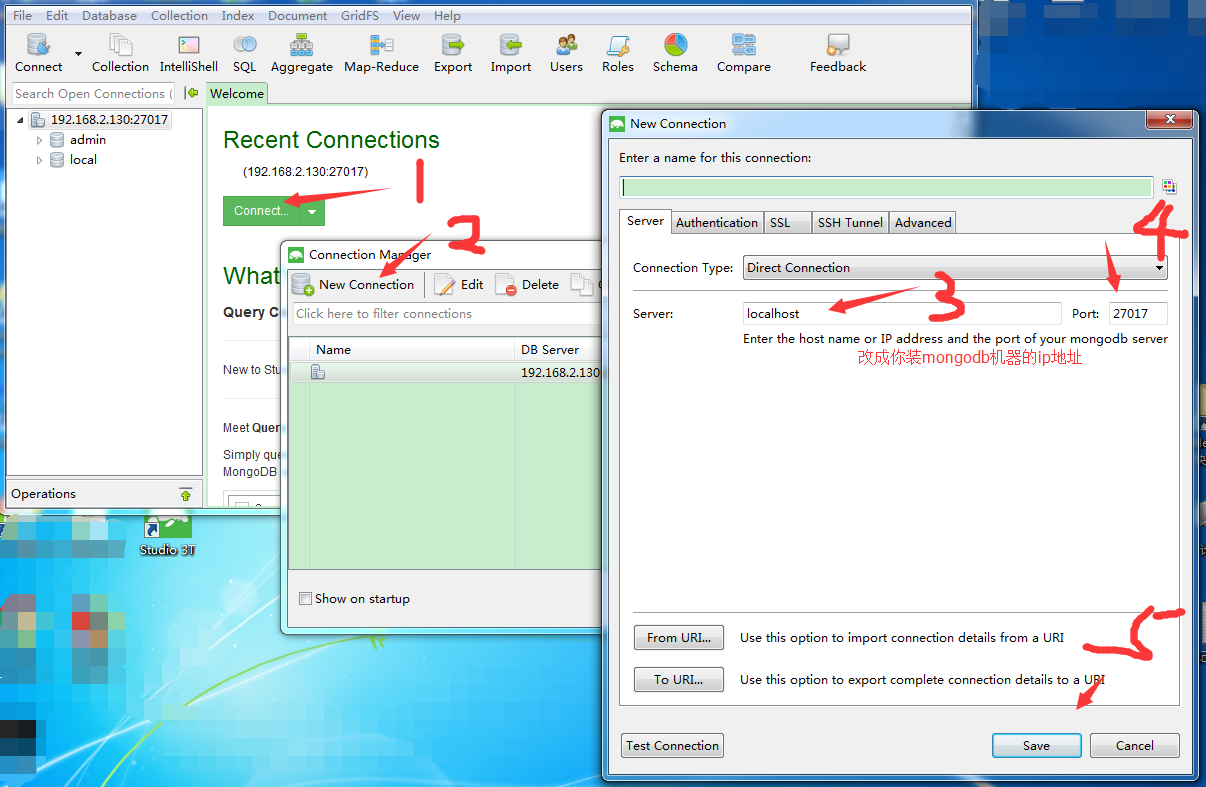
最后需要环境包的可以在评论留下你的联系方式我会给你发一份.
ChatterBot之linux下安装mongodb 02的更多相关文章
- Linux下安装MongoDB
MongoDB是一个C++编写的基于分布式文件存储的数据库,是一个介于关系和非关系之间的数据库,当然也属于NoSQL的行列,存储方式和Redis类似,是json格式的kav-value存储方式,只是R ...
- Linux下安装mongodb详细过程
本次安装mongodb使用yum.repo方式.详细过程请参考,也列出一些安装过程中的错误,欢迎指正. mongodb版本:3.0 先在linux下cd 到 /etc/yum.repos.d/ 新建脚 ...
- 26、linux下安装MongoDB
26.1.MongoDB介绍: 1.什么是MongoDB: MongoDB 是由C++语言编写的,是一个基于分布式文件存储的开源数据库系统.在高负载的情况下,添加更多的节点,可以保证服务器性能. Mo ...
- Linux下安装MongoDB 4.2数据库--使用tar包方式
(一)基础环境设置 操作系统版本 :centos-7.4 MongoDB版本:MongoDB 4.2 社区版 (1)关闭防火墙 # 关闭防火墙 [root@mongodbenterprise lib ...
- Linux 下安装 Mongodb
mongodb在linux下面的安装应该是很简单的,但是有一个小点需要注意,这也就是我为什么写这篇博客的原因. 首先到其官网上下载最新稳定版,解压到目录,如/usr/local/mongodb 在mo ...
- Linux下安装 mongodb
1.下载 去官网 https://www.mongodb.com 找到对应版本的mongodb 的下载地址 这样的: https://fastdl.mongodb.org/linux/mongodb ...
- linux下安装mongodb(php版本5.3)
转:原文出处忘记了. 1. 下载MongoDB 2. 解压文件到某目录下,然后重命名: [root@localhost var]# tar -xzvf mongodb-linux-i686-2.0.1 ...
- Linux下安装MongoDB全程记录
1.下载安装包 wget https://fastdl.mongodb.org/linux/mongodb-linux-x86_64-amazon-3.6.0.tgz 2.解压缩 [root@loca ...
- linux 下安装mongodb
1.初始化docker: -v 设置docker和host共享目录,格式hostPath:dockerContainerPath -p 端口映射 --name,容器名称 cen ...
随机推荐
- hdu 4117 -- GRE Words (AC自动机+线段树)
题目链接 problem Recently George is preparing for the Graduate Record Examinations (GRE for short). Obvi ...
- 微信退款流程,以及在过程中遇见的错误和解决方式(php 语言)
官方下载demo 1:https://pay.weixin.qq.com/wiki/doc/api/jsapi.php?chapter=11_1 开发步骤 : https://pay.weix ...
- LeetCode 63. Unique Path II(所有不同路径之二)
Follow up for "Unique Paths": Now consider if some obstacles are added to the grids. How m ...
- PHP基础入门详解(一)【世界上最好用的编程语言】
简介 --------- PHP(超文本预处器)是一种通用开源脚本语言.语法吸收了C语言.Java和Perl的特点,利于学习,使用广泛,主要适用于Web开发领域.PHP 独特的语法混合了C.Ja ...
- 别指望一文读懂Java并发之从一个线程开始
Understanding concurrent programming is on the same order of difficulty as understanding object-orie ...
- C#中判断语句 if、if-else if、switch-case
1.if一般用于一个条件的判断: 2.if-else if 一般用于多个条件的判断: 3.switch-case一般用于多个条件的判断. 注:if-else if与switch-case的区别在于:一 ...
- c++ 类覆盖方法中的协变返回类型
c++ 类覆盖方法中的协变返回类型 在C++中,只要原来的返回类型是指向类的指针或引用,新的返回类型是指向派生类的指针或引用,覆盖的方法就可以改变返回类型.这样的类型称为协变返回类型(Covarian ...
- git使用教程之git分支
1 分支简介 让我们来看一个简单的分支新建与分支合并的例子,实际工作中你可能会用到类似的工作流. 你将经历如下步骤: 开发某个网站. 为实现某个新的需求,创建一个分支. 在这个分支上开展工作. 正在此 ...
- 分酒问题(DFS解法)
题目大概是这样: 已知有三个容量分别为3千克.5千克和8千克的并且是没有刻度的酒瓶,3千克和5千克的瓶子均装满了酒,而8千克的瓶子为空.现要求仅用这三个酒瓶将这些酒均分为两个4千克并分别装入5千克和8 ...
- onload、DOMContentLoaded与性能问题
onload.DOMContentLoaded与性能问题 onload事件 DomContentLoaded 1.onload事件 onload事件一般在所有的文档内容加载完成后触发,如果网页中图 ...