
基于DevExpress的BandedGridView动态生成多行(复合)表头
最近cs项目中有个看板的功能需求,整个系统是基于DevExpress组件开发的,由于对这个组件的布局不是很熟,也借鉴了网上一些其他人的做法,普遍都是通过GridControl的BandedGridView来实现的,但是网上很多做法都是从设计视图手动创建绑定Brand的,并不是动态生成的,于是我花了半天时间,把这个控件的用法研究了一下,可以通过代码动态创建生成表头,写了个demo,在这和大家分享一下。
GridControl里面默认的控件是GridView,需要手动转换成BrandedGridView,具体如何转换,网上有很多,这里就不详细介绍了。
先看下designer的代码:
namespace WindowsFormsApplication1
{
    partial class Form2
    {
        /// <summary>
        /// Required designer variable.
        /// </summary>
        private System.ComponentModel.IContainer components = null;

        /// <summary>
        /// Clean up any resources being used.
        /// </summary>
        /// <param name="disposing">true if managed resources should be disposed; otherwise, false.</param>
        protected override void Dispose(bool disposing)
        {
            if (disposing && (components != null))
            {
                components.Dispose();
            }
            base.Dispose(disposing);
        }

        #region Windows Form Designer generated code

        /// <summary>
        /// Required method for Designer support - do not modify
        /// the contents of this method with the code editor.
        /// </summary>
        private void InitializeComponent()
        {
            this.panel1 = new System.Windows.Forms.Panel();
            this.button1 = new System.Windows.Forms.Button();
            this.gridControl1 = new DevExpress.XtraGrid.GridControl();
            this.bandedGridView1 = new DevExpress.XtraGrid.Views.BandedGrid.BandedGridView();
            this.panel1.SuspendLayout();
            ((System.ComponentModel.ISupportInitialize)(this.gridControl1)).BeginInit();
            ((System.ComponentModel.ISupportInitialize)(this.bandedGridView1)).BeginInit();
            this.SuspendLayout();
            //
            // panel1
            //
            this.panel1.Controls.Add(this.button1);
            this.panel1.Dock = System.Windows.Forms.DockStyle.Top;
            , );
            this.panel1.Name = "panel1";
            , );
            ;
            //
            // button1
            //
            , );
            this.button1.Name = "button1";
            , );
            ;
            this.button1.Text = "演示";
            this.button1.UseVisualStyleBackColor = true;
            this.button1.Click += new System.EventHandler(this.button1_Click);
            //
            // gridControl1
            //
            this.gridControl1.Dock = System.Windows.Forms.DockStyle.Fill;
            , );
            this.gridControl1.MainView = this.bandedGridView1;
            this.gridControl1.Name = "gridControl1";
            , );
            ;
            this.gridControl1.ViewCollection.AddRange(new DevExpress.XtraGrid.Views.Base.BaseView[] {
            this.bandedGridView1});
            //
            // bandedGridView1
            //
            this.bandedGridView1.GridControl = this.gridControl1;
            this.bandedGridView1.Name = "bandedGridView1";
            this.bandedGridView1.OptionsView.ShowGroupPanel = false;
            this.bandedGridView1.OptionsView.ShowIndicator = false;
            this.bandedGridView1.CustomDrawCell += BandedGridView1_CustomDrawCell;
            //
            // Form2
            //
            this.AutoScaleDimensions = new System.Drawing.SizeF(6F, 12F);
            this.AutoScaleMode = System.Windows.Forms.AutoScaleMode.Font;
            , );
            this.Controls.Add(this.gridControl1);
            this.Controls.Add(this.panel1);
            this.Name = "Form2";
            this.Text = "Form2";
            this.panel1.ResumeLayout(false);
            ((System.ComponentModel.ISupportInitialize)(this.gridControl1)).EndInit();
            ((System.ComponentModel.ISupportInitialize)(this.bandedGridView1)).EndInit();
            this.ResumeLayout(false);

        }

        #endregion

        private System.Windows.Forms.Panel panel1;
        private System.Windows.Forms.Button button1;
        private DevExpress.XtraGrid.GridControl gridControl1;
        private DevExpress.XtraGrid.Views.BandedGrid.BandedGridView bandedGridView1;
    }
}
然后是界面的代码:
using System;
using System.Collections.Generic;
using System.Data;
using System.Drawing;
using System.Windows.Forms;
using DevExpress.Utils;
using DevExpress.XtraGrid.Views.BandedGrid;
using DevExpress.XtraGrid.Views.Base;

namespace WindowsFormsApplication1
{

    public partial class Form2 : Form
    {
        public Form2()
        {
            InitializeComponent();
            InitBandGrid();
        }

        private void button1_Click(object sender, EventArgs e)
        {
            gridControl1.DataSource = GetData();
        }

        List<ColumnHeaderInfo> InitColumnHeader()
        {
            string[] Day = { "星期日", "星期一", "星期二", "星期三", "星期四", "星期五", "星期六" };
            List<ColumnHeaderInfo> list = new List<ColumnHeaderInfo>();
            var date = DateTime.Now.Date;
            ; i < ; i++)
            {
                var colDate = date.AddDays(i);
                ColumnHeaderInfo info = new ColumnHeaderInfo
                {
                    Date = colDate.ToString("yyyy-MM-dd"),
                    WeekDay = Day[Convert.ToInt32(colDate.DayOfWeek.ToString("d"))]
                };
                list.Add(info);
            }
            return list;
        }

        /// <summary>
        /// 根据仓库权限初始化仓库显示列头
        /// </summary>
        private void InitBandGrid()
        {
            var list = InitColumnHeader();
            bandedGridView1.BeginUpdate();
            bandedGridView1.BeginDataUpdate();

            bandedGridView1.BandPanelRowHeight = ;
            bandedGridView1.RowHeight = ;
            bandedGridView1.OptionsView.ShowColumnHeaders = false; //因为有Band列了,所以把ColumnHeader隐藏
            bandedGridView1.OptionsView.AllowCellMerge = true;

            bandedGridView1.Bands.Clear();

            GridBand gbStoreType = new GridBand
            {
                Name = @"StoreType",
                Caption = @" "
            };
            BandedGridColumn col = new BandedGridColumn
            {
                Name = "colStoreType",
                Caption = @" ",
                FieldName = "StoreType",
                Visible = true
            };
            gbStoreType.Columns.Add(col); //把新增的显示字段绑定到gridband上,以供显示数据用
            bandedGridView1.Bands.Add(gbStoreType);

            gbStoreType.View.Columns.Add(col);

            if (list != null)
                foreach (var item in list)
                {
                    GridBand gbDate = new GridBand
                    {
                        Name = @"Date_" + item.Date,
                        Caption = item.Date
                    };
                    GridBand gbWeekDay = gbDate.Children.AddBand(item.WeekDay);

                    GridBand gbCol1 = gbWeekDay.Children.AddBand("预约收货时段");

                    //必须先将其绑定至bandgridview上后才能去添加column,否则无法加载数据
                    var bandName1 = "Date_WeekDay_col1_" + item.Date;
                    var bandFieldName1 = "Date_WeekDay_col1_" + item.Date;
                    BandedGridColumn col1 = new BandedGridColumn
                    {
                        Name = bandName1,
                        Caption = @"预约收货时段",
                        FieldName = bandFieldName1,
                        Visible = true
                    };
                    gbCol1.Columns.Add(col1); //把新增的显示字段绑定到gridband上,以供显示数据用

                    GridBand gbCol2 = gbWeekDay.Children.AddBand("实际预约/最大预约");
                    var bandName2 = "Date_WeekDay_col2_" + item.Date;
                    var bandFieldName2 = "Date_WeekDay_col2_" + item.Date;
                    BandedGridColumn col2 = new BandedGridColumn
                    {
                        Name = bandName2,
                        Caption = @"实际预约/最大预约",
                        FieldName = bandFieldName2,
                        Visible = true
                    };
                    gbCol2.Columns.Add(col2); //把新增的显示字段绑定到gridband上,以供显示数据用

                    bandedGridView1.Bands.Add(gbDate);
                    gbCol1.View.Columns.Add(col1);
                    gbCol2.View.Columns.Add(col2);

                    col1.OptionsColumn.AllowMerge = DefaultBoolean.False;
                    col2.OptionsColumn.AllowMerge = DefaultBoolean.False;

                    gbDate.AppearanceHeader.TextOptions.HAlignment = HorzAlignment.Center; //这是合并表头居中显示
                    gbWeekDay.AppearanceHeader.TextOptions.HAlignment = HorzAlignment.Center; //这是合并表头居中显示
                    gbCol1.AppearanceHeader.TextOptions.HAlignment = HorzAlignment.Center; //这是合并表头居中显示
                    gbCol2.AppearanceHeader.TextOptions.HAlignment = HorzAlignment.Center; //这是合并表头居中显示

                }
            bandedGridView1.EndDataUpdate();
            bandedGridView1.EndUpdate();
        }

        private void BandedGridView1_CustomDrawCell(object sender,
            RowCellCustomDrawEventArgs e)
        {
            var currentView = sender as BandedGridView;
            if (currentView == null) return;

            var row = currentView.GetDataRow(e.RowHandle);
            if (row["RedColumnIndex"] != DBNull.Value && !string.IsNullOrWhiteSpace(e.CellValue.ToString()))
            {
                string[] args = row["RedColumnIndex"].ToString()
                    .Split(new[] {','}, StringSplitOptions.RemoveEmptyEntries);
                foreach (var arg in args)
                {
                    if (e.Column.VisibleIndex == int.Parse(arg))
                    {
                        e.Appearance.BackColor = Color.Red;
                    }
                }
            }
            if (row["GreenColumnIndex"] != DBNull.Value && !string.IsNullOrWhiteSpace(e.CellValue.ToString()))
            {
                string[] args = row["GreenColumnIndex"].ToString()
                    .Split(new[] { ',' }, StringSplitOptions.RemoveEmptyEntries);
                foreach (var arg in args)
                {
                    if (e.Column.VisibleIndex == int.Parse(arg))
                    {
                        e.Appearance.BackColor = Color.Green;
                    }
                }
            }
        }

        DataTable GetData()
        {
            var list = InitColumnHeader();
            DataTable dt = new DataTable();
            dt.Columns.Add("StoreType");
            foreach (var item in list)
            {
                dt.Columns.Add("Date_WeekDay_col1_" + item.Date);
                dt.Columns.Add("Date_WeekDay_col2_" + item.Date);
            }
            dt.Columns.Add("RedColumnIndex");
            dt.Columns.Add("GreenColumnIndex");
            dt.Rows.Add("常温","8:00-9:00", "1000/800", "8:00-9:00", "1000/800", "8:00-9:00", "1000/800", "8:00-9:00",
                "1000/800", "8:00-9:00", "1000/800", "8:00-9:00", "1000/800", "8:00-9:00", "1000/800","2,4,6,8,10,12,14","");
            dt.Rows.Add("常温","8:00-9:00", "1000/800", "8:00-9:00", "1000/800", "8:00-9:00", "1000/800", "8:00-9:00",
                "1000/800", "8:00-9:00", "1000/800", "8:00-9:00", "1000/800", "8:00-9:00", "1000/800", "", "6,8,10,12,14");
            dt.Rows.Add("常温","8:00-9:00", "1000/800", "8:00-9:00", "1000/800", "8:00-9:00", "1000/800", "8:00-9:00",
                "1000/800", "8:00-9:00", "1000/800", "8:00-9:00", "1000/800", "8:00-9:00", "1000/800", "10,12,14","");
            dt.Rows.Add("冷冻", "8:00-9:00", "1000/800", "8:00-9:00", "1000/800", "8:00-9:00", "1000/800", "8:00-9:00",
               "1000/800", "8:00-9:00", "1000/800", "8:00-9:00", "1000/800", "8:00-9:00", "1000/800","","");
            dt.Rows.Add("冷冻", "8:00-9:00", "1000/800", "8:00-9:00", "1000/800", "8:00-9:00", "1000/800", "8:00-9:00",
                "1000/800", "8:00-9:00", "1000/800", "8:00-9:00", "1000/800", "8:00-9:00", "1000/800","","");
            dt.Rows.Add("冷冻", "8:00-9:00", "1000/800", "8:00-9:00", "1000/800", "8:00-9:00", "1000/800", "8:00-9:00",
                "1000/800", "8:00-9:00", "1000/800", "8:00-9:00", "1000/800", "8:00-9:00", "1000/800","","");
            return dt;
        }

        public class ColumnHeaderInfo
        {
            public string Date { get; set; }
            public string WeekDay { get; set; }
        }
    }
}
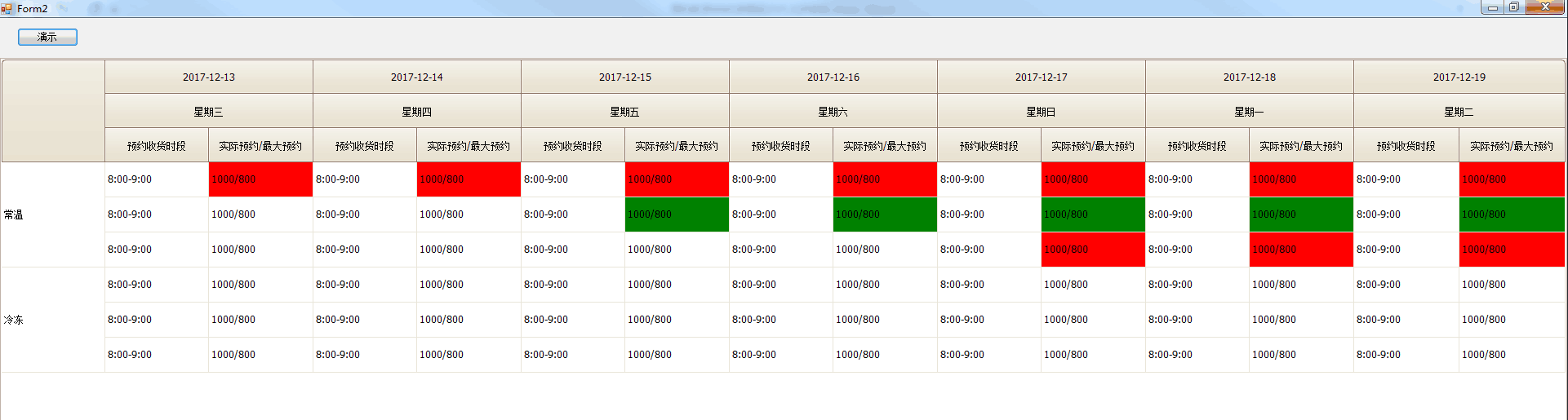
运行后的效果:
说明:
- Demo数据仅为了展示,所以我在窗体代码里面写死了,绑定的动态数据源最好是DataTable类型,因为列名也是动态创建生成的,可扩展性比较强
- 为了美观,设置了BrandedGridView的行高属性:BandPanelRowHeight表头高度,RowHeight每行数据单元格的行高
- 需求中有预警设置指定单元格背景色的功能,以前用普通的DataGridView的时候,有CellFormating事件,处理比较方便,GridView控件里面有个类似的事件,叫CustomDrawCell,具体实现可参考以上代码
到此为止,基本上就实现了如何用代码动态创建生成复合表头的功能,希望可以对大家有所帮助,谢谢
基于DevExpress的BandedGridView动态生成多行(复合)表头的更多相关文章
- 编辑表格输入内容、根据input输入框输入数字动态生成表格行数、编辑表格内容提交传给后台数据处理
编辑表格输入内容.根据input输入框输入数字动态生成表格行数.编辑表格内容提交传给后台数据处理 记录自己学习做的东西,写的小demo,希望对大家也有帮助! 代码如下: <!DOCTYPE ht ...
- Java获取后台数据,动态生成多行多列复选框
本例目标: 获取后台数据集合,将集合的某个字段,比如:姓名,以复选框形式显示在HTML页面 应用场景: 获取数据库的人员姓名,将其显示在页面,供多项选择 效果如下: 一.后台 查询数据库,返回List ...
- winform中动态生成多行label,同时添加滚动条
设计思路大概是这样的,Form内添加一个groupBox,groupBox内添加一个panel,panel的属性AutoScroll=true,在panel内动态添加label. 原始From如下: ...
- 分享我基于NPOI+ExcelReport实现的导入与导出EXCEL类库:ExcelUtility (续3篇-导出时动态生成多Sheet EXCEL)
ExcelUtility 类库经过我(梦在旅途)近期不断的优化与新增功能,现已基本趋向稳定,功能上也基本可以满足绝大部份的EXCEL导出需求,该类库已在我们公司大型ERP系统全面使用,效果不错,今天应 ...
- 基于webpack的前端工程化开发解决方案探索(一):动态生成HTML(转)
1.什么是工程化开发 软件工程的工程化开发概念由来已久,但对于前端开发来说,我们没有像VS或者eclipse这样量身打造的IDE,因为在大多数人眼中,前端代码无需编译,因此只要一个浏览器来运行调试就行 ...
- 论一种基于JS技术的WEB前端动态生成框图的方法
前言 HTML是一种标记语言,由HTML的标签元素和文本编写的文档可被浏览器描述为一幅网页.通常情况下网页的实现是由HTML.CSS和Javascript三者结合完成的,HTML负责网页的结构,CSS ...
- DevExpress 中根据数据库字典动态生成卡式菜单 z
第三方的Devexpress套件因为要使用权限机制控制不同用户进入系统显示菜单所以要配合字典数据动态生成.在WEB中这种问题灰常的轻松在winform里就稍微有点不同为了用DEV实现卡式菜单有组的概念 ...
- MSChart使用之动态生成多个多行ChartArea
前台代码: <asp:Chart ID=" > <Titles> <asp:Title Name="Title1" runat=" ...
- Java利用poi生成word(包含插入图片,动态表格,行合并)
转(小改): Java利用poi生成word(包含插入图片,动态表格,行合并) 2018年12月20日 09:06:51 wjw_11093010 阅读数:70 Java利用poi生成word(包含插 ...
随机推荐
- Android 6.0运行时权限
一.Runtime Permissions Android 6.0在手机安全方面做的一个处理就是增加了运行时权限(Runtime Permissions). 新的权限机制更好的保护了用户的隐私,Goo ...
- robotframework自动化:登陆操作
robotframework自动化系统:登录 robotframework对于编程能力比较弱的测试人员而言,真的是雪中送炭!我们可以使用robotframework根据之前完成的测试用例,一步步完善自 ...
- css中单位px和em,rem的区别[转载]
PX特点 1. IE无法调整那些使用px作为单位的字体大小: 2. 国外的大部分网站能够调整的原因在于其使用了em或rem作为字体单位: 3. Firefox能够调整px和em,rem,但是96%以上 ...
- Object.observe() 观察对象
这个对象方法可以用来异步观察对javascript对象的改动: // Let's say we have a model with data var model = {}; // Which we ...
- JavaScript核心参考
Array 方法 concat() 把元素衔接到数组中. every() 测试断言函数是否对每个数组元素都为真. filter() 返回满足断言函数的数组元素. forEach() 为数组的每一个元素 ...
- SSL证书简介
前言 之前写了一篇本站点如何部署SSL证书的文章<Centos7.4下用Docker-Compose部署WordPress(续)-服务器端用Nginx作为反向代理并添加SSL证书(阿里云免费DV ...
- HTML知识速递
1.html的定义 超文本标记语言(Hypertext Markup Language,HTML)通过标签语言来标记要显示的网页中的各个部分.一套规则,浏览器认识的规则 浏览器按顺序渲染网页文件,然后 ...
- SVN服务迁移备份操作步骤
SVN服务备份操作步骤 1.准备源服务器和目标服务器 源服务器:192.168.1.250 目标服务器:192.168.1.251 root/rootroot 2.对目标服务器(251)装SVN服务器 ...
- c#把汉字转化成全拼音函数(全拼)
/// <summary> /// 把汉字转换成拼音(全拼) /// </summary> /// <param name=&q ...
- DevExpress.XtraEditors.TextEdit 设为密码输入框
DevExpress.XtraEditors.TextEdit 设为密码输入框,解决办法: 设计窗口-->属性Properties-->Mask节点-->PasswordChar输入 ...