
Iris_data_analysis
SVM调用实例——鸢尾花
任务描述:
构建一个模型,根据鸢尾花的花萼和花瓣大小将其分为三种不同的品种。

数据集:
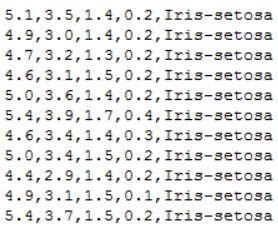
每一行数据由4个特征值及1个目标值组成,4个特征值分别为:萼片长度、萼片宽度、花瓣长度、花瓣宽度,目标值为三种不同类别的鸢尾花。
代码实现:
# ! /usr/bin/env python37

# ! -*- coding:utf-8 -*-

# ====#====#====#====

# HomePage:https://www.cnblogs.com/Qzzz/

# FileName: Iris.py

# Version:1.0.5

# ====#====#====#====

#*************导入必要的包***********************

# numpy:用于科学计算

# matplotlib:用于进行可视化

# sklearn:机器学习算法

import numpy as np

from sklearn import model_selection as mo

from sklearn import svm

from sklearn.svm import SVC

import matplotlib.pyplot as plt

import matplotlib as mpl

from matplotlib import colors

#*************将字符串转为整型,便于数据加载***********************

#在函数中建立了一个对应字典,输入字符串,输出字符串对应的数字

def iris_type(s):

#   print(type(s))

    it = {b'Iris-setosa':0, b'Iris-versicolor':1, b'Iris-virginica':2}

    return it[s]

#加载数据

data_path='./iris.data'

data = np.loadtxt(data_path,                          #数据文件的路径

                  dtype = float,                      #数据类型

                  delimiter=',',                      #数据分隔符

                  converters={4:iris_type})           #将第五列使用函数iris_type进行转换

# print(data)

# print(data.shape)

#数据分割

x,y = np.split(data,                                  #要切分的数组

               (4,),                                  #沿轴切分的位置,第5列开始往后为y

               axis=1)                                #1代表纵向分割,按列分割

x = x[:,0:2]

#第一个逗号之前表示行,只有冒号表示所有行,第二个冒号0:2表示0,1两列

#在X中我们取前两列作为特征,为了后面的可视化,原始的四维不好画图,x[:,0:4]代表第一为全取,第二维取0~2

#????剩下两列的数据不做处理????

# print(x)

x_train,x_test,y_train,y_test=mo.train_test_split(x,                #所要划分的样本特征集

                                                  y,                #所要划分的样本结果

                                                  random_state=1,   #随机数种子确保产生的随机数组相同

                                                  test_size=0.3)    #测试样本占比

#**********************SVM分类器构建*************************

def classifier():

    #clf = svm.SVC(C=0.8, kernel='rbf', gamma=50, decision_function_shape='ovr)

    clf = svm.SVC(C=0.5,                             #误差项惩罚系数,默认值是1

                  kernel = 'linear',                 #线性核 kernel='rbf':高斯核

                  decision_function_shape = 'ovr')   #决策函数

    return clf

clf = classifier()

#************************模型训练*****************************

# y_train.ravel()              #扁平化操作,将原来的二维数组转换为一维数组

# array([2., 0., 0., 0., 1., 0., 0., 2., 2., 2., 2., 2., 1., 2., 1., 0., 2.,

#        2., 0., 0., 2., 0., 2., 2., 1., 1., 2., 2., 0., 1., 1., 2., 1., 2.,

#        1., 0., 0., 0., 2., 0., 1., 2., 2., 0., 0., 1., 0., 2., 1., 2., 2.,

#        1., 2., 2., 1., 0., 1., 0., 1., 1., 0., 1., 0., 0., 2., 2., 2., 0.,

#        0., 1., 0., 2., 0., 2., 2., 0., 2., 0., 1., 0., 1., 1., 0., 0., 1.,

#        0., 1., 1., 0., 1., 1., 1., 1., 2., 0., 0., 2., 1., 2., 1., 2., 2.,

#        1., 2., 0.])

def train(clf, x_train, y_train):

    clf.fit(x_train,            #训练及特征向量,fit表示输入数据开始拟合

            y_train.ravel())    #训练集目标值扁平化,将原来的二维数组转换为一维数组

train(clf, x_train, y_train)

#**************模型评估并判断ab是否相等,计算acc的均值*************

def show_accuracy(a, b, tip):

    acc = a.ravel() == b.ravel()

    print('%s Accuracy:%.3f' %(tip, np.mean(acc)))

def print_accuracy(clf, x_train, y_train, x_test, y_test):

    #分别打印训练集和测试集的准确率

    print('training prediction:%.3f' %(clf.score(x_train, y_train)))

    print('test data prediction:%.3f' %(clf.score(x_test, y_test)))

    #原始结果与预测结果进行比对

    show_accuracy(clf.predict(x_train), y_train, 'training data')

    show_accuracy(clf.predict(x_test), y_test, 'testing data')

    #计算决策函数的值,表示x到各分割平面的距离

    print('decision_function:\n', clf.decision_function(x_train))

print_accuracy(clf, x_train, y_train, x_test, y_test)

#************************模型使用*************************

def draw(clf, x):

    iris_feature = 'sepal length', 'sepal width', 'petal lenght', 'petal width'

        # 开始画图

    x1_min, x1_max = x[:, 0].min(), x[:, 0].max()               #第0列的范围

    x2_min, x2_max = x[:, 1].min(), x[:, 1].max()               #第1列的范围

    x1, x2 = np.mgrid[x1_min:x1_max:200j, x2_min:x2_max:200j]   #生成网格采样点 开始坐标:结束坐标(不包括):步长

    #flat将二维数组转换成1个1维的迭代器,然后把x1和x2的所有可能值给匹配成为样本点

    grid_test = np.stack((x1.flat, x2.flat), axis=1)            #stack():沿着新的轴加入一系列数组,竖着(按列)增加两个数组,grid_test的shape:(40000, 2)

    print('grid_test:\n', grid_test)

    # 输出样本到决策面的距离

    z = clf.decision_function(grid_test)

    print('the distance to decision plane:\n', z)

    grid_hat = clf.predict(grid_test)                           # 预测分类值 得到【0,0.。。。2,2,2】

    print('grid_hat:\n', grid_hat)

    grid_hat = grid_hat.reshape(x1.shape)                       # reshape grid_hat和x1形状一致

                                                                #若3*3矩阵e,则e.shape()为3*3,表示3行3列

    #light是网格测试点的配色,相当于背景

    #dark是样本点的配色

    cm_light = mpl.colors.ListedColormap(['#A0FFA0', '#FFA0A0', '#A0A0FF'])

    cm_dark = mpl.colors.ListedColormap(['g', 'b', 'r'])

     #画出所有网格样本点被判断为的分类,作为背景

    plt.pcolormesh(x1, x2, grid_hat, cmap=cm_light)                                   # pcolormesh(x,y,z,cmap)这里参数代入

                                                                                      # x1,x2,grid_hat,cmap=cm_light绘制的是背景。

    #squeeze()把y的个数为1的维度去掉,也就是变成一维。

    plt.scatter(x[:, 0], x[:, 1], c=np.squeeze(y), edgecolor='k', s=50, cmap=cm_dark) # 样本点

    plt.scatter(x_test[:, 0], x_test[:, 1], s=200, facecolor='yellow', zorder=10, marker='+')       # 测试点

    plt.xlabel(iris_feature[0], fontsize=20)

    plt.ylabel(iris_feature[1], fontsize=20)

    plt.xlim(x1_min, x1_max)

    plt.ylim(x2_min, x2_max)

    plt.title('svm in iris data classification', fontsize=30)

    plt.grid()

    plt.show()
Iris_data_analysis的更多相关文章
随机推荐
- 使用kubeoperator安装的k8s 版本1.20.14 将节点上的容器运行时从 Docker Engine 改为 containerd
官方文档:https://kubernetes.io/zh-cn/docs/tasks/administer-cluster/migrating-from-dockershim/change-runt ...
- MinIO Server配置指南
MinIO server在默认情况下会将所有配置信息存到 ${HOME}/.minio/config.json 文件中. 以下部分提供每个字段的详细说明以及如何自定义它们. 配置目录 默认的配置目录是 ...
- Init Container(初始化容器)
在很多应用场景中,应用在启动之前都需要进行如下初始化操作. ◎ 等待其他关联组件正确运行(例如数据库或某个后台服务). ◎ 基于环境变量或配置模板生成配置文件. ◎ 从远程数据库获取本地所需配置,或者 ...
- Docker容器优雅重启
默认情况下,当 Docker 守护进程终止时,它将关闭正在运行的容器.您可以配置守护程序,以便容器在守护程序不可用时保持运行.此功能称为live-restore.live-restore选项有助于减少 ...
- ElastAlert配置和告警规则各种用法
config.yaml配置说明 #用来加载rule的目录,默认是example_rules rules_folder: example_rules #用来设置定时向elasticsearch发送请求 ...
- SpringBoot课程学习(三)
一.YAML格式的基本语法 (1)格式: 大小写敏感 数据值前边必须有空格,作为分隔符 使用缩进表示层级关系 缩进时不允许使用Tab键,只允许使用空格(各个系统 Tab对应的 空格数目可能不同,导致层 ...
- .NET MAUI 社区工具包 1.3版本发布
2022 年 10 月 4 日,微软发布了 .NET MAUI 社区工具包的 1.3 版,具体参见微软官方博客:https://devblogs.microsoft.com/dotnet/announ ...
- 利用FastReport传递图片参数,在报表上展示签名信息
在一个项目中,客户要求对报表中的签名进行仿手写的签名处理,因此我们原先只是显示相关人员的姓名的地方,需要采用手写方式签名,我们的报表是利用FastReport处理的,在利用楷体处理的时候,开发展示倒是 ...
- 网络工程知识(二)VLAN的基础和配置:802.1q帧;Access、Trunk、Hybrid接口工作模式过程与配置;VLANIF的小实验
介绍-VLAN VLAN(Virtual Local Area Network)即虚拟局域网,工作在数据链路层. 交换机将通过:接口.MAC.基于子网.协议划分(IPv4和IPv6).基于策略的方式划 ...
- Sublime Text4(Build 4126) 安装备忘
Sublime Text4(Build 4126) 安装备忘 sublime text 4126 PJ已测可用 打开浏览器进入网站https://hexed.it 打开sublime text4安装目 ...