
Iris_data_analysis
SVM调用实例——鸢尾花
任务描述:
构建一个模型,根据鸢尾花的花萼和花瓣大小将其分为三种不同的品种。

数据集:
每一行数据由4个特征值及1个目标值组成,4个特征值分别为:萼片长度、萼片宽度、花瓣长度、花瓣宽度,目标值为三种不同类别的鸢尾花。
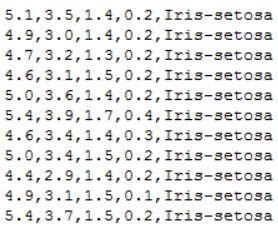
代码实现:
# ! /usr/bin/env python37

# ! -*- coding:utf-8 -*-

# ====#====#====#====

# HomePage:https://www.cnblogs.com/Qzzz/

# FileName: Iris.py

# Version:1.0.5

# ====#====#====#====

#*************导入必要的包***********************

# numpy:用于科学计算

# matplotlib:用于进行可视化

# sklearn:机器学习算法

import numpy as np

from sklearn import model_selection as mo

from sklearn import svm

from sklearn.svm import SVC

import matplotlib.pyplot as plt

import matplotlib as mpl

from matplotlib import colors

#*************将字符串转为整型,便于数据加载***********************

#在函数中建立了一个对应字典,输入字符串,输出字符串对应的数字

def iris_type(s):

#   print(type(s))

    it = {b'Iris-setosa':0, b'Iris-versicolor':1, b'Iris-virginica':2}

    return it[s]

#加载数据

data_path='./iris.data'

data = np.loadtxt(data_path,                          #数据文件的路径

                  dtype = float,                      #数据类型

                  delimiter=',',                      #数据分隔符

                  converters={4:iris_type})           #将第五列使用函数iris_type进行转换

# print(data)

# print(data.shape)

#数据分割

x,y = np.split(data,                                  #要切分的数组

               (4,),                                  #沿轴切分的位置,第5列开始往后为y

               axis=1)                                #1代表纵向分割,按列分割

x = x[:,0:2]

#第一个逗号之前表示行,只有冒号表示所有行,第二个冒号0:2表示0,1两列

#在X中我们取前两列作为特征,为了后面的可视化,原始的四维不好画图,x[:,0:4]代表第一为全取,第二维取0~2

#????剩下两列的数据不做处理????

# print(x)

x_train,x_test,y_train,y_test=mo.train_test_split(x,                #所要划分的样本特征集

                                                  y,                #所要划分的样本结果

                                                  random_state=1,   #随机数种子确保产生的随机数组相同

                                                  test_size=0.3)    #测试样本占比

#**********************SVM分类器构建*************************

def classifier():

    #clf = svm.SVC(C=0.8, kernel='rbf', gamma=50, decision_function_shape='ovr)

    clf = svm.SVC(C=0.5,                             #误差项惩罚系数,默认值是1

                  kernel = 'linear',                 #线性核 kernel='rbf':高斯核

                  decision_function_shape = 'ovr')   #决策函数

    return clf

clf = classifier()

#************************模型训练*****************************

# y_train.ravel()              #扁平化操作,将原来的二维数组转换为一维数组

# array([2., 0., 0., 0., 1., 0., 0., 2., 2., 2., 2., 2., 1., 2., 1., 0., 2.,

#        2., 0., 0., 2., 0., 2., 2., 1., 1., 2., 2., 0., 1., 1., 2., 1., 2.,

#        1., 0., 0., 0., 2., 0., 1., 2., 2., 0., 0., 1., 0., 2., 1., 2., 2.,

#        1., 2., 2., 1., 0., 1., 0., 1., 1., 0., 1., 0., 0., 2., 2., 2., 0.,

#        0., 1., 0., 2., 0., 2., 2., 0., 2., 0., 1., 0., 1., 1., 0., 0., 1.,

#        0., 1., 1., 0., 1., 1., 1., 1., 2., 0., 0., 2., 1., 2., 1., 2., 2.,

#        1., 2., 0.])

def train(clf, x_train, y_train):

    clf.fit(x_train,            #训练及特征向量,fit表示输入数据开始拟合

            y_train.ravel())    #训练集目标值扁平化,将原来的二维数组转换为一维数组

train(clf, x_train, y_train)

#**************模型评估并判断ab是否相等,计算acc的均值*************

def show_accuracy(a, b, tip):

    acc = a.ravel() == b.ravel()

    print('%s Accuracy:%.3f' %(tip, np.mean(acc)))

def print_accuracy(clf, x_train, y_train, x_test, y_test):

    #分别打印训练集和测试集的准确率

    print('training prediction:%.3f' %(clf.score(x_train, y_train)))

    print('test data prediction:%.3f' %(clf.score(x_test, y_test)))

    #原始结果与预测结果进行比对

    show_accuracy(clf.predict(x_train), y_train, 'training data')

    show_accuracy(clf.predict(x_test), y_test, 'testing data')

    #计算决策函数的值,表示x到各分割平面的距离

    print('decision_function:\n', clf.decision_function(x_train))

print_accuracy(clf, x_train, y_train, x_test, y_test)

#************************模型使用*************************

def draw(clf, x):

    iris_feature = 'sepal length', 'sepal width', 'petal lenght', 'petal width'

        # 开始画图

    x1_min, x1_max = x[:, 0].min(), x[:, 0].max()               #第0列的范围

    x2_min, x2_max = x[:, 1].min(), x[:, 1].max()               #第1列的范围

    x1, x2 = np.mgrid[x1_min:x1_max:200j, x2_min:x2_max:200j]   #生成网格采样点 开始坐标:结束坐标(不包括):步长

    #flat将二维数组转换成1个1维的迭代器,然后把x1和x2的所有可能值给匹配成为样本点

    grid_test = np.stack((x1.flat, x2.flat), axis=1)            #stack():沿着新的轴加入一系列数组,竖着(按列)增加两个数组,grid_test的shape:(40000, 2)

    print('grid_test:\n', grid_test)

    # 输出样本到决策面的距离

    z = clf.decision_function(grid_test)

    print('the distance to decision plane:\n', z)

    grid_hat = clf.predict(grid_test)                           # 预测分类值 得到【0,0.。。。2,2,2】

    print('grid_hat:\n', grid_hat)

    grid_hat = grid_hat.reshape(x1.shape)                       # reshape grid_hat和x1形状一致

                                                                #若3*3矩阵e,则e.shape()为3*3,表示3行3列

    #light是网格测试点的配色,相当于背景

    #dark是样本点的配色

    cm_light = mpl.colors.ListedColormap(['#A0FFA0', '#FFA0A0', '#A0A0FF'])

    cm_dark = mpl.colors.ListedColormap(['g', 'b', 'r'])

     #画出所有网格样本点被判断为的分类,作为背景

    plt.pcolormesh(x1, x2, grid_hat, cmap=cm_light)                                   # pcolormesh(x,y,z,cmap)这里参数代入

                                                                                      # x1,x2,grid_hat,cmap=cm_light绘制的是背景。

    #squeeze()把y的个数为1的维度去掉,也就是变成一维。

    plt.scatter(x[:, 0], x[:, 1], c=np.squeeze(y), edgecolor='k', s=50, cmap=cm_dark) # 样本点

    plt.scatter(x_test[:, 0], x_test[:, 1], s=200, facecolor='yellow', zorder=10, marker='+')       # 测试点

    plt.xlabel(iris_feature[0], fontsize=20)

    plt.ylabel(iris_feature[1], fontsize=20)

    plt.xlim(x1_min, x1_max)

    plt.ylim(x2_min, x2_max)

    plt.title('svm in iris data classification', fontsize=30)

    plt.grid()

    plt.show()
Iris_data_analysis的更多相关文章
随机推荐
- Openstack Neutron:三层技术和实现
目录 - 1.Neutron 三层技术简介 - 2.集中式router - 1.在节点上安装L3 agent - 2.配置外部网络 - 3.通过CLI或者Horizon 来创建路由 - 4.连接租户网 ...
- 谷歌MapReduce经典论文翻译(中英对照)
MapReduce: Simplified Data Processing on Large Clusters(MapReduce: 简化大型集群下的数据处理) 作者:Jeffrey Dean and ...
- Elasticsearch: Reindex接口
在我们开发的过程中,我们有很多时候需要用到Reindex接口.它可以帮我们把数据从一个index到另外一个index进行重新reindex.这个对于特别适用于我们在修改我们数据的mapping后,需要 ...
- Elasticsearch Top10 监控指标
文章转载自: https://mp.weixin.qq.com/s?__biz=MzI2NDY1MTA3OQ==&mid=2247484441&idx=1&sn=8292f50 ...
- Mysql三种日志(binlog,redolog,undolog)的作用和区别
Mysql有三种很重要的日志也是面试经常涉及到的考点,分别是 binlog .redo log和undo log, 这里面binlog 是server层实现的日志,而redo log 和undo lo ...
- 内存映射IO(MMIO)
端口I/O 介绍: 一种I/O编址方式是端口映射I/O(port-mapped I/O), CPU使用专门的I/O指令对设备进行访问, 并把设备的地址称作端口号. 在执行其中的一条指令时,CPU使用地 ...
- bean文档类型定义
ELEMENT:表示当前 (bean*):表示0到多个bean元素 (property*):表示0到多个property元素 ATTLIST:表示属性 #REQUIRED:表示不可缺少 #IMPLIE ...
- Linux进程间通信(一)
进程间通信 概念:进程是一个独立的资源分配单位,不同进程之间有关联,不能在一个进程中直接访问另一个进程的资源. 进程和进程之间的资源是相互独立的,一个进程不能直接访问另外一个进程的资源,但是进程和进程 ...
- LcdTools如何实现PX01读取SD中BIN文件并通过端口发出去
在实际应用中我们会碰到需要下载很大容量固件,比如TP固件几百K大小BIN文件,这种情况下用LcdTools写初始化代码的方式实现就不大现实:此时我们可以通过PX01 SD来实现. 首先,把需要操作的B ...
- 十四、资源控制器之RS
RC (ReplicationController )主要的作用就是用来确保容器应用的副本数始终保持在用户定义的副本数 .即如果有容器异常退出,会自动创建新的 Pod 来替代:而如果异常多出来的容器也 ...