
SpringBoot实现电子文件签字+合同系统
本文已经收录到Github仓库,该仓库包含计算机基础、Java基础、多线程、JVM、数据库、Redis、Spring、Mybatis、SpringMVC、SpringBoot、分布式、微服务、设计模式、架构、校招社招分享等核心知识点,欢迎star~
Github地址:https://github.com/Tyson0314/Java-learning
一、前言
今天公司领导提出一个功能,说实现一个文件的签字+盖章功能,然后自己进行了简单的学习,对文档进行数字签名与签署纸质文档的原因大致相同,数字签名通过使用计算机加密来验证 (身份验证:验证人员和产品所声明的身份是否属实的过程。例如,通过验证用于签名代码的数字签名来确认软件发行商的代码来源和完整性。)数字信息,如文档、电子邮件和宏。数字签名有助于确保:真实性,完整性,不可否认性。目前市面上的电子签章产品也是多样化,但是不管是哪个厂家的产品,在线签章简单易用,同时也能保证签章的有效性,防篡改,防伪造,稳定,可靠就是好产品。
此次开源的系统模拟演示了文件在OA系统中的流转,主要为办公系统跨平台在线处理Office文档提供了完美的解决方案。Word文档在线处理的核心环节,包括:起草文档、领导审批、核稿、领导盖章、正式发文。PageOffice产品支持PC端Word文档在线处理的所有环节;MobOffice产品支持了移动端领导审批和领导盖章的功能。支持PC端和移动端对文档审批和盖章的互认。然后此次博客中使用的卓正软件的电子签章采用自主知识产权的核心智能识别验证技术,确保文档安全可靠。采用 COM、ActiveX嵌入式技术开发,确保软件能够支持多种应用。遵循《中华人民共和国电子签名法》关于电子签名的规范,同时支持国际通用的 RSA算法,符合国家安全标准。
PageOffice和MobOffice产品结合使用为跨平台处理Office文件提供了完美的解决方案,主要功能有word在线编辑保存和留痕,word和pdf文件在线盖章(电子印章)。
二、项目源码及部署
1、项目结构及使用框架
该签字+盖章流程系统使用了SpringBoot+thymeleaf实现的,然后jar包依赖使用了maven
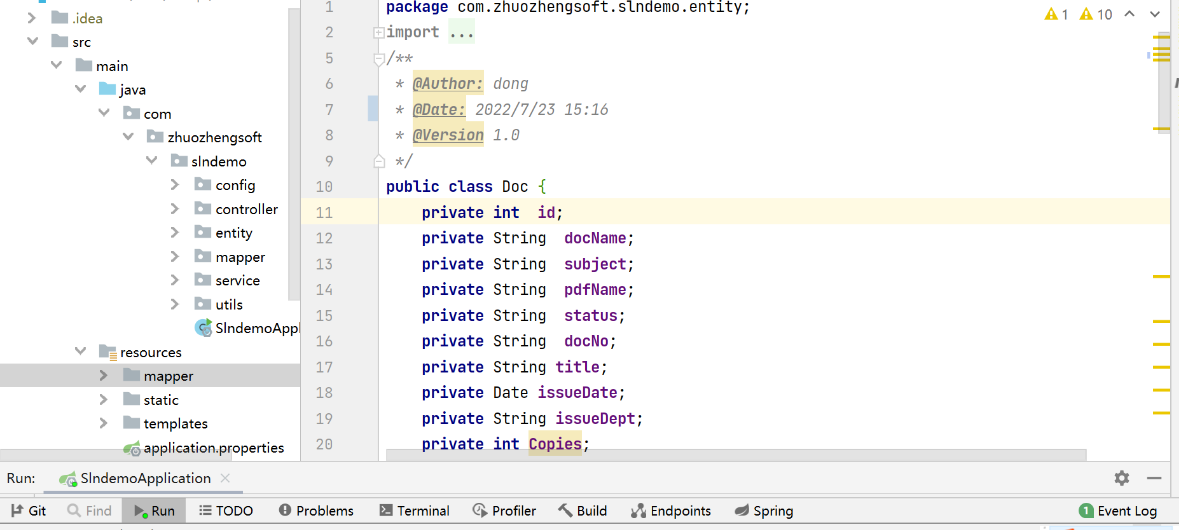
- 控制层
@Controller

@RequestMapping("/mobile")

public class MobileOfficeController {

    @Value("${docpath}")

    private  String docPath;

    @Value("${moblicpath}")

    private  String moblicpath;

    @Autowired

    DocService m_docService;

    /**

     * 添加MobOffice的服务器端授权程序Servlet(必须)

     *

     */

    @RequestMapping("/opendoc")

    public void opendoc(HttpServletRequest request, HttpServletResponse response, HttpSession session,String type,String userName)throws  Exception {

        String fileName = "";

        userName= URLDecoder.decode(userName,"utf-8");

        Doc doc=m_docService.getDocById(1);

        if(type.equals("word")){

            fileName = doc.getDocName();

        }else{

            fileName = doc.getPdfName();

        }

        OpenModeType openModeType = OpenModeType.docNormalEdit;

        if (fileName.endsWith(".doc")) {

            openModeType = OpenModeType.docNormalEdit;

        } else if (fileName.endsWith(".pdf")) {

            String mode = request.getParameter("mode");

            if (mode.equals("normal")) {

                openModeType = OpenModeType.pdfNormal;

            } else {

                openModeType = OpenModeType.pdfReadOnly;

            }

        }

        MobOfficeCtrl mobCtrl = new MobOfficeCtrl(request,response);

        mobCtrl.setSysPath(moblicpath);

        mobCtrl.setServerPage("/mobserver.zz");

        //mobCtrl.setZoomSealServer("http://xxx.xxx.xxx.xxx:8080/ZoomSealEnt/enserver.zz");

        mobCtrl.setSaveFilePage("/mobile/savedoc?testid="+Math.random());

        mobCtrl.webOpen("file://"+docPath+fileName,  openModeType , userName);

    }

    @RequestMapping("/savedoc")

    public  void  savedoc(HttpServletRequest request,  HttpServletResponse response){

        FileSaver fs = new FileSaver(request, response);

        fs.saveToFile(docPath+fs.getFileName());

        fs.close();

    }

}

复制代码
- 项目业务层源码
@Service

public class DocServiceImpl implements DocService {

    @Autowired

    DocMapper docMapper;

    @Override

    public Doc getDocById(int id) throws Exception {

        Doc  doc=docMapper.getDocById(id);

        //如果doc为null的话,页面所有doc.属性都报错

        if(doc==null) {

            doc=new Doc();

        }

        return doc;

    }

    @Override

    public Integer addDoc(Doc doc) throws Exception {

       int id=docMapper.addDoc(doc);

        return id;

    }

    @Override

    public Integer updateStatusForDocById(Doc doc) throws Exception {

        int id=docMapper.updateStatusForDocById(doc);

        return id;

    }

    @Override

    public Integer updateDocNameForDocById(Doc doc) throws Exception {

        int id=docMapper.updateDocNameForDocById(doc);

        return id;

    }

    @Override

    public Integer updatePdfNameForDocById(Doc doc) throws Exception {

        int id=docMapper.updatePdfNameForDocById(doc);

        return id;

    }

}

复制代码
- 拷贝文件
public class CopyFileUtil {

  //拷贝文件

  public static boolean copyFile(String oldPath, String newPath) throws Exception {

      boolean copyStatus=false;

      int bytesum = 0;

      int byteread = 0;

      File oldfile = new File(oldPath);

      if (oldfile.exists()) { //文件存在时

          InputStream inStream = new FileInputStream(oldPath); //读入原文件

          FileOutputStream fs = new FileOutputStream(newPath);

          byte[] buffer = new byte[1444];

          int length;

          while ((byteread = inStream.read(buffer)) != -1) {

              bytesum += byteread; //字节数 文件大小

              //System.out.println(bytesum);

              fs.write(buffer, 0, byteread);

          }

          fs.close();

          inStream.close();

          copyStatus=true;

      }else{

          copyStatus=false;

      }

      return copyStatus;

  }

}

复制代码
- 二维码源码
public class QRCodeUtil {

    private String codeText;//二维码内容

    private BarcodeFormat barcodeFormat;//二维码类型

    private int width;//图片宽度

    private int height;//图片高度

    private String imageformat;//图片格式

    private int backColorRGB;//背景色,颜色RGB的数值既可以用十进制表示,也可以用十六进制表示

    private int codeColorRGB;//二维码颜色

    private ErrorCorrectionLevel errorCorrectionLevel;//二维码纠错能力

    private String encodeType;

    public QRCodeUtil() {

        codeText = "www.zhuozhengsoft.com";

        barcodeFormat = BarcodeFormat.PDF_417;

        width = 400;

        height = 400;

        imageformat = "png";

        backColorRGB = 0xFFFFFFFF;

        codeColorRGB = 0xFF000000;

        errorCorrectionLevel = ErrorCorrectionLevel.H;

        encodeType = "UTF-8";

    }

    public QRCodeUtil(String text) {

        codeText = text;

        barcodeFormat = BarcodeFormat.PDF_417;

        width = 400;

        height = 400;

        imageformat = "png";

        backColorRGB = 0xFFFFFFFF;

        codeColorRGB = 0xFF000000;

        errorCorrectionLevel = ErrorCorrectionLevel.H;

        encodeType = "UTF-8";

    }

    public String getCodeText() {

        return codeText;

    }

    public void setCodeText(String codeText) {

        this.codeText = codeText;

    }

    public BarcodeFormat getBarcodeFormat() {

        return barcodeFormat;

    }

    public void setBarcodeFormat(BarcodeFormat barcodeFormat) {

        this.barcodeFormat = barcodeFormat;

    }

    public int getWidth() {

        return width;

    }

    public void setWidth(int width) {

        this.width = width;

    }

    public int getHeight() {

        return height;

    }

    public void setHeight(int height) {

        this.height = height;

    }

    public String getImageformat() {

        return imageformat;

    }

    public void setImageformat(String imageformat) {

        this.imageformat = imageformat;

    }

    public int getBackColorRGB() {

        return backColorRGB;

    }

    public void setBackColorRGB(int backColorRGB) {

        this.backColorRGB = backColorRGB;

    }

    public int getCodeColorRGB() {

        return codeColorRGB;

    }

    public void setCodeColorRGB(int codeColorRGB) {

        this.codeColorRGB = codeColorRGB;

    }

    public ErrorCorrectionLevel getErrorCorrectionLevel() {

        return errorCorrectionLevel;

    }

    public void setErrorCorrectionLevel(ErrorCorrectionLevel errorCorrectionLevel) {

        this.errorCorrectionLevel = errorCorrectionLevel;

    }

    private BufferedImage toBufferedImage(BitMatrix bitMatrix) {

        int width = bitMatrix.getWidth();

        int height = bitMatrix.getHeight();

        BufferedImage image = new BufferedImage(width, height, BufferedImage.TYPE_INT_RGB);

        for (int x = 0; x < width; x++) {

            for (int y = 0; y < height; y++) {

                image.setRGB(x, y, bitMatrix.get(x, y) ? this.codeColorRGB: this.backColorRGB);

            }

        }

        return image;

    }

    private byte[] writeToBytes(BitMatrix bitMatrix)

            throws IOException {

        try {

            BufferedImage bufferedimage = toBufferedImage(bitMatrix);

            //将图片保存到临时路径中

            File file = java.io.File.createTempFile("~pic","."+ this.imageformat);

            //System.out.println("临时图片路径:"+file.getPath());

            ImageIO.write(bufferedimage,this.imageformat,file);

            //获取图片转换成的二进制数组

            FileInputStream fis = new FileInputStream(file);

            int fileSize = fis.available();

            byte[] imageBytes = new byte[fileSize];

            fis.read(imageBytes);

            fis.close();

            //删除临时文件

            if (file.exists()) {

                file.delete();

            }

            return imageBytes;

        } catch (Exception e) {

            System.out.println(" Image err :" + e.getMessage());

            return null;

        }

    }

    //获取二维码图片的字节数组

    public byte[] getQRCodeBytes()

            throws IOException {

        try {

            MultiFormatWriter multiFormatWriter = new MultiFormatWriter();

            //设置二维码参数

            Map hints = new HashMap();

            if (this.errorCorrectionLevel != null) {

                //设置二维码的纠错级别

                hints.put(EncodeHintType.ERROR_CORRECTION, this.errorCorrectionLevel);

            }

            if (this.encodeType!=null && this.encodeType.trim().length() > 0) {

                //设置编码方式

                hints.put(EncodeHintType.CHARACTER_SET, this.encodeType);

            }

            BitMatrix bitMatrix = multiFormatWriter.encode(this.codeText, BarcodeFormat.QR_CODE, this.width, this.height, hints);

            byte[] bytes = writeToBytes(bitMatrix);

            return bytes;

        } catch (Exception e) {

            e.printStackTrace();

            return null;

        }

    }

}

复制代码
2、项目下载及部署
- 项目源码下载地址:download.csdn.net/download/we…
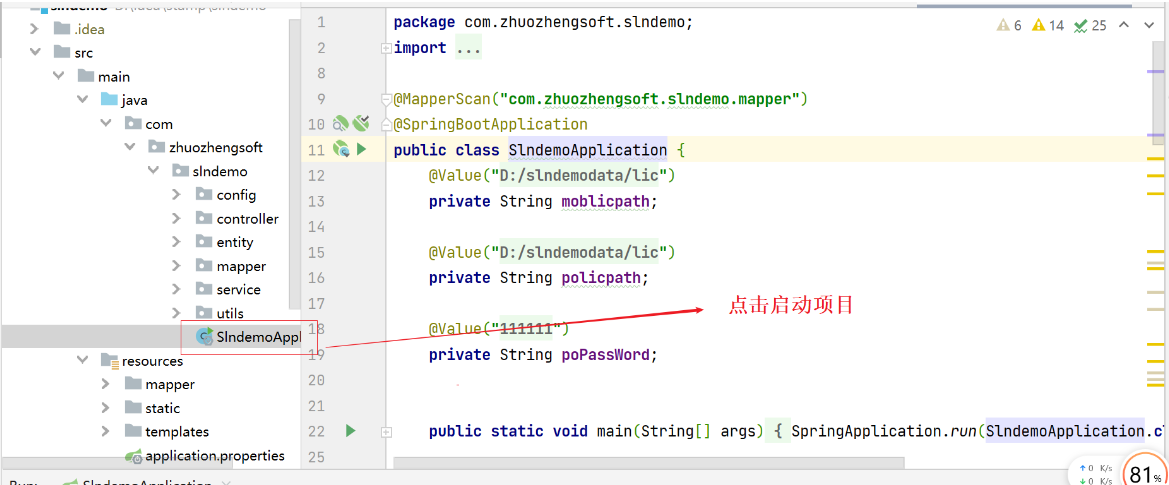
- 下载项目源码后,使用idea导入slndemo项目并运行
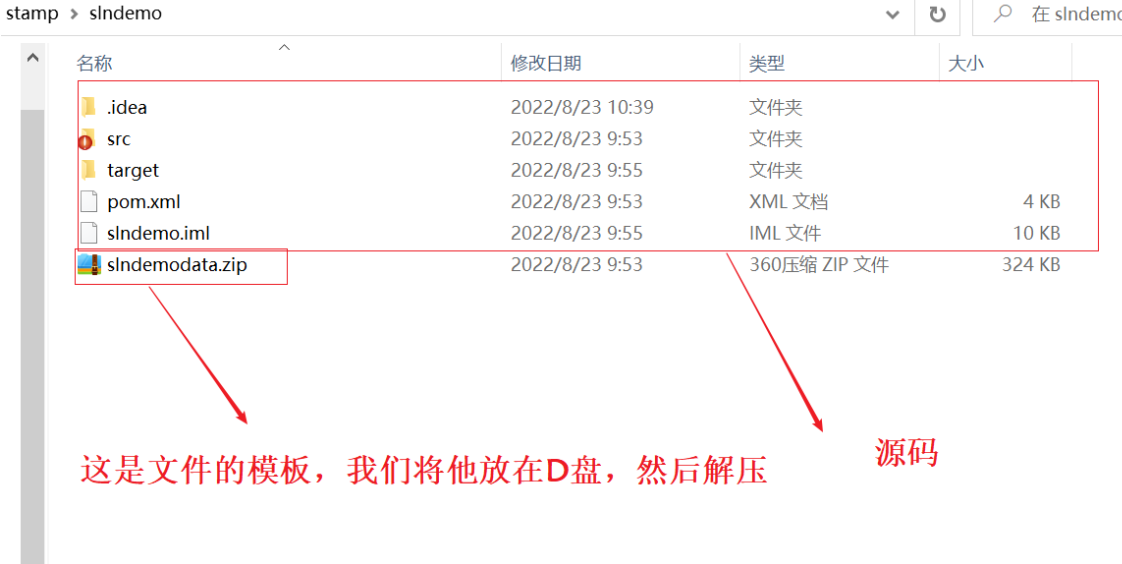
将项目slndemo下的slndemodata.zip压缩包拷贝到本地D盘根目录下并解压
点击启动项目
三、功能展示
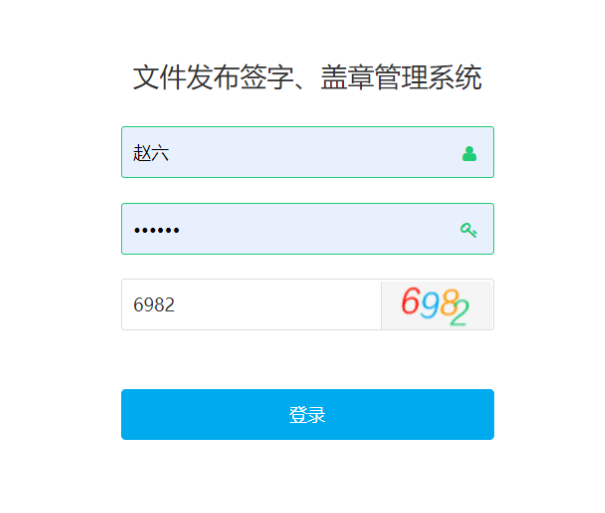
1、项目启动后登录首页
- 项目地址:
http://localhost:8888/pc/login - 账户:张三 密码:123456

2、系统首页功能简介
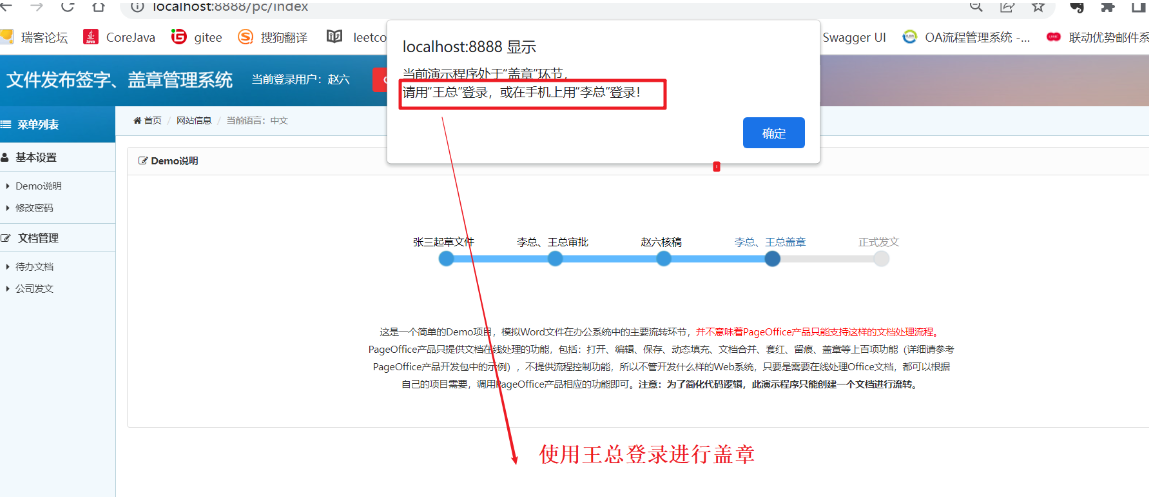
这是一个简单的Demo项目,模拟Word文件在办公系统中的主要流转环节,并不意味着PageOffice产品只能支持这样的文档处理流程。PageOffice产品只提供文档在线处理的功能,包括:打开、编辑、保存、动态填充、文档合并、套红、留痕、盖章等上百项功能(详细请参考PageOffice产品开发包中的示例),不提供流程控制功能,所以不管开发什么样的Web系统,只要是需要在线处理Office文档,都可以根据自己的项目需要,调用PageOffice产品相应的功能即可。「注意:为了简化代码逻辑,此演示程序只能创建一个文档进行流转。」
3、点击起草文档
点击起草文档,点击提交
点击代办文档,然后点击编辑,当你点击编辑时你没有下载PageOffice,他会提醒你安装,你点击安装之后,关闭浏览器,重新打开浏览器就能编辑了!
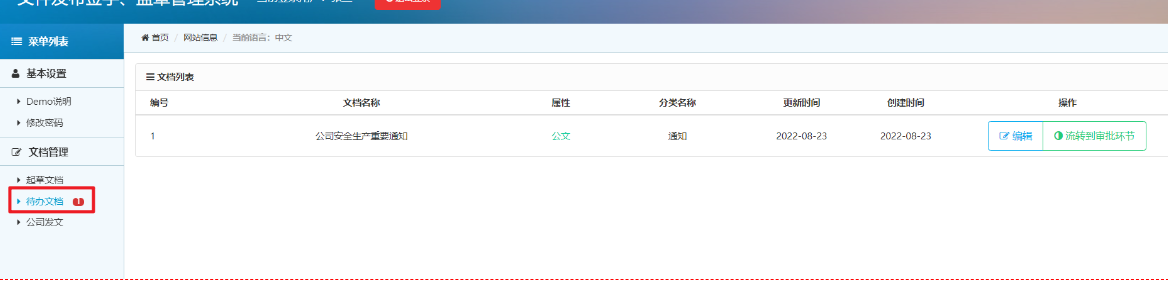
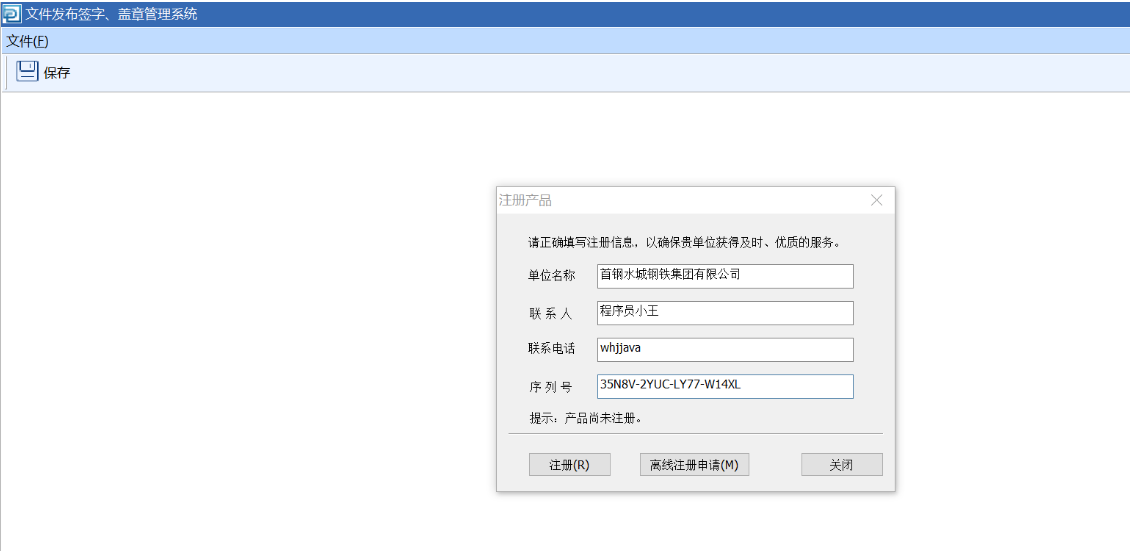
- 我们使用了PageOffice企业版,必须要注册序列化
- 版 本:PageOffice企业版5(试用)
- 序列号:35N8V-2YUC-LY77-W14XL
- 当我们注册成功以后,就可以编辑发布的文件或者公告了
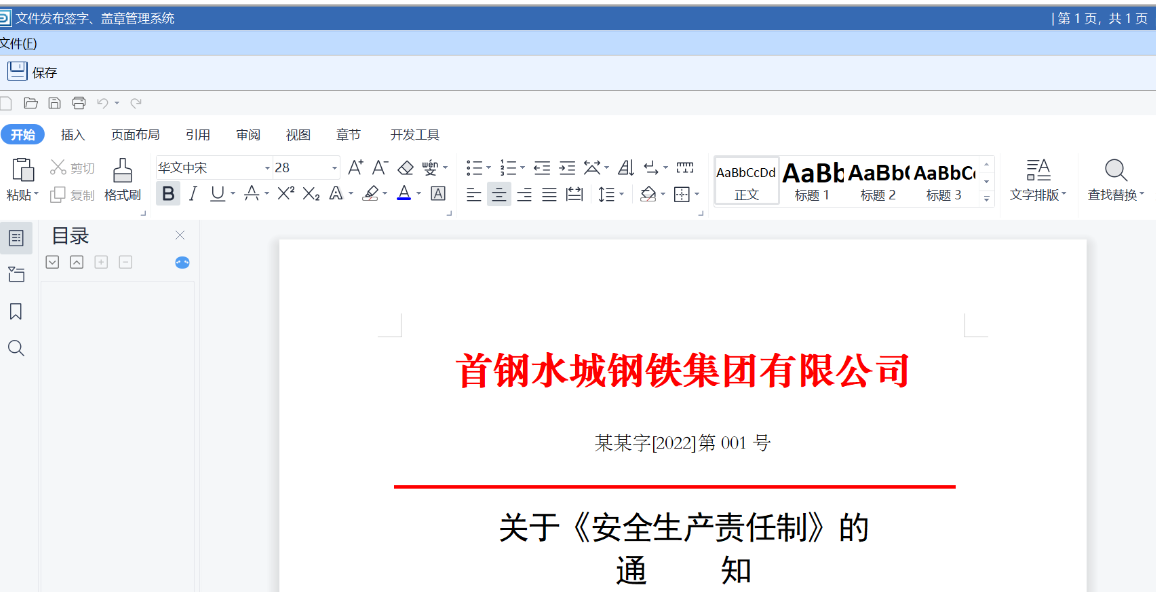
编辑好以后点击保存
点击审批
4、审批
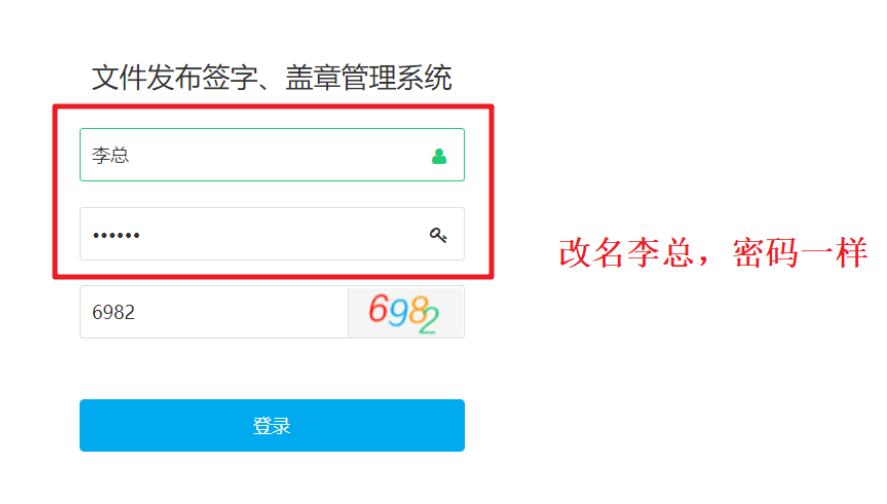
- 登录李总审批
- 退出系统,然后输入李总
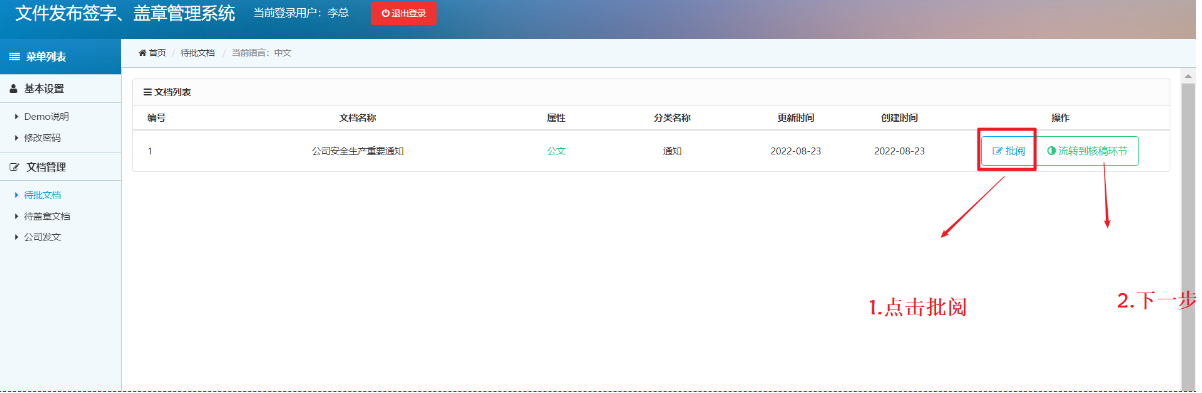
- 然后点击批阅,下一步
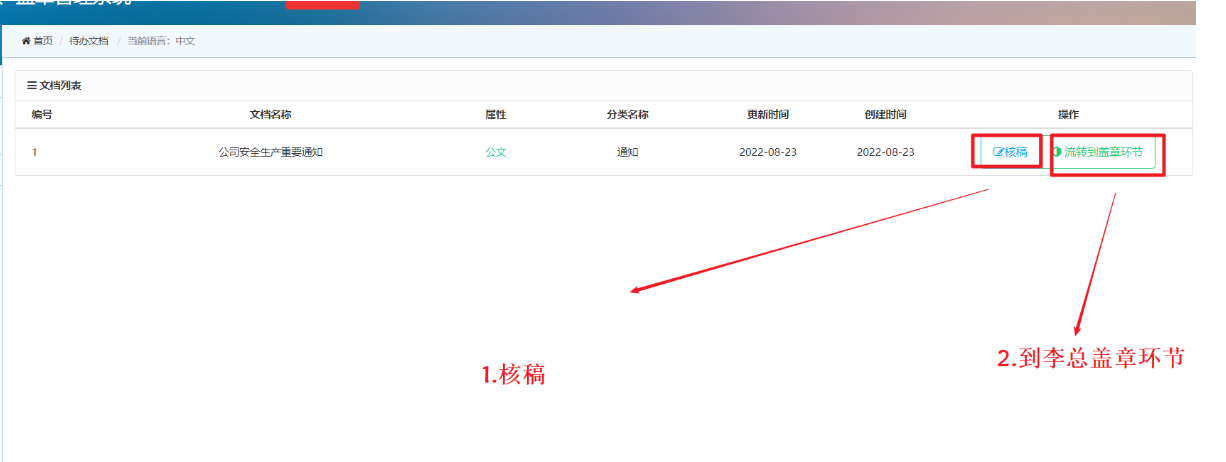
- 登录赵六进行审核稿子
5、审稿
- 审稿
- 审核然后到盖章环节
- 使用王总登录进行盖章
6、盖章和签字的实现
- 王总登录

点击盖章
点击加盖印章
我们盖章前需要输入姓名+密码,需要输入错误报错
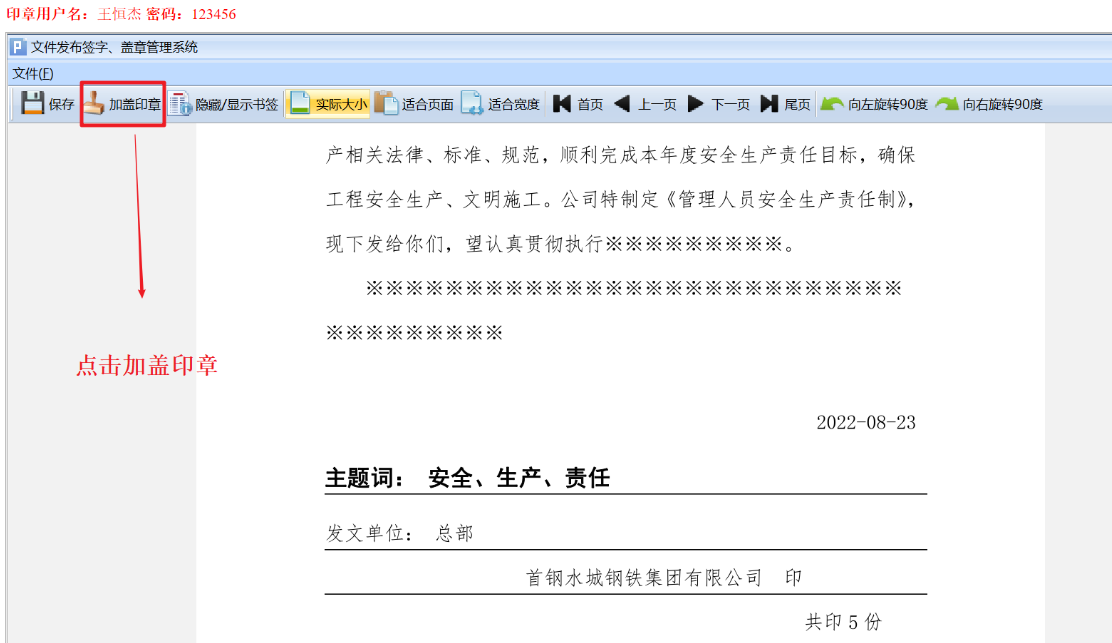
- 正确的账户密码是:
- 账户:王五
- 密码:123456
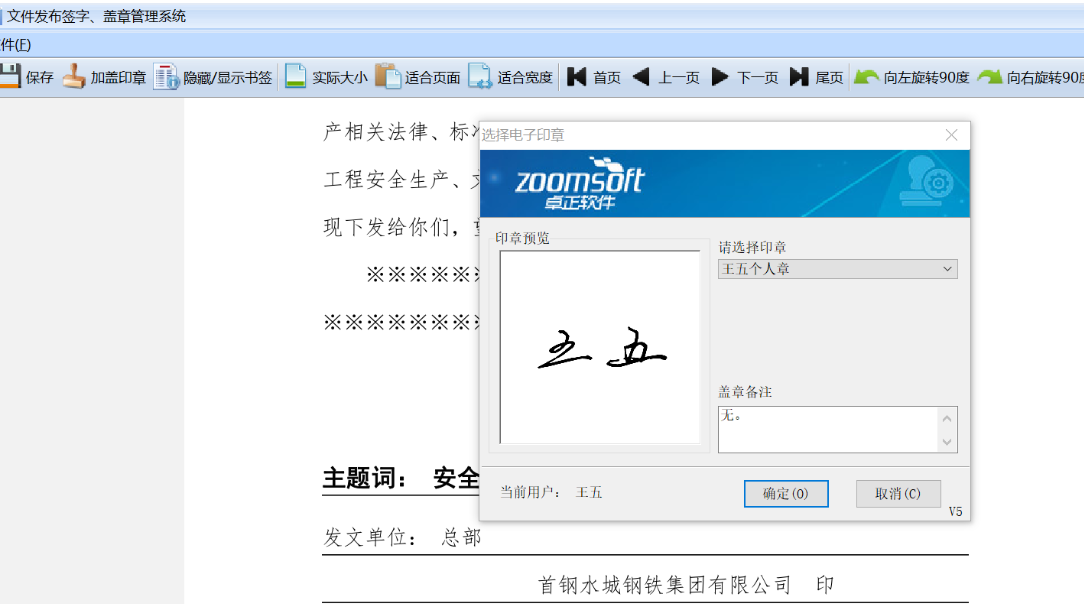
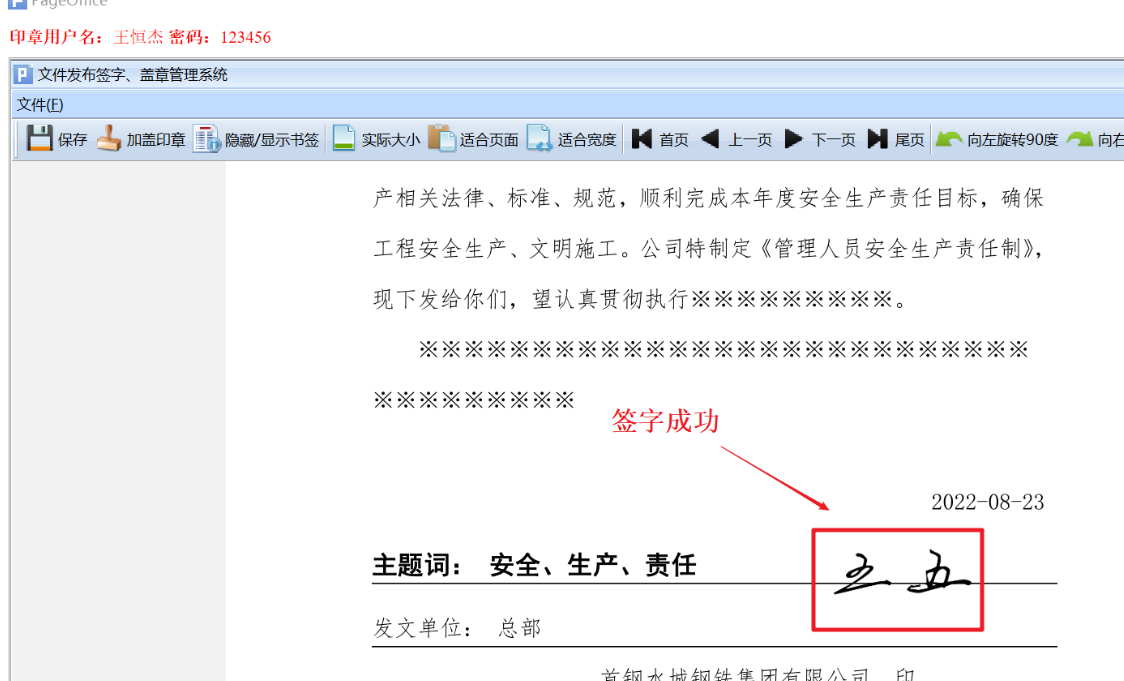
登录成功后有选择王五的个人章进行签字
签字成功
公司盖章,重复以上步骤
签字盖章成功
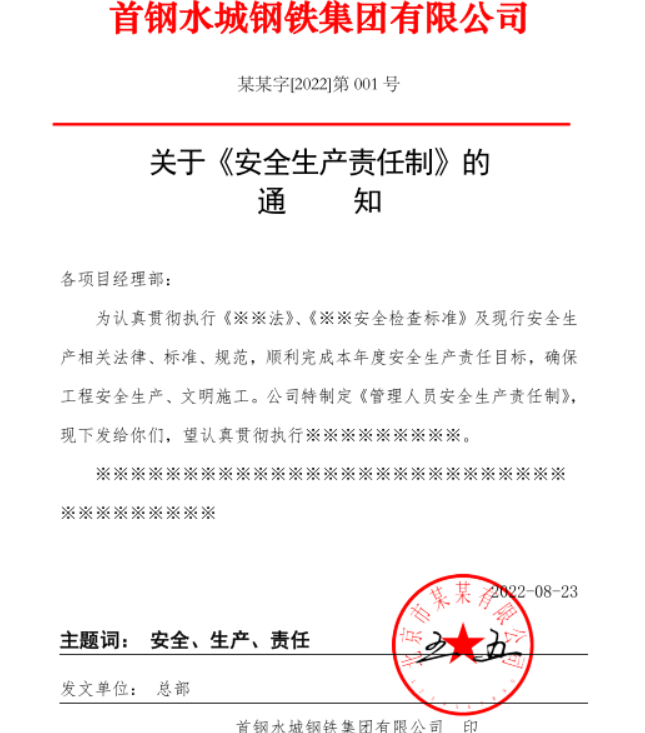
7、完整签字盖章文件
保存之后发布文件
公司文件展示
盖章签字后的文件
最后给大家分享一个Github仓库,上面有大彬整理的300多本经典的计算机书籍PDF,包括C语言、C++、Java、Python、前端、数据库、操作系统、计算机网络、数据结构和算法、机器学习、编程人生等,可以star一下,下次找书直接在上面搜索,仓库持续更新中~
Github地址:https://github.com/Tyson0314/java-books
SpringBoot实现电子文件签字+合同系统的更多相关文章
- 基于nginx+xxl-job+springboot高可用分布式任务调度系统
技术.原理讲解: <分布式任务调度平台XXL-JOB--源码解析一:项目介绍> <分布式任务调度平台XXL-JOB--源码解析二:基于docker搭建admin调度中心和execut ...
- Jeewx-Boot 1.1 版本发布,基于SpringBoot的开源微信管家系统
项目介绍 JeewxBoot是一款基于SpringBoot的开源微信管家系统,采用SpringBoot2.1.3 + Mybatis + Velocity 框架技术.支持微信公众号.微信第三方平台(扫 ...
- SpringBoot+MongoDB实现物流订单系统
码字不易,点赞收藏,养成习惯!原创作者公众号:bigsai.更多精彩期待与您分享!项目收录在github的MongoDB案例中,文章收录在回车课堂中如果没基础请看看前两篇(墙裂推荐)MongoDB从立 ...
- SpringBoot + SpringSecurity + Quartz + Layui实现系统权限控制和定时任务
1. 简介 Spring Security是一个功能强大且易于扩展的安全框架,主要用于为Java程序提供用户认证(Authentication)和用户授权(Authorization)功能. ...
- springboot项目配置logback日志系统
记录springboot项目配置logback日志文件管理: logback依赖jar包 SpringBoot项目配置logback理论上需要添加logback-classic依赖jar包: < ...
- springboot+ELK+logback日志分析系统demo
之前写的有点乱,这篇整理了一下搭建了一个简单的ELK日志系统 借鉴此博客完成:https://blog.csdn.net/qq_22211217/article/details/80764568 设置 ...
- 使用winsw将springboot打包的jar注册系统本地服务
1.下载winsw 下载地址:https://github.com/kohsuke/winsw/releases 我这里下载的是2.3.0版. 下载sample-minimal.xml和WinSW.N ...
- 关于springboot连接数据库失败时,系统报错 MySQL:The server time zone value 'Öйú±ê׼ʱ¼ä' is unrecognized or represents .....
起初在遇到这个问题时,当然知道是怎么回事,但因为是新手,也不知道怎么处理... 百度了下,发现网上很多攻城狮们都是在mysql的命令行界面处理. 先输入命令:show variables like ' ...
- SpringBoot实战——微信点餐系统
1.初始化项目 引入模块 <dependencies> <dependency> <groupId>org.springframework.boot</gro ...
- Springboot+vue 实现汽车租赁系统(毕业设计二)(前后端项目分离)
文章目录 1.系统功能列表 2.管理员端界面 2.1 商家登录界面 2.2 用户信息管理界面 2.3 汽车管理界面 2.4 订单界面 2.5 汽车图形报表 2.6 优惠券新增界面 3.普通用户界面 3 ...
随机推荐
- 【Azure 事件中心】Event Hub 无法连接,出现 Did not observe any item or terminal signal within 60000ms in 'flatMapMany' 的错误消息
问题描述 使用Java SDK连接Azure Event Hub,一直出现 java.util.concurrent.TimeoutException 异常, 消息为:java.util.concur ...
- 用Nodejs 实现一个简单的 Redis客户端
目录 0. 写在前面 1. 背景映入 2. 数据库选择 3. Nodejs TCP连接 3. 代码编写 4. 实验 5. wireshark 抓包分析 6. 杂与代码 0. 写在前面 大家如果有去看过 ...
- Atcoder beginner contest 249 C-Just K(二进制枚举)
题目大意:给你N个字符串,你可以从中选择任意数量的字符串,请统计在你的字串中,相同字母出现次数正好为K次的字母数.数据保证出现的字母都是小写字母. 1≤N≤15 1 ≤K≤N 一开始读题的时候读错了, ...
- java学习之SpringMVC拦截器开发
0x00前言 springmvc的拦截器类似于Selvet的Filter,但是所属的操作又不一样 Spring MVC 提供了 Interceptor 拦截器机制,用于请求的预处理和后处理,也就是增强 ...
- 【云原生 · Kubernetes】runtime组件
个人名片: 因为云计算成为了监控工程师 个人博客:念舒_C.ying CSDN主页️:念舒_C.ying runtime组件 8.1 部署cri-o组件 8.2 下载二进制文件 8.3 修改配置文件 ...
- IPV4地址详解
在互联网时代,相信会上网的人应该对IP地址都不是很陌生.就像我们每个人都有一个身份证号码一样,网络里的每个终端都使用一个IP地址用于标示自己.那么你知道哪些是保留地址?哪些是特殊地址吗? 一.保留地址 ...
- Vue使用axios请求接口返回成功200但是进入到catch中
发生这个问题时查阅了许多资料,没有一个是对得上的.最后发现原来是在请求拦截器中的错误 错误代码如下 // 添加响应拦截器 axios.interceptors.response.use(functio ...
- SSH(五)spring整合hibernate
一.创建hibernate实体映射文件. 在实体所在包创建映射文件product.hbm.xml,引入hibernate的映射约束.(该约束位于hibernate3.jar里面hibernate-ma ...
- 关于 risrqnis
这道题里最有用的( Range Insert Subset Range Query [n?] In Set 破案了 我那五个点是因为维护不知道有什么用的东西炸了 删了就过了 题面 [JRKSJ R4] ...
- js中数组追加和删除
1.push 往后追加 let arr=[1,2,3,4];arr.push(5);console.log(arr);//得到[1,2,3,4,5] 2.unshift方法 往前追加 let arr ...