
Software--Programming--Java__Maven
Maven 是一个构建工具,可用于编译、测试和部署 Java 项目
采用了 管理优先配置原则。
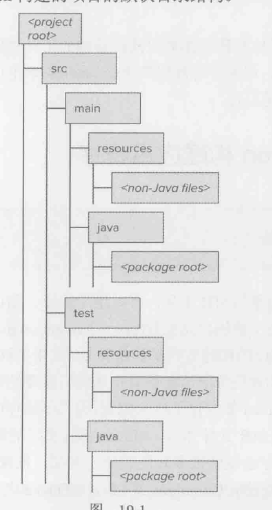
Maven 构建的项目的默认目录结构
  1 <?xml version="1.0" encoding="UTF-8"?>

  2 <project xmlns="http://maven.apache.org/POM/4.0.0"

  3          xmlns:xsi="http://www.w3.org/2001/XMLSchema-instance"

  4          xsi:schemaLocation="http://maven.apache.org/POM/4.0.0 http://maven.apache.org/xsd/maven-4.0.0.xsd">

  5     <modelVersion>4.0.0</modelVersion>

  6

  7     <groupId>com</groupId>

  8     <artifactId>MavenApp</artifactId>

  9     <version>1.0-SNAPSHOT</version>

 10

 11     <dependencies>

 12         <dependency>

 13             <groupId>commons-io</groupId>

 14             <artifactId>commons-io</artifactId>

 15             <version>1.4</version>

 16         </dependency>

 17         <dependency>

 18             <groupId>org.springframework</groupId>

 19             <artifactId>spring-core</artifactId>

 20             <version>3.0.0.RELEASE</version>

 21         </dependency>

 22         <dependency>

 23             <groupId>junit</groupId>

 24             <artifactId>junit</artifactId>

 25             <version>4.8.2</version>

 26             <scope>test</scope>

 27         </dependency>

 28         <dependency>

 29             <groupId>org.mockito</groupId>

 30             <artifactId>mockito-core</artifactId>

 31             <version>1.9.0</version>

 32             <scope>test</scope>

 33         </dependency>

 34     </dependencies>

 35

 36     <build>

 37         <plugins>

 38             <plugin>

 39                 <groupId>org.apache.maven.plugins</groupId>

 40                 <artifactId>maven-compiler-plugin</artifactId>

 41                 <configuration>

 42                     <source>1.8</source>

 43                     <target>1.8</target>

 44                     <showDeprecation>true</showDeprecation>

 45                     <showWarnings>true</showWarnings>

 46                     <fork>true</fork>

 47                 </configuration>

 48             </plugin>

 49             <plugin>

 50                 <groupId>org.apache.maven.plugins</groupId>

 51                 <artifactId>maven-surefire-plugin</artifactId>

 52                 <configuration>

 53                     <excludes>

 54                         <exclude>**/*IntegrationTest.java</exclude>

 55                     </excludes>

 56                 </configuration>

 57                 <executions>

 58                     <execution>

 59                         <id>integration-test</id>

 60                         <goals>

 61                             <goal>test</goal>

 62                         </goals>

 63                         <phase>integration-test</phase>

 64                         <configuration>

 65                             <excludes>

 66                                 <exclude>none</exclude>

 67                             </excludes>

 68                         </configuration>

 69                     </execution>

 70                 </executions>

 71             </plugin>

 72             <plugin>

 73                 <artifactId>maven-assembly-plugin</artifactId>

 74                 <version>2.4</version>

 75                 <configuration>

 76                     <finalName>standalone-application</finalName>

 77                     <descriptorRefs>

 78                         <descriptorRef>jar-with-dependencies</descriptorRef>

 79                     </descriptorRefs>

 80                     <archive>

 81                         <mainfest>

 82                             <mainClass>

 83                                 com.MavenApp.MainClass

 84                             </mainClass>

 85                         </mainfest>

 86                     </archive>

 87                 </configuration>

 88                 <executions>

 89                     <execution>

 90                         <id>make-assembly</id>

 91                         <phase>package</phase>

 92                         <goals>

 93                             <goal>single</goal>

 94                         </goals>

 95                     </execution>

 96                 </executions>

 97

 98             </plugin>

 99         </plugins>

100     </build>

101

102

103 </project>
pom.xml
Software--Programming--Java__Maven的更多相关文章
- Questions that are independent of programming language. These questions are typically more abstract than other categories.
Questions that are independent of programming language. These questions are typically more abstract ...
- Common in Hardware & Software
A lot of common in Hardware programming & Software Programming
- DAMICON'S LIST OF OPEN SOFTWARE
http://www.damicon.com/resources/opensoftware.html DAMICON'S LIST OF OPEN SOFTWARE This List of Open ...
- nginx安装
nginx工作模式-->1个master+n个worker进程 安装nginx的所需pcre库[用于支持rewrite模块] 下载软件方法: 搜索 pcre download 网址:http: ...
- CentOS Mono Nginx 部署 MVC4+WebApi
CentOS Mono Nginx 部署 MVC4+WebApi 经过几天的折磨,终于在CentOS上成功部署了MVC4+WebApi.Mono上的服务器推荐两种:Jexus(国产高人写的一款很牛的服 ...
- 腾讯云下安装 nodejs + 实现 Nginx 反向代理
本文将介绍如何给腾讯云上的 Ubuntu Server 12.04 LTS 64位主机安装 node 及 nginx,并简单配置反向代理. 笔者在整个安装过程中遇到不少麻烦(不赘述),如果你希望少踩坑 ...
- Centos 上 Tengine安装
安装步骤: 1.系统环境 1.1 更新系统 [root@centos ~]# yum update -y 1.2 查看环境 [root@centos ~]# cat /etc/redhat-relea ...
- nginx+lua
一场电闪与雷鸣的结合, 公司原有服务器已经配置好nginx,需要重新装载lua模块,哈哈哈,无法无法. 安装LUA模块需要以下 pcre ftp://ftp.csx.cam.ac.uk ...
- Windows编译Nginx源码
Windows下的Nginx战役,人不作就不会死!就像是拿着麦当劳的优惠券去买肯德基一样,别扭啊 Nginx是一款轻量级的Web 服务器.反向代理服务器.邮件服务器等等集一大串荣誉于一身的大牌人物!他 ...
- ssl + nginx + tomcat 部署方案
安装make yum -y install gcc automake autoconf libtool make 安装g++ yum install gcc gcc-c++ 安装PCRE cd /us ...
随机推荐
- Recycle Queue Sample
public class RecycleQueue<T> { public int len; T[] v; int max; int front; int rear; public Rec ...
- 「SOL」行列式 (模拟赛)
1. 题面 有一个大小为 \(n\) (\(n\le10^6\))的方阵 \(A\),给定 \(d_1,d_2,d_3,\dots,d_n\),\((p_2,b_2,c_2),(p_3,b_3,c_3 ...
- Spring 事务传播属性
Spring 事务相关 3 个 API 定义类 Spring 事务底层 API 定义主要有 PlatformTransactionManager.TransactionDefintion 和 Tran ...
- 使用 WSDL 指定的标准 SOAP 消息格式
为 XML 文档(定义 Web 服务)定义架构的行业标准 Web 服务描述语言 (WSDL) 提供了两个主要的 SOAP 格式设置选项.这两个选项均在 XML 元素中指定,而不在主 WSDL 命名空间 ...
- blog2对PTA4,5,6集的习题总结
一. 前言 通过本三次PTA得题目,我受益匪浅.题量的话不算太多,但是题目难度有些大.在本次PTA第六次题目集中,题目难度较中,第四次题目集第一道水文数据处理与第五次题目集的查询关键字出现次 ...
- Python学习笔记(五)if分支语句
一.if语法 示例: 1 money = int(input('请输入余额:')) 2 if money >= 5: 3 print('买得起!') 4 5 if True: 6 print(' ...
- (0319) uvm 库的安装编译:
https://mp.weixin.qq.com/s/jCSp89UYsEZGRU2BN5IloA
- 谷歌云|机密 GKE 节点可在计算优化的 C2D 虚拟机上使用
机密 GKE 节点可用于计算优化的 C2D 虚拟机. 许多公司已采用 Google Kubernetes Engine (GKE) 作为其应用程序基础架构中的关键组件.在某些情况下,使用容器和 Kub ...
- C盘爆红满了怎么办?既然C盘装不下了,那咱给C盘扩容不就完事了吗!
我们在使用电脑的过程中,经常容易出现C盘爆红,反而其他盘还有大量可用空间的情况. 为什么会这样呢?其实主要就两种原因: 一是电脑使用习惯不好,不管什么软件都默认安装在C盘,大文件又喜欢放在桌面,久而久 ...
- jwt二次加密失败原因(Bad “options.expiresIn“ option the payload already has an “exp“ property.)
在写vue+nodejs项目的校验token时,出现了次错误 然后想了想问题所在: 第一次加密的时候使用jwt.sign(value,秘钥,{}),会返回一个字符串,然后当前端跳转别的发送请求时,会将 ...