
OpenLayers之OGC服务加载
一、实验内容
- 手动构造 GetCapabilities、GetMap 的操作链接,并在浏览器里发送HTTP 请求;利用 OpenLayers 进行 WMS 服务加载;
- 手动构造 GetCapabilities、GetTile 的操作链接,并在浏览器里发送HTTP 请求;利用 OpenLayers 进行 WMTS 服务加载;
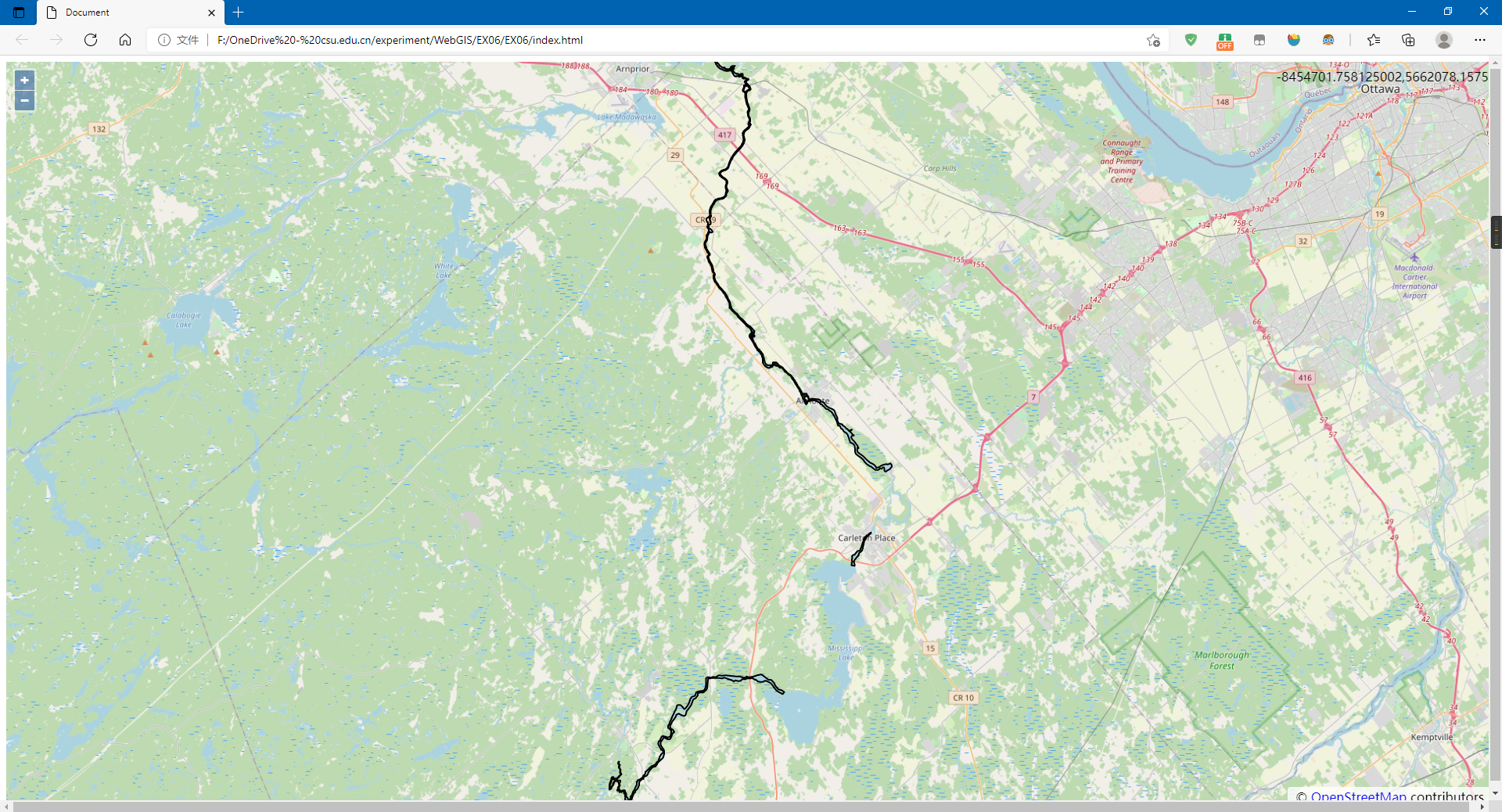
- 手动构造 GetCapabilities、DescribeFeatureType、GetFeature 的操作链接,并在浏览器里发送 HTTP 请求;利用 OpenLayers 进行 WFS 服务加载以及
加载时添加过滤条件。
二、实验步骤
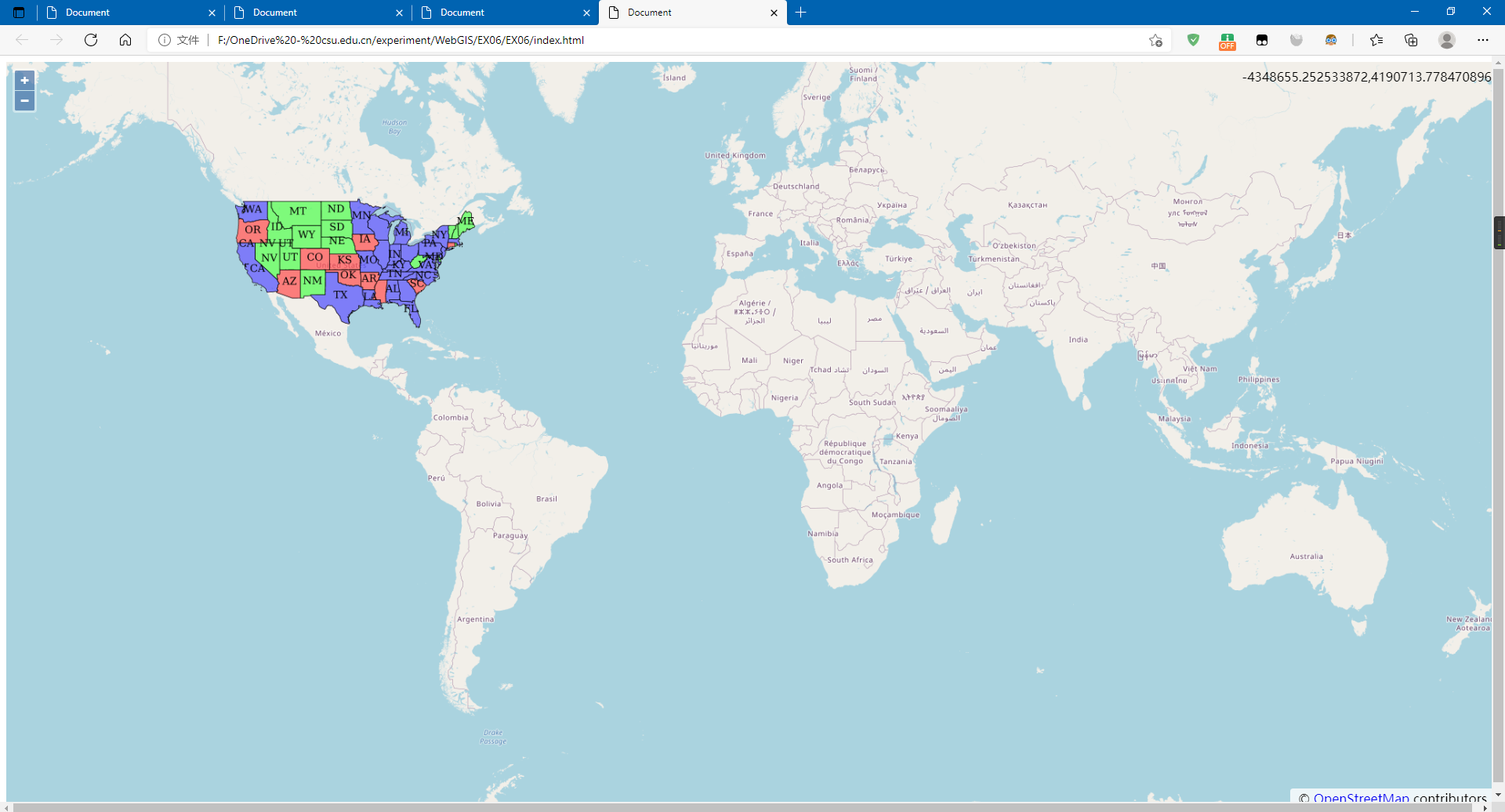
2.1 利用TileWMS加载WMS
<!DOCTYPE html>

<html lang="zh">

<head>

    <meta charset="UTF-8">

    <meta http-equiv="X-UA-Compatible" content="IE=edge">

    <meta name="viewport" content="width=device-width, initial-scale=1.0">

    <title>Document</title>

    <link rel="stylesheet" href="./v6.5.0-dist/ol.css">

    <script src="./v6.5.0-dist/ol.js"></script>

    <style>

        html,

        body {

            height: 100%;

            width: 100%;

        }

        #map {

            height: 100%;

            width: 100%;

            margin: 0%;

        }

    </style>

</head>

<body>

    <div id="map"></div>

    <script>

        var projection = ol.proj.get('EPSG:4326');//地图投影坐标系

        var map = new ol.Map({

            target: 'map',

            view: new ol.View({

                center: [0, 0],

                zoom: 2,

            }),

            layers: [

                new ol.layer.Tile({ source: new ol.source.OSM() })]

        });

        var wmsLayer = new ol.layer.Tile({

            source: new ol.source.TileWMS({

                url: 'https://ahocevar.com/geoserver/wms',

                params: { 'LAYERS': 'topp:states' }

            })

        });

        map.addLayer(wmsLayer)

        var mousePositionControl = new ol.control.MousePosition({ projection: 'EPS6:4326' });

        map.addControl(mousePositionControl);

    </script>

</body>

</html>
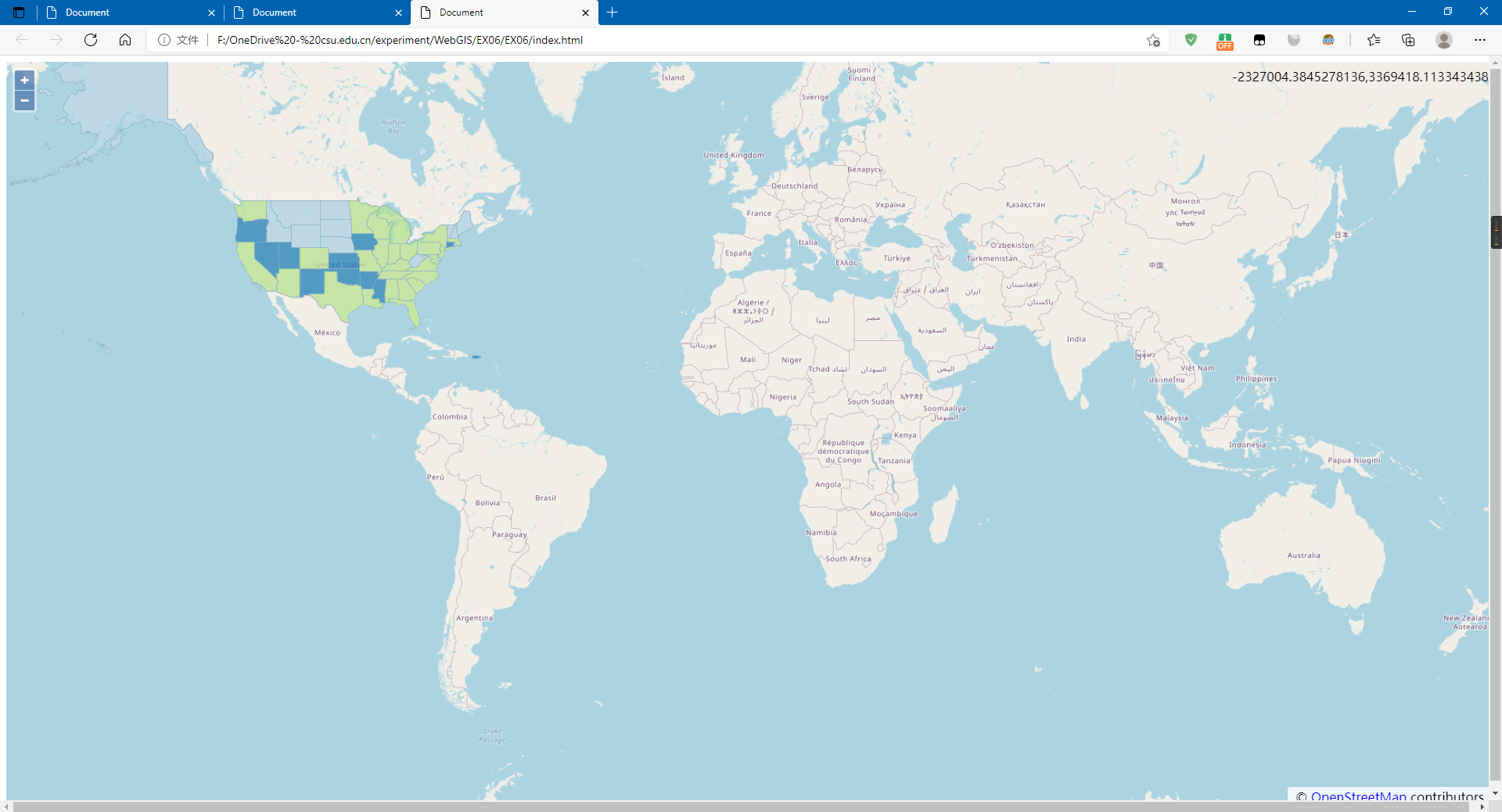
2.2 利用ImageWMS加载WMS
<!DOCTYPE html>

<html lang="zh">

<head>

    <meta charset="UTF-8">

    <meta http-equiv="X-UA-Compatible" content="IE=edge">

    <meta name="viewport" content="width=device-width, initial-scale=1.0">

    <title>Document</title>

    <link rel="stylesheet" href="./v6.5.0-dist/ol.css">

    <script src="./v6.5.0-dist/ol.js"></script>

    <style>

        html,

        body {

            height: 100%;

            width: 100%;

        }

        #map {

            height: 100%;

            width: 100%;

            margin: 0%;

        }

    </style>

</head>

<body>

    <div id="map"></div>

    <script>

        var projection = ol.proj.get('EPSG:4326');//地图投影坐标系

        var map = new ol.Map({

            target: 'map',

            view: new ol.View({

                center: [0, 0],

                zoom: 2,

            }),

            layers: [

                new ol.layer.Tile({ source: new ol.source.OSM() })]

        });

        var wmsLayer = new ol.layer.Image({

            source: new ol.source.ImageWMS({

                url: 'https://ahocevar.com/geoserver/wms', params: { 'LAYERS': 'usa:states' }

            })

        });

        map.addLayer(wmsLayer)

        var mousePositionControl = new ol.control.MousePosition({ projection: 'EPS6:4326' });

        map.addControl(mousePositionControl);

    </script>

</body>

</html>
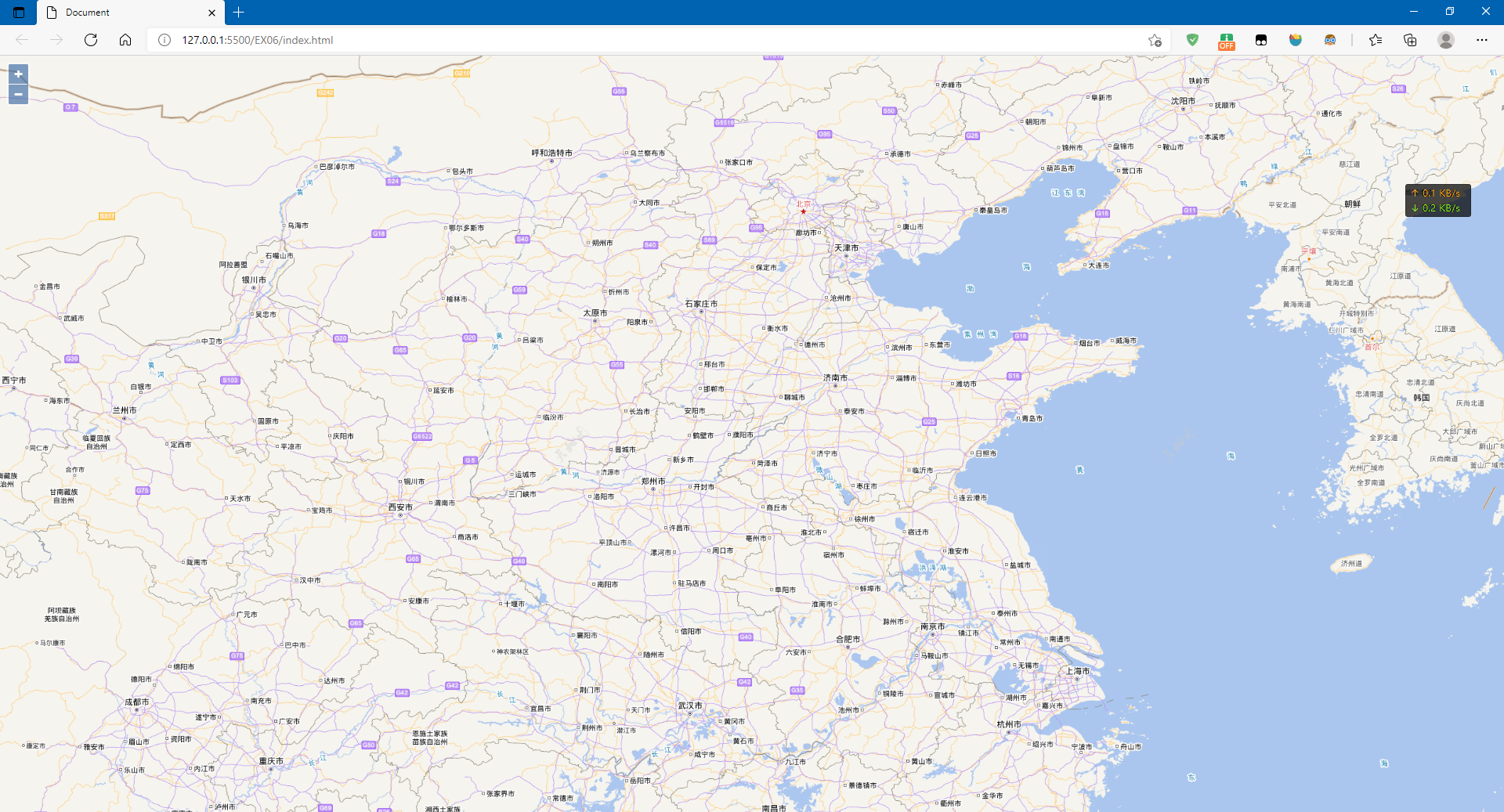
2.3 加载WMTS
<!DOCTYPE html>

<html lang="zh">

<head>

    <meta charset="UTF-8">

    <meta http-equiv="X-UA-Compatible" content="IE=edge">

    <meta name="viewport" content="width=device-width, initial-scale=1.0">

    <title>Document</title>

    <link rel="stylesheet" href="./v6.5.0-dist/ol.css">

    <script src="./v6.5.0-dist/ol.js"></script>

    <style>

        html,

        body,

        div {

            height: 100%;

            width: 100%;

            margin: 0%;

        }

    </style>

</head>

<body>

    <div id="map"></div>

    <script>

        var projection = ol.proj.get("EPSG:4326"); var projectionExtent = projection.getExtent();

        var size = ol.extent.getWidth(projectionExtent) / 256; var resolutions = [];

        for (var z = 2; z < 19; ++z) {

            resolutions[z] = size / Math.pow(2, z);

        }

        var map = new ol.Map({

            layers: [

                new ol.layer.Tile({

                    source: new ol.source.WMTS({

                        url: "http://t{0-6}.tianditu.gov.cn/vec_c/wmts?tk=1d109683f4d84198e37a38c442d68311",

                        name: "中国矢量1-4级",

                        layer: "vec",

                        style: "default",

                        matrixSet: "c",

                        format: "tiles",

                        wrapX: true,

                        tileGrid: new ol.tilegrid.WMTS({

                            origin: ol.extent.getTopLeft(projectionExtent), resolutions: resolutions,

                            matrixIds: [0, 1, 2, 3, 4, 5, 6, 7, 8, 9, 10, 11, 12, 13, 14]

                        })

                    }),

                }),

                new ol.layer.Tile({

                    source: new ol.source.WMTS({

                        name: "中国矢量注记1-4级",

                        url: "http://t{0-6}.tianditu.gov.cn/cva_c/wmts?tk=1d109683f4d84198e37a38c442d68311",

                        layer: "cva",

                        style: "default",

                        matrixSet: "c",

                        format: "tiles",

                        wrapX: true,

                        tileGrid: new ol.tilegrid.WMTS({

                            origin: ol.extent.getTopLeft(projectionExtent), resolutions: resolutions,

                            matrixIds: [0, 1, 2, 3, 4, 5, 6, 7, 8, 9, 10, 11, 12, 13, 14]

                        })

                    }),

                })

            ],

            target: "map",

            view: new ol.View({

                center: [120.14805, 30.26971], projection: projection,

                zoom: 3,

                maxZoom: 17, minZoom: 1

            })

        });

    </script>

</body>

</html>
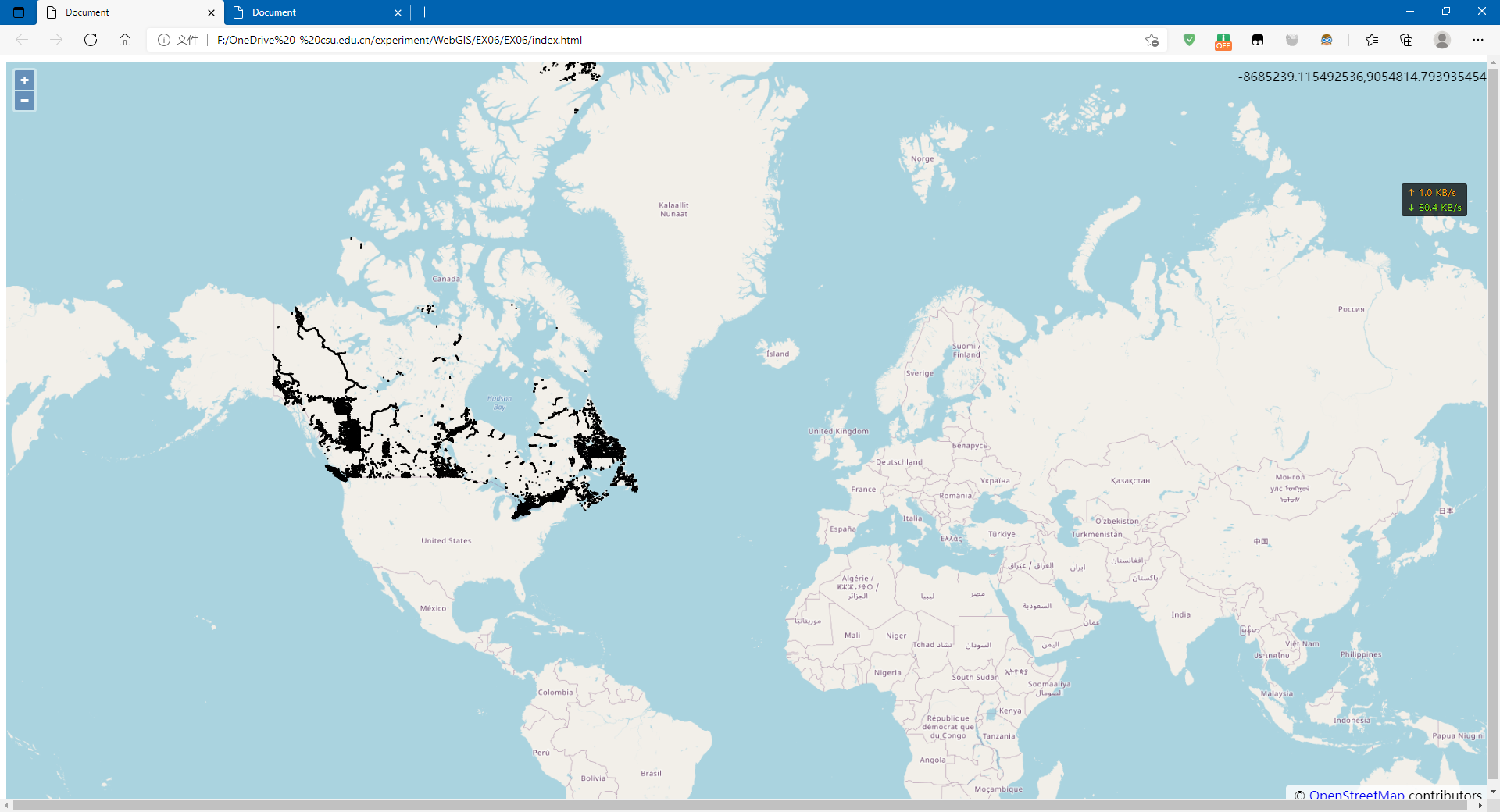
2.4 利用其它格式加载WFS
<!DOCTYPE html>

<html lang="zh">

<head>

    <meta charset="UTF-8">

    <meta http-equiv="X-UA-Compatible" content="IE=edge">

    <meta name="viewport" content="width=device-width, initial-scale=1.0">

    <title>Document</title>

    <link rel="stylesheet" href="./v6.5.0-dist/ol.css">

    <script src="./v6.5.0-dist/ol.js"></script>

    <style>

        html,

        body {

            height: 100%;

            width: 100%;

        }

        #map {

            height: 100%;

            width: 100%;

            margin: 0%;

        }

    </style>

</head>

<body>

    <div id="map"></div>

    <script>

        var projection = ol.proj.get('EPSG:3857');//地图投影坐标系

        var map = new ol.Map({

            target: 'map',

            view: new ol.View({

                center: [-8908887.277395891, 5381918.072437216],

                zoom: 12,

            }),

            layers: [

                new ol.layer.Tile({ source: new ol.source.OSM() })]

        });

        var vectorSource = new ol.source.Vector();

        var vector = new ol.layer.Vector({

            source: vectorSource,

            style: new ol.style.Style({

                stroke: new ol.style.Stroke({

                    color: 'rgba(0,0,255,1.0)',

                    width: 2,

                }),

            }),

        });

        var vectorSource = new ol.source.Vector({

            format: new ol.format.GeoJSON(),

            url: function (extent) {

                return (

                    "https://ahocevar.com/geoserver/wfs?service=WFS&" +

                    "version=1.1.0&request=GetFeature&typename=osm:water_areas&" +

                    "outputFormat=application/json&srsname=EPSG:3857&" +

                    "bbox=" +

                    extent.join(',') + ',EPSG:3857'

                );

            },

            strategy: ol.loadingstrategy.bboxStrategy,

        });

        var vector = new ol.layer.Vector({

            source: vectorSource,

            style: new ol.style.Style({

                stroke: new ol.style.Stroke({

                    color: 'rgba(0, 0,255,1.0)', width: 2,

                }),

            }),

        });

        map.addLayer(vector)

        var mousePositionControl = new ol.control.MousePosition({ projection: 'EPS6:4326' });

        map.addControl(mousePositionControl);

    </script>

</body>

</html>
2.5 利用ol.format.WFS加载WFS
<!DOCTYPE html>

<html lang="zh">

<head>

    <meta charset="UTF-8">

    <meta http-equiv="X-UA-Compatible" content="IE=edge">

    <meta name="viewport" content="width=device-width, initial-scale=1.0">

    <title>Document</title>

    <link rel="stylesheet" href="./v6.5.0-dist/ol.css">

    <script src="./v6.5.0-dist/ol.js"></script>

    <style>

        html,

        body {

            height: 100%;

            width: 100%;

        }

        #map {

            height: 100%;

            width: 100%;

            margin: 0%;

        }

    </style>

</head>

<body>

    <div id="map"></div>

    <script>

        var projection = ol.proj.get('EPSG:3857');//地图投影坐标系

        var map = new ol.Map({

            target: 'map',

            view: new ol.View({

                center: [-8908887.277395891, 5381918.072437216],

                zoom: 12,

            }),

            layers: [

                new ol.layer.Tile({ source: new ol.source.OSM() })]

        });

        var vectorSource = new ol.source.Vector();

        var vector = new ol.layer.Vector({

            source: vectorSource,

            style: new ol.style.Style({

                stroke: new ol.style.Stroke({

                    color: 'rgba(0,0,255,1.0)',

                    width: 2,

                }),

            }),

        });

        // generate a GetFeature request

        var featureRequest = new ol.format.WFS().writeGetFeature({

            srsName: 'EPSG:3857',

            featureNS: 'http://openstreemap.org',

            featurePrefix: 'osm',

            featureTypes: ['water_areas'],

            outputFormat: 'application/json',

            filter: ol.format.filter.and(

                ol.format.filter.like('name', 'Mississippi*'),

                ol.format.filter.equalTo('waterway', 'riverbank')),

        });

        // then post the request and add the received features to a layer

        fetch(' https://ahocevar.com/geoserver/wfs', {

            method: 'POST',

            body: new XMLSerializer().serializeToString(featureRequest),

        })

            .then(function (response) { return response.json(); })

            .then(function (json) {

                var features = new ol.format.GeoJSON().readFeatures(json);

                vectorSource.addFeatures(features);

                map.getView().fit(vectorSource.getExtent());

            });

        map.addLayer(vector)

        var mousePositionControl = new ol.control.MousePosition({ projection: 'EPS6:4326' });

        map.addControl(mousePositionControl);

    </script>

</body>

</html>
OpenLayers之OGC服务加载的更多相关文章
- Android 三级联动选择城市+后台服务加载数据库
技术渣,大家将就着看 首先我们需要一个xml数据保存到数据库,这里我从QQ下面找到一个loclist.xml文件 <CountryRegion Name="中国" Code= ...
- ArcGIS API for Silverlight 调用GP服务加载等值线图层
原文:ArcGIS API for Silverlight 调用GP服务加载等值线图层 第二篇.Silverlight客户端调用GP服务 利用ArcGIS API for Silverlight实现G ...
- Openstack本学习笔记——Neutron-server服务加载和启动源代码分析(三)
本文是在学习Openstack过程中整理和总结.因为时间和个人能力有限.错误之处在所难免,欢迎指正! 在Neutron-server服务载入与启动源代码分析(二)中搞定模块功能的扩展和载入.我们就回到 ...
- 影像服务——加载CESIUM自带的影像服务
1.加载arcgis数据——ArcGisMapServerImageryProvider var viewer = new Cesium.Viewer("cesiumDiv",{ ...
- openlayers的loaders方式加载
openlayers loaders方式加载 let layerVector = new ol.layer.Vector({ source : new ol.source.Vector({ loade ...
- 使用第三方CDN加速服务加载js/css
ASP.NET MVC 3.0 http://ajax.aspnetcdn.com/ajax/mvc/3.0/jquery.unobtrusive-ajax.js http://ajax.aspnet ...
- 如何让aspnet服务加载静态资源html(我的动态网页静态化) 转
我们知道,IIS自身是不能处理像ASPX扩展名这样的页面,只能直接请求像HTML这样的静态文件. 当客户端请求一个服务器资源时,这个HTTP请求会被inetinfo.exe进程截获(www服务),然后 ...
- 记录一次win2003服务器的IIS服务加载.flv后缀的资源报错404的处理方法
问题:访问某个域名下的xxxx.flv资源,页面报错404. 解决思路: 1.权限是否给足 user权限给完全控制咯 如果你访问该域名下的其他资源无问题的话就不是介个原因了 2.MIME类型是否少了 ...
- Arcgis for Js之加载wms服务
概述:本节讲述Arcgis for Js加载ArcgisServer和GeoServer发布的wms服务. 1.定义resourceInfo var resourceInfo = { extent: ...
- openlayers 加载瓦片详解 一
在这先说点题外话,本人在研究webgl 三维球过程中惊人发现,openlayers 的开发人员也在研究webgl并经证实他们也正在研发基于 webgl的三维gis开源平台,这可能是首个开源的三维平台, ...
随机推荐
- 使用Spring Reactor优化推荐流程
1. 背景 公司有一个推荐系统Rec,这个系统的主要功能是: 向外部系统提供推荐接口 根据请求获取推荐策略 根据推荐策略完成推荐的召回.过滤.打分.排序阶段 Rec作为微服务中的一环,本身不存储召回的 ...
- 万字干货|Synchronized关键字详解
作者:小牛呼噜噜 | https://xiaoniuhululu.com 计算机内功.JAVA底层.面试.职业成长相关资料等更多精彩文章在公众号「小牛呼噜噜」 前言 大家好,我是呼噜噜,在之前的文章中 ...
- Hadoop如何保证自己的江湖地位?Yarn功不可没
前言 任何计算任务的运行都离不开计算资源,比如CPU.内存等,那么如何对于计算资源的管理调度就成为了一个重点.大数据领域中的Hadoop之所以一家独大,深受市场的欢迎,和他们设计了一个通用的资源管理调 ...
- RuntimeError: setuptools >= 41 required to build
使用命令python setup.py install 安装第三方库报RuntimeError: setuptools >= 41 required to build 原因setuptools版 ...
- js修改数组中的属性名
将数组 [{id:"1",name:"AAA"}] 修改为 ===> [{id:"1",text:"AAA",va ...
- 第六节 FAF与GP不工作保护区的绘制
飞行程序设计软件实践 前一篇文章中,通过风标设计2023插件,我们在CAD中绘制了FAP方式下的精密进近保护区. 接着这个话题我们继续来看一下FAF方式下的保护区应该怎样绘制,以及OAS参数的其它用法 ...
- [机器学习] Yellowbrick使用笔记5-回归可视化
回归模型试图预测连续空间中的目标.回归计分可视化工具显示模型空间中的实例,以便更好地理解模型是如何进行预测的.代码下载 Yellowbrick已经实施了三种回归评估: 残差图Residuals Plo ...
- Spark详解(01) - Scala编程语言
Spark详解(01) - Scala编程语言概述 Scala官网:https://www.scala-lang.org/ 什么是Scala 从英文的角度来讲,Scala并不是一个单词,而是Scala ...
- TiDB 底层存储结构 LSM 树原理介绍
作者:京东物流 刘家存 随着数据量的增大,传统关系型数据库越来越不能满足对于海量数据存储的需求.对于分布式关系型数据库,我们了解其底层存储结构是非常重要的.本文将介绍下分布式关系型数据库 TiDB 所 ...
- SqlServer服务中利用触发器对指定账户进行登录ip限制提升安全性
转眼间上次写文章已经是 2022年12月15日的事情啦,本来从2022年7月份开始写作之后保持着每周一篇,然而从12月15日后断更了这么久,经历了,隔离.阳.过年.从今天开始继续坚持写作,本片文章给大 ...