
【整活向】把tidb的文档塞给了基于oceanbase的RAG机器人
最近官方推出了免费试用365天的云数据库,版本也升级到了4.3.支持了向量功能.
官方推出了活动体验AI的动手实战活动, 教程中使用了docker单机版数据库,既然有免费的云数据库,就优先使用云数据库体验一下.
1. 云环境申请
在官网的主页有有一个大大的标题,OB Cloud 365天免费试用.经过简单的操作后,大约等5分钟,就创建了一个免费的数据库实例了.

点击右上方的"三个点",依次创建用户、创建数据库、获取连接串,就可以通过公网连接云上数据库了,要谨慎添加白名单,避免资源被非法连接.
进入实例控制台后,点击"参数管理",设置ob_vector_memory_limit_percentage,启用向量检索功能,将参数值设置为30.
2. 安装python
要求的python版本大于等于3.9,小于4.0.我使用的是3.9.6.
# yum install python39
3. CLONE项目
# git clone https://github.com/oceanbase-devhub/ai-workshop-2024.git
4. 安装poetry
poetry是python的依赖和包管理工具,安装包更简单也更方便.
# python3 -m pip install poetry

# cd ~/ai-workshop-2024

# poetry install
如果下载包比较慢,可以将官方源换为阿里源
# cd ai-workshop-2024

# vi pyproject.toml

// 删除下面的源信息

[[tool.poetry.source]]

name = "PyPI"

priority = "primary"

[[tool.poetry.source]]

name = "tuna"

url = "https://mirrors.tuna.tsinghua.edu.cn/pypi/web/simple"

priority = "supplemental"

// 添加下面的源信息

[[tool.poetry.source]]

name = "ali"

url = "https://mirrors.aliyun.com/pypi/simple/"

priority = "primary"

[[tool.poetry.source]]

name = "tuna"

url = "https://mirrors.tuna.tsinghua.edu.cn/pypi/web/simple"

priority = "supplemental"

//使配置生效

# poetry lock
接下来配置环境变量
# cp .env.example .env

# vi .env

API_KEY=xxxxxxxxxxxxxxxxxxxxxxxxxxxxxxxx	# 替换https://open.bigmodel.cn/usercenter/apikeys 智谱AI的API KEY

LLM_MODEL="glm-4-flash"

LLM_BASE_URL="https://open.bigmodel.cn/api/paas/v4/" # BigModel (ZhipuAI)

# LLM_BASE_URL="https://api.openai.com/v1/" # OpenAI

# LLM_BASE_URL="https://dashscope.aliyuncs.com/compatible-mode/v1" # Dashscope (Alibaba)

HF_ENDPOINT=https://hf-mirror.com

BGE_MODEL_PATH=BAAI/bge-m3

OLLAMA_URL=

OLLAMA_TOKEN=

OPENAI_API_KEY=

OPENAI_BASE_URL=

OPENAI_EMBEDDING_MODEL=

DB_HOST="127.0.0.1"	# 数据库的IP或域名

DB_PORT="2881"		# 数据库的端口

DB_USER="root@test"	# 连接的用户名

DB_NAME="test"		# 连接的数据库名

DB_PASSWORD=""		# 连接的密码
5. 准备BGE-M3 模型
# poetry run python utils/prepare_bgem3.py

===================================

BGEM3FlagModel loaded successfully!

===================================

出现以上的输出,就成功了.
6. 准备文档数据
从github克隆文档数据
# cd doc_repos

# git config --global http.postBuffer 16000M  // 增加修改buffer大小

# git config --global core.compression -1 // 启动压缩

# git clone --single-branch --branch V4.3.3 https://github.com/oceanbase/oceanbase-doc.git --depth 1  //如果git报错,添加后面的参数

# git clone --single-branch --branch V4.3.0 https://github.com/oceanbase/ocp-doc.git

# git clone --single-branch --branch V4.3.1 https://github.com/oceanbase/odc-doc.git

# git clone --single-branch --branch V4.2.5 https://github.com/oceanbase/oms-doc.git

# git clone --single-branch --branch V2.10.0 https://github.com/oceanbase/obd-doc.git

# git clone --single-branch --branch V4.3.0 https://github.com/oceanbase/oceanbase-proxy-doc.git

# cd ..
把文档的标题转换为标准的 markdown 格式
# poetry run python convert_headings.py \

  doc_repos/oceanbase-doc/zh-CN \

  doc_repos/ocp-doc/zh-CN \

  doc_repos/odc-doc/zh-CN \

  doc_repos/oms-doc/zh-CN \

  doc_repos/obd-doc/zh-CN \

  doc_repos/oceanbase-proxy-doc/zh-CN
生成文档向量和元数据,等待时间比较长,并且相当看硬件性能,是个不错的性能压测工具
# poetry run python embed_docs.py --doc_base doc_repos/oceanbase-doc/zh-CN

# poetry run python embed_docs.py --doc_base doc_repos/ocp-doc/zh-CN --component ocp

# poetry run python embed_docs.py --doc_base doc_repos/odc-doc/zh-CN --component odc

# poetry run python embed_docs.py --doc_base doc_repos/oms-doc/zh-CN --component oms

# poetry run python embed_docs.py --doc_base doc_repos/obd-doc/zh-CN --component obd

# poetry run python embed_docs.py --doc_base doc_repos/oceanbase-proxy-doc/zh-CN --component odp
保存加载数据
# poetry run python utils/extract.py --output_file ~/my-data.json
加载预处理的文档数据
# poetry run python utils/load.py --source_file ~/my-data.json
7. 验证数据库和数据
进入.env配置文件中的数据库,会有一个新表,表名是corpus,表结构中的embedding列的数据类型是VECTOR(1024),这个类型就是向量类型,
mysql> desc corpus;

+----------------+---------------+------+-----+---------+-------+

| Field          | Type          | Null | Key | Default | Extra |

+----------------+---------------+------+-----+---------+-------+

| id             | varchar(4096) | NO   | PRI | NULL    |       |

| embedding      | VECTOR(1024)  | YES  |     | NULL    |       |

| document       | longtext      | YES  |     | NULL    |       |

| metadata       | json          | YES  |     | NULL    |       |

| component_code | int(11)       | NO   | PRI | NULL    |       |

+----------------+---------------+------+-----+---------+-------+

5 rows in set (0.04 sec)

mysql> select count(*) from corpus;

+----------+

| count(*) |

+----------+

|     6500 |

+----------+

1 row in set (0.05 sec)
8.启动web界面
上面的准备工作已经全部完成,接下来就是激动人心的时刻了,原神启动!!!(走错片场了),启动web界面
# poetry run streamlit run --server.runOnSave false chat_ui.py

    You can now view your Streamlit app in your browser.

	Local URL: http://localhost:8501

	Network URL: http://172.xxx.xxx.xxx:8501

	External URL: http://xxx.xxx.xxx.xxx:8501 # 这是您可以从浏览器访问的 URL
刚好streamlit提供服务的IP都不是对外的,修改.streamlit/config.toml,指定对外服务的IP和端口
[server]

port = 8501

enableCORS = false

[browser]

serverAddress = "192.168.56.110"

gatherUsageStats = false
重启后,IP被绑定到了192.168.56.110上.
试着提问个问题

9.将tidb的文档存入数据库中
首先,在github上我找到了tidb的中文文档,把clone的文件保存到doc_repos目录中
git clone https://github.com/pingcap/docs-cn.git --depth 1
替换文档标题
poetry run python convert_headings.py doc_repos/docs-cn-release-7.6

poetry run python convert_headings.py doc_repos/docs-cn-release-7.6/tiup

poetry run python convert_headings.py doc_repos/docs-cn-release-7.6/tiproxy

poetry run python convert_headings.py doc_repos/docs-cn-release-7.6/tiflash

poetry run python convert_headings.py doc_repos/docs-cn-release-7.6/tidb-lightning

poetry run python convert_headings.py doc_repos/docs-cn-release-7.6/tidb-binlog

poetry run python convert_headings.py doc_repos/docs-cn-release-7.6/ticdc

poetry run python convert_headings.py doc_repos/docs-cn-release-7.6/templates

poetry run python convert_headings.py doc_repos/docs-cn-release-7.6/sync-diff-inspector

poetry run python convert_headings.py doc_repos/docs-cn-release-7.6/storage-engine

poetry run python convert_headings.py doc_repos/docs-cn-release-7.6/sql-statements

poetry run python convert_headings.py doc_repos/docs-cn-release-7.6/scripts

poetry run python convert_headings.py doc_repos/docs-cn-release-7.6/resources

poetry run python convert_headings.py doc_repos/docs-cn-release-7.6/releases

poetry run python convert_headings.py doc_repos/docs-cn-release-7.6/performance-schema

poetry run python convert_headings.py doc_repos/docs-cn-release-7.6/media

poetry run python convert_headings.py doc_repos/docs-cn-release-7.6/information-schema

poetry run python convert_headings.py doc_repos/docs-cn-release-7.6/functions-and-operators

poetry run python convert_headings.py doc_repos/docs-cn-release-7.6/faq

poetry run python convert_headings.py doc_repos/docs-cn-release-7.6/dm

poetry run python convert_headings.py doc_repos/docs-cn-release-7.6/develop

poetry run python convert_headings.py doc_repos/docs-cn-release-7.6/dashboard

poetry run python convert_headings.py doc_repos/docs-cn-release-7.6/config-templates

poetry run python convert_headings.py doc_repos/docs-cn-release-7.6/clinic

poetry run python convert_headings.py doc_repos/docs-cn-release-7.6/br

poetry run python convert_headings.py doc_repos/docs-cn-release-7.6/best-practices

poetry run python convert_headings.py doc_repos/docs-cn-release-7.6/benchmark
生成向量文档和元数据,保存到数据库中
poetry run python embed_docs.py --doc_base doc_repos/docs-cn-release-7.6

poetry run python embed_docs.py --doc_base doc_repos/docs-cn-release-7.6/tiup

poetry run python embed_docs.py --doc_base doc_repos/docs-cn-release-7.6/tiproxy

poetry run python embed_docs.py --doc_base doc_repos/docs-cn-release-7.6/tiflash

poetry run python embed_docs.py --doc_base doc_repos/docs-cn-release-7.6/tidb-lightning

poetry run python embed_docs.py --doc_base doc_repos/docs-cn-release-7.6/tidb-binlog

poetry run python embed_docs.py --doc_base doc_repos/docs-cn-release-7.6/ticdc

poetry run python embed_docs.py --doc_base doc_repos/docs-cn-release-7.6/templates

poetry run python embed_docs.py --doc_base doc_repos/docs-cn-release-7.6/sync-diff-inspector

poetry run python embed_docs.py --doc_base doc_repos/docs-cn-release-7.6/storage-engine

poetry run python embed_docs.py --doc_base doc_repos/docs-cn-release-7.6/sql-statements

poetry run python embed_docs.py --doc_base doc_repos/docs-cn-release-7.6/scripts

poetry run python embed_docs.py --doc_base doc_repos/docs-cn-release-7.6/resources

poetry run python embed_docs.py --doc_base doc_repos/docs-cn-release-7.6/releases

poetry run python embed_docs.py --doc_base doc_repos/docs-cn-release-7.6/performance-schema

poetry run python embed_docs.py --doc_base doc_repos/docs-cn-release-7.6/media

poetry run python embed_docs.py --doc_base doc_repos/docs-cn-release-7.6/information-schema

poetry run python embed_docs.py --doc_base doc_repos/docs-cn-release-7.6/functions-and-operators

poetry run python embed_docs.py --doc_base doc_repos/docs-cn-release-7.6/faq

poetry run python embed_docs.py --doc_base doc_repos/docs-cn-release-7.6/dm

poetry run python embed_docs.py --doc_base doc_repos/docs-cn-release-7.6/develop

poetry run python embed_docs.py --doc_base doc_repos/docs-cn-release-7.6/dashboard

poetry run python embed_docs.py --doc_base doc_repos/docs-cn-release-7.6/config-templates

poetry run python embed_docs.py --doc_base doc_repos/docs-cn-release-7.6/clinic

poetry run python embed_docs.py --doc_base doc_repos/docs-cn-release-7.6/br

poetry run python embed_docs.py --doc_base doc_repos/docs-cn-release-7.6/best-practices

poetry run python embed_docs.py --doc_base doc_repos/docs-cn-release-7.6/benchmark
10. 效果展示
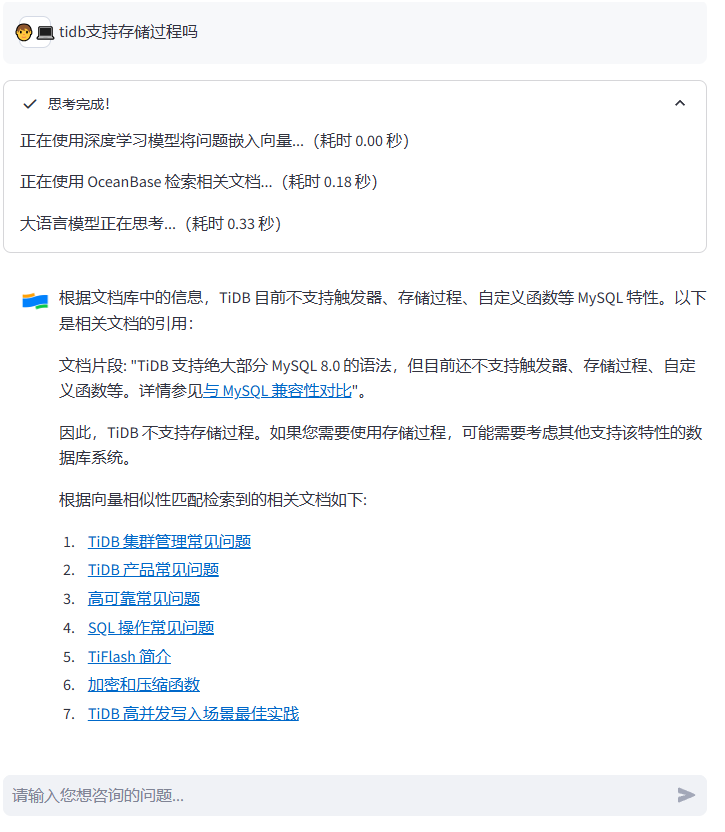
在web页面中关掉"仅限oceanbase相关问题"

先问个关于tidb的问题,使用到了下面的几个本地文档.
接下来请两位打擂台

总体来说搭建比较简单,解析向量数据需要足够的计算资源,并且等待时间比较长.
参考文档:
【创意工坊】试用 OceanBase 4.3.3 构建《黑神话:悟空》智能游戏助手
https://github.com/oceanbase-devhub/ai-workshop-2024/blob/main/README_zh.md
https://www.oceanbase.com/docs/common-oceanbase-database-cn-1000000001579715
免费使用OceanBase Cloud搭建RAG聊天机器人
【整活向】把tidb的文档塞给了基于oceanbase的RAG机器人的更多相关文章
- tidb 记录文档
ansible-playbook stop.yml / start.yml 重启集群,在ansible目录下执行 SHOW STATS_META; 查看统计信息 重启集群:ansible-play ...
- 常用PDF文档开发库
C++库: 1,PDF类库 PoDoFo http://podofo.sourceforge.net/ PoDoFo 是一个用来操作 PDF 文件格式的 C++ 类库.它还包含一些小工具用来解析 ...
- ASP.NET WebApi 文档Swagger深度优化
本文版权归博客园和作者吴双本人共同所有,转载和爬虫请注明博客园蜗牛原文地址,cnblogs.com/tdws 写在前面 请原谅我这个标题党,写到了第100篇随笔,说是深度优化,其实也并没有什么深度 ...
- 基于MVC4+EasyUI的Web开发框架经验总结(8)--实现Office文档的预览
在博客园很多文章里面,曾经有一些介绍Office文档预览查看操作的,有些通过转为PDF进行查看,有些通过把它转换为Flash进行查看,但是过程都是曲线救国,真正能够简洁方便的实现Office文档的预览 ...
- JS文档生成工具:JSDoc 介绍
JSDoc是一个根据javascript文件中注释的信息,生成API文档的工具.生成的文档是html文件.类似JavaDoc和PHPDoc. 用法 /** 一坨注释之类的 */JSDoc会从/**开头 ...
- PowerDesigner(九)-模型文档编辑器(生成项目文档)(转)
模型文档编辑器 PowerDesigner的模型文档(Model Report)是基于模型的,面向项目的概览文档,提供了灵活,丰富的模型文档编辑界面,实现了设计,修改和输出模型文档的全过程. 模型文 ...
- [置顶] stax解析xml文档的6种方式
原文链接:http://blog.csdn.net/u011593278/article/details/9745271 stax解析xml文档的方式: 基于光标的查询: 基于迭代模型的查找: 基于过 ...
- ES 父子文档查询
父子文档的特点 1. 父/子文档是完全独立的. 2. 父文档更新不会影响子文档. 3. 子文档更新不会影响父文档或者其它子文档. 父子文档的映射与索引 1. 父子关系 type 的建立必须在索引新建或 ...
- Java 处理word文档后在前端展示
最新新开发的这个项目需要使用word文档并要求能在前端页面上带格式展示,由于项目不是内部使用,所以不考虑插件类的处理模式,都必须要本地处理完成,前端不需要做什么更新或者说安装就能直接访问,类似于百度文 ...
- 基于WPF系统框架设计(5)-Ribbon整合Avalondock 2.0实现多文档界面设计(二)
AvalonDock 是一个.NET库,用于在停靠模式布局(docking)中排列一系列WPF/WinForm控件.最新发布的版本原生支持MVVM框架.Aero Snap特效并具有更好的性能. Ava ...
随机推荐
- seldom-platform颠覆传统的自动化测试平台
1. 传统的自动化测试平台 近些年,中等以上规模的公司测试团队都在建设自己的自动化测试平台.主要要以 HTTP接口测试 和 性能测试 为主:一些平台还支持 Web UI测试和App UI测试等,试图通 ...
- OpenTelemetry 101:面向 IT 领导者和爱好者的非技术指南
如果您从事软件开发. SRE或DevOps工作,您可能听说过可观察性.遥测和跟踪等术语.这些概念对于理解应用程序在生产环境中的行为至关重要,并且它们是现代软件开发实践的重要组成部分. 您可能还听说过在 ...
- .NET 中的中间件(Middleware)
ASP.NET Core 中间件 什么是中间件(Middleware)? 中间件是组装到应用程序管道中以处理请求和响应的软件. 每个组件: 选择是否将请求传递给管道中的下一个组件. 可以在调用管道中的 ...
- arcgis技术文章索引
1.Error: The System Clock has been set back to the past. 点击打开链接 2.Error: Error 1500. Another insta ...
- openEuler欧拉安装Jenkins并修改构建workspace路径
一.系统优化 关闭防火墙 systemctl stop firewalld systemctl disable firewalld 关闭selinux sed -ri 's/SELINUX=enfo ...
- Java的HTTP接口测试框架Gatling
之前讲过的<JHM>是一个java的基准测试框架,一般用于测试jdk里的API.如果要测试http接口,可以使用Gatling. 你可能用过JMeter,也是可以的 原生的Gatling是 ...
- 【Javaweb】JSP标准标签库
目录 JSTL 1.什么是JSTL 2.版本 3.标签函数库 4.优点 JSTL基本概念 标签(Tag) 标签库(Tag library) 标签库描述文件(Tag Library Descriptor ...
- JGit的常用功能(提交、回滚,日志查询)
最近项目中要做一个回滚功能,目的是如果这次发布出现了问题,立马回滚到上一次发布的版本,用jgit实现的,具体方法如下: public class GitUtil { private final sta ...
- 2021年最新js手机号正则验证 最全全部号段
手机号验证正则 /^1[3-9]\d{9}$/ js的例子 isphone.html <html> <body> <input id="Tel" ty ...
- Qt编写地图综合应用38-覆盖物矩形
一.前言 矩形的应用场景和多边形基本一致,也是用来框起一块区域,然后根据坐标点集合,找到该区域内的标注点集合,比如指定某个县市区域多边形,然后找到这个县市对应的所有站点,拿到这些站点在做其他处理. 二 ...