
centos6.9安装oracle11g
感谢强哥的文档 源文档链接
https://www.qstack.com.cn/archives/68.html
#-------------------------------------------------------------------------------
#
# 安装centos6.9下的oracle
# Author:nod
# Date:18-09-05
# 请确认hostname设置为oracle
# 创建目录/tmp/oracle mkdir -p /tmp/oracle
# 将p10404530_112030_Linux-x86-64_1of7.zip p10404530_112030_Linux-x86-64_2of7.zip\
# pdksh-5.2.14-30-mdv2011.0.x86_64.rpm 上传到/tmp/oracle目录
# 硬盘最低要求为50G 内存2G
# 百度云地址:链接:https://pan.baidu.com/s/11rgfBVJ-Vh46JKkIIu73Mg 密码:x34r
#-------------------------------------------------------------------------------
#-------------------------------------------------------------------------------
# 环境准备
#-------------------------------------------------------------------------------
/etc/init.d/iptables stop
chkconfig iptables off
sed -i 's/SELINUX=enforcing/SELINUX=disabled/' /etc/selinux/config
setenforce 0
curl -o /etc/yum.repos.d/CentOS-Base.repo http://mirrors.aliyun.com/repo/Centos-6.repo
wget -O /etc/yum.repos.d/epel.repo http://mirrors.aliyun.com/repo/epel-6.repo
#检查内容
cat /etc/sysconfig/i18n
#LANG="en_US.UTF-8"
#SYSFONT="latarcyrheb-sun16"
echo $LANG
#en_US.UTF-8
yum -y groupinstall "Compatibility libraries" "Base" "Development tools" "debugging Tools"
yum -y install lrzsz
umount /mnt
cd /etc/yum.repos.d/
mkdir test -p
\mv *.repo test
echo '[local]
name=local
baseurl=file:///mnt
gpgcheck=0' >local.repo
mount /dev/cdrom /mnt
yum makecache
yum groupinstall desktop -y
yum install -y xorg-x11-utils
echo '*/5 * * * * /usr/sbin/ntpdate ntp1.aliyun.com >/dev/null 2>&1' >/var/spool/cron/root
mkdir -p /tmp/oracle
#-------------------------------------------------------------------------------
# 用户环境
#-------------------------------------------------------------------------------
groupadd oinstall
groupadd dba
useradd -g oinstall -G dba oracle
echo 123456 |passwd --stdin oracle
mkdir -p /u01/app
chown -R oracle:oinstall /u01
chmod -R 755 /u01
#-------------------------------------------------------------------------------
# 用户环境
#-------------------------------------------------------------------------------
#修改host解析
#172.30.2.119本机ip oracle
cat >> /etc/profile << EOF
if [ \$USER = "oracle" ];then
if [ \$SHELL = "/bin/ksh" ];then
ulimit -p 16384
ulimit -n 65536
else
ulimit -u 16384 -n 65536
fi
fi
EOF
cat >> /home/oracle/.bash_profile <<EOF
HISTTIMEFORMAT='[%F %T]'
ORACLE_BASE=/u01/app
ORACLE_SID=orcl
ORACLE_HOME=\$ORACLE_BASE/oracle/product/11.2.0.3/db_1
NLS_LANG=AMERICAN_CHINA.ZHS16GBK
LD_LIBRARY_PATH=\$ORACLE_HOME/lib:/lib:/usr/lib
PATH=\$ORACLE_HOME/bin:\$PATH
export ORACLE_BASE ORACLE_HOME ORACLE_SID NLS_LANG PATH
EOF
cat >> /etc/sysctl.conf <<EOF
kernel.shmmni = 4096
kernel.sem = 250 32000 100 128
fs.file-max = 6815744
net.ipv4.ip_local_port_range = 9000 65500
net.core.rmem_default = 262144
net.core.rmem_max = 4194304
net.core.wmem_default= 262144
net.core.wmem_max = 1048576
fs.aio-max-nr = 1048576
EOF
cat >> /etc/security/limits.conf <<EOF
oracle soft nproc 2047
oracle hard nproc 16384
oracle soft nofile 1024
oracle hard nofile 65536
EOF
cat >> /etc/pam.d/login <<EOF
session required /lib64/security/pam_limits.so
EOF
sysctl -p
cd /tmp/oracle
unzip -q p10404530_112030_Linux-x86-64_1of7.zip
unzip -q p10404530_112030_Linux-x86-64_2of7.zip
#此处是你物理机的ip 需要开启Xmanager - Passive
export DISPLAY=172.30.2.113:0.0
su - oracle
cd /tmp/oracle/database/
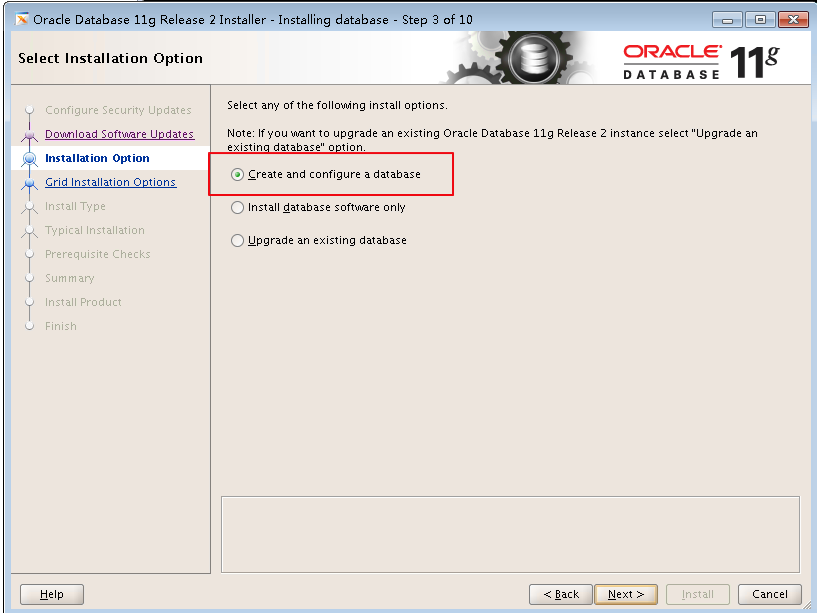
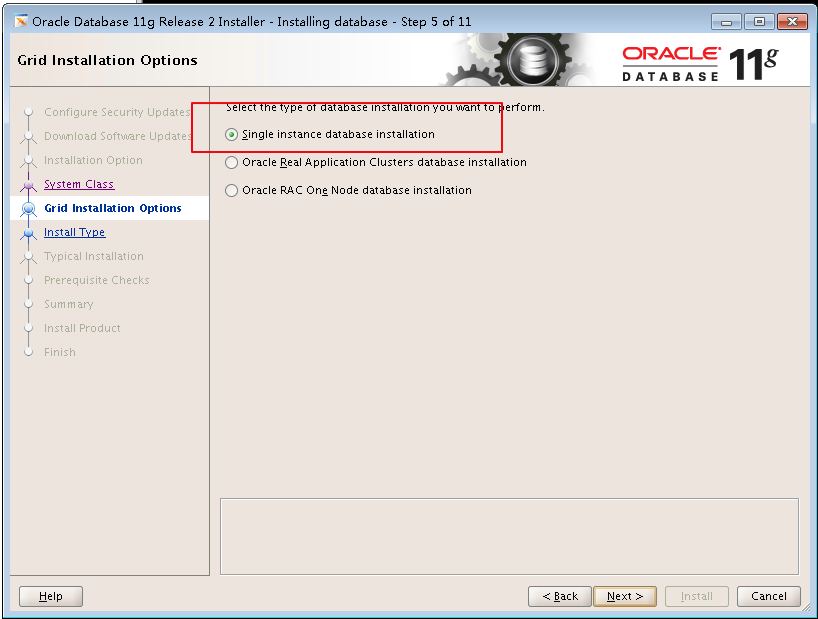
./runInstaller
#-------------------------------------------------------------------------------
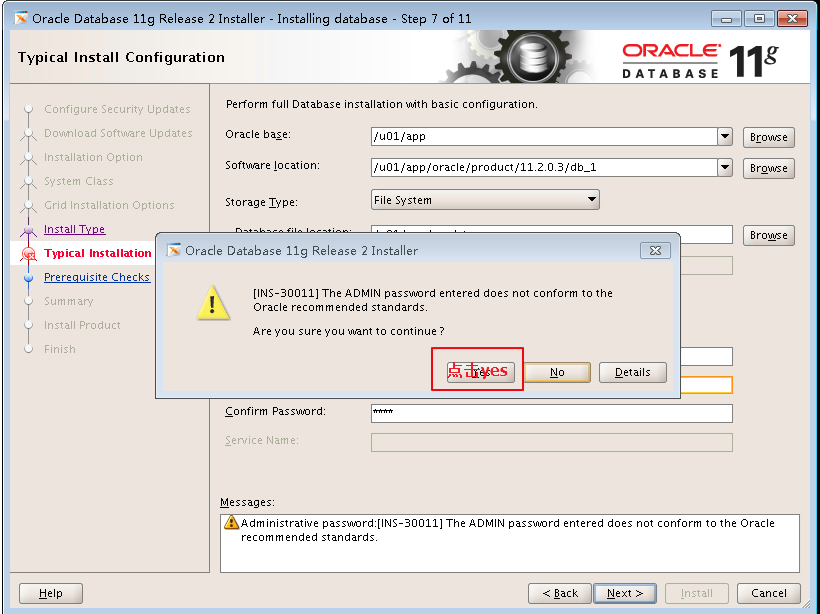
# 进入图形界面更改 建议设置orcl密码为orcl
#-------------------------------------------------------------------------------
yum install -y libaio-devel
yum install -y elfutils-libelf-devel
cd /tmp/oracle
rpm -ivh pdksh-5.2.14-30-mdv2011.0.x86_64.rpm
sh /u01/oraInventory/orainstRoot.sh
sh /u01/app/oracle/product/11.2.0.3/db_1/root.sh
[root@oracle logs]# sh /u01/oraInventory/orainstRoot.sh
Changing permissions of /u01/oraInventory.
Adding read,write permissions for group.
Removing read,write,execute permissions for world.
Changing groupname of /u01/oraInventory to oinstall.
The execution of the script is complete.
[root@oracle logs]# sh /u01/app/oracle/product/11.2.0.3/db_1/root.sh
Performing root user operation for Oracle 11g
The following environment variables are set as:
ORACLE_OWNER= oracle
ORACLE_HOME= /u01/app/oracle/product/11.2.0.3/db_1
Enter the full pathname of the local bin directory: [/usr/local/bin]:
Copying dbhome to /usr/local/bin ...
Copying oraenv to /usr/local/bin ...
Copying coraenv to /usr/local/bin ...
Creating /etc/oratab file...
Entries will be added to the /etc/oratab file as needed by
Database Configuration Assistant when a database is created
Finished running generic part of root script.
Now product-specific root actions will be performed.
Finished product-specific root actions.
sqlplus / as sysdba







centos6.9安装oracle11g的更多相关文章
- CentOS6.8安装Oracle11g
===== 这中间还有很多细节问题该文档中并没有说明和指出: 1.如/tmp目录必须单独分出来,不然oracle在以后的使用中会逐渐变慢 2.官网说的512M内存即可,这里纠正下,如果只是测试安装那还 ...
- CentOS6.4 安装 Oracle11g
1.硬件要求检查: 1.1 内存要求: 内存大于1G(使用虚拟机安装时内存要稍微大一些,否则安装检查不通过) #cat /proc/meminfo //查看内存大小 1.2 交换分区要求: 交换分区是 ...
- 【通过ssh oracle11g安装】centos6静默安装oracle11g
转载链接:https://blog.csdn.net/u011391839/article/details/76566316 根据实际情况略作调整~ 博主参考了以上链接成功进行安装,列一下自己遇到的坑 ...
- CentOS6.5安装Oracle11g
安装前必读: 1. 安装Oracle的虚拟机需要固定IP. 2. 注意安装过程中root用户与oracle用户的切换(su root/su oracle) 3. 环境变量 ...
- centos7远程安装oracle11g R2详细教程-解决一切问题
相关链接与资源: sqldevelper(各种操作系统的oracle客户端) http://www.oracle.com/technetwork/cn/developer-tools/sql-deve ...
- Linux CentOS 6.5 64位 静默安装Oracle11g 云主机
本例: 通过SSH远程连接云主机,上传oracle11g安装包,在centos6.5上无图形化界面静默安装oracle11g. 涉及工具及环境: 1.本地环境windows7+ssh远程连接工具xSh ...
- Centos6.5 安装 Oracle11gR2(64位)
Centos6.5安装 Oracle11gR2(64位) 安装centos6.5 (我的是虚拟机环境) 1. 下载centos6.5的安装包,不解释. 例如以下图: 2. 下载oracle安装包, ...
- Linux-CentOS7下安装Oracle11g
简述: 本文操作环境采用CentOS7 Linux安装Oracle11g与Windows区别较大,在Linux下需要创建用户以及用户组来供Oracle使用 Windows可以直接图形化界面从第一步到最 ...
- vmware Centos6.6安装64位
Centos6.6安装64位 必须开启BIOS中的虚拟化技术 首先开机进入BIOS,一般机器是按F2,我的T420是按F1,然后进入Security,Virtualization,选择Enable即可 ...
随机推荐
- #366 A-C
A. Hulk 题意是给你一个n 输出一个英文字符串,找下规律就发现 当(i!=n&&i%2==1) 输出的是 I hate that (注意大写) 当(i!=n&&i ...
- hdu1542 Atlantis 线段树--扫描线求面积并
There are several ancient Greek texts that contain descriptions of the fabled island Atlantis. Some ...
- 【mysql】索引原理-MySQL索引原理以及查询优化
转载:https://www.cnblogs.com/bypp/p/7755307.html 一.介绍 1.什么是索引? 一般的应用系统,读写比例在10:1左右,而且插入操作和一般的更新操作很少出现性 ...
- Distributed Phoenix Chat using Redis PubSub
转自:https://www.poeticoding.com/distributed-phoenix-chat-using-redis-pubsub/ In the previous articl ...
- LoadRunner手写脚本、检查点、集合点、事务、思考时间
手写脚本 什么时候要手写? 可以有条件手写脚本的场景有两类: 有接口说明文档 没有借口说明文档,要去录制,录制不了,抓包手写 所需函数 我们这里讲的例子是基于 http 协议的,也是常见的两种请求类型 ...
- python, 用filter实现素数
# _*_ coding:utf-8 _*_ #step1: 生成一个序列def _odd_iter(): n = 1 while True: n = n + 1 yield n #Step2: 定义 ...
- redis实现与分析-单机数据库实现
数据库 1,1个数据库数据结构和上面一样,两个字典,一个包含所有的键,一个包含了键的过期时间 2,redis删除过期键策略:定期+惰性 定期:一段时间开始删,删不全下次继续删 惰性:使用键的时候检察 ...
- hadoop 常见 命令
一 hadoop namenode 命令 1 格式化namanode 磁盘 hadoop namenode -format 二 hadoop fs 命令 和 linux 命令 非常类似 ...
- JAVA_HOME 设置为JDK 7无效
场景: Window 10中有Jdk 7和jdk8, 还有Oracle配置 环境变量的配置如下 然后JAVA_HOME 设置为java 7 但是java -version显示为java 8 解决方法 ...
- DeviceIoControl 驱动交互
驱动程序通信的函数,除了ReadFile和WriteFile函数还有DeviceIoControl函数,而且DeviceIoControl函数那是相当的彪悍.因为它可以自定义控制码,你只要在IRP_M ...