
【C#】语音识别 - System.Speech
一个有趣的东西,今后可能用得上。
C#语音识别:在命名空间 System.Speech下SpeechSynthesizer可以将文字转换成语音
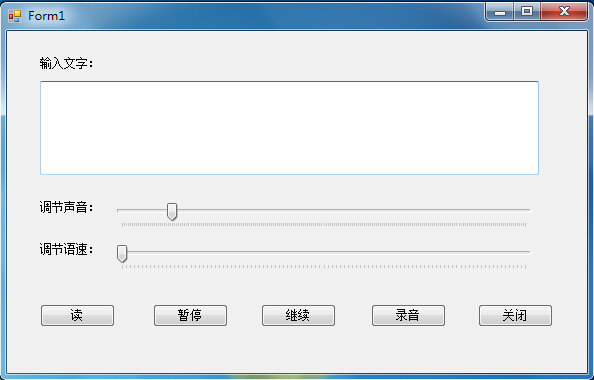
贴出代码:
public partial class Form1 : Form

    {

        private SpeechSynthesizer ss;

        public Form1()

        {

            InitializeComponent();

        }

        private void Form1_Load(object sender, EventArgs e)

        {

            ss = new SpeechSynthesizer();

        }

        private void button1_Click(object sender, EventArgs e)

        {

            ss.Rate = trackbarSpeed.Value;

            ss.Volume = trackbarVoice.Value;

            ss.SpeakAsync(txtSpeechText.Text);

        }

        private void button2_Click(object sender, EventArgs e)

        {

            ss.Pause();

        }

        private void button3_Click(object sender, EventArgs e)

        {

            ss.Resume();

        }

        private void button4_Click(object sender, EventArgs e)

        {

            SpeechSynthesizer ss = new SpeechSynthesizer();

            ss.Rate = trackbarSpeed.Value;

            ss.Volume = trackbarVoice.Value;

            SaveFileDialog savefd = new SaveFileDialog();

            savefd.Filter = "wave Files|*.wav";

            ss.SetOutputToWaveFile(savefd.FileName);

            ss.Speak(txtSpeechText.Text);

            ss.SetOutputToDefaultAudioDevice();

            MessageBox.Show("完成录音~~~", "提示");

        }

        private void button5_Click(object sender, EventArgs e)

        {

            Application.Exit();

        }

    }
【C#】语音识别 - System.Speech的更多相关文章
- C#的语音识别 using System.Speech.Recognition;
using System; using System.Collections.Generic; using System.Linq; using System.Speech.Recognition; ...
- C#中的System.Speech命名空间初探
本程序是口算两位数乘法,随机生成两个两位数,用语音读出来.然后开启语音识别,接受用户输入,知道答案正确关闭语音识别.用户说答案时,可以说“再说一遍”重复题目. 关键是GrammarBuilder和Ch ...
- C# 使用System.Speech 进行语音播报和识别
C# 使用System.Speech 进行语音播报和识别 using System.Speech.Synthesis; using System.Speech.Recognition; //语音识别 ...
- System.Speech.Synthesis 添加暂停、继续功能
为了方便调用暂停.继续的方法.要将speech的功能写成一个类.直接附上代码: using System; using System.Collections.Generic; using System ...
- asp.net引用System.Speech实现语音提示
using System; using System.Speech.Synthesis; namespace testvoice { class Program { static void Main( ...
- System.Speech使用
使用微软语音库 使用微软语音库可以很快速的制作一个小应用,比如一个唐诗的朗诵工具.本示例也是使用微软语音库,制作了一个唐诗宋词朗诵的应用,仅供加深学习印象 首先是要引入System.Speech库 然 ...
- python之语音识别(speech模块)
1.原理 语音操控分为 语音识别和语音朗读两部分. 这两部分本来是需要自然语言处理技能相关知识以及一系列极其复杂的算法才能搞定,可是这篇文章将会跳过此处,如果你只是对算法和自然语言学感兴趣的话,就只有 ...
- C# ms speech文字转语音例子
最近突发奇想 想玩玩 文字转语音的东东 谷歌了一下 发现微软有一个TTS 的SDK 查了查相关资料 发现 还真不错 然后就开始玩玩Microsoft Speech SDK的 DEMO了 ...
- 玩一下C#的语音识别
在.NET4.0中,我可以借助System.Speech组件让电脑来识别我们的声音. 以上,当我说"name",显示"Darren",我说"age&q ...
随机推荐
- php 中使用正则
1.匹配一个由一个小写字母和一位数字组成的字符串,比如”z2″ 用^[a-z][0-9]$ 2.当在一组方括号里使用^是,它表示“非”或“排除”的意思 比如要求第一个字符不能是数字:^[^0- ...
- 四则运算V1.1
作业:https://edu.cnblogs.com/campus/nenu/SWE2017FALL/homework/997 代码:https://coding.net/u/Dawnfox/p/f4 ...
- linux服务器进程信息查看命令
#lsof 列出当前系统打开文件,常与-i选项使用,用于查看某个端口被哪个程序占用 [root@bogon ~]# lsof -i:80 COMMAND PID USER FD TYPE DEVICE ...
- MBR, EFI, 硬盘分区表
文章目录 硬盘MBR详细介绍 结束柱面号(End cylinder)超过1023时怎么处理 grub stage 1 是如何引导grub stage 2 的 MBR和2TB的限制 (MBR/GPT/E ...
- js面向对象编程 ---- 系列教程
原 js面向对象编程:数据的缓存 原 js面向对象编程:如何检测对象类型 原 js面向对象编程:if中可以使用那些作为判断条件呢? 原 js面向对象编程:this到底代表什么?第二篇 原 js面向对象 ...
- JSON数据的处理中的特殊字符
JSON现在是很常见的处理数据的方式了.但由于自己使用的是反射获取数据,必须自己处理特殊字符,但总是发现有一些看不见的字符在前台 var obj = jQuery.parseJSON(msg);会转换 ...
- setsockopt调用IP_ADD_MEMBERSHIP出错errno:19 no such device
if (setsockopt(fd,IPPROTO_IP,IP_ADD_MEMBERSHIP,&mreq,sizeof(mreq)) < 0) { pri ...
- GUI相关学习资料
分类 1,基于OS,包括windows,linux,android,ios 2,基于语言,包括c++,java,c#,javacript 3,按照技术分类,这个其实和os,编程语言分不开,大概可以分为 ...
- windows python监听文件触发脚本
from watchdog.events import * class FileEventHandler(FileSystemEventHandler): def __init__(self): Fi ...
- jstack实战死循环与死锁学习笔记
一.实战死循环导致CPU飙高 top -p pid -H jstack pid printf "%s" 十进制的线程id 二.创建CUP100%实例(死循环) 1.创建CpuCo ...