
nginx配置文服
修改nginx.conf
添加如下内容
autoindex on; # 显示目录
autoindex_exact_size on; # 显示文件大小
autoindex_localtime on; # 显示文件时间
#  power by www.phpStudy.net

#user  nobody;

worker_processes  1;

error_log  logs/error.log;

#error_log  logs/error.log  notice;

#error_log  logs/error.log  info;

#pid        logs/nginx.pid;

events {

    worker_connections  1024;

}

http {

    include       mime.types;

    default_type  application/octet-stream;

    log_format  main  '$remote_addr - $remote_user [$time_local] "$request" '

                      '$status $body_bytes_sent "$http_referer" '

                      '"$http_user_agent" "$http_x_forwarded_for"';

    access_log  logs/access.log  main;

    sendfile        on;

    #tcp_nopush     on;

    #keepalive_timeout  0;

    keepalive_timeout  65;

    #tcp_nodelay on;

  fastcgi_connect_timeout 300;

  fastcgi_send_timeout 300;

  fastcgi_read_timeout 300;

  fastcgi_buffer_size 128k;

  fastcgi_buffers 4 128k;

  fastcgi_busy_buffers_size 256k;

  fastcgi_temp_file_write_size 256k;

  #gzip  on;

  gzip on;

  gzip_min_length  1k;

  gzip_buffers     4 32k;

  gzip_http_version 1.1;

  gzip_comp_level 2;

  gzip_types       text/plain application/x-javascript text/css application/xml;

  gzip_vary on;

  gzip_disable "MSIE [1-6].";

  server_names_hash_bucket_size 128;

  client_max_body_size     100m;

  client_header_buffer_size 256k;

  large_client_header_buffers 4 256k;

  underscores_in_headers on;

  autoindex on; # 显示目录

  autoindex_exact_size on; # 显示文件大小

  autoindex_localtime on; # 显示文件时间

  root "F:/work/workspace/smart/spring-smart-html/";

  index  index.html index.htm;

 server {

        listen       80;

        server_name  192.168.64.1 192.168.0.104 127.0.0.1;

        #charset koi8-r;

        #access_log  logs/host.access.log  main;

 	location /smart/ {

        proxy_pass http://localhost:8081/spring-smart-web/smart/;

        proxy_set_header   Host    $host;

        proxy_set_header   X-Real-IP   $remote_addr;

        proxy_set_header   X-Forwarded-For $proxy_add_x_forwarded_for;

		proxy_connect_timeout 300;

		proxy_send_timeout 300;

		proxy_read_timeout 300;

    }

	location ~ .*\.(html|htm|gif|jpg|jpeg|bmp|png|ico|txt|js|css|less|map|eot|svg|ttf|woff|woff2|cab|scss|otf|exe|pdf|doc|xlsx)$ {

		root "F:/work/workspace/smart/spring-smart-html/";

		index  index.html index.htm;

		expires 1d;

    }

}

	include vhost/*.conf;

}
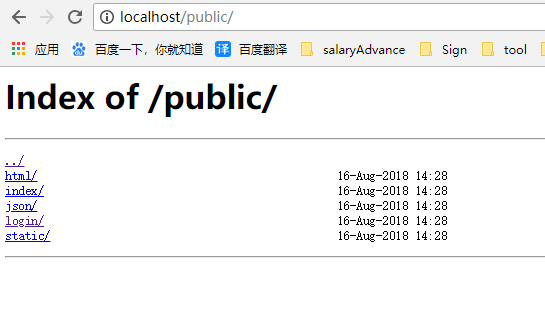
访问
nginx配置文服的更多相关文章
- 史上最全的Nginx配置文档
Nginx是一个异步框架的Web服务器,也可以用作反向代理,负载平衡器 和 HTTP缓存.该软件由Igor Sysoev 创建,并于2004年首次公开发布.同名公司成立于2011年,以提供支持.Ngi ...
- Nginx配置文档具体解释
Nginx的配置文档具体解释.在这儿做个总结,以便以后使用的时间查看. 下面大部分自己整理.部分来自參考 #设置用户 #user nobody; #启动进程数(一般和server的CPU同样) #能 ...
- Rhel6-cacti+nagios+ganglia(nginx)配置文档
(lnmp平台) 系统环境: rhel6 x86_64 iptables and selinux disabled 主机: 192.168.122.185 server85.example.com 1 ...
- Nginx配置文档
转https://www.cnblogs.com/hunttown/p/5759959.html
- nginx配置 的话注意几点 1.错误时注意看log 2.天威证书的话,有文档按照其文档一步步配置即可;3每句话的结尾注意千万别丢掉分号
nginx配置 的话注意几点 1.错误时注意看log 2.天威证书的话,有文档按照其文档一步步配置即可:3每句话的结尾注意千万别丢掉分号:4.配置https时 其转发可以转发到http上 pass_ ...
- 死磕nginx系列--配置文档解读
nginx配置文件主要分为四个部分: main(全局设置) http ( ) upstream(负载均衡服务器设置) server(主机设置) location(URL匹配特点位置的设置) serve ...
- nginx 安全配置文档
1.配置文档中有多处明确写出了nginx的配置文件路径,该路径是测试环境中的路径,线上系统的nginx配置文件与文档中所写的路径可能不一样,在进行相关配置时,应以线上配置文件的实际路径为准. 线上系统 ...
- (转)nginx 安全配置文档
原文:https://www.cnblogs.com/heaven-xi/p/9961357.html#top 1.配置文档中有多处明确写出了nginx的配置文件路径,该路径是测试环境中的路径,线上系 ...
- Nginx 1.10.1 编译、配置文档(支持http_v2,TLSv1.2,openssl v1.0.2)
1.安装常用工具及基础包: [root@localhost /]# yum -y install wget git vim make gcc gcc-c++ openssl-devel [root@l ...
随机推荐
- 最简单的网络图片的爬取 --Pyhon网络爬虫与信息获取
1.本次要爬取的图片的url http://www.nxl123.cn/static/imgs/php.jpg 2.代码部分 import requestsimport osurl = "h ...
- Linux网桥配置
CentOS:1.配置临时网桥,重启后风格配置丢失[root@CentOS ~]# yum -y install bridge-utils[root@CentOS ~]# brctl addbr br ...
- C#后台Post提交XML 及接收该XML的方法
//发送XML public void Send(object sender, System.EventArgs e) { string WebUrl = "http:/ ...
- 动态改变Listview的item背景颜色和item中字体的颜色
https://blog.csdn.net/qq_14813933/article/details/50417859
- https请求排错过程
1. 看请求有没有到nginx 此时需要查看nginx的日志.一般每一个项目都会配置一个nginx站点,而一个站点都会又一个nginx配置文件,这个文件位于哪里呢?不出意外应该在:下面,如果找不到的话 ...
- 回收站(recyclebin)及回滚
1. alter table table_name enable row movement; flashback table table_name to timestamp to_timestam ...
- 动态BT跳转
METHOD eh_onzobject_id_link. ***定义 DATA : lv_crmt_object_guid TYPE crmt_object_guid, lv_index TYPE i ...
- sku 加减号的增删
---恢复内容开始--- //php页面public function test(){ $id="1"; $data=Db::table('week3_goods') ->j ...
- C# 3.0 / C# 3.5 系统内置委托
内置委托的定义声明: System.Func,代表有返回类型的委托: public delegate TResult Func<out TResult>(); public delegat ...
- 反向代理/负载均衡/session/cookie
正向代理:客户端将流量重定向到burpsuite等软件或连接到VPN再访问服务器而不是直接访问服务器的场景.流量流动方向是真正机器--代理服务器.正向代理又称代理.普通代理. 反向代理:服务器端使用反 ...