
[vue]组件的导入
参考: http://vue2.mmxiaowu.com/article/584a3957fc007e72b0f576d9
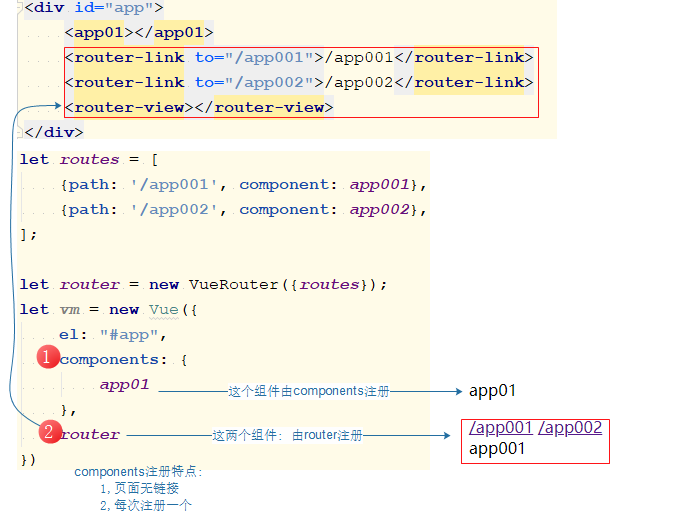
vue组件的注册
1.通过components方式注册
2.通过router方式注册(两者可以并行存在).
3.如果是render+router方式, 那么router只能写在render的组件template里.

<!DOCTYPE html>

<html lang="en">

<head>

    <meta charset="UTF-8">

    <title>Title</title>

</head>

<body>

<div id="app">

    <app01></app01>

    <router-link to="/app001">/app001</router-link>

    <router-link to="/app002">/app002</router-link>

    <router-view></router-view>

</div>

<template id="app01">

    <div>

        <p>app01</p>

    </div>

</template>

<template id="app001">

    <div>app001</div>

</template>

<template id="app002">

    <div>app002</div>

</template>

<script src="node_modules/vue/dist/vue.js"></script>

<script src="node_modules/vue-router/dist/vue-router.js"></script>

<script>

    let app01 = {

        name:'app01',

        template: "#app01",

    };

    let app001 = {

        name:'app001',

        template: "#app001",

    };

    let app002 = {

         name:'app002',

        template: "#app002",

    };

    let routes = [

        {path: '/app001', component: app001},

        {path: '/app002', component: app002},

    ];

    let router = new VueRouter({routes});

    let vm = new Vue({

        el: "#app",

        components: {

            app01

        },

        router

    })

</script>

</body>

</html>
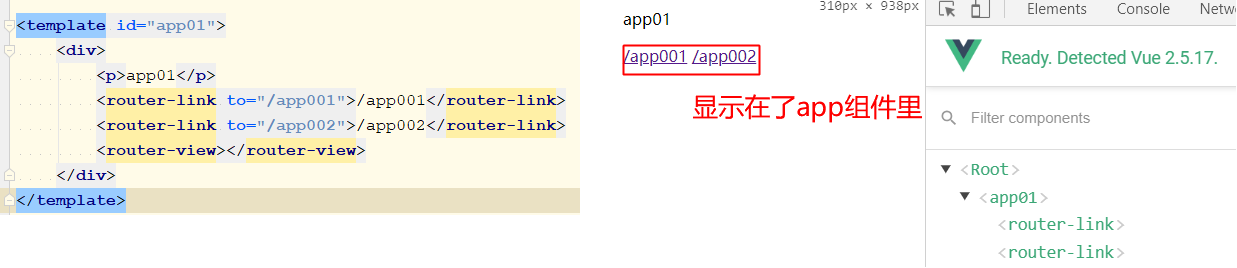
router方式灵活,可以作为components注册组件的子组件存在
作为谁的子, 取决于router-link和router-view写在谁下了.
<!DOCTYPE html>

<html lang="en">

<head>

    <meta charset="UTF-8">

    <title>Title</title>

</head>

<body>

<div id="app">

    <app01></app01>

</div>

<template id="app01">

    <div>

        <p>app01</p>

        <router-link to="/app001">/app001</router-link>

        <router-link to="/app002">/app002</router-link>

        <router-view></router-view>

    </div>

</template>

<template id="app001">

    <div>app001</div>

</template>

<template id="app002">

    <div>app002</div>

</template>

<script src="node_modules/vue/dist/vue.js"></script>

<script src="node_modules/vue-router/dist/vue-router.js"></script>

<script>

    let app01 = {

        template: "#app01",

    };

    let app001 = {

        template: "#app001",

    };

    let app002 = {

        template: "#app002",

    };

    let routes = [

        {path: '/app001', component: app001},

        {path: '/app002', component: app002},

    ];

    let router = new VueRouter({routes});

    let vm = new Vue({

        el: "#app",

        components: {

            app01

        },

        router

    })

</script>

</body>

</html>
render方式注册组件
上面这个链接里说了: render+router

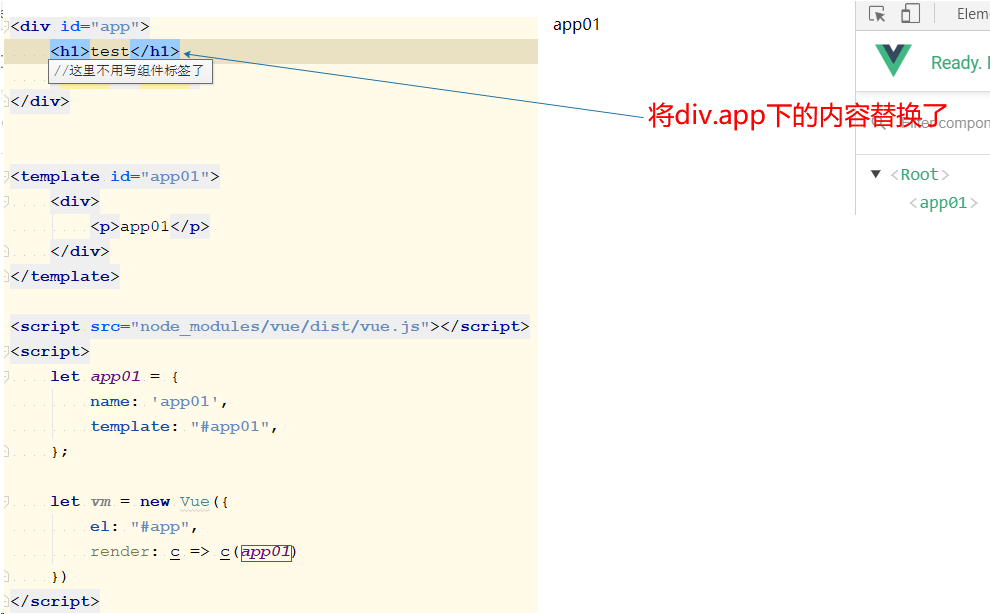
方法1:
render: c => c(app01)作用:
0,注册组件
1.生成标签
2.自动插入标签
特点: 会覆盖div.app下的内容
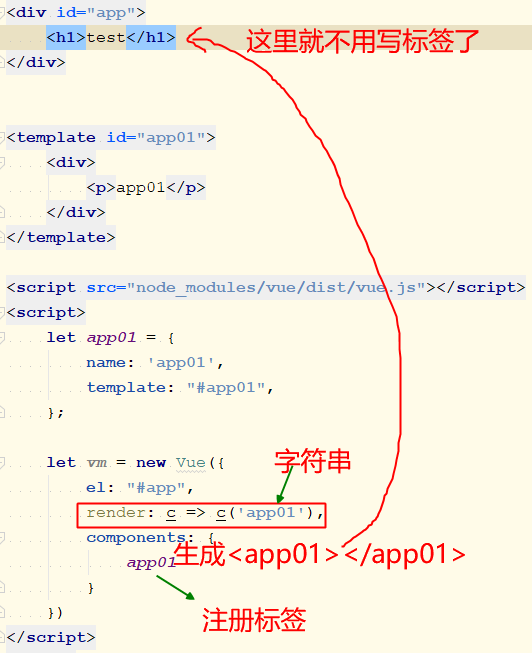
方法2:
render: c => c('app01')作用:
1.生成标签
2.自动插入标签
特点: 会覆盖div.app下内容
document的的创建标签方法
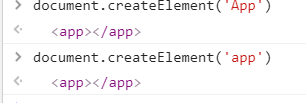
方法3: template
template: '' 作用:
1,生成标签
2,插入标签
特点: 会覆盖app下内容
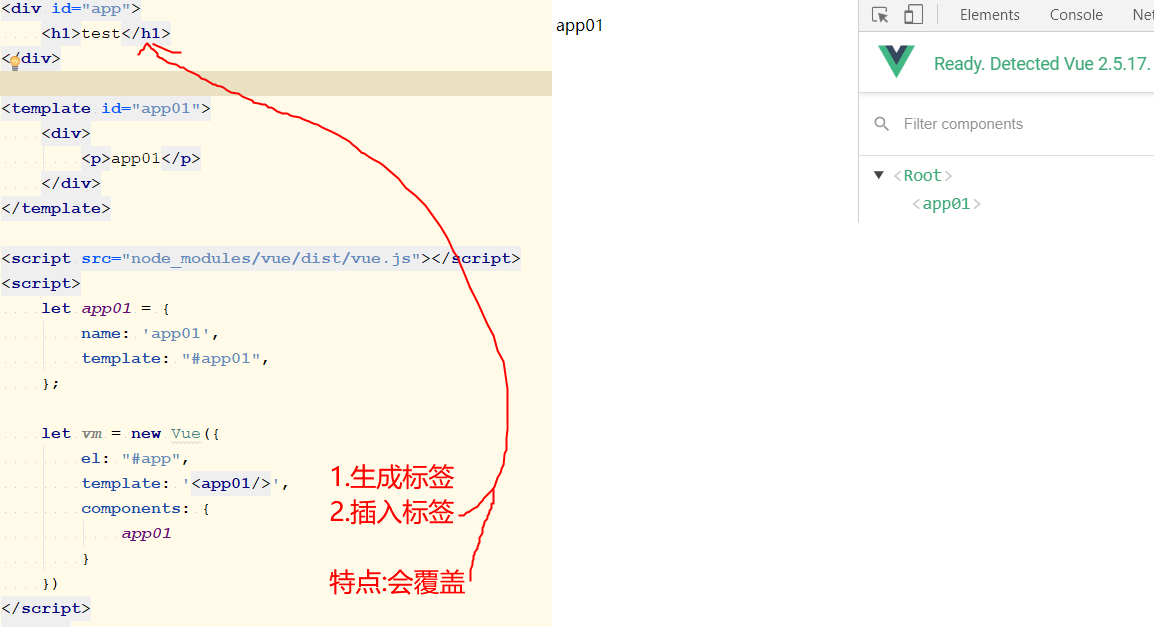
<!DOCTYPE html>

<html lang="en">

<head>

    <meta charset="UTF-8">

    <title>Title</title>

</head>

<body>

<div id="app">

    <h1>test</h1>

</div>

<template id="app01">

    <div>

        <p>app01</p>

    </div>

</template>

<script src="node_modules/vue/dist/vue.js"></script>

<script>

    let app01 = {

        name: 'app01',

        template: "#app01",

    };

    let vm = new Vue({

        el: "#app",

        template: '<app01/>',

        components: {

            app01

        }

    })

</script>

</body>

</html>
小结:
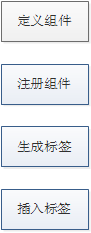
| render: c => c('app01') | template: '' |
|---|---|
| 1.生成标签 | 1.生成标签 |
| 2.插入标签 | 2.插入标签 |
| 覆盖app下的内容 | 覆盖app下的内容 |
| 配合runtime用 | 配合vue.js用 |
| 局部组件 | 全局组件 |
|---|---|
| 1.创建 | 1,创建 |
| 2.注册 | - |
| 3.使用 | 3,使用 |
第二栏是 template: '<app01/>'
webpack: 使用render+runtime-only方式
- 方法1
new Vue({

    el: '#app',

    render: creatElment => creatElment(App),

});
- 方法2
通过render渲染一个元素, 然后把 App 当组件来用
new Vue({

    el: '#app',

    render: c => c('App'),

    components: {

        App

    }

});
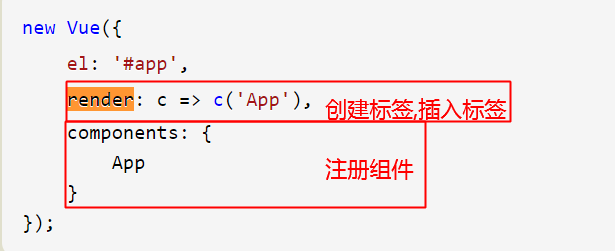
注意: 这种情况下, App 组件并不是根组件
webpack: 使用vue.js
- 方法3:
<div id="app">

    <App></App>

</div>
import Vue from '../node_modules/vue/dist/vue.js'

import App from "./App.vue";

new Vue({

    el: '#app',

    components: {

        App

    }

});
- 方法4:
import Vue from '../node_modules/vue/dist/vue.js'

import App from './App.vue'

new Vue({

    el: '#app',

    template: '<App/>',

    components: {

        App

    }

});
webpack: vue-cli使用的方式
vue-cli默认使用的是../node_modules/vue/dist/vue.js,而非runtime.

import Vue from '../node_modules/vue/dist/vue.js'

import App from './App.vue'

import login from './components/login.vue';

import register from './components/register.vue';

import VueRouter from 'vue-router';

Vue.use(VueRouter);

let routes = [

    {path: '/login', component: login},

    {path: '/register', component: register},

];

let router = new VueRouter({routes});

new Vue({

    el: '#app',

    template: '<App/>',

    components: {App},

    router

});
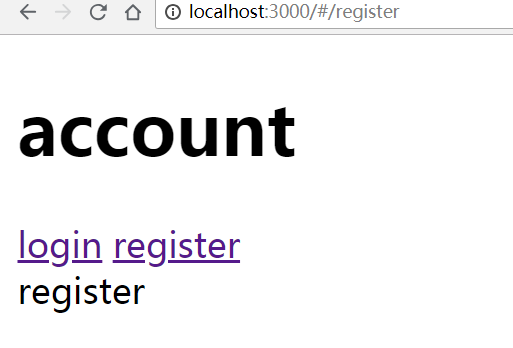
- 将login和register直接导入App.vue
- 将login和register先导入account.vue, 在将account.vue导入App.vue/
router方式导入
./components/login.vue
<template>

    <div>login</div>

</template>

<script>

    export default {

        name: "login"

    }

</script>

<style scoped>

</style>
./components/register.vue
<template>

    <div>register</div>

</template>

<script>

    export default {

        name: "register"

    }

</script>

<style scoped>

</style>
./components/account.vue
<template>

    <div>

        <router-link to="/account/login">/account/login</router-link>

        <router-link to="/account/register">/account/register</router-link>

        <router-view></router-view>

    </div>

</template>

<script>

    export default {

        name: "account"

    }

</script>

<style scoped>

</style>
App.vue
<template>

    <div id="app">

        <router-link to="/account">/account</router-link>

        <router-view></router-view>

    </div>

</template>

<script>

    export default {

        name: 'app',

    }

</script>

<style>

</style>
import 方式实现
./components/login.vue
<template>

    <div>login</div>

</template>

<script>

    export default {

        name: "login"

    }

</script>

<style scoped>

</style>
./components/register.vue
<template>

    <div>register</div>

</template>

<script>

    export default {

        name: "register"

    }

</script>

<style scoped>

</style>
./components/account.vue
<template>

    <div>

        <p>account</p>

        <login></login>

        <register></register>

    </div>

</template>

<script>

    import login from './login.vue';

    import register from './register.vue';

    export default {

        name: "account",

        components: {

            login,

            register

        }

    }

</script>

<style scoped>

</style>
App.vue
<template>

    <div id="app">

        <account></account>

    </div>

</template>

<script>

    import account from './components/account.vue'

    export default {

        name: 'app',

        components: {

            account

        }

    }

</script>

<style>

</style>

[vue]组件的导入的更多相关文章
- 自己封装 vue 组件 和 插件
vue 组件 一.组件的创建,两种方法.(本质上是1.2两种,vue文件,只是创建了一个 组件选项对象,仅是一个js对象)1.定义组件:Vue.component('button-counter', ...
- 基于vue项目的组件中导入mui框架初始化滑动等效果时需移除严格模式的问题
基于vue项目的组件中导入mui框架初始化滑动等效果时,控制台报错:Uncaught TypeError: 'caller', 'callee', and 'arguments' properties ...
- Vue (三) --- Vue 组件开发
------------------------------------------------------------------好心情,会让你峰回路转. 5. 组件化开发 5.1 组件[compo ...
- vue2.0 如何自定义组件(vue组件的封装)
一.前言 之前的博客聊过 vue2.0和react的技术选型:聊过vue的axios封装和vuex使用.今天简单聊聊 vue 组件的封装. vue 的ui框架现在是很多的,但是鉴于移动设备的复杂性,兼 ...
- vue 组件开发、vue自动化工具、axios使用与router的使用(3)
一. 组件化开发 1.1 组件[component] 在网页中实现一个功能,需要使用html定义功能的内容结构,使用css声明功能的外观样式,还要使用js定义功能的特效,因此就产生了一个功能先关的代码 ...
- 如何把一个vue组件改为ionic/angular组件
同是mvvm框架,他们之间是很相似的,如何你已经熟悉其中的一个,那么另一个也就基本上也就会的差不多了. 一.动态属性.值.事件绑定 vue中使用v-bind:或者之间分号:进行绑定 ng中左括号[]进 ...
- storybook构建vue组件
最近在研究业务型组件的使用,因为在单独开发组件的时候需要调试,所以为每一个组件都编写一个webpack开发环境,然后上传上去为了其他人可以直接使用又把webpack上传上去,这样会有两个问题: 1:每 ...
- VUE组件汇总
内容 UI组件 开发框架 实用库 服务端 辅助工具 应用实例 Demo示例 UI组件 element ★13489 - 饿了么出品的Vue2的web UI工具套件 Vux ★8133 - 基于Vue和 ...
- vue 组件发布记录
好久没做独立的 vue 组件了,最近突然想把一个常用的 vue 组件打成一个 npm 包,方便使用.好久不用,发现已经忘记环境怎么搭建.翻看以前的组件,才慢慢回想起来,中间还出现些错误.在这记录下开发 ...
随机推荐
- mysql 冷热备份
文章转自:http://www.linuxidc.com/Linux/2014-03/98710.htm 冷备份(OFF, 慢, 时间点上恢复)冷备份发生在数据库已经正常关闭的情况下,当正常关闭时会提 ...
- Git使用基础篇
Git使用基础篇 前言 Git是一个分布式的版本控制工具,本篇文章从介绍Git开始,重点在于介绍Git的基本命令和使用技巧,让你尝试使用Git的同时,体验到原来一个版 本控制工具可以对开发产生如此之多 ...
- 解决UEFI启动模式下无法使用U盘启动WIN7安装界面
问题场景 现在很多人都习惯使用U盘进行安装系统,主要是快捷方便.本文主要是讲解一下U盘在UEFI模式下无法启动Windows7安装界面的问题,可能很多人会说使用PE系统进行安装,但是因为我的主板只有独 ...
- linux远程安装和使用
Putty:一个Telnet.SSH.rlogin.纯TCP以及串行接口连接软件,体积小.完全免费.使用方便快捷,基本的功能都有.有点不好的地方:在一界面上一次只能打开一个窗口,对于快速查看和操作不太 ...
- Page Visibility API 页面是否获取焦点 Event: visibilitychange
W3C 文档 https://www.w3.org/TR/page-visibility/ MDN 文档 https://www.w3.org/TR/page-visibility/ // Docum ...
- 分块+莫队||BZOJ3339||BZOJ3585||Luogu4137||Rmq Problem / mex
题面:P4137 Rmq Problem / mex 题解:先莫队排序一波,然后对权值进行分块,找出第一个没有填满的块,直接for一遍找答案. 除了bzoj3339以外,另外两道题Ai范围都是1e9. ...
- windows下批量生成文件夹
在windows环境下如果想要批量生成文件夹: 1.创建一个记事本文件 2.首行大写MD 3.后面加上你想创建的文件夹的名字,每个名字之间有空格 4.退出记事本并保存 5.将记事本文件后缀改为bat文 ...
- [No000012E]WPF(6/7):概念绑定
WPF 的体系结构,标记扩展,依赖属性,逻辑树/可视化树,布局,转换等.今天,我们将讨论 WPF 最重要的一部分——绑定.WPF 带来了优秀的数据绑定方式,可以让我们绑定数据对象,这样每次对象发生更改 ...
- qs.parse()、qs.stringify()使用方法
qs是一个npm仓库所管理的包,可通过npm install qs命令进行安装. 1. qs.parse()将URL解析成对象的形式 const Qs = require('qs'); let url ...
- [bigdata] palantir
Palantir的无缝数据融合技术关键在于本体数据模型的灵活性,动态性,而且要能反映人.事.物和环境的关联关系及因果联系,这是大数据技术面临的核心挑战.