
unbuntu安装Node.js
先删除这些
rm -rf ~/.npm
rm -rf ~/.npm-global
rm -rf ~/.npmrc
rm -rf ~/.node-gyp
按https://github.com/nodesource/distributions/blob/master/README.md#debinstall
安装
curl -sL https://deb.nodesource.com/setup_13.x | sudo -E bash -

sudo apt-get install -y nodejs
npm uninstall -g @angular/cli
npm cache clean --force
sudo apt remove nodejs
如果新安装的mint新版本,比如19.2 19.3... node会提示操作系统不支持
形如:

,那么参考https://github.com/nodesource/distributions/issues/881
1 下载nodejs_install.sh
wget -O nodejs_install.sh https://deb.nodesource.com/setup_13.x
2
xed ./nodejs_install.sh
在文件靠后的地方,找到mint
check_alt "Linux Mint"    "tara"     "Ubuntu" "bionic"

check_alt "Linux Mint"    "tessa"    "Ubuntu" "bionic"
加一行
check_alt "Linux Mint" "tara" "Ubuntu" "bionic"
check_alt "Linux Mint" "tessa" "Ubuntu" "bionic"check_alt "Linux Mint" "tricia" "Ubuntu" "bionic"
形如
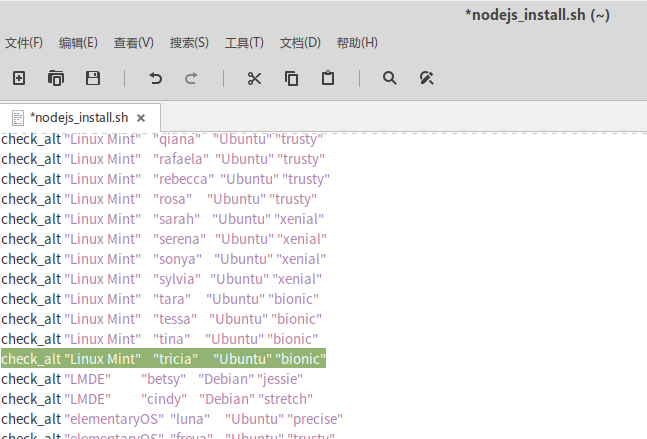
然后 保存退出
sudo bash ./nodejs_install.sh
就可以 安装了
sudo apt-get install -y nodejs
参考这个修改npm路径,以便用-g安装包的时候不报错
Make a directory for global installations:
mkdir ~/.npm-global
Configure npm to use the new directory path:
npm config set prefix '~/.npm-global'xed ~/.profileOpen or create a
~/.profilefile and add this line:export PATH=~/.npm-global/bin:$PATH
Back on the command line, update your system variables:
source ~/.profile
添加 PATH="$HOME/.npm-global/bin:$PATH"
再安装angular就不用sudo了
先确认安装了
sudo apt install build-essential
如果不行,就
sudo -i
aptitude install g++
否则sass编译不过,提示没有g++
npm install -g -f @angular/cli
应对被墙, 装nrm
npm i nrm -g
然后用
nrm ls 列出代理
nrm use XXX 切换代理
安装phantomjs
sudo apt-get install phantomjs
安装typescript
npm i -g typescript
查看版本
ng --version
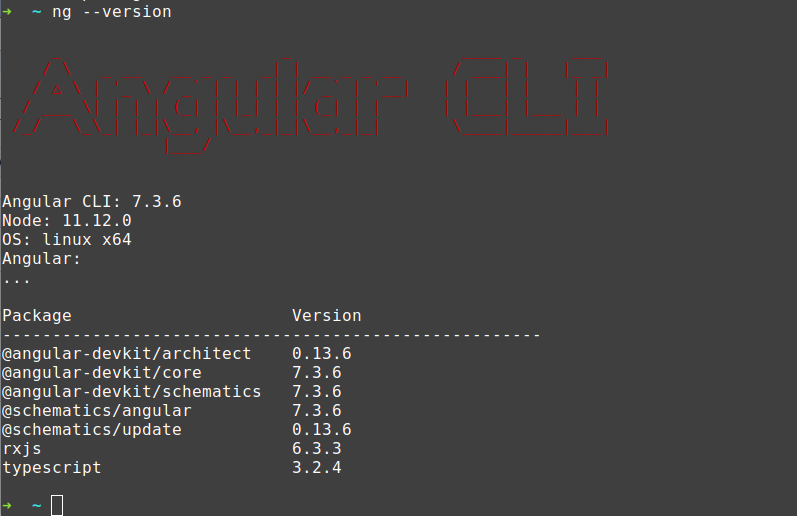
看见Angular: ...应该是安装正确的.
否则会看见error (8.x的node如果没卸载干净安装9 会提示 ts错误)
安装vscode https://code.visualstudio.com/docs/setup/linux
curl https://packages.microsoft.com/keys/microsoft.asc | gpg --dearmor > microsoft.gpg

sudo install -o root -g root -m 644 microsoft.gpg /etc/apt/trusted.gpg.d/

sudo sh -c 'echo "deb [arch=amd64] https://packages.microsoft.com/repos/vscode stable main" > /etc/apt/sources.list.d/vscode.list'
sudo apt-get install apt-transport-https
sudo apt-get update
sudo apt-get install code # or code-insidersunbuntu安装Node.js的更多相关文章
- 在Linux Mint上安装node.js和npm
1.安装Node.js 前端开发过程中,很多项目使用npm的http-server的模块来运行一个静态的服务器,我个人在Dell的笔记本上安装的是Linux Mint最新版本,所以想尝试一下在Linu ...
- ubuntu kylin 14.04安装Node.js和Famous
默认使用软件中心安装node.js,然后参考https://famo.us/install进行安装 1.sudo apt-get install git 2.npm install -g yo gru ...
- centos 6.5安装node.js
1.检查是否安装gcc编译器 rpm -q gcc rpm -q gcc-c++ 2.如果没有安装则通过以下代码安装gcc编译器 yum -y install gcc-c++ kernel-devel ...
- [译]How to Install Node.js on Ubuntu 14.04 如何在ubuntu14.04上安装node.js
原文链接为 http://www.hostingadvice.com/how-to/install-nodejs-ubuntu-14-04/ 由作者Jacob Nicholson 发表于October ...
- Linux 安装node.js ---- 源码编译的方式
一 : 普通用户: 安装前准备环境: 1.检查Linux 版本 命令: cat /etc/redhat-release 2.检查 gcc.gcc-c++ 是否安装过 命令: rpm -q gcc rp ...
- CentOS 6 中安装Node.js 4.0 版本或以上
如果想在CentOS 6 中安装Node.js >4.0,如果通过以往的方式安装: wget http://nodejs.org/dist/v4.0.0/node-v4.0.0.tar.gz t ...
- Nodejs学习笔记(一)--- 简介及安装Node.js开发环境
目录 学习资料 简介 安装Node.js npm简介 开发工具 Sublime Node.js开发环境配置 扩展:安装多版本管理器 学习资料 1.深入浅出Node.js http://www.info ...
- 1. windows环境安装Node.js
1. 下载 地址: https://nodejs.org/en/ 2. 下载最新版本v6.1.0 Currrent
- 安装node.js+express for win7的Web开发环境配置
1.安装 node.js. 进入官网的下载地址:http://www.nodejs.org/download/ . 选择Windows Installer或者选择Windows Installer ( ...
随机推荐
- django field
name=models.CharField(max_length=30,unique=True,verbose_name='姓 名') birthday=models.DateField(bla ...
- MySQL5.7 的新特点
1.安全性 MySQL 5.7 的目标是成为发布以来最安全的 MySQL 服务器,其在 SSL/TLS 和全面安全开发方面有一些重要的改变. mysql.user表结构升级 MySQL5.7用户表my ...
- c++中的header-only library
不同于在java中,虽然在java中,有些第三方库只是做了桥接的功能,比如slf4j-log4j-api,但是在运行时他们仍然是需要的,所以最多只能说是松耦合做得很好. 但是在c++中,一般我们应用第 ...
- Improving your submission -- Kaggle Competitions
1: Improving Our Features In the last mission, we made our first submission to Titanic: Machine Lear ...
- python简说(二十八)json.path
import jsonpathres = jsonpath.jsonpath(d,'$..name') 字典,模糊匹配
- opencv学习之路(1)、示例程序
一.介绍 工欲善其事必先利其器,首先当然是配置环境安装软件啦. 我安装的vs2012+opencv2.48以及opencv3.0.具体安装步骤按照浅墨大神的博客进行即可:http://blog.cs ...
- 20145308 《网络对抗》 MAL_后门应用与实践 学习总结
20145308 <网络对抗> MAL_后门应用与实践 学习总结 实践目的 使用nc实现win和Linux间的后门连接 meterpreter的应用 MSF POST的应用 知识点学习总结 ...
- 【安装】Matlab7.0简介及安装
一.简介 Matlab下载官方版是美国MathWorks公司出品的商业数学软件,Matlab7.0下载官方版用于算法开发.数据可视化.数据分析以及数值计算的高级技术计算语言和交互式环境,主要包括MAT ...
- LuoguP3674 小清新人渣的本愿 && BZOJ4810: [Ynoi2017]由乃的玉米田
题目地址 小清新人渣的本愿 [Ynoi2017]由乃的玉米田 所以这两题也就输出不一样而已 题解 这种lxl的题还是没修改操作的题基本就是莫队 分开考虑每个询问 1.减法 \(a-b=x⇒a=b+x\ ...
- 题解——UVA11997 K Smallest Sums
题面 背景 输入 输出 翻译(渣自翻) 给定K个包含K个数字的表,要求将其能产生的\( k^{k} \)个值中最小的K个输出出来 题解 k路归并问题的经典问题 可以转化为二路归并问题求解 考虑A[], ...