
Python实现代码统计工具——终极加速篇
Python实现代码统计工具——终极加速篇
声明
本文对于先前系列文章中实现的C/Python代码统计工具(CPLineCounter),通过C扩展接口重写核心算法加以优化,并与网上常见的统计工具做对比。实测表明,CPLineCounter在统计精度和性能方面均优于其他同类统计工具。以千万行代码为例评测性能,CPLineCounter在Cpython和Pypy环境下运行时,比国外统计工具cloc1.64分别快14.5倍和29倍,比国内SourceCounter3.4分别快1.8倍和3.6倍。
运行测试环境
本文基于Windows系统平台,运行和测试所涉及的代码实例。平台信息如下:
>>> import sys, platform

>>> print '%s %s, Python %s' %(platform.system(), platform.release(), platform.python_version())

Windows XP, Python 2.7.11

>>> sys.version

'2.7.11 (v2.7.11:6d1b6a68f775, Dec  5 2015, 20:32:19) [MSC v.1500 32 bit (Intel)]'
注意,Python不同版本间语法存在差异,故文中某些代码实例需要稍作修改,以便在低版本Python环境中运行。
一. 代码实现与优化
为避免碎片化,本节将给出完整的实现代码。注意,本节某些变量或函数定义与先前系列文章中的实现存在细微差异,请注意甄别。
1.1 代码实现
首先,定义两个存储统计结果的列表:
import os, sys

rawCountInfo = [0, 0, 0, 0, 0]

detailCountInfo = []
其中,rawCountInfo存储粗略的文件总行数信息,列表元素依次为文件行、代码行、注释行和空白行的总数,以及文件数目。detailCountInfo存储详细的统计信息,包括单个文件的行数信息和文件名,以及所有文件的行数总和。
以下将给出具体的实现代码。为避免大段粘贴代码,以函数为片段简要描述。
def CalcLinesCh(line, isBlockComment):

    lineType, lineLen = 0, len(line)

    if not lineLen:

        return lineType

    line = line + '\n' #添加一个字符防止iChar+1时越界

    iChar, isLineComment = 0, False

    while iChar < lineLen:

        if line[iChar] == ' ' or line[iChar] == '\t':   #空白字符

            iChar += 1; continue

        elif line[iChar] == '/' and line[iChar+1] == '/': #行注释

            isLineComment = True

            lineType |= 2; iChar += 1 #跳过'/'

        elif line[iChar] == '/' and line[iChar+1] == '*': #块注释开始符

            isBlockComment[0] = True

            lineType |= 2; iChar += 1

        elif line[iChar] == '*' and line[iChar+1] == '/': #块注释结束符

            isBlockComment[0] = False

            lineType |= 2; iChar += 1

        else:

            if isLineComment or isBlockComment[0]:

                lineType |= 2

            else:

                lineType |= 1

        iChar += 1

    return lineType   #Bitmap:0空行,1代码,2注释,3代码和注释

def CalcLinesPy(line, isBlockComment):

    #isBlockComment[single quotes, double quotes]

    lineType, lineLen = 0, len(line)

    if not lineLen:

        return lineType

    line = line + '\n\n' #添加两个字符防止iChar+2时越界

    iChar, isLineComment = 0, False

    while iChar < lineLen:

        if line[iChar] == ' ' or line[iChar] == '\t':   #空白字符

            iChar += 1; continue

        elif line[iChar] == '#':            #行注释

            isLineComment = True

            lineType |= 2

        elif line[iChar:iChar+3] == "'''":  #单引号块注释

            if isBlockComment[0] or isBlockComment[1]:

                isBlockComment[0] = False

            else:

                isBlockComment[0] = True

            lineType |= 2; iChar += 2

        elif line[iChar:iChar+3] == '"""':  #双引号块注释

            if isBlockComment[0] or isBlockComment[1]:

                isBlockComment[1] = False

            else:

                isBlockComment[1] = True

            lineType |= 2; iChar += 2

        else:

            if isLineComment or isBlockComment[0] or isBlockComment[1]:

                lineType |= 2

            else:

                lineType |= 1

        iChar += 1

    return lineType   #Bitmap:0空行,1代码,2注释,3代码和注释
CalcLinesCh()和CalcLinesPy()函数分别基于C和Python语法判断文件行属性,按代码、注释或空行分别统计。
from ctypes import c_uint, c_ubyte, CDLL

CFuncObj = None

def LoadCExtLib():

    try:

        global CFuncObj

        CFuncObj = CDLL('CalcLines.dll')

    except Exception: #不捕获系统退出(SystemExit)和键盘中断(KeyboardInterrupt)异常

        pass

def CalcLines(fileType, line, isBlockComment):

    try:

        #不可将CDLL('CalcLines.dll')放于本函数内,否则可能严重拖慢执行速度

        bCmmtArr = (c_ubyte * len(isBlockComment))(*isBlockComment)

        CFuncObj.CalcLinesCh.restype = c_uint

        if fileType is 'ch': #is(同一性运算符)判断对象标识(id)是否相同,较==更快

            lineType = CFuncObj.CalcLinesCh(line, bCmmtArr)

        else:

            lineType = CFuncObj.CalcLinesPy(line, bCmmtArr)

        isBlockComment[0] = True if bCmmtArr[0] else False

        isBlockComment[1] = True if bCmmtArr[1] else False

        #不能采用以下写法,否则本函数返回后isBlockComment列表内容仍为原值

        #isBlockComment = [True if i else False for i in bCmmtArr]

    except Exception, e:

        #print e

        if fileType is 'ch':

            lineType = CalcLinesCh(line, isBlockComment)

        else:

            lineType = CalcLinesPy(line, isBlockComment)

    return lineType
为提升运行速度,作者将CalcLinesCh()和CalcLinesPy()函数用C语言重写,并编译生成动态链接库。这两个函数的C语言版本实现和使用详见1.2小节。LoadCExtLib()和CalcLines()函数旨在加载该动态链接库并执行相应的C版本统计函数,若加载失败则执行较慢的Python版本统计函数。
上述代码运行于CPython环境,且C动态库通过Python2.5及后续版本内置的ctypes模块加载和执行。该模块作为Python的外部函数库,提供与C语言兼容的数据类型,并允许调用DLL或共享库中的函数。因此,ctypes常被用来在纯Python代码中封装(wrap)外部动态库。
若代码运行于Pypy环境,则需使用cffi接口调用C程序:
from cffi import FFI

CFuncObj, ffiBuilder = None, FFI()

def LoadCExtLib():

    try:

        global CFuncObj

        ffiBuilder.cdef('''

        unsigned int CalcLinesCh(char *line, unsigned char isBlockComment[2]);

        unsigned int CalcLinesPy(char *line, unsigned char isBlockComment[2]);

        ''')

        CFuncObj = ffiBuilder.dlopen('CalcLines.dll')

    except Exception: #不捕获系统退出(SystemExit)和键盘中断(KeyboardInterrupt)异常

        pass

def CalcLines(fileType, line, isBlockComment):

    try:

        bCmmtArr = ffiBuilder.new('unsigned char[2]', isBlockComment)

        if fileType is 'ch': #is(同一性运算符)判断对象标识(id)是否相同,较==更快

            lineType = CFuncObj.CalcLinesCh(line, bCmmtArr)

        else:

            lineType = CFuncObj.CalcLinesPy(line, bCmmtArr)

        isBlockComment[0] = True if bCmmtArr[0] else False

        isBlockComment[1] = True if bCmmtArr[1] else False

        #不能采用以下写法,否则本函数返回后isBlockComment列表内容仍为原值

        #isBlockComment = [True if i else False for i in bCmmtArr]

    except Exception, e:

        #print e

        if fileType is 'ch':

            lineType = CalcLinesCh(line, isBlockComment)

        else:

            lineType = CalcLinesPy(line, isBlockComment)

    return lineType
cffi用法类似ctypes,但允许直接加载C文件来调用里面的函数(在解释过程中自动编译)。此处为求统一,仍使用加载动态库的方式。
def SafeDiv(dividend, divisor):

    if divisor: return float(dividend)/divisor

    elif dividend:       return -1

    else:                return 0

gProcFileNum = 0

def CountFileLines(filePath, isRawReport=True, isShortName=False):

    fileExt = os.path.splitext(filePath)

    if fileExt[1] == '.c' or fileExt[1] == '.h':

        fileType = 'ch'

    elif fileExt[1] == '.py': #==(比较运算符)判断对象值(value)是否相同

        fileType = 'py'

    else:

        return

    global gProcFileNum; gProcFileNum += 1

    sys.stderr.write('%d files processed...\r'%gProcFileNum)

    isBlockComment = [False]*2  #或定义为全局变量,以保存上次值

    lineCountInfo = [0]*5       #[代码总行数, 代码行数, 注释行数, 空白行数, 注释率]

    with open(filePath, 'r') as file:

        for line in file:

            lineType = CalcLines(fileType, line.strip(), isBlockComment)

            lineCountInfo[0] += 1

            if   lineType == 0:  lineCountInfo[3] += 1

            elif lineType == 1:  lineCountInfo[1] += 1

            elif lineType == 2:  lineCountInfo[2] += 1

            elif lineType == 3:  lineCountInfo[1] += 1; lineCountInfo[2] += 1

            else:

                assert False, 'Unexpected lineType: %d(0~3)!' %lineType

    if isRawReport:

        global rawCountInfo

        rawCountInfo[:-1] = [x+y for x,y in zip(rawCountInfo[:-1], lineCountInfo[:-1])]

        rawCountInfo[-1] += 1

    elif isShortName:

        lineCountInfo[4] = SafeDiv(lineCountInfo[2], lineCountInfo[2]+lineCountInfo[1])

        detailCountInfo.append([os.path.basename(filePath), lineCountInfo])

    else:

        lineCountInfo[4] = SafeDiv(lineCountInfo[2], lineCountInfo[2]+lineCountInfo[1])

        detailCountInfo.append([filePath, lineCountInfo])
注意"%d files processed..."进度提示。因无法判知输出是否通过命令行重定向至文件(sys.stdout不变,sys.argv不含">out"),该进度提示将换行写入输出文件内。假定代码文件数目为N,输出文件内将含N行进度信息。目前只能利用重定向缺省只影响标准输出的特点,将进度信息由标准错误输出至控制台;同时增加-o选项,以显式地区分标准输出和文件写入,降低使用者重定向的可能性。
此外,调用CalcLines()函数时通过strip()方法剔除文件行首尾的空白字符。因此,CalcLinesCh()和CalcLinesPy()内无需行结束符判断分支。
SORT_ORDER = (lambda x:x[0], False)

def SetSortArg(sortArg=None):

    global SORT_ORDER

    if not sortArg:

        return

    if any(s in sortArg for s in ('file', '0')): #条件宽松些

    #if sortArg in ('rfile', 'file', 'r0', '0'):

        keyFunc = lambda x:x[1][0]

    elif any(s in sortArg for s in ('code', '1')):

        keyFunc = lambda x:x[1][1]

    elif any(s in sortArg for s in ('cmmt', '2')):

        keyFunc = lambda x:x[1][2]

    elif any(s in sortArg for s in ('blan', '3')):

        keyFunc = lambda x:x[1][3]

    elif any(s in sortArg for s in ('ctpr', '4')):

        keyFunc = lambda x:x[1][4]

    elif any(s in sortArg for s in ('name', '5')):

        keyFunc = lambda x:x[0]

    else: #因argparse内已限制排序参数范围,此处也可用assert

        print >>sys.stderr, 'Unsupported sort order(%s)!' %sortArg

        return

    isReverse = sortArg[0]=='r' #False:升序(ascending); True:降序(decending)

    SORT_ORDER = (keyFunc, isReverse)

def ReportCounterInfo(isRawReport=True, stream=sys.stdout):

     #代码注释率 = 注释行 / (注释行+有效代码行)

    print >>stream, 'FileLines  CodeLines  CommentLines  BlankLines  CommentPercent  %s'\

          %(not isRawReport and 'FileName' or '')

    if isRawReport:

       print >>stream, '%-11d%-11d%-14d%-12d%-16.2f<Total:%d Code Files>' %(rawCountInfo[0],\

             rawCountInfo[1], rawCountInfo[2], rawCountInfo[3], \

             SafeDiv(rawCountInfo[2], rawCountInfo[2]+rawCountInfo[1]), rawCountInfo[4])

       return

    total = [0, 0, 0, 0]

    #对detailCountInfo排序。缺省按第一列元素(文件名)升序排序,以提高输出可读性。

    detailCountInfo.sort(key=SORT_ORDER[0], reverse=SORT_ORDER[1])

    for item in detailCountInfo:

        print >>stream, '%-11d%-11d%-14d%-12d%-16.2f%s' %(item[1][0], item[1][1], item[1][2], \

              item[1][3], item[1][4], item[0])

        total[0] += item[1][0]; total[1] += item[1][1]

        total[2] += item[1][2]; total[3] += item[1][3]

    print >>stream, '-' * 90  #输出90个负号(minus)或连字号(hyphen)

    print >>stream, '%-11d%-11d%-14d%-12d%-16.2f<Total:%d Code Files>' \

          %(total[0], total[1], total[2], total[3], \

          SafeDiv(total[2], total[2]+total[1]), len(detailCountInfo))
ReportCounterInfo()输出统计报告。注意,详细报告输出前,会根据指定的排序规则对输出内容排序。此外,空白行术语由EmptyLines改为BlankLines。前者表示该行除行结束符外不含任何其他字符,后者表示该行只包含空白字符(空格、制表符和行结束符等)。
为支持同时统计多个目录和(或)文件,使用ParseTargetList()解析目录-文件混合列表,将其元素分别存入目录和文件列表:
def ParseTargetList(targetList):

    fileList, dirList = [], []

    if targetList == []:

        targetList.append(os.getcwd())

    for item in targetList:

        if os.path.isfile(item):

            fileList.append(os.path.abspath(item))

        elif os.path.isdir(item):

            dirList.append(os.path.abspath(item))

        else:

            print >>sys.stderr, "'%s' is neither a file nor a directory!" %item

    return [fileList, dirList]
LineCounter()函数基于目录和文件列表进行统计:
def CountDir(dirList, isKeep=False, isRawReport=True, isShortName=False):

    for dir in dirList:

        if isKeep:

            for file in os.listdir(dir):

                CountFileLines(os.path.join(dir, file), isRawReport, isShortName)

        else:

            for root, dirs, files in os.walk(dir):

               for file in files:

                  CountFileLines(os.path.join(root, file), isRawReport, isShortName)

def CountFile(fileList, isRawReport=True, isShortName=False):

    for file in fileList:

        CountFileLines(file, isRawReport, isShortName)

def LineCounter(isKeep=False, isRawReport=True, isShortName=False, targetList=[]):

    fileList, dirList = ParseTargetList(targetList)

    if fileList != []:

        CountFile(fileList, isRawReport, isShortName)

    if dirList != []:

        CountDir(dirList, isKeep, isRawReport, isShortName)
然后,添加命令行解析处理:
import argparse

def ParseCmdArgs(argv=sys.argv):

    parser = argparse.ArgumentParser(usage='%(prog)s [options] target',

                      description='Count lines in code files.')

    parser.add_argument('target', nargs='*',

           help='space-separated list of directories AND/OR files')

    parser.add_argument('-k', '--keep', action='store_true',

           help='do not walk down subdirectories')

    parser.add_argument('-d', '--detail', action='store_true',

           help='report counting result in detail')

    parser.add_argument('-b', '--basename', action='store_true',

           help='do not show file\'s full path')

##    sortWords = ['0', '1', '2', '3', '4', '5', 'file', 'code', 'cmmt', 'blan', 'ctpr', 'name']

##    parser.add_argument('-s', '--sort',

##        choices=[x+y for x in ['','r'] for y in sortWords],

##        help='sort order: {0,1,2,3,4,5} or {file,code,cmmt,blan,ctpr,name},' \

##             "prefix 'r' means sorting in reverse order")

    parser.add_argument('-s', '--sort',

           help='sort order: {0,1,2,3,4,5} or {file,code,cmmt,blan,ctpr,name}, ' \

             "prefix 'r' means sorting in reverse order")

    parser.add_argument('-o', '--out',

           help='save counting result in OUT')

    parser.add_argument('-c', '--cache', action='store_true',

           help='use cache to count faster(unreliable when files are modified)')

    parser.add_argument('-v', '--version', action='version',

           version='%(prog)s 3.0 by xywang')

    args = parser.parse_args()

    return (args.keep, args.detail, args.basename, args.sort, args.out, args.cache, args.target)
注意ParseCmdArgs()函数中增加的-s选项。该选项指定输出排序方式,并由r前缀指定升序还是降序。例如,-s 0或-s file表示输出按文件行数升序排列,-s r0或-s rfile表示输出按文件行数降序排列。
-c缓存选项最适用于改变输出排序规则时。为支持该选项,使用Json模块持久化统计报告:
CACHE_FILE = 'Counter.dump'

CACHE_DUMPER, CACHE_GEN = None, None

from json import dump, JSONDecoder

def CounterDump(data):

    global CACHE_DUMPER

    if CACHE_DUMPER == None:

        CACHE_DUMPER = open(CACHE_FILE, 'w')

    dump(data, CACHE_DUMPER)

def ParseJson(jsonData):

    endPos = 0

    while True:

        jsonData = jsonData[endPos:].lstrip()

        try:

            pyObj, endPos = JSONDecoder().raw_decode(jsonData)

            yield pyObj

        except ValueError:

            break

def CounterLoad():

    global CACHE_GEN

    if CACHE_GEN == None:

        CACHE_GEN = ParseJson(open(CACHE_FILE, 'r').read())

    try:

        return next(CACHE_GEN)

    except StopIteration, e:

        return []

def shouldUseCache(keep, detail, basename, cache, target):

    if not cache:  #未指定启用缓存

        return False

    try:

        (_keep, _detail, _basename, _target) = CounterLoad()

    except (IOError, EOFError, ValueError): #缓存文件不存在或内容为空或不合法

        return False

    if keep == _keep and detail == _detail and basename == _basename \

       and sorted(target) == sorted(_target):

        return True

    else:

        return False
注意,json持久化会涉及字符编码问题。例如,当源文件名包含gbk编码的中文字符时,文件名写入detailCountInfo前应通过unicode(os.path.basename(filePath), 'gbk')转换为Unicode,否则dump时会报错。幸好,只有测试用的源码文件才可能包含中文字符。因此,通常不用考虑编码问题。
此时,可调用以上函数统计代码并输出报告:
def main():

    global gIsStdout, rawCountInfo, detailCountInfo

    (keep, detail, basename, sort, out, cache, target) = ParseCmdArgs()

    stream = sys.stdout if not out else open(out, 'w')

    SetSortArg(sort); LoadCExtLib()

    cacheUsed = shouldUseCache(keep, detail, basename, cache, target)

    if cacheUsed:

        try:

            (rawCountInfo, detailCountInfo) = CounterLoad()

        except (EOFError, ValueError), e: #不太可能出现

            print >>sys.stderr, 'Unexpected Cache Corruption(%s), Try Counting Directly.'%e

            LineCounter(keep, not detail, basename, target)

    else:

       LineCounter(keep, not detail, basename, target)

    ReportCounterInfo(not detail, stream)

    CounterDump((keep, detail, basename, target))

    CounterDump((rawCountInfo, detailCountInfo))
为测量行数统计工具的运行效率,还可添加如下计时代码:
if __name__ == '__main__':

    from time import clock

    startTime = clock()

    main()

    endTime = clock()

    print >>sys.stderr, 'Time Elasped: %.2f sec.' %(endTime-startTime)
为避免cProfile开销,此处使用time.clock()测量耗时。
1.2 代码优化
CalcLinesCh()和CalcLinesPy()除len()函数外并未使用其他Python库函数,因此很容易改写为C实现。其C语言版本实现最初如下:
#include <stdio.h>

#include <string.h>

#define TRUE    1

#define FALSE   0

unsigned int CalcLinesCh(char *line, unsigned char isBlockComment[2]) {

    unsigned int lineType = 0;

    unsigned int lineLen = strlen(line);

    if(!lineLen)

        return lineType;

    char *expandLine = calloc(lineLen + 1/*\n*/, 1);

    if(NULL == expandLine)

        return lineType;

    memmove(expandLine, line, lineLen);

    expandLine[lineLen] = '\n'; //添加一个字符防止iChar+1时越界

    unsigned int iChar = 0;

    unsigned char isLineComment = FALSE;

    while(iChar < lineLen) {

        if(expandLine[iChar] == ' ' || expandLine[iChar] == '\t') {  //空白字符

            iChar += 1; continue;

        }

        else if(expandLine[iChar] == '/' && expandLine[iChar+1] == '/') { //行注释

            isLineComment = TRUE;

            lineType |= 2; iChar += 1; //跳过'/'

        }

        else if(expandLine[iChar] == '/' && expandLine[iChar+1] == '*') { //块注释开始符

            isBlockComment[0] = TRUE;

            lineType |= 2; iChar += 1;

        }

        else if(expandLine[iChar] == '*' && expandLine[iChar+1] == '/') { //块注释结束符

            isBlockComment[0] = FALSE;

            lineType |= 2; iChar += 1;

        }

        else {

            if(isLineComment || isBlockComment[0])

                lineType |= 2;

            else

                lineType |= 1;

        }

        iChar += 1;

    }

    free(expandLine);

    return lineType;   //Bitmap:0空行,1代码,2注释,3代码和注释

}

unsigned int CalcLinesPy(char *line, unsigned char isBlockComment[2]) {

    //isBlockComment[single quotes, double quotes]

    unsigned int lineType = 0;

    unsigned int lineLen = strlen(line);

    if(!lineLen)

        return lineType;

    char *expandLine = calloc(lineLen + 2/*\n\n*/, 1);

    if(NULL == expandLine)

        return lineType;

    memmove(expandLine, line, lineLen);

    //添加两个字符防止iChar+2时越界

    expandLine[lineLen] = '\n'; expandLine[lineLen+1] = '\n';

    unsigned int iChar = 0;

    unsigned char isLineComment = FALSE;

    while(iChar < lineLen) {

        if(expandLine[iChar] == ' ' || expandLine[iChar] == '\t') {  //空白字符

            iChar += 1; continue;

        }

        else if(expandLine[iChar] == '#') { //行注释

            isLineComment = TRUE;

            lineType |= 2;

        }

        else if(expandLine[iChar] == '\'' && expandLine[iChar+1] == '\''

             && expandLine[iChar+2] == '\'') { //单引号块注释

            if(isBlockComment[0] || isBlockComment[1])

                isBlockComment[0] = FALSE;

            else

                isBlockComment[0] = TRUE;

            lineType |= 2; iChar += 2;

        }

        else if(expandLine[iChar] == '"' && expandLine[iChar+1] == '"'

             && expandLine[iChar+2] == '"') { //双引号块注释

            if(isBlockComment[0] || isBlockComment[1])

                isBlockComment[1] = FALSE;

            else

                isBlockComment[1] = TRUE;

            lineType |= 2; iChar += 2;

        }

        else {

            if(isLineComment || isBlockComment[0] || isBlockComment[1])

                lineType |= 2;

            else

                lineType |= 1;

        }

        iChar += 1;

    }

    free(expandLine);

    return lineType;   //Bitmap:0空行,1代码,2注释,3代码和注释

}
这种实现最接近原来的Python版本,但还能进一步优化,如下:
#define TRUE    1

#define FALSE   0

unsigned int CalcLinesCh(char *line, unsigned char isBlockComment[2]) {

    unsigned int lineType = 0;

    unsigned int iChar = 0;

    unsigned char isLineComment = FALSE;

    while(line[iChar] != '\0') {

        if(line[iChar] == ' ' || line[iChar] == '\t') {  //空白字符

            iChar += 1; continue;

        }

        else if(line[iChar] == '/' && line[iChar+1] == '/') { //行注释

            isLineComment = TRUE;

            lineType |= 2; iChar += 1; //跳过'/'

        }

        else if(line[iChar] == '/' && line[iChar+1] == '*') { //块注释开始符

            isBlockComment[0] = TRUE;

            lineType |= 2; iChar += 1;

        }

        else if(line[iChar] == '*' && line[iChar+1] == '/') { //块注释结束符

            isBlockComment[0] = FALSE;

            lineType |= 2; iChar += 1;

        }

        else {

            if(isLineComment || isBlockComment[0])

                lineType |= 2;

            else

                lineType |= 1;

        }

        iChar += 1;

    }

    return lineType;   //Bitmap:0空行,1代码,2注释,3代码和注释

}

unsigned int CalcLinesPy(char *line, unsigned char isBlockComment[2]) {

    //isBlockComment[single quotes, double quotes]

    unsigned int lineType = 0;

    unsigned int iChar = 0;

    unsigned char isLineComment = FALSE;

    while(line[iChar] != '\0') {

        if(line[iChar] == ' ' || line[iChar] == '\t') {  //空白字符

            iChar += 1; continue;

        }

        else if(line[iChar] == '#') { //行注释

            isLineComment = TRUE;

            lineType |= 2;

        }

        else if(line[iChar] == '\'' && line[iChar+1] == '\''

             && line[iChar+2] == '\'') { //单引号块注释

            if(isBlockComment[0] || isBlockComment[1])

                isBlockComment[0] = FALSE;

            else

                isBlockComment[0] = TRUE;

            lineType |= 2; iChar += 2;

        }

        else if(line[iChar] == '"' && line[iChar+1] == '"'

             && line[iChar+2] == '"') { //双引号块注释

            if(isBlockComment[0] || isBlockComment[1])

                isBlockComment[1] = FALSE;

            else

                isBlockComment[1] = TRUE;

            lineType |= 2; iChar += 2;

        }

        else {

            if(isLineComment || isBlockComment[0] || isBlockComment[1])

                lineType |= 2;

            else

                lineType |= 1;

        }

        iChar += 1;

    }

    return lineType;   //Bitmap:0空行,1代码,2注释,3代码和注释

}
优化后的版本利用&&运算符短路特性,因此不必考虑越界问题,从而避免动态内存的分配和释放。
作者的Windows系统最初未安装Microsoft VC++工具,因此使用已安装的MinGW开发环境编译dll文件。将上述C代码保存为CalcLines.c,编译命令如下:
gcc -shared -o CalcLines.dll CalcLines.c
注意,MinGW中编译dll和编译so的命令相同。-shared选项指明创建共享库,在Windows中为dll文件,在Unix系统中为so文件。
其间,作者还尝试其他C扩展工具,如PyInline。在http://pyinline.sourceforge.net/下载压缩包,解压后拷贝目录PyInline-0.03至Lib\site-packages下。在命令提示符窗口中进入该目录,执行python setup.py install安装PyInline
执行示例时提示BuildError: error: Unable to find vcvarsall.bat。查阅网络资料,作者下载Microsoft Visual C++ Compiler for Python 2.7并安装。然而,实践后发现PyInline非常难用,于是作罢。
由于对MinGW编译效果存疑,作者最终决定安装VS2008 Express Edition。之所以选择2008版本,是考虑到CPython2.7的Windows版本基于VS2008的运行时(runtime)库。安装后,在C:\Program Files\Microsoft Visual Studio 9.0\VC\bin目录可找到cl.exe(编译器)和link.exe(链接器)。按照网络教程设置环境变量后,即可在Visual Studio 2008 Command Prompt命令提示符中编译和链接程序。输入cl /help或cl -help可查看编译器选项说明。
将CalcLines.c编译为动态链接库前,还需要对函数头添加_declspec(dllexport),以指明这是从dll导出的函数:
_declspec(dllexport) unsigned int CalcLinesCh(char *line, unsigned char isBlockComment[2]) {...

_declspec(dllexport) unsigned int CalcLinesPy(char *line, unsigned char isBlockComment[2]) {...
否则Python程序加载动态库后,会提示找不到相应的C函数。
添加函数导出标记后,执行如下命令编译源代码:
cl /Ox /Ot /Wall /LD /FeCalcLines.dll CalcLines.c
其中,/Ox选项表示使用最大优化,/Ot选项表示代码速度优先。/LD表示创建动态链接库,/Fe指明动态库名称。
动态库文件可用UPX压缩。由MinGW编译的dll文件,UPX压缩前后分别为13KB和11KB;而VS2008编译过的dll文件,UPX压缩前后分别为41KB和20KB。经测两者速度相当。考虑到动态库体积,后文仅使用MinGW编译的dll文件。
使用C扩展的动态链接库,代码统计工具在CPython2.7环境下可获得极大的速度提升。相对而言,Pypy因为本身加速效果显著,动态库的性能提升反而不太明显。此外,当待统计文件数目较少时,也可不使用dll文件(此时将启用Python版本的算法);当文件数目较多时,dll文件会显著提高统计速度。详细的评测数据参见第二节。
作者使用的Pypy版本为5.1,可从官网下载Win32安装包。该安装包默认包含cffi1.6,后者的使用可参考《Python学习入门手册以及CFFI》或CFFI官方文档。安装Pypy5.1后,在命令提示符窗口输入pypy可查看pypy和cffi版本信息:
E:\PyTest>pypy

Python 2.7.10 (b0a649e90b66, Apr 28 2016, 13:11:00)

[PyPy 5.1.1 with MSC v.1500 32 bit] on win32

Type "help", "copyright", "credits" or "license" for more information.

>>>> import cffi

>>>> cffi.__version__

'1.6.0'
若要CPLineCounter在未安装Python环境的主机上运行,应先将CPython版本的代码转换为exe并压缩后,连同压缩后的dll文件一并发布。使用者可将其放入同一个目录,再将该目录加入PATH环境变量,即可在Windows命令提示符窗口中运行CPLineCounter。例如:
D:\pytest>CPLineCounter -d lctest -s code

FileLines  CodeLines  CommentLines  BlankLines  CommentPercent  FileName

6          3          4             0           0.57            D:\pytest\lctest\hard.c

27         7          15            5           0.68            D:\pytest\lctest\file27_code7_cmmt15_blank5.py

33         19         15            4           0.44            D:\pytest\lctest\line.c

44         34         3             7           0.08            D:\pytest\lctest\test.c

44         34         3             7           0.08            D:\pytest\lctest\subdir\test.c

243        162        26            60          0.14            D:\pytest\lctest\subdir\CLineCounter.py

------------------------------------------------------------------------------------------

397        259        66            83          0.20            <Total:6 Code Files>

Time Elasped: 0.04 sec.
二. 精度与性能评测
为检验CPLineCounter统计精度和性能,作者从网上下载几款常见的行数统计工具,即cloc1.64(10.9MB)、linecount3.7(451KB)、SourceCounter3.4(8.34MB)和SourceCount_1.0(644KB)。
首先测试统计精度。以line.c为目标代码,上述工具的统计输出如下表所示("-"表示该工具未直接提供该统计项):
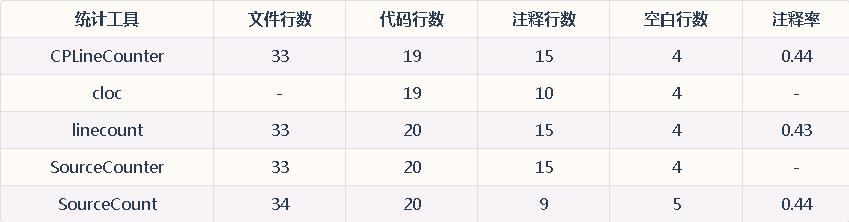
经人工检验,CPLineCounter的统计结果准确无误。linecount和SourceCounter统计也较为可靠。
然后,统计82个源代码文件,上述工具的统计输出如下表所示:
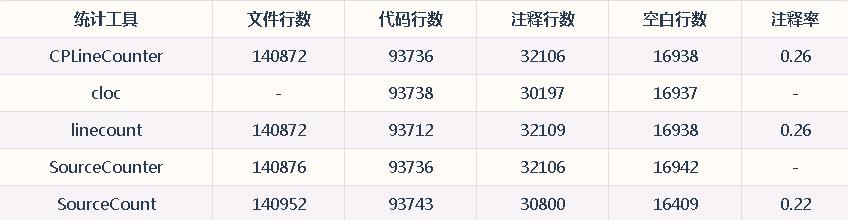
通常,文件总行数和空行数统计规则简单,不易出错。因此,选取这两项统计重合度最高的工具作为基准,即CPLineCounter和linecount。同时,对于代码行数和注释行数,CPLineCounter和SourceCounter的统计结果重合。根据统计重合度,有理由认为CPLineCounter的统计精度最高。
最后,测试统计性能。在作者的Windows XP主机(Pentium G630 2.7GHz主频2GB内存)上,统计5857个C源代码文件,总行数接近千万级。上述工具的性能表现如下表所示。表中仅显示总计项,实际上仍统计单个文件的行数信息。注意,测试时linecount要勾选"目录统计时包含同名文件",cloc要添加--skip-uniqueness和--by-file选项。
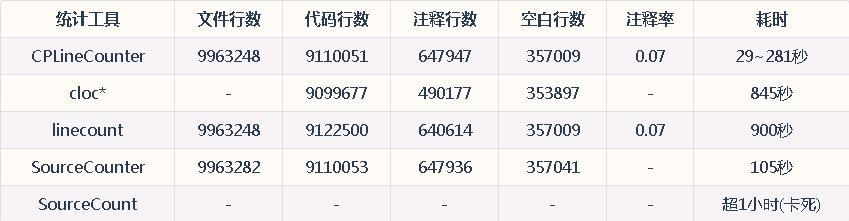
其中,CPLineCounter的性能因运行场景而异,统计耗时少则29秒,多则281秒。。需要注意的是,cloc仅统计出5733个文件。
以条形图展示上述工具的统计性能,如下所示:
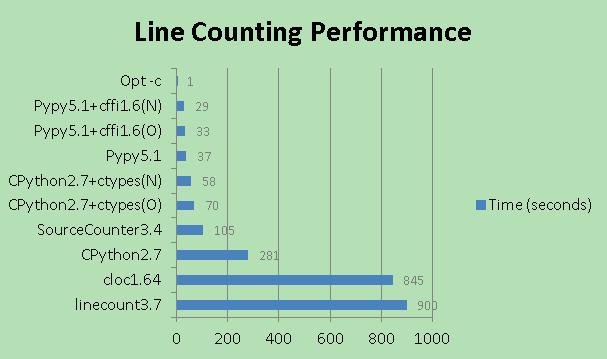
图中"Opt-c"表示CPLineCounter以-c选项运行,"CPython2.7+ctypes(O)"表示以CPython2.7环境运行附带旧DLL库的CPLineCounter,"Pypy5.1+cffi1.6(N)"表示以Pypy5.1环境运行附带新DLL库的CPLineCounter,以此类推。
由于CPLineCounter并非纯粹的CPU密集型程序,因此DLL库算法本身的优化并未带来性能的显著提升(对比旧DLL库和新DLL库)。对比之下,Pypy内置JIT(即时编译)解释器,可从整体上极大地提升Python脚本的运行速度,加速效果甚至可与C匹敌。此外,性能测试数据会受到目标代码、CPU架构、预热、缓存、后台程序等多方面因素影响,因此不同工具或组合的性能表现可能与作者给出的数据略有出入。
综合而言,CPLineCounter统计速度最快且结果可靠,软件体积也小(exe1.3MB,dll11KB)。SourceCounter统计结果比较可靠,速度较快,且内置项目管理信息。cloc文件数目统计误差大,linecount代码行统计误差大,两者速度较慢。但cloc可配置项丰富,并且可自行编译以压缩体积。SourceCount统计速度最慢,结果也不太可靠。
了解Python并行计算的读者也可修改CPLineCounter源码实现,加入多进程处理,压满多核处理器;还可尝试多线程,以改善IO性能。以下截取CountFileLines()函数的部分line_profiler结果:
E:\PyTest>kernprof -l -v CPLineCounter.py source -d > out.txt

140872     93736      32106         16938       0.26            <Total:82 Code Files>

Wrote profile results to CPLineCounter.py.lprof

Timer unit: 2.79365e-07 s

Total time: 5.81981 s

File: CPLineCounter.py

Function: CountFileLines at line 143

Line #      Hits         Time  Per Hit   % Time  Line Contents

==============================================================

   143                                           @profile

   144                                           def CountFileLines(filePath, isRawReport=True, isShortName=False):

... ... ... ... ... ... ... ...

   162        82      7083200  86380.5     34.0      with open(filePath, 'r') as file:

   163    140954      1851877     13.1      8.9          for line in file:

   164    140872      6437774     45.7     30.9              lineType = CalcLines(fileType, line.strip(), isBlockComment)

   165    140872      1761864     12.5      8.5              lineCountInfo[0] += 1

   166    140872      1662583     11.8      8.0              if   lineType == 0:  lineCountInfo[3] += 1

   167    123934      1499176     12.1      7.2              elif lineType == 1:  lineCountInfo[1] += 1

   168     32106       406931     12.7      2.0              elif lineType == 2:  lineCountInfo[2] += 1

   169      1908        27634     14.5      0.1              elif lineType == 3:  lineCountInfo[1] += 1; lineCountInfo[2] += 1

... ... ... ... ... ... ... ...
line_profiler可用pip install line_profiler安装。在待评估函数前添加装饰器@profile后,运行kernprof命令,将给出被装饰函数中每行代码所耗费的时间。-l选项指明逐行分析,-v选项则指明执行后屏显计时信息。Hits(执行次数)或Time(执行时间)值较大的代码行具有较大的优化空间。
由line_profiler结果可见,该函数偏向CPU密集型(7580行占用该函数56.7%的耗时)。然而考虑到目录遍历等操作,很可能整体程序为IO密集型。因此,选用多进程还是多线程加速还需要测试验证。最简单地,可将7380行(即读文件和统计行数)均改为C实现。其他部分要么为IO密集型要么使用Python库,用C语言改写事倍功半。
最后,若仅仅统计代码行数,Linux或Mac系统中可使用如下shell命令:
find ./codeDir -name "*.c" -or -name "*.h" | xargs wc -l  #除空行外的总行数

find ./codeDir -name "*.c" -or -name "*.h" | xargs wc -l  #各文件行数及总和
Python实现代码统计工具——终极加速篇的更多相关文章
- python 练习(一)代码统计工具的实现
最近部门成立了一个python学习小组,旨在让大家在做项目中开始成长起来,于是老大就给布置了第一个小任务:代码统计工具,具体的需求如下: 需求: . 能够统计指定目录下C++程序的代码行数. . C+ ...
- Python实现C代码统计工具(四)
目录 Python实现C代码统计工具(四) 标签: Python 计时 持久化 声明 运行测试环境 一. 自定义计时函数 1.1 整个程序计时 1.2 代码片段计时 1.3 单条语句计时 二. 性能优 ...
- Python代码统计工具
目录 Python代码统计工具 声明 一. 问题提出 二. 代码实现 三. 效果验证 Python代码统计工具 标签: Python 代码统计 声明 本文将对<Python实现C代码统计工具(一 ...
- Python实现C代码统计工具(三)
目录 Python实现C代码统计工具(三) 声明 一. 性能分析 1.1 分析单条语句 1.2 分析代码片段 1.3 分析整个模块 二. 制作exe Python实现C代码统计工具(三) 标签: Py ...
- Python实现C代码统计工具(二)
目录 Python实现C代码统计工具(二) 声明 一. 问题提出 二. 代码实现 三. 效果验证 Python实现C代码统计工具(二) 标签: Python 代码统计 声明 本文将对<Pytho ...
- Python实现C代码统计工具(一)
目录 Python实现C代码统计工具(一) 声明 一. 问题提出 二. 代码实现 三. 效果验证 四. 后记 Python实现C代码统计工具(一) 标签: Python 代码统计 声明 本文将基于Py ...
- Python静态代码检查工具Flake8
简介 Flake8 是由Python官方发布的一款辅助检测Python代码是否规范的工具,相对于目前热度比较高的Pylint来说,Flake8检查规则灵活,支持集成额外插件,扩展性强.Flake8是对 ...
- C++代码统计工具
自己前几天写的C++代码统计工具. http://pan.baidu.com/s/17SnnH
- svn代码统计工具的金额
StatSVN介绍 StatSVN是Java写开源统计程序,从statCVS从移植.从能Subversion版本号来获取信息库,该项目开发的叙述性说明,然后生成各种表格和图表.例:时间线.针对每一个开 ...
随机推荐
- javascript parseUrl函数解析url获取网址url参数
function parseURL(url) { var a = document.createElement('a'); a.href = url; return { source: url, pr ...
- py3 pymysql
虽然大家可能在python2.x中用习惯了mysqldb,但是在python3.x中已经不支持那个组件了. 取而代之的是: import pymysql 所以,大家pip起来吧.另外,mysql官方出 ...
- RMQ(Range MinimumQuery)问题之ST算法
ST算法------是用来求解给定区间RMQ的最值,本文以最小值为例 ST算法分为两部分 离线预处理(nlogn):运用DP思想,用于求解区间最值,并保存到一个二维数组中. 在线查询 (O(1)):对 ...
- Docker技术快速精通指南
doctor专业网站:http://www.dockerinfo.net/ Docker中文文档 csdn 的docker专栏: Docker技术快速精通指南
- ACM-ICPC 2018 南京赛区网络预赛 E题
ACM-ICPC 2018 南京赛区网络预赛 E题 题目链接: https://nanti.jisuanke.com/t/30994 Dlsj is competing in a contest wi ...
- java解决手机上传竖拍照片旋转90\180\270度问题
<dependency> <groupId>com.drewnoakes</groupId> <artifactId>metadata-extracto ...
- python测试开发django-51.Ajax发送post请求登录案例
前言 我想实现一个登录功能:登录的接口是另外一个地方提供,页面上点登录按钮的时候,先访问登录接口,根据接口返回json信息判断是否登录成功,登录成功页面跳转,登录不成功,在登录首页显示失败原因 登录页 ...
- 面试必备:HashMap、Hashtable、ConcurrentHashMap的原理与区别
同步首发:http://www.yuanrengu.com/index.php/2017-01-17.html 如果你去面试,面试官不问你这个问题,你来找我^_^ 下面直接来干货,先说这三个Map的区 ...
- too much recursion(太多递归)Uncaught RangeError: Maximum call stack size exceeded BootstrapValidator报错
在BootstrapValidator中已默认遵守Bootstrap规则,form里的每个输入项目必需包含在类为form-group的标签里,否则BootstrapValidator中定义的field ...
- 【PHP】PHP 7.4 新特性
PHP 7.4 预计在 2019 年年末就会正式发布了,本文先来看看一下 PHP 7.4 的新特性. 1.预加载 预加载的实现理论上是可以为 PHP 带来很大的性能提升的.比如说:现在传统的 PHP ...