
ES6之Array数组
定义数组
const array =[,];

const arr = new Array(1,2,3,4);

const array1 = new Array();

array1[]="test";
给数组不同位置插值,及头部弹出元素和尾部弹出元素的方法:
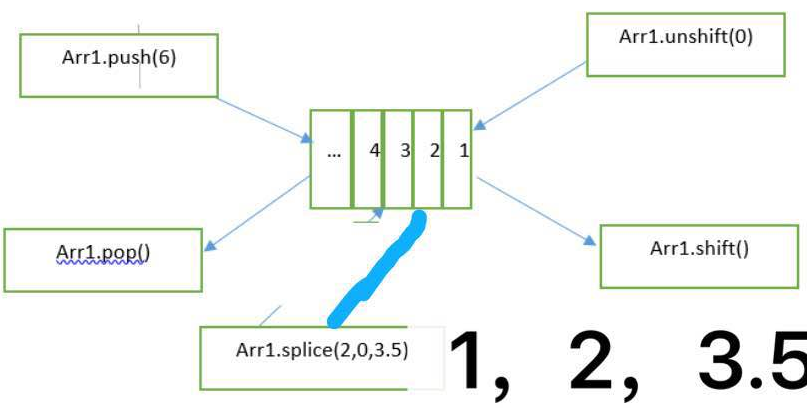
常用方法
1. array.concat(array1, array2,...arrayN);
合并多个数组,返回合并后的新数组,原数组没有变化。
const array = [1,2].concat(['a', 'b'], ['name']);

// [1, 2, "a", "b", "name"]
2. array.every(callback[, thisArg]);
检测数组中的所有元素是否都满足条件,全部通过返回true,否则返回false。
[5,6,7,8].every(el=>{

return el > 5;//callback函数必须返回true或者false

})
// 结果为false
3. array.filter(callback[, thisArg]);
返回符合条件的新数组
const filtered = [1, 2, 3].filter(element => element > 1);

// filtered: [2, 3];
4. array.find(callback[, thisArg]);
返回满足条件的第一个元素,否则返回undefined
const finded = [1, 2, 3].find(element => element > 1);

// finded: 2
5. array.findIndex(callback[, thisArg]);
返回满足条件的第一个元素的索引,否则返回-1
const findIndex = [1, 2, 3].findIndex(element => element > 1);

// findIndex: 1
6. array.includes(searchElement, fromIndex);
includes() 方法用来判断一个数组是否包含一个指定的值,返回 true或 false。searchElement:要查找的元素;fromIndex:开始查找的索引位置。
[1, 2, 3].includes(4, 2);

// false

[1, 2, 3].includes(1);

// true
7. array.indexOf(searchElement[, fromIndex = 0]);
返回在数组中第一个给定元素的索引,如果不存在,则返回-1。searchElement:要查找的元素;fromIndex:开始查找的索引位置。
[2, 9, 7, 8, 9].indexOf(9);

//
8. array.join(separator=',');
将数组中的元素通过separator连接成字符串,并返回该字符串,separator默认为","。
[1, 2, 3].join(';');

// "1;2;3"
9. array.map(callback[, thisArg]);
返回一个新数组。注意:如果没有return值,则新数组会插入一个undefined值。
array.map由于不具有过滤的功能,因此array调用map函数时,如果array中的数据并不是每一个都会return,则必须先filter,然后再map,即map调用时必须是对数组中的每一个元素都有效。
const maped = [{name: 'aa', age: 18}, {name: 'bb', age: 20}].map(item => item.name + 'c');

// maped: ['aac', 'bbc'];

//对象转为数组

let country = {"beijing": 10, "shanghai": 6, "shenzhen": 9 };

let obj = Object.keys(country).map(key =>  ({   name: key,   value: country[key] }) );

console.log(obj);
10. array.pop() 与 array.shift();
pop为从数组中删除最后一个元素,并返加该值,数组为空时返回undefined。
[1, 2, 3].pop();

//
shift删除数组的第一个元素,并返加该值,数组为空返回undefined。
const shifted = ['one', 'two', 'three'].shift();

// shifted: 'one'
11. array.push(element1, element2, ....elementN) 与 array.unshift(element1, element2, ...elementN);
push是将一个或多个元素添加到数组的末尾,并返回新数组的长度;
unshift将一个或多个元素添加到数组的开头,并返回新数组的长度。
const arr = [1, 2, 3];

const length = arr.push(4, 5);

// arr: [1, 2, 3, 4, 5]; length: 5
push和unshift方法具有通用性,通过call()或者apply()方法调用可以完成合并两个数组的操作。
const vegetables = ['parsnip', 'potato'];

const moreVegs = ['celery', 'beetroot'];

// 将第二个数组融合进第一个数组

//  vegetables.push('celery', 'beetroot');

Array.prototype.push.apply(vegetables, moreVegs);

或者

[].push.apply(vegetables, moreVegs);

// vegetables: ['parsnip', 'potato', 'celery', 'beetroot']
切记与 array.concat区分,它会产生新数组,不影响原数组。
12. array.reduce(callback[, initialValue]);
对数组中的每个元素(从左到右)执行callback,并把每次的返回值传递给下次
const total = [, , , ].reduce((sum, value) => {

  return sum + value;

}, );

// total is 6

const flattened = [[, ], [, ], [, ]].reduce((a, b) => {

  return a.concat(b);

}, []);

// flattened is [0, 1, 2, 3, 4, 5]// initialValue累加器初始值, callback函数定义:
//取最大值

let ages = [1,12,3,5,4,8];

function getMax(val1,val2) {

    if (val1 > val2) {

           return val1;

        } else {

           return val2;

        }

}

let maxAge = ages.reduce((max,age)=>getMax(max,age), 0);

console.log(maxAge );

//数组去重

let colors = ['red','green','blue','red','green','blue'];

 const distinctColor = colors.reduce((distinct, color) => ( (distinct.indexOf(color) !== -1) ? distinct : [...distinct, color] ), [] );

console.log(distinctColor);
function callback(accumulator, currentValue, currentIndex, array) {

}

accumulator代表累加器的值,初始化时,如果initialValue有值,则accumulator初始化的值为initialValue,整个循环从第一个元素开始;
initialValue无值,则accumulator初始化的值为数组第一个元素的值,currentValue为数组第二个元素的值,整个循环从第二个元素开始。
initialValue的数据类型可以是任意类型,不需要跟原数组内的元素值类型一致。
const newArray = [{ name: 'aa', age: 1 }, { name: 'bb', age: 2 }, { name: 'cc', age: 3 }].reduce((arr, element) => {

  if (element.age >= 2) {

    arr.push(element.name);

  }

  return arr; // 必须有return,因为return的返回值会被赋给新的累加器,否则累加器的值会为undefined。

}, []);

// newArray is ["bb", "cc"];
上面代码的同等写法:
const newArray = [{ name: 'aa', age: 1 }, { name: 'bb', age: 2 }, { name: 'cc', age: 3 }]
.filter(element => element.age >= 2)
.map(item => item.name);

// newArray is ["bb", "cc"];
对于reduce的特殊用法,其实类似于省略了一个变量初始化步骤,然后通过每次的callback的返回修改该变量,最后返回最终变量值的过程,类似于一个变量声明 + 一个forEach执行过程。
const newArray = [];

[{ name: 'aa', age: 1 }, { name: 'bb', age: 2 }, { name: 'cc', age: 3 }].forEach(item => {

 if (item.age >=2) {

  newArray.push(item.name);

 }

});
13. array.reverse();
将数组中元素的位置颠倒。
['one', 'two', 'three'].reverse();

// ['three', 'two', 'one'],原数组被翻转
14. array.slice(begin, end)
返回一个新数组,包含原数组从begin 到 end(不包含end)索引位置的元素。
const newArray = ['zero', 'one', 'two', 'three'].slice(1, 3);

// newArray: ['one', 'two'];
15. array.some(callback[, thisArg]);
判断数组中是否含有满足条件的元素。找到第一个满足条件的元素时,立即返回true。
[2, 5, 8, 1, 4].some(item => item > 6);

// true
16. array.sort([compareFunction]);
对数组中的元素进行排序,compareFunction不存在时,元素按照转换为的字符串的诸个字符的Unicode位点进行排序,慎用!请使用时一定要加compareFunction函数,而且该排序是不稳定的。
[1, 8, 5].sort((a, b) => {

  return a-b; // 从小到大排序

});

// [1, 5, 8]
17. array.splice(start[, deleteCount, item1, item2, ...]);
通过删除现有元素和/或添加新元素来更改一个数组的内容。start:指定修改的开始位置;deleteCount:从 start位置开始要删除的元素个数;item...:要添加进数组的元素,从start 位置开始。
返回值是由被删除的元素组成的一个数组。如果只删除了一个元素,则返回只包含一个元素的数组。如果没有删除元素,则返回空数组。
如果 deleteCount 大于start 之后的元素的总数,则从 start 后面的元素都将被删除(含第 start 位)。
const myFish = ['angel', 'clown', 'mandarin', 'sturgeon'];

const deleted = myFish.splice(, , 'drum'); // 在索引为2的位置插入'drum'

// myFish 变为 ["angel", "clown", "drum", "mandarin", "sturgeon"],deleted为[]
caveat
push、unshift、shift、 pop、reverse、 sort、splice这七个方法直接修改原数组。其他方法不会改动原数组。
校验是不是数组
Array.isArray([]);  // true

Array.isArray(undefined); // false;

或者

array instanceof Array; // true 检测对象的原型链是否指向构造函数的prototype对象

或者

array.constructor === Array; // true

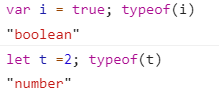
注意:typeof []; // "object" 不可以用此方法检查!!!
ES6之Array数组的更多相关文章
- ES6新特性-------数组、Math和扩展操作符(续)
三.Array Array对象增加了一些新的静态方法,Array原型上也增加了一些新方法. 1.Array.from 从类数组和可遍历对象中创建Array的实例 类数组对象包括:函数中的argumen ...
- ES6,Array.fill()函数的用法
ES6为Array增加了fill()函数,使用制定的元素填充数组,其实就是用默认内容初始化数组. 该函数有三个参数. arr.fill(value, start, end) value:填充值. st ...
- for 循环 和 Array 数组对象
博客地址:https://ainyi.com/12 for 循环 和 Array 数组对象方法 for for-in for-of forEach效率比较 - 四种循环,遍历长度为 1000000 的 ...
- es6 语法 (数组扩展)
{ let arr = Array.of(3, 4, 7, 9, 11); console.log('arr', arr); //[3,4,7,9,11] let empty = Array.of() ...
- ES6,Array.find()和findIndex()函数的用法
ES6为Array增加了find(),findIndex函数. find()函数用来查找目标元素,找到就返回该元素,找不到返回undefined. findIndex()函数也是查找目标元素,找到就返 ...
- ES6,Array.copyWithin()函数的用法
ES6为Array增加了copyWithin函数,用于操作当前数组自身,用来把某些个位置的元素复制并覆盖到其他位置上去. Array.prototype.copyWithin(target, star ...
- ES6,Array.of()函数的用法
ES6为Array增加了of函数用已一种明确的含义将一个或多个值转换成数组. 因为,用new Array()构造数组的时候,是有二意性的. 构造时,传一个参数,表示生成多大的数组. 构造时,传多个参数 ...
- ES6,Array.from()函数的用法
ES6为Array增加了from函数用来将其他对象转换成数组. 当然,其他对象也是有要求,也不是所有的,可以将两种对象转换成数组. 1.部署了Iterator接口的对象,比如:Set,Map,Arra ...
- ES6...扩展运算符(数组或类数组对象)
数组和类数组对象定义 数组:[] 类数组对象:只包含使用从零开始,且自然递增的整数做键名,并且定义了length表示元素个数的对象,我们就认为他是类数组对象. 数组使用 let foo_arr = [ ...
随机推荐
- ES6中Set 和 Map用法
JS中Set与Map用法 一.Set 1.基本用法 ES6 提供了新的数据结构 Set.它类似于数组,但是成员的值都是唯一的,没有重复的值. Set 本身是一个构造函数,用来生成 Set 数据结构. ...
- [dpdk][sysfs][pci] 在dpdk程序中操纵PCI设备
〇 需求 在DPDK程序运行时,希望能够实时的操纵PCI 网卡设备的驱动绑定与解绑. 本文的目的是为了调查满足以上需求的,kernel提供的,标准的API都有几种,分别是什么.以确定实施方案. 一 ...
- linux 通过pid 寻找程序路径的最简单命令(pwdx)
在linux实际操作命令中,查看pid的方式有很多种,通过pid找程序路径的方式也有好几个,但是可能大家都忽略的一个很简单也是很实用的命令:pwdx. 比如要查找某个java编写的程序运行情况可通过j ...
- 2019年度【计算机视觉&机器学习&人工智能】国际重要会议汇总
简介 每年全世界都会举办很多计算机视觉(Computer Vision,CV). 机器学习(Machine Learning,ML).人工智能(Artificial Intelligence ,AI) ...
- SQL获取第一天最后一天
DECLARE @dtdatetime SET @dt=GETDATE() DECLARE @number int --1.指定日期该年的第一天或最后一天 --A. 年的第一天 SELECTCONVE ...
- NOIP2009(codevs1173)最优贸易
题目大意:给你一张有n个点m条边的有向图,每个点有一个权值,求一条1到n的路径,使得这条路径上存在两个点且他们的权值差最大. 思路:用dis[i]]记录从1到i的路径中所能得到两点间权值差的最大值,然 ...
- Eureka服务注册与发现
一.服务注册 注册Eureka的服务非常的简单,只需要引入spring-cloud-starter-netflix-eureka-client的jar包即可. <dependency> & ...
- Linux hostname设置,静态ip设置,hostname与静态ip相互映射
1,hostname设置 永久设置: centos 7 下,切换到root 用户 vi /etc/hostname 输入要修改的hostname centos 6或者其他linux 系统,可能在/et ...
- Oarcle 入门之where关键字
--where 关键字 --作用:过滤行 *将需要的行用where引导出来 用法: 1.判断符号:=,!=,<>,<,>,<=,>=,any,some,all; 例 ...
- 一次Webservice请求的流程