
redis+spring 整合
最近在研究redis也结合了许多网上的资料分享给大家,有些不足的还望大家多补充提点,下面直接进入主题。
结构图:
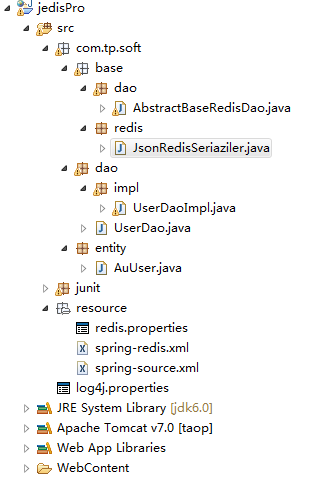
几个redis的核心jar,spring的一些jar自行导入
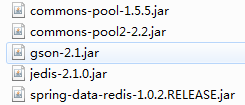
接下来开始配置项目:
1、配置文件
redis.properties
redis.host = 192.168.76.76

redis.port = 6379

redis.pass = admin

redis.maxIdle = 200

redis.maxActive = 1024

redis.maxWait = 10000

redis.testOnBorrow = true
spring-redis.xml
<?xml version="1.0" encoding="UTF-8"?>

<beans xmlns="http://www.springframework.org/schema/beans"

    xmlns:xsi="http://www.w3.org/2001/XMLSchema-instance"

    xmlns:aop="http://www.springframework.org/schema/aop"

    xmlns:context="http://www.springframework.org/schema/context"

    xmlns:tx="http://www.springframework.org/schema/tx"

    xmlns:jee="http://www.springframework.org/schema/jee"

    xmlns:jdbc="http://www.springframework.org/schema/jdbc"

    xmlns:cache="http://www.springframework.org/schema/cache"

    xmlns:jaxws="http://cxf.apache.org/jaxws"

    xmlns:jaxrs="http://cxf.apache.org/jaxrs"

    xsi:schemaLocation="http://www.springframework.org/schema/beans

                     http://www.springframework.org/schema/beans/spring-beans.xsd

                     http://www.springframework.org/schema/tx

                     http://www.springframework.org/schema/tx/spring-tx.xsd

                     http://www.springframework.org/schema/context

                     http://www.springframework.org/schema/context/spring-context.xsd

                     http://www.springframework.org/schema/aop

                     http://www.springframework.org/schema/aop/spring-aop.xsd

                     http://www.springframework.org/schema/jee

                     http://www.springframework.org/schema/jee/spring-jee-3.1.xsd

                     http://www.springframework.org/schema/jdbc

                     http://www.springframework.org/schema/jdbc/spring-jdbc-3.1.xsd

                     http://www.springframework.org/schema/cache http://www.springframework.org/schema/cache/spring-cache-3.2.xsd

                     http://cxf.apache.org/jaxws

                     http://cxf.apache.org/schemas/jaxws.xsd

                     http://cxf.apache.org/jaxrs

                     http://cxf.apache.org/schemas/jaxrs.xsd"  default-autowire="byName" >

    <!-- 引入配置文件 -->

    <context:property-placeholder location="classpath:/resource/redis.properties"/>

    <!-- 连接池基本参数配置,类似数据库连接池 -->

    <bean id="poolConfig" class="redis.clients.jedis.JedisPoolConfig">

        <property name="maxIdle" value="${redis.maxIdle}" />

        <property name="testOnBorrow" value="${redis.testOnBorrow}"/>

    </bean>

    <!-- 连接池配置,类似数据库连接池 -->

    <bean id="connectionFactory" class="org.springframework.data.redis.connection.jedis.JedisConnectionFactory" >

        <property name="hostName" value="${redis.host}"></property>

        <property name="port" value="${redis.port}"></property>

        <property name="password" value="${redis.pass}"></property>

        <property name="poolConfig"  ref="poolConfig"></property>

    </bean>

    <!-- 调用连接池工厂配置 -->

    <bean id="redisTemplate" class=" org.springframework.data.redis.core.RedisTemplate">

        <property name="connectionFactory" ref="connectionFactory"></property>

        <!-- 自定义json序列化存储 -->

        <!--  <property name="defaultSerializer">

            <bean class="org.springframework.data.redis.serializer.StringRedisSerializer"/>

        </property>   -->

        <!-- 如果不配置Serializer,那么存储的时候智能使用String,如果用User类型存储,那么会提示错误User can't cast

        to String!!! -->

         <property name="keySerializer">

            <bean

            class="org.springframework.data.redis.serializer.StringRedisSerializer" />

        </property>

        <property name="valueSerializer">

            <bean

                class="org.springframework.data.redis.serializer.JdkSerializationRedisSerializer" />

        </property>

    </bean>

</beans>
spring-source.xml
<?xml version="1.0" encoding="UTF-8"?>

<beans xmlns="http://www.springframework.org/schema/beans"

    xmlns:xsi="http://www.w3.org/2001/XMLSchema-instance"

    xmlns:aop="http://www.springframework.org/schema/aop"

    xmlns:context="http://www.springframework.org/schema/context"

    xmlns:tx="http://www.springframework.org/schema/tx"

    xmlns:jee="http://www.springframework.org/schema/jee"

    xmlns:jdbc="http://www.springframework.org/schema/jdbc"

    xmlns:cache="http://www.springframework.org/schema/cache"

    xmlns:jaxws="http://cxf.apache.org/jaxws"

    xmlns:jaxrs="http://cxf.apache.org/jaxrs"

    xsi:schemaLocation="http://www.springframework.org/schema/beans

                     http://www.springframework.org/schema/beans/spring-beans.xsd

                     http://www.springframework.org/schema/tx

                     http://www.springframework.org/schema/tx/spring-tx.xsd

                     http://www.springframework.org/schema/context

                     http://www.springframework.org/schema/context/spring-context.xsd

                     http://www.springframework.org/schema/aop

                     http://www.springframework.org/schema/aop/spring-aop.xsd

                     http://www.springframework.org/schema/jee

                     http://www.springframework.org/schema/jee/spring-jee-3.1.xsd

                     http://www.springframework.org/schema/jdbc

                     http://www.springframework.org/schema/jdbc/spring-jdbc-3.1.xsd

                     http://www.springframework.org/schema/cache http://www.springframework.org/schema/cache/spring-cache-3.2.xsd

                     http://cxf.apache.org/jaxws

                     http://cxf.apache.org/schemas/jaxws.xsd

                     http://cxf.apache.org/jaxrs

                     http://cxf.apache.org/schemas/jaxrs.xsd"  default-autowire="byName" >

    <context:annotation-config />

    <!-- 扫描注解web整合时用 -->

    <context:component-scan base-package="com.tp.soft.*" />

    <bean id="jsonSerializer" class="com.tp.soft.base.redis.JsonRedisSeriaziler"/>

    <bean id="userDao" class="com.tp.soft.dao.impl.UserDaoImpl" />

</beans>
2、配置公用Dao
AbstractBaseRedisDao.java
package com.tp.soft.base.dao;

import java.io.Serializable;

import org.springframework.beans.factory.annotation.Autowired;

import org.springframework.data.redis.core.RedisTemplate;

import org.springframework.data.redis.serializer.RedisSerializer;

import com.tp.soft.base.redis.JsonRedisSeriaziler;

/**

 * @author taop

 *

 * @param <K>

 * @param <V>

 */

public abstract class AbstractBaseRedisDao<K extends Serializable, V extends Serializable> {

    @Autowired

    protected RedisTemplate<K, V> redisTemplate;

    //json转换时用 若用系统自带序列对象可不写

    @Autowired

    private JsonRedisSeriaziler jsonSerializer;

    /**

     * 注入

     * 设置redisTemplate

     * @param redisTemplate

     */

    public void setRedisTemplate(RedisTemplate<K, V> redisTemplate){

        this.redisTemplate = redisTemplate;

    }

    //json转换时用 若用系统自带序列对象可不写

    public void setJsonRedisSeriaziler(JsonRedisSeriaziler jsonSerializer) {

        this.jsonSerializer = jsonSerializer;

    }

    //json转换时用 若用系统自带序列对象可不写

    protected String getRedisSerializer(Object obj){

        return jsonSerializer.seriazileAsString(obj);

    }

    //json转换时用 若用系统自带序列对象可不写

    protected <T> T deserRedisSerializer(String str, Class<T> clazz){

        return jsonSerializer.deserializeAsObject(str, clazz);

    }

     /**

      * 方法一

       * 获取 RedisSerializer

       * <br>------------------------------<br>

       */

      protected RedisSerializer<String> getRedisSerializer() {

        return redisTemplate.getStringSerializer();

      }

}
3、若调用jackson 序列化对象 则新建, 若默认序列化对象可不创建
JsonRedisSeriaziler.java
package com.tp.soft.base.redis;

import java.nio.charset.Charset;

import org.apache.commons.lang.SerializationException;

import org.codehaus.jackson.map.ObjectMapper;

public class JsonRedisSeriaziler {

    public static final String EMPTY_JSON = "{}";

    public static final Charset DEFAULT_CHARSET = Charset.forName("UTF-8");

    protected ObjectMapper objectMapper = new ObjectMapper();

    public JsonRedisSeriaziler(){}

    /**

     * java-object as json-string

     * @param object

     * @return

     */

    public String seriazileAsString(Object object){

        if (object== null) {

            return EMPTY_JSON;

        }

        try {

            return this.objectMapper.writeValueAsString(object);

        } catch (Exception ex) {

            throw new SerializationException("Could not write JSON: " + ex.getMessage(), ex);

        }

    }

    /**

     * json-string to java-object

     * @param str

     * @return

     */

    public <T> T deserializeAsObject(String str,Class<T> clazz){

        if(str == null || clazz == null){

            return null;

        }

        try{

            return this.objectMapper.readValue(str, clazz);

        }catch (Exception ex) {

            throw new SerializationException("Could not write JSON: " + ex.getMessage(), ex);

        }

    }

}
4、实体类
AuUser.java
package com.tp.soft.entity;

import java.io.Serializable;

public class AuUser implements Serializable{

    /**

     *

     */

    private static final long serialVersionUID = -1695973853274402680L;

    private String id;

    private String username;

    private String password;

    public AuUser() {

    }

    public AuUser(String id, String username, String password) {

        super();

        this.id = id;

        this.username = username;

        this.password = password;

    }

    public String getId() {

        return id;

    }

    public void setId(String id) {

        this.id = id;

    }

    public String getUsername() {

        return username;

    }

    public void setUsername(String username) {

        this.username = username;

    }

    public String getPassword() {

        return password;

    }

    public void setPassword(String password) {

        this.password = password;

    }

}
5、接口
UserDao.java
package com.tp.soft.dao;

import java.util.List;

import com.tp.soft.entity.AuUser;

public interface UserDao {

    boolean add(AuUser auUser) ;

    boolean add(List<AuUser> list);

    void delete(String key);

    void delete(List<String> keys);

    boolean update(AuUser auUser);

    AuUser get(String keyId);

}
6、接口实现类
UserDaoImpl.java
package com.tp.soft.dao.impl;

import java.io.Serializable;

import java.util.List;

import org.springframework.dao.DataAccessException;

import org.springframework.data.redis.connection.RedisConnection;

import org.springframework.data.redis.core.BoundValueOperations;

import org.springframework.data.redis.core.RedisCallback;

import org.springframework.data.redis.core.ValueOperations;

import org.springframework.data.redis.serializer.RedisSerializer;

import com.tp.soft.base.dao.AbstractBaseRedisDao;

import com.tp.soft.dao.UserDao;

import com.tp.soft.entity.AuUser;

public class UserDaoImpl extends AbstractBaseRedisDao<String, AuUser> implements UserDao{

    @Override

    public boolean add(final AuUser auUser) {

//         this.redisTemplate.opsForValue().set("pwd", "123456");

//         ValueOperations<String, String> operations = redisTemplate

//                .opsForValue();

//         String redisSerializer = getRedisSerializer(auUser);

//         operations.set("user:"+auUser.getId(), redisSerializer);

//         return true;

        //方法一

//        redisTemplate.execute(new RedisCallback<Object>() {

//            public Object doInRedis(RedisConnection connection)

//                    throws DataAccessException {

//                RedisSerializer<String> serializer = getRedisSerializer();

//                byte[] key  = serializer.serialize(auUser.getId());

//                byte[] name = serializer.serialize(auUser.getUsername());

//                connection.set(key, name);

//                return null;

//              }

//        });

        //方法二

         ValueOperations<String, AuUser> valueOps = redisTemplate.opsForValue();

         valueOps.set(auUser.getId(), auUser);

         return true;

    }

    @Override

    public AuUser get(final String keyId) {

        //System.out.println(this.redisTemplate.opsForValue().get("pwd"));

//        ValueOperations<String, String> operations = redisTemplate

//                .opsForValue();

//        String json = operations.get("user:"+keyId);

//        return deserRedisSerializer(json, AuUser.class);

        //return null;

        //方法一

        /*AuUser result = redisTemplate.execute(new RedisCallback<AuUser>() {

              public AuUser doInRedis(RedisConnection connection)

                  throws DataAccessException {

                RedisSerializer<String> serializer = getRedisSerializer();

                byte[] key = serializer.serialize(keyId);

                byte[] value = connection.get(key);

                if (value == null) {

                  return null;

                }

                String nickname = serializer.deserialize(value);

                return new AuUser(keyId, nickname, "1234");

              }

            });

            return result; */

        //方式2:不在redistemplate中配置Serializer,而是在Service的实现类中单独指定Serializer。

        BoundValueOperations<String, AuUser> boundValueOps = redisTemplate.boundValueOps(keyId);

        AuUser user = (AuUser) boundValueOps.get();

        return user;

    }

    @Override

    public boolean add(List<AuUser> list) {

        // TODO Auto-generated method stub

        return false;

    }

    @Override

    public void delete(String key) {

        // TODO Auto-generated method stub

    }

    @Override

    public void delete(List<String> keys) {

        // TODO Auto-generated method stub

    }

    @Override

    public boolean update(AuUser auUser) {

        // TODO Auto-generated method stub

        return false;

    }

}
6、junit测试类
RedisZhTest.java
package junit;

import junit.framework.Assert;

import org.junit.Test;

import org.springframework.beans.factory.annotation.Autowired;

import org.springframework.test.context.ContextConfiguration;

import org.springframework.test.context.junit4.AbstractJUnit4SpringContextTests;

import com.tp.soft.dao.UserDao;

import com.tp.soft.entity.AuUser;

@ContextConfiguration(locations = {"classpath:/resource/spring-*.xml"})

public class RedisZhTest extends AbstractJUnit4SpringContextTests{

    @Autowired

    private UserDao userDao;

    @Test

    public void testAddUser(){

        AuUser user = new AuUser();

        user.setId("1");

        user.setUsername("taop");

        user.setPassword("12345");

        boolean result = userDao.add(user);

        //Assert.assertTrue(result);

        AuUser auUser = userDao.get("1");

        System.out.println(auUser.getUsername());

        System.out.println(auUser.getPassword());

    }

}
结果打印:

redis+spring 整合的更多相关文章
- spring和redis的整合
spring和redis的整合-超越昨天的自己系列(7) 超越昨天的自己系列(7) 扯淡: 最近一直在慢慢多学习各个组件,自己搭建出一些想法.是一个涉猎的过程,慢慢意识到知识是可以融汇贯通,举一反三 ...
- Redis和Spring整合
Redis和Spring整合 Redis在这篇里就不做介绍了~以后系统的学学,然后整理写出来. 首先是环境的搭建 通过自己引包的方式,将redis和spring-redis的包引到自己的项目中,我项目 ...
- redis集群配置,spring整合jedis,缓存同步
前台的商品数据(图片等加载缓慢)查询,先从redis缓存查询数据. redis是一个nosql数据库,内存版数据库,读取速度11w/s.本身具有内存淘汰机制,是单线程服务器(分时操作系统),线程安全. ...
- 【Spring】17、spring cache 与redis缓存整合
spring cache,基本能够满足一般应用对缓存的需求,但现实总是很复杂,当你的用户量上去或者性能跟不上,总需要进行扩展,这个时候你或许对其提供的内存缓存不满意了,因为其不支持高可用性,也不具备持 ...
- 网站性能优化小结和spring整合redis
现在越来越多的地方需要非关系型数据库了,最近网站优化,当然从页面到服务器做了相应的优化后,通过在线网站测试工具与之前没优化对比,发现有显著提升. 服务器优化目前主要优化tomcat,在tomcat目录 ...
- Spring整合Redis&JSON序列化&Spring/Web项目部署相关
几种JSON框架用法和效率对比: https://blog.csdn.net/sisyphus_z/article/details/53333925 https://blog.csdn.net/wei ...
- spring整合redis之hello
1.pom.xml文件 <dependencies> <!-- spring核心包 --> <dependency> <groupId>org.spri ...
- Spring整合Redis时报错:java.util.NoSuchElementException: Unable to validate object
我在Spring整合Redis时报错,我是犯了一个很低级的错误! 我设置了Redis的访问密码,在Spring的配置文件却没有配置密码这一项,配置上密码后,终于不报错了!
- Spring Boot + MyBatis + Druid + Redis + Thymeleaf 整合小结
Spring Boot + MyBatis + Druid + Redis + Thymeleaf 整合小结 这两天闲着没事想利用**Spring Boot**加上阿里的开源数据连接池**Druid* ...
随机推荐
- windows下怎样测试oracle安装是否成功以及在oracle中创建用户并赋予用户权限;和[Err] ORA-65096: 公用用户名或角色名无效的解决方案
测试oracle数据安装是否成功,可按顺序执行以下两个步骤: 测试步骤 1:请执行操作系统级的命令:tnsping orcl 上述命令假定全局数据库名是 orcl.以下是命令执行后的示例(请在cmd命 ...
- partial_sum
版本1: template < class InputIterator, class OutputIterator > OutputIterator partial_sum(InputIt ...
- Dijkstra模板
Dijkstra struct node { long long x,d; node(); node(long long xx,long long dd){ x = xx; d = dd; } }; ...
- css学习_css用户界面样式
1.css用户界面样式 a.鼠标样式(记住几个兼容性好的) cursor:default/pointer/move/text; b.轮廓 outline outline:2px solid red: ...
- Luogu 1177 - 【模板】快速排序 - [快速排序][归并排序][无旋Treap]
题目链接:https://www.luogu.org/problemnew/show/P1177 题意:输入 $n$ 以及后续 $n$ 个整数,让你将这 $n$ 个整数从小到大排序输出. 归并排序(用 ...
- FakeGame 集成总结
1.64位支持(目前编译不过); 2.Dx9? 2.以何种方式提供(源码?工程版本(VS2005还是其他)): 3.是否可以连接TC的服务器进行调试? TDR编解码失败: 不同目录下存在a.lib的不 ...
- Android ListVeiw控件(转载整理)
列表的显示需要三个元素: 1.ListVeiw 用来展示列表的View. 2.适配器 用来把数据映射到ListView上的中介. 3.数据 具体的将被映射的字符串,图片,或者基本组件. 根据列表 ...
- svn 目录
svn介绍 SVN与Git的区别 SVN服务的模式和多种访问方式 多种访问原理图解与优缺点 SVN安装部署 svn 部署 配置 配置svn用户及密码 配置svn用户及权限 svn 启动命令讲解 svn ...
- python框架之Django(8)-CBV中添加装饰器
现有如下检查登录装饰器: from functools import wraps def check_login(func): @wraps(func) def inner(request, *arg ...
- django时区设置 media配置 日期截断函数 上传图片管理设计方案
1.django时区 修改一下app里的设置 TIME_ZONE = 'Asia/Shanghai' USE_I18N = True USE_L10N = True # 不用UTC时间 USE_TZ ...