
Django框架的使用教程--类视图-中间间-模板[六]
类视图
类视图的使用
视图函数
class class_view(View):

    """类视图"""

    def get(self, request):

        return render(request, 'index.html')

    def post(self, request):

        return render(request, 'show.html')
路由
url(r'^class_view/$', views.class_view.as_view()),
结果
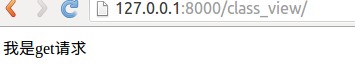
类视图的源码
    @classonlymethod

    def as_view(cls, **initkwargs):

        """

        Main entry point for a request-response process.

        """

        for key in initkwargs:

            if key in cls.http_method_names:

                raise TypeError("You tried to pass in the %s method name as a "

                                "keyword argument to %s(). Don't do that."

                                % (key, cls.__name__))

            if not hasattr(cls, key):

                raise TypeError("%s() received an invalid keyword %r. as_view "

                                "only accepts arguments that are already "

                                "attributes of the class." % (cls.__name__, key))

     # 类视图的函数

        def view(request, *args, **kwargs):

            self = cls(**initkwargs)

            if hasattr(self, 'get') and not hasattr(self, 'head'):

                self.head = self.get

            self.request = request

            self.args = args

            self.kwargs = kwargs

            return self.dispatch(request, *args, **kwargs)

        view.view_class = cls

        view.view_initkwargs = initkwargs

        # take name and docstring from class

        update_wrapper(view, cls, updated=())

        # and possible attributes set by decorators

        # like csrf_exempt from dispatch

        update_wrapper(view, cls.dispatch, assigned=())

        return view

    # 根据不同的请求函数返回不同的值

    def dispatch(self, request, *args, **kwargs):

        # Try to dispatch to the right method; if a method doesn't exist,

        # defer to the error handler. Also defer to the error handler if the

        # request method isn't on the approved list.

        if request.method.lower() in self.http_method_names:

            handler = getattr(self, request.method.lower(), self.http_method_not_allowed)

        else:

            handler = self.http_method_not_allowed

        return handler(request, *args, **kwargs)

# http_method_names = ['get', 'post', 'put', 'patch', 'delete', 'head', 'options', 'trace']
类视图使用装饰器
方法一:使用装饰器定义类视图(不推荐使用,只能整个类添加装饰器,不能单独方法添加)
代码
def my_decorator(func):

    def without(request, *args, **kwargs):

        print('装饰器被调用')

        print('路径%s' % request.path)

        return func(request, *args, **kwargs)

    return without

class decorator_view(View):

    def get(self, request):

        print('这是get方法')

        return HttpResponse('ok')

    def post(self, request):

        print('这是post方法')

        return HttpResponse('ok')
路由
# 直接在URL中使用装饰器
from .views import decorator_view
url(r'^decorator_view/$', views.my_decorator(decorator_view.as_view())),
结果

方法二:使用装饰器定义类视图(可以指定的请求方式)
代码(以下的视图函数名字可以自己定义过)
# 可以指定装饰器的特定请求,如name='get'

@method_decorator(my_decorator, name='dispatch')

class decorator_view(View):

    def get(self, request):

        print('这是get方法')

        return HttpResponse('ok')

    def post(self, request):

        print('这是post方法')

        return HttpResponse('ok')
路由
# 直接在URL中使用装饰器

from .views import decorator_view

url(r'^decorator_view/$', views.my_decorator(decorator_view.as_view())),
运行结果

方法三:使用装饰器定义类视图(定义方法的类装饰器)
代码
class decorator_view(View):

    # 给get添加装饰器

    @method_decorator(my_decorator)

    def get(self, request):

        print('这是get方法')

        return HttpResponse('ok')

    # 给post添加装饰器

    @method_decorator(my_decorator)

    def post(self, request):

        print('这是post方法')

        return HttpResponse('ok')
路由
# 直接在URL中使用装饰器

from .views import decorator_view

url(r'^decorator_view/$', views.my_decorator(decorator_view.as_view())),
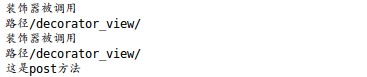
运行(postman测试)
中间件
在子应用工程目录中新建一个middleware.py文件
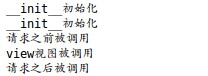
middleware.py(在调试模式下,中间件被调用两次)
def my_middleware(get_response):

    print('__init__初始化')

    def in_middleware(request):

        print('请求之前被调用')

        response = get_response(request)

        print('请求之后被调用')

        return response

    return in_middleware
视图函数
def index_view(request):

    print('view视图被调用')

    return HttpResponse('ok')
运行
注册中间件

多个中间件的使用
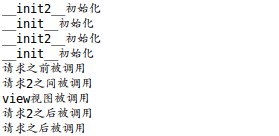
1)在视图函数执行之前,中间件由上至下执行
2)在视图函数请求至后,中间间由下到上
注册中间间

定义两个中间件
def my_middleware(get_response):

    print('__init__初始化')

    def in_middleware(request):

        print('请求之前被调用')

        response = get_response(request)

        print('请求之后被调用')

        return response

    return in_middleware

def my_middleware1(get_response):

    print('__init2__初始化')

    def in_middleware(request):

        print('请求2之间被调用')

        response = get_response(request)

        print('请求2之后被调用')

        return response

    return in_middleware
运行结果
模板的使用
根目录创建一个静态文件static_files
修改静态文件的参数

访问

模板的配置

模板的继承
{% extends "父模板路径"%}
代码块
{% block 名称 %}
预留区域,可以编写默认内容,也可以没有默认内容
{% endblock 名称 %}
注释
{#...#}
多行注释
{% comment %}
...
{% endcomment %}
Django框架的使用教程--类视图-中间间-模板[六]的更多相关文章
- Django内置的通用类视图
1.ListView 表示对象列表的一个页面. 执行这个视图的时候,self.object_list将包含视图正在操作的对象列表(通常是一个查询集,但不是必须). 属性: model: 指定模型 te ...
- 六、Django之表单和类视图-Part 4
一.表单form 为了接收用户的投票选择,我们需要在前端页面显示一个投票界面.让我们重写先前的polls/detail.html文件,代码如下: <h1>{{ question.quest ...
- Django:(05)类视图,装饰器和中间件
一.类视图的定义和使用 在Django中还可以通过类来定义一个视图,称为类视图. 定义一个类视图:定义一个类,需继承 Django 提供的 View 类 . from django.views.gen ...
- Django框架的使用教程--视图和路由[二]
视图和路由 1.创建一个django_test应用 2.setting中设置django_test INSTALLED_APPS = [ 'django.contrib.admin', 'django ...
- Django框架的使用教程--路由-请求-响应[四]
路由 路由可以定义在工程的目录下(看你的需求),也可以定义在各个应用中来保存应用的路由,用主路文件urls中使用include()包含各个应用的子路由的数据 路由的解析顺序 Django接收到请求后, ...
- Django框架的使用教程--站点的管理[七]
Django的站点管理 创建超级管理员命令(密码要8位) python manage.py createsuperuser 进入站点管理 注册模型类 from django.contrib impor ...
- Django框架的使用教程--Cookie-Session[五]
Cookie cookie是存储在浏览器中的一段文本信息,下次同一网站请求,就会发送该cookie给服务器,一般的浏览器都有启动cookie,用cookie存储信息,最好不要存储密码,cookie也有 ...
- Django框架的使用教程--mysql数据库[三]
Django的数据库 1.在Django_test下的view.py里面model定义模型 from django.db import models # Create your models here ...
- Django框架的使用教程--环境的搭建和项目的创建[一]
Django环境的搭建 Django 常用的命令 # 创建一个名为Django_test子应用 python manage.py startapp Django_test # 生成迁移文件 pytho ...
随机推荐
- Python学习的路上,Anaconda送你一双遮天神翼
一.背景 最近在学习python,发现在本地搭建python环境的时候,要是想要同时搭建不同python版本的环境,就比较麻烦,很容易就出现冲突了,很是头疼.然后光明就出现这山重水复疑无路的时候, ...
- Hadoop项目实战-用户行为分析之编码实践
1.概述 本课程的视频教程地址:<用户行为分析之编码实践> 本课程以用户行为分析案例为基础,带着大家去完成对各个KPI的编码工作,以及应用调度工作,让大家通过本课程掌握Hadoop项目的编 ...
- Golang GC原理
一.内存泄漏 内存泄露,是从操作系统的角度上来阐述的,形象的比喻就是“操作系统可提供给所有进程的存储空间(虚拟内存空间)正在被某个进程榨干”,导致的原因就是程序在运行的时候,会不断地动态开辟的存储空间 ...
- (转)关于CNN中平移不变性的理解
https://www.quora.com/Why-and-how-are-convolutional-neural-networks-translation-invariant https://st ...
- SpringMVC教程3
SpringMVC教程2 一.文件上传 1.引入相关jar包 maven坐标 <!-- fileUpload 解析上传的文件用到的jar --> <dependency> &l ...
- InnoDB存储引擎--Innodb Buffer Pool(缓存池)
InnoDB存储引擎--Innodb Buffer Pool(缓存池) Innodb Buffer Pool的概念 InnoDB的Buffer Pool主要用于缓存用户表和索引数据的数据页面.它是一块 ...
- C++的静态联编和动态联编
联编的概念 联编是指一个计算机程序自身彼此关联的过程,在这个联编过程中,需要确定程序中的操作调用(函数调用)与执行该操作(函数)的代码段之间的映射关系. 意思就是这个函数的实现有多种,联编就是把调用和 ...
- openWin和openFrame 设置透明背景
openWin简单点说就是:像是一个浏览器 openFrame就是对应openWin浏览器里面打开的每一个网页 有些操作只能在openWin里面执行,比如监听安卓返回事件,只能在openWin里面才有 ...
- c# API接受图片文件以文件格式上传图片
/// 文件图片上传 /// </summary> /// <returns>成功上传返回上传后的文件名</returns> [HttpPost] public a ...
- R0~R16寄存器作用
R0-R3 用作传入函数参数,传出函数返回值.在子程序调用之间,可以将 r0-r3 用于任何用途. 被调用函数在返回之前不必恢复 r0-r3.如果调用函数需要再次使用 r0-r3 的内容,则它 ...