
Django基础,Day2 - 编写urls,views,models
编写views
views:作为MVC中的C,接收用户的输入,调用数据库Model层和业务逻辑Model层,处理后将处理结果渲染到V层中去。
polls/views.py:
from django.http import HttpResponse

# Create your views here.

def index(request):

    return HttpResponse("Hello, world. You're at the polls index.")
编写urls
urls,程序的入口,支持正则匹配访问url,将访问url映射到views中的具体某个函数中。
为了能调用到上面这个views,我们需要将views.index函数映射到URL中。
我们可以创建一个urls.py 在App目录下。
polls/urls.py:
#!/usr/bin/python

# coding=utf-8

from django.conf.urls import url

from . import views

urlpatterns = [

    url(r'^$', views.index, name='index'),

]
下一步,我们需要将创建的urls.py 添加到全局urls.py中,如
mysite/urls.py:
from django.conf.urls import url, include

from django.contrib import admin

urlpatterns = [

    url(r'^polls/', include('polls.urls')),

    url(r'^admin/', admin.site.urls),

]
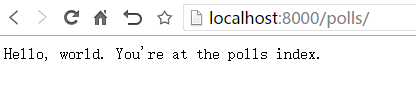
此时,可以通过访问 http://localhost:8000/polls/ 可以调用到所编写的views
编写models
models与数据库操作相关,是django处理数据库的一个特色之处,它包含你的数据库基本字段与数据。通过一系列封装的api可以直接操作数据库。当然,也支持原生sql。
既然models与数据库相关,那么首先需要配置数据库
1、数据库设置,mysite/settings.py:
这里默认使用内置的sqlite3,配置如下:
DATABASES = {

    'default': {

        'ENGINE': 'django.db.backends.sqlite3',

        'NAME': os.path.join(BASE_DIR, 'db.sqlite3'),

    }

}
如果想要改为MYSQL,配置修改如下:
DATABASES = {

    'default': {

        'ENGINE': 'django.db.backends.mysql',

        'NAME': MYSQL_DB,

        'USER': MYSQL_USER,

        'PASSWORD': MYSQL_PASS,

        'HOST': MYSQL_HOST_M,

        'PORT': MYSQL_PORT,

    }

}
2、初始化数据库数据
在pycharm中,首次使用django相关命令,需要做一些配置。如

配置 python manage.py migrate
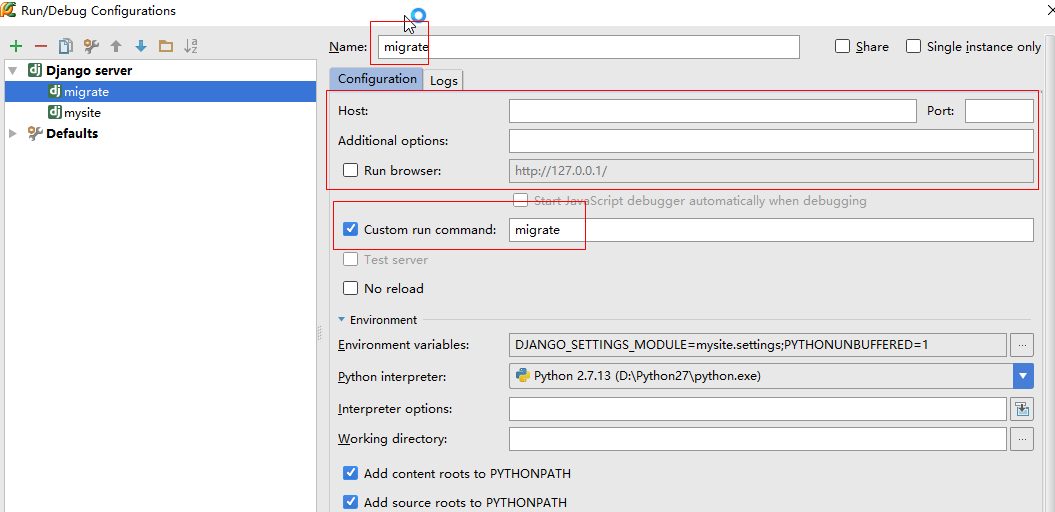
配置好后便可运行,运行结果如:
$ python manage.py migrate

Operations to perform:

  Apply all migrations: admin, auth, contenttypes, sessions

Running migrations:

  Applying contenttypes.0001_initial... OK

  Applying auth.0001_initial... OK

  Applying admin.0001_initial... OK

  Applying admin.0002_logentry_remove_auto_add... OK

  Applying contenttypes.0002_remove_content_type_name... OK

  Applying auth.0002_alter_permission_name_max_length... OK

  Applying auth.0003_alter_user_email_max_length... OK

  Applying auth.0004_alter_user_username_opts... OK

  Applying auth.0005_alter_user_last_login_null... OK

  Applying auth.0006_require_contenttypes_0002... OK

  Applying auth.0007_alter_validators_add_error_messages... OK

  Applying auth.0008_alter_user_username_max_length... OK

  Applying sessions.0001_initial... OK
3、创建models
在本实例中,创建两个models:Questions 和 Choice.
polls/models.py:
from __future__ import unicode_literals

from django.db import models

# Create your models here.

class Question(models.Model):

    question_text = models.CharField(max_length=200)

    pub_date = models.DateTimeField('date published')

class Choice(models.Model):

    question = models.ForeignKey(Question, on_delete=models.CASCADE)

    choice_text = models.CharField(max_length=200)

    votes = models.IntegerField(default=0)
4、激活models
将app包含到project中,我们需要将它的配置类注册到全局配置中的 INSTALLED_APPS 中。它的配置类 PollsConfig 在 polls/apps.py 中,所以它的路径为'polls.apps.PollsConfig'
编辑mysite/settings.py:
INSTALLED_APPS = [

    'polls.apps.PollsConfig',

    'django.contrib.admin',

    'django.contrib.auth',

    'django.contrib.contenttypes',

    'django.contrib.sessions',

    'django.contrib.messages',

    'django.contrib.staticfiles',

]
现在,django已经知道包含了polls app。此时,我们需要告诉django,models已经更改。to create migrations for those changes
$ python manage.py makemigrations polls
makemigrations 命令将会生成一些更新sql语句,同样的,为了在pycharm中容易使用,将其配置如:

运行后,控制台输出如:

然后,重新运行 python manage.py migrate,将会在数据库中创建这些models表。to apply those changes to the database.
$ python manage.py migrate

注意,每次更改models,都必须重新分别执行
$ python manage.py makemigrations

$ python manage.py migrate
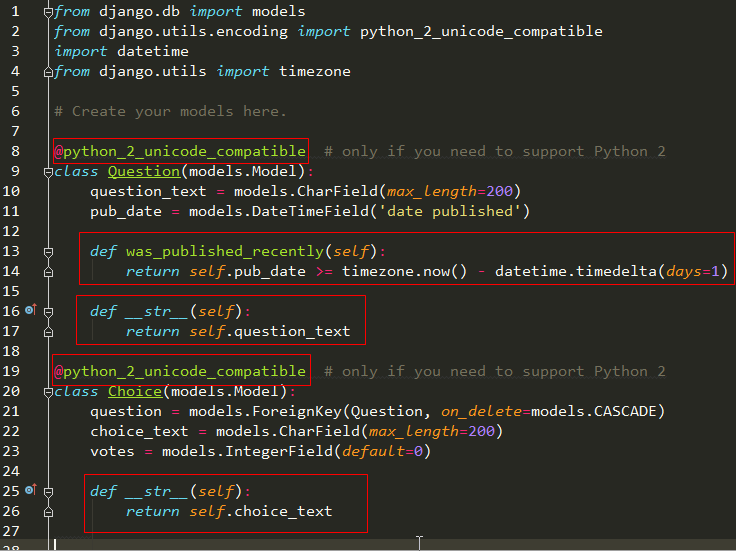
增强models
polls/models.py:
from django.db import models

from django.utils.encoding import python_2_unicode_compatible

import datetime

from django.utils import timezone

# Create your models here.

@python_2_unicode_compatible  # only if you need to support Python 2

class Question(models.Model):

    question_text = models.CharField(max_length=200)

    pub_date = models.DateTimeField('date published')

    def was_published_recently(self):

        return self.pub_date >= timezone.now() - datetime.timedelta(days=1)

    def __str__(self):

        return self.question_text

@python_2_unicode_compatible  # only if you need to support Python 2

class Choice(models.Model):

    question = models.ForeignKey(Question, on_delete=models.CASCADE)

    choice_text = models.CharField(max_length=200)

    votes = models.IntegerField(default=0)

    def __str__(self):

        return self.choice_text
修改位置:
通过Database API操作数据
进入django shell 环境:
$ python manage.py shell
执行database API:
>>> from polls.models import Question, Choice   # Import the model classes we just wrote.

# No questions are in the system yet.

>>> Question.objects.all()

<QuerySet []>

# Create a new Question.

# Support for time zones is enabled in the default settings file, so

# Django expects a datetime with tzinfo for pub_date. Use timezone.now()

# instead of datetime.datetime.now() and it will do the right thing.

>>> from django.utils import timezone

>>> q = Question(question_text="What's new?", pub_date=timezone.now())

# Save the object into the database. You have to call save() explicitly.

>>> q.save()

# Now it has an ID. Note that this might say "1L" instead of "", depending

# on which database you're using. That's no biggie; it just means your

# database backend prefers to return integers as Python long integer

# objects.

>>> q.id

# Access model field values via Python attributes.

>>> q.question_text

"What's new?"

>>> q.pub_date

datetime.datetime(, , , , , , , tzinfo=<UTC>)

# Change values by changing the attributes, then calling save().

>>> q.question_text = "What's up?"

>>> q.save()

# objects.all() displays all the questions in the database.

# Make sure our __str__() addition worked.

>>> Question.objects.all()

<QuerySet [<Question: What's up?>]>

# Django provides a rich database lookup API that's entirely driven by

# keyword arguments.

>>> Question.objects.filter(id=)

<QuerySet [<Question: What's up?>]>

>>> Question.objects.filter(question_text__startswith='What')

<QuerySet [<Question: What's up?>]>

# Get the question that was published this year.

>>> from django.utils import timezone

>>> current_year = timezone.now().year

>>> Question.objects.get(pub_date__year=current_year)

<Question: What's up?>

# Request an ID that doesn't exist, this will raise an exception.

>>> Question.objects.get(id=)

Traceback (most recent call last):

    ...

DoesNotExist: Question matching query does not exist.

# Lookup by a primary key is the most common case, so Django provides a

# shortcut for primary-key exact lookups.

# The following is identical to Question.objects.get(id=).

>>> Question.objects.get(pk=)

<Question: What's up?>

# Make sure our custom method worked.

>>> q = Question.objects.get(pk=)

>>> q.was_published_recently()

True

# Give the Question a couple of Choices. The create call constructs a new

# Choice object, does the INSERT statement, adds the choice to the set

# of available choices and returns the new Choice object. Django creates

# a set to hold the "other side" of a ForeignKey relation

# (e.g. a question's choice) which can be accessed via the API.

>>> q = Question.objects.get(pk=)

# Display any choices from the related object set -- none so far.

>>> q.choice_set.all()

<QuerySet []>

# Create three choices.

>>> q.choice_set.create(choice_text='Not much', votes=)

<Choice: Not much>

>>> q.choice_set.create(choice_text='The sky', votes=)

<Choice: The sky>

>>> c = q.choice_set.create(choice_text='Just hacking again', votes=)

# Choice objects have API access to their related Question objects.

>>> c.question

<Question: What's up?>

# And vice versa: Question objects get access to Choice objects.

>>> q.choice_set.all()

<QuerySet [<Choice: Not much>, <Choice: The sky>, <Choice: Just hacking again>]>

>>> q.choice_set.count()

# The API automatically follows relationships as far as you need.

# Use double underscores to separate relationships.

# This works as many levels deep as you want; there's no limit.

# Find all Choices for any question whose pub_date is in this year

# (reusing the 'current_year' variable we created above).

>>> Choice.objects.filter(question__pub_date__year=current_year)

<QuerySet [<Choice: Not much>, <Choice: The sky>, <Choice: Just hacking again>]>

# Let's delete one of the choices. Use delete() for that.

>>> c = q.choice_set.filter(choice_text__startswith='Just hacking')

>>> c.delete()
***微信扫一扫,关注“python测试开发圈”,了解更多测试教程!***
Django基础,Day2 - 编写urls,views,models的更多相关文章
- Django基础之路由(urls)层
目录 Django基础之路由(urls)层 无名分组与有名分组 无名分组 有名分组 反向解析 前段解析 后端解析 无名分组反向解析 前段解析 后端解析 有名分组的反向解析 前段解析 后端解析 路由分发 ...
- Django基础(一)_URLconf、Views、template、ORM
一 什么是web框架? 框架,即framework,特指为解决一个开放性问题而设计的具有一定约束性的支撑结构,使用框架可以帮你快速开发特定的系统,简单地说,就是你用别人搭建好的舞台来做表演. 对于所有 ...
- django复习笔记3:urls/views/templates三板斧
0.先看看文件结构 mysite/ mysite/ ├── __pycache__ │ └── manage.cpython-.pyc ├── blog │ ├── __init__.py │ ...
- Django基础知识MTV
Django简介 Django是使用Python编写的一个开源Web框架.可以用它来快速搭建一个高性能的网站. Django也是一个MVC框架.但是在Django中,控制器接受用户输入的部分由框架自行 ...
- Django基础--Django基本命令、路由配置系统(URLconf)、编写视图、Template、数据库与ORM
web框架 框架,即framework,特指为解决一个开放性问题而设计的具有一定约束性的支撑结构. 使用框架可以帮你快速开发特定的系统. 简单地说,就是你用别人搭建好的舞台来做表演. 尝试搭建一个简单 ...
- Django基础之视图(views)层、模板层
目录 Django基础之视图(views)层.模板层 JsonResponse 向前端返回一个json格式字符串的两种方式 重写Django中的json的某个方法 form表单上传文件 FBV与CBV ...
- Django基础之模型(models)层(上)
目录 Django基础之模型(models)层 单表查询 必知必会13条 神奇的双下划线查询 多表查询 外键的字段的增删改查 表与表之间的关联查询 基于双下划线的跨表查询(连表查询) 补充知识 Dja ...
- Django基础之安装配置
安装配置 一 MVC和MTV模式 著名的MVC模式:所谓MVC就是把web应用分为模型(M),控制器(C),视图(V)三层:他们之间以一种插件似的,松耦合的方式连接在一起. 模型负责业务对象与数据库的 ...
- Django基础(一)
Django基础(一) 知识预览 Django基本命令 二 路由配置系统(URLconf) 三 编写视图 四 Template 五 数据库与ORM admin的配置 一 什么是web框架? 框架,即f ...
随机推荐
- 软件工程第二次作业——git的使用
1. 参照 http://www.cnblogs.com/xinz/p/3803109.html 的第一题,每人建立一个GitHub账号,组长建立一个Project,将本组成员纳入此Porject中的 ...
- nfs挂载配置
nfs挂载步骤 服务器端 1.安装nfs-utils rpcbind $sudo yum –y install nfs-utils rpcbind 2.文件开放出去配置/etc/exports 例子: ...
- C语言调试过程中duplicate symbol错误分析
说明:在我们调试C语言的过程中,经常会遇到duplicate symbol错误(在Mac平台下利用Xcode集成开发环境).如下图: 一.简单分析一下C语言程序的开发步骤. 由上图我们可以看出C语言由 ...
- pmd静态代码分析
在正式进入测试之前,进行一定的静态代码分析及code review对代码质量及系统提高是有帮助的,以上为数据证明 Pmd 它是一个基于静态规则集的Java源码分析器,它可以识别出潜在的如下问题:– 可 ...
- redis字符串
字符串类型是redis的基本类型 字符串数据类型的相关命令用于管理 redis 字符串值,基本语法如下:COMMAND KEY_NAME SET 和GET用于设置和读取key的值 1.SET key ...
- NodeJS、NPM安装配置步骤(windows版本)
windows下的NodeJS安装是比较方便的(v0.6.0版本之后,支持windows native),只需要登陆官网(http://nodejs.org/),便可以看到首页的"INSTA ...
- linux下EOF写法梳理
在平时的运维工作中,我们经常会碰到这样一个场景:执行脚本的时候,需要往一个文件里自动输入N行内容.如果是少数的几行内容,还可以用echo追加方式,但如果是很多行,那么单纯用echo追加的方式就显得愚蠢 ...
- [LeetCode] Generate Parentheses 生成括号
Given n pairs of parentheses, write a function to generate all combinations of well-formed parenthes ...
- 关于GIT合并出错的记录
今天给美术解决GIT资源冲突时碰到的问题,搞了挺长时间终于解决了.参看下面这个网址:http://www.bujichong.com/m/68 今天git一小部分代码发现出错了, 上网查了一下, 大体 ...
- Mongodb的安装使用
1.下载 最好不要去.com的那个网站下载: 各个版本的下载地址: http://dl.mongodb.org/dl/win32/x86_64 2.压缩包版本: 下载压缩包版本,目录结构如图: ...