
goaccess
找了各种工具,最终还是觉得goaccess不仅图文并茂,而且速度快,每秒8W 的日志记录解析速度,websocket10秒刷新统计数据,站在巨人肩膀上你也会看得更远…先上图:
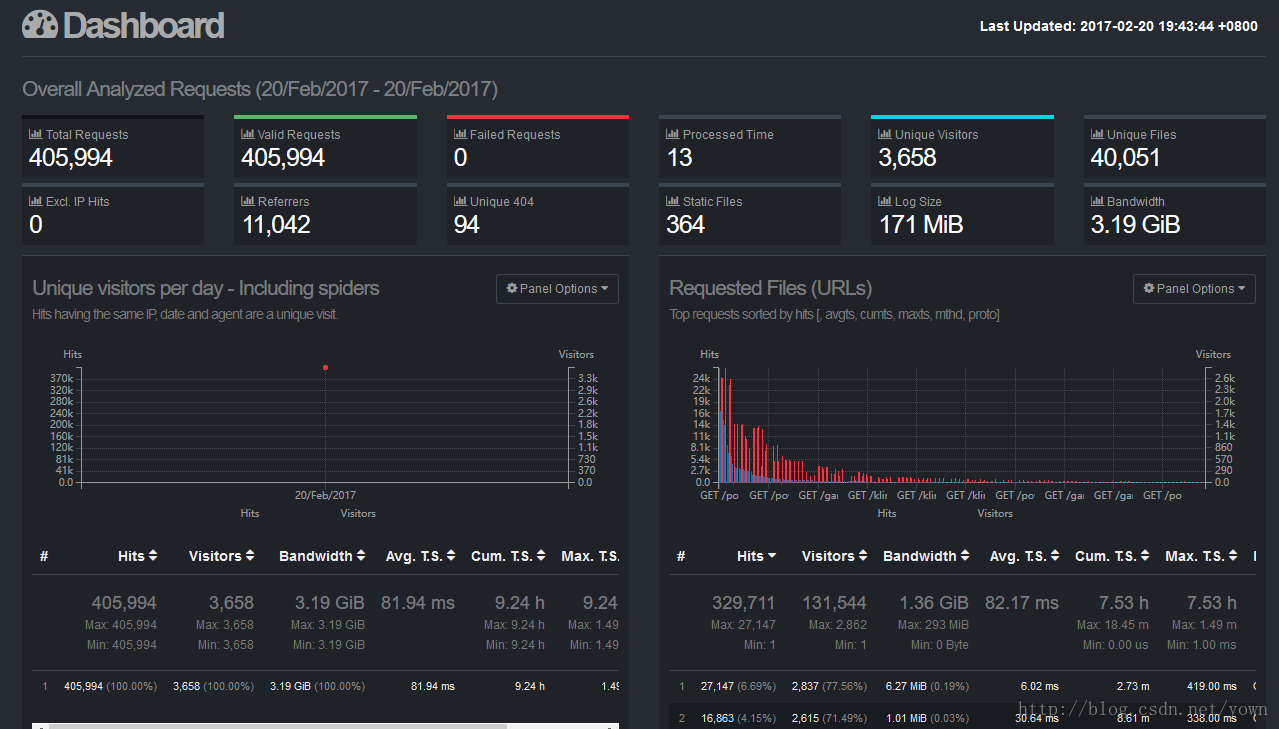
具体方案如下步骤:
一、linux上安装goaccess(版本 1.1.1,一般安装在nginx所在机器上的/opt目录)
a.先安装依赖包
yum install ncurses-devel

wget http://geolite.maxmind.com/download/geoip/api/c/GeoIP.tar.gz

tar -zxvf GeoIP.tar.gz

cd GeoIP-1.4.8/

./configure

make && make install
- 1
- 2
- 3
- 4
- 5
- 6
- 7
b.安装goaccess
wget http://tar.goaccess.io/goaccess-1.1.1.tar.gz
tar -xzvf goaccess-1.1.1.tar.gz
cd goaccess-1.1.1/
./configure –enable-geoip –enable-utf8
make
make install
二、校对nginx的配置的日志格式(nginx.conf中log_format 使用以下自定义格式)
    log_format main '$remote_addr - $remote_user [$time_local] "$request" '

                    '$status $body_bytes_sent "$http_referer" '

                    '"$http_user_agent" "$http_x_forwarded_for" '

                    '$connection $upstream_addr '

                    '$upstream_response_time $request_time';
- 1
- 2
- 3
- 4
- 5
- 6
- 7
- 8
- 9
- 10
修改后重启:
nginx -s stop
nginx
三、生成配置文件goaccess_log_conf_nginx.conf
vi /opt/goaccess/goaccess_log_conf_nginx.conf
time-format %T

date-format %d/%b/%Y

log_format %h - %^ [%d:%t %^] "%r" %s %b "%R" "%u" "%^" %^ %^ %^ %T
- 1
- 2
- 3
- 4
- 5
- 6
四、生成统计页面
手工生成当日统计页面:
goaccess -f /opt/nginx/logs/access.log -p /opt/goaccess/goaccess_log_conf_nginx.conf -o /opt/www/day-report.html- 1
生成实时统计页面:
nohup goaccess -f /opt/nginx/logs/access.log -p /opt/goaccess/goaccess_log_conf_nginx.conf -o /opt/www/real-time-yong-report.html --real-time-html --ws-url=report.xxx.com &- 1
检查是否存在进程: ps -ef|grep goaccess
- 1
- 2
五、开通对外访问地址
a.安装新的tomcat(假设在/opt/report-tomcat目录) 端口:7891 修改conf/server.xml中的端口,并增加访问目录:
<Host name="localhost"  appBase="webapps"

            unpackWARs="true" autoDeploy="false">

        <Context path="/" docBase="/opt/www" />

</Host>

然后增加权限与角色( conf/tomcat-users.xml) :

<role rolename="report"/>

<user username="report" password="reportxxx" roles="report"/>

最后在webapps/ROOT/WEB-INFO/web.xml的web-app中增加:

<security-constraint>

 <web-resource-collection>

     <web-resource-name>

       Restricted Area

     </web-resource-name>

     <url-pattern>/*</url-pattern>

 </web-resource-collection>

 <auth-constraint>

   <role-name>report</role-name>

 </auth-constraint>

</security-constraint>

<login-config>

    <auth-method>BASIC</auth-method>

    <realm-name>Authenticate yourself</realm-name>

</login-config>

b.确认统计端口:7890、7891对外开放

c.访问页面是否ok

   手工生成当日统计页面:http://report.xxx.com:7891/day-report.html

   实时统计页面:   http://report.xxx.com:7891/real-time-yong-report.html
- 1
- 2
- 3
- 4
- 5
- 6
- 7
- 8
- 9
- 10
- 11
- 12
- 13
- 14
- 15
- 16
- 17
- 18
- 19
- 20
- 21
- 22
- 23
- 24
- 25
- 26
- 27
- 28
- 29
- 30
- 31
- 32
- 33
- 34
- 35
- 36
- 37
- 38
- 39
- 40
附:
参考链接:
各种日志格式转换工具:https://github.com/stockrt/nginx2goaccess
goaccess官网:https://goaccess.io
goaccess的更多相关文章
- goaccess的安装和使用
一.简介1.goaccess用于分析apache和nginx日志的强大工具 2.官网:https://goaccess.io 二.安装1.下载goaccess的安装包wget http://tar.g ...
- nginx日志分析利器GoAccess
面试的时候一定会被面到的问题是:给出web服务器的访问日志,请写一个脚本来统计访问前10的IP有哪些?访问前10的请求有哪些?当你领略过goaccess之后,你就明白,这些问题,除了考验你的脚本背诵记 ...
- 网站日志实时分析工具GoAccess使用
网站日志实时分析工具GoAccess使用 系统环境CentOS release 5.5 (Final) GoAccess是一款开源的网站日志实时分析工具. GoAccess 的工作方式就是读取和解析 ...
- GoAccess日志分析工具使用文档
----Sevck 2016/3/4 17:24:13 #1软件说明: GoAccess是一款开源.实时,运行在命令行终端下的web日志分析工具.该工具提供快速.多样的HTTP状态统计,可以令管理员不 ...
- jboss7访问日志功能及使用goaccess工具分析
网络上虽然很多文章分别讲到jboss7的访问日志如何配置,goaccess工具怎么分析nginx/tomcat等日志.但将两者放在一起即“通过goaccess分析jboss访问日志”的倒是没搜索到. ...
- 用GOACCESS分析NGINX日志
参考URL: http://4b3r.com/goaccess-analyze-nginx-access-log/64/ http://jesuspan.sinaapp.com/crontab%E6% ...
- Goaccess解析nginx日志备忘
参考 http://nginx.org/en/docs/http/ngx_http_log_module.html?&_ga=1.92028562.949762386.1481787781#l ...
- nginx 日志分析工具goaccess
参考:https://www.goaccess.io/download 安装 $ wget http://tar.goaccess.io/goaccess-1.1.1.tar.gz $ tar -xz ...
- 安装部署 Goaccess
CentOS 7安装 Goaccess 安装依赖 # yum install ncurses-devel geoip-devel libmaxminddb-devel tokyocabinet-dev ...
- 日志分析工具之goAccess
在此推荐一款分析日志的工具,方便我们日常对于网站的访问状况有一个较为清晰的了解 一.安装 官网: https://goaccess.io/download 源码安装: 1. wget http:// ...
随机推荐
- chrome's developer console
原文链接: https://medium.freecodecamp.org/10-tips-to-maximize-your-javascript-debugging-experience-b69a7 ...
- mongodb与mysql命令详细对比
传统的关系数据库一般由数据库(database).表(table).记录(record)三个层次概念组成,MongoDB是由数据库(database).集合(collection).文档对象(docu ...
- jenkines的工作区目录位置查找
先找到jenkines的主目录 系统-系统配置 然后工作区在主目录的workspace文件夹里面
- python之路——15
王二学习python的笔记以及记录,如有雷同,那也没事,欢迎交流,wx:wyb199594 复习 1.迭代器 1.可迭代协议:含有iter 2.迭代器协议:含有iter和next 3.特点:节省内存, ...
- 知识点:Mysql 基本用法之函数
函数 MySQL中提供了许多内置函数 例如: sql 内置函数: 一.数学函数 ROUND(x,y) 返回参数x的四舍五入的有y位小数的值 RAND() 返回0到1内的随机值,可以通过提供一个参数(种 ...
- 1、Shiro 安全框架与Spring 整合详解
Apache Shiro 是一个安全认证框架,和 Spring Security 相比,在于他使用了比较简洁易懂的认证和授权方式.其提供的 native-session(即把用户认证后的授权信息保存在 ...
- 验证Textbox的字符长度
private void textBox1_KeyPress(object sender, System.Windows.Forms.KeyPressEventArgs e) { ) { //Indi ...
- Axiso解决跨域访问(...XMLHttpRequest cannot load http://xxx.xxx No 'Access-Control-Allow-Origin'...)
直接访问如下:this.$axios.get("http://localhost:8089/yc/demo").then(res=>{ console.log(res) ...
- C#设计模式(4)——抽象工厂模式(Abstract Factory)
简单工厂模式: 简单工厂模式的工厂类随着产品类的增加需要增加额外的代码 工厂方法模式: 工厂方法模式每个具体工厂类只完成单个实例的创建,所以它具有很好的可扩展性 但是在实际应用中,一个工厂不止会创建单 ...
- Rhythmk 一步一步学 JAVA(6): JSP 语法学习笔记
1.修改JSP页面模版: 找到MyEclips安装目录,搜索“Jsp.vtl”,找到该文件修改编码,以及一些不需要用到的代码. 2.查找项目生成的Servlet文件路径: 查看当前项目父级目录搜索 . ...