
goaccess
找了各种工具,最终还是觉得goaccess不仅图文并茂,而且速度快,每秒8W 的日志记录解析速度,websocket10秒刷新统计数据,站在巨人肩膀上你也会看得更远…先上图:
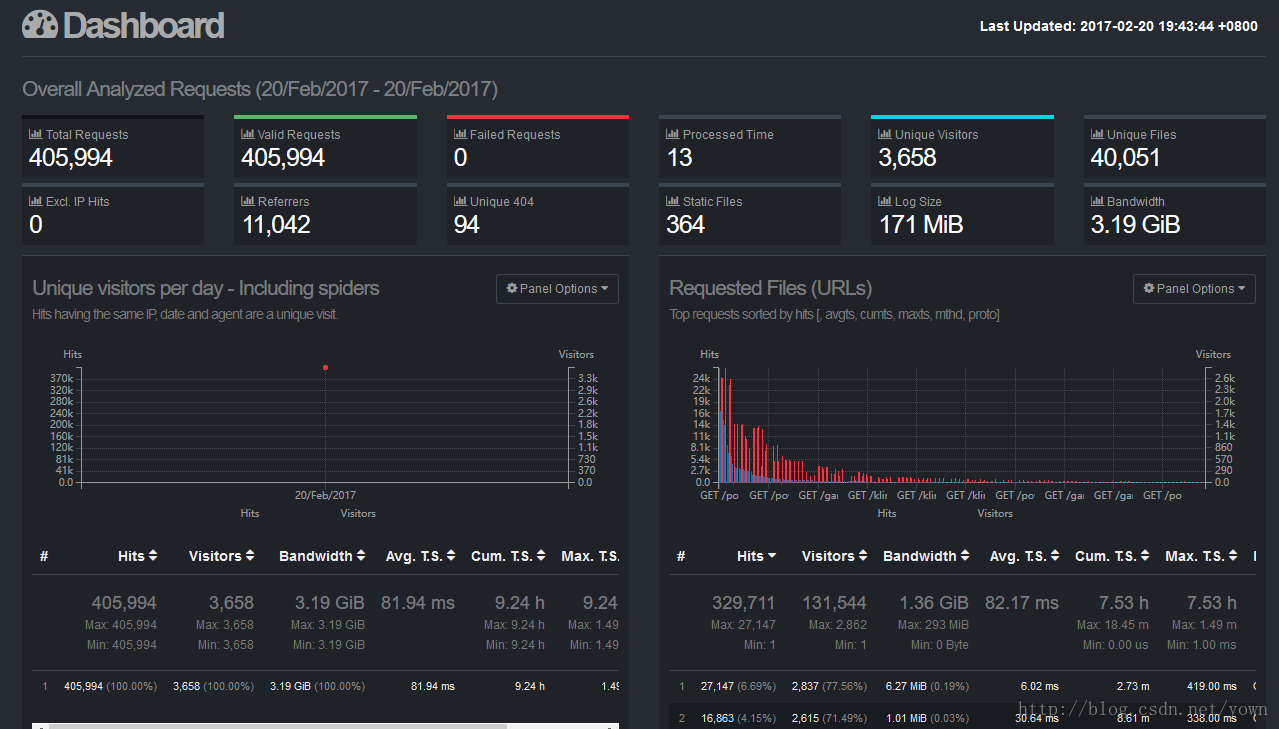
具体方案如下步骤:
一、linux上安装goaccess(版本 1.1.1,一般安装在nginx所在机器上的/opt目录)
a.先安装依赖包
yum install ncurses-devel

wget http://geolite.maxmind.com/download/geoip/api/c/GeoIP.tar.gz

tar -zxvf GeoIP.tar.gz

cd GeoIP-1.4.8/

./configure

make && make install
- 1
- 2
- 3
- 4
- 5
- 6
- 7
b.安装goaccess
wget http://tar.goaccess.io/goaccess-1.1.1.tar.gz
tar -xzvf goaccess-1.1.1.tar.gz
cd goaccess-1.1.1/
./configure –enable-geoip –enable-utf8
make
make install
二、校对nginx的配置的日志格式(nginx.conf中log_format 使用以下自定义格式)
    log_format main '$remote_addr - $remote_user [$time_local] "$request" '

                    '$status $body_bytes_sent "$http_referer" '

                    '"$http_user_agent" "$http_x_forwarded_for" '

                    '$connection $upstream_addr '

                    '$upstream_response_time $request_time';
- 1
- 2
- 3
- 4
- 5
- 6
- 7
- 8
- 9
- 10
修改后重启:
nginx -s stop
nginx
三、生成配置文件goaccess_log_conf_nginx.conf
vi /opt/goaccess/goaccess_log_conf_nginx.conf
time-format %T

date-format %d/%b/%Y

log_format %h - %^ [%d:%t %^] "%r" %s %b "%R" "%u" "%^" %^ %^ %^ %T
- 1
- 2
- 3
- 4
- 5
- 6
四、生成统计页面
手工生成当日统计页面:
goaccess -f /opt/nginx/logs/access.log -p /opt/goaccess/goaccess_log_conf_nginx.conf -o /opt/www/day-report.html- 1
生成实时统计页面:
nohup goaccess -f /opt/nginx/logs/access.log -p /opt/goaccess/goaccess_log_conf_nginx.conf -o /opt/www/real-time-yong-report.html --real-time-html --ws-url=report.xxx.com &- 1
检查是否存在进程: ps -ef|grep goaccess
- 1
- 2
五、开通对外访问地址
a.安装新的tomcat(假设在/opt/report-tomcat目录) 端口:7891 修改conf/server.xml中的端口,并增加访问目录:
<Host name="localhost"  appBase="webapps"

            unpackWARs="true" autoDeploy="false">

        <Context path="/" docBase="/opt/www" />

</Host>

然后增加权限与角色( conf/tomcat-users.xml) :

<role rolename="report"/>

<user username="report" password="reportxxx" roles="report"/>

最后在webapps/ROOT/WEB-INFO/web.xml的web-app中增加:

<security-constraint>

 <web-resource-collection>

     <web-resource-name>

       Restricted Area

     </web-resource-name>

     <url-pattern>/*</url-pattern>

 </web-resource-collection>

 <auth-constraint>

   <role-name>report</role-name>

 </auth-constraint>

</security-constraint>

<login-config>

    <auth-method>BASIC</auth-method>

    <realm-name>Authenticate yourself</realm-name>

</login-config>

b.确认统计端口:7890、7891对外开放

c.访问页面是否ok

   手工生成当日统计页面:http://report.xxx.com:7891/day-report.html

   实时统计页面:   http://report.xxx.com:7891/real-time-yong-report.html
- 1
- 2
- 3
- 4
- 5
- 6
- 7
- 8
- 9
- 10
- 11
- 12
- 13
- 14
- 15
- 16
- 17
- 18
- 19
- 20
- 21
- 22
- 23
- 24
- 25
- 26
- 27
- 28
- 29
- 30
- 31
- 32
- 33
- 34
- 35
- 36
- 37
- 38
- 39
- 40
附:
参考链接:
各种日志格式转换工具:https://github.com/stockrt/nginx2goaccess
goaccess官网:https://goaccess.io
goaccess的更多相关文章
- goaccess的安装和使用
一.简介1.goaccess用于分析apache和nginx日志的强大工具 2.官网:https://goaccess.io 二.安装1.下载goaccess的安装包wget http://tar.g ...
- nginx日志分析利器GoAccess
面试的时候一定会被面到的问题是:给出web服务器的访问日志,请写一个脚本来统计访问前10的IP有哪些?访问前10的请求有哪些?当你领略过goaccess之后,你就明白,这些问题,除了考验你的脚本背诵记 ...
- 网站日志实时分析工具GoAccess使用
网站日志实时分析工具GoAccess使用 系统环境CentOS release 5.5 (Final) GoAccess是一款开源的网站日志实时分析工具. GoAccess 的工作方式就是读取和解析 ...
- GoAccess日志分析工具使用文档
----Sevck 2016/3/4 17:24:13 #1软件说明: GoAccess是一款开源.实时,运行在命令行终端下的web日志分析工具.该工具提供快速.多样的HTTP状态统计,可以令管理员不 ...
- jboss7访问日志功能及使用goaccess工具分析
网络上虽然很多文章分别讲到jboss7的访问日志如何配置,goaccess工具怎么分析nginx/tomcat等日志.但将两者放在一起即“通过goaccess分析jboss访问日志”的倒是没搜索到. ...
- 用GOACCESS分析NGINX日志
参考URL: http://4b3r.com/goaccess-analyze-nginx-access-log/64/ http://jesuspan.sinaapp.com/crontab%E6% ...
- Goaccess解析nginx日志备忘
参考 http://nginx.org/en/docs/http/ngx_http_log_module.html?&_ga=1.92028562.949762386.1481787781#l ...
- nginx 日志分析工具goaccess
参考:https://www.goaccess.io/download 安装 $ wget http://tar.goaccess.io/goaccess-1.1.1.tar.gz $ tar -xz ...
- 安装部署 Goaccess
CentOS 7安装 Goaccess 安装依赖 # yum install ncurses-devel geoip-devel libmaxminddb-devel tokyocabinet-dev ...
- 日志分析工具之goAccess
在此推荐一款分析日志的工具,方便我们日常对于网站的访问状况有一个较为清晰的了解 一.安装 官网: https://goaccess.io/download 源码安装: 1. wget http:// ...
随机推荐
- UDP广播包
一,广播地址: 广播地址是专门用于同时向网络中所有工作站进行发送的一个地址.在使用TCP/IP 协议的网络中,主机号为全1的IP地址为广播地址.例如,对于 :192.168.199.0(掩码:255. ...
- android 获取对权限的选择
一般是第三方软件拦截,再次提示给用户,确认权限的,如360等.(PS 没有设置权限的app 是会崩溃的 ,而是不是弹出权限确认,因为你都没设置这个权限)看了网上很多,确切说没有一个适合我的. 其实用 ...
- ActiveMQ-5.15.2下载和启动(windows)
一.下载和部署 我的ActiveMQ版本是 5.15.2,参照别人家的博客,下载和启动照样成功.别人家的博客地址: http://blog.csdn.net/clj198606061111/artic ...
- gitea 源码阅读笔记 002 生成无依赖单文件可执行包
gitea bindata static gitea 可以通过 make generate 生成一个单文件可执行程序, 该文件不需要任何其它依赖,直接可以单独执行. 对于用户的安装.升级和生成dock ...
- [sharepoint]根据用户名获取该用户的权限
写在前面 这样的一个场景,客户端请求sharepoint的rest api,但不允许传输用户的密码,使用的是证书认证的方式,但这样所有的用户用的是同一个证书,这样造成的结果就是无法识别该用户是否有操作 ...
- DELL服务器r710配置RAID
DELL服务器r710配置RAID: 1.开机后等待DELL图标出现,连续按ctrl+r,进入RAID配置界面: 2.进入RAID配置界面,如果是下面的这个界面,选择Disk group 0这项需要按 ...
- 为什么SQL用UPDATE语句更新时更新行数会多3行有触发器有触发器有触发器有触发器有触发器有触发器
update明显更新就一行,但是结果显示更新多行. 原因是有触发器有触发器有触发器有触发器有触发器有触发器有触发器有触发器有触发器
- 安装和激活Office 2019
有条件请支持正版!相比费尽力气找一个可能不太安全的激活工具,直接买随时随地更新的Office 365确实是最好的办法.暂时没有经济实力的,可以看看这篇文章.下载OTP工具 首先到Office Tool ...
- sass的基本使用
使用sass的前提是安装Ruby,如果是Mac系统,那么免去安装,Windows系统需要自行安装https://www.sass.hk/install/.当安装好以后,直接执行安装sass命令:gem ...
- 记一个jquery 无缝轮播的制作方法
接触前端也很久了,今天才发现,要做好一个轮播,其实有很多东西需要考虑进去,否则做出来的轮播效果并不好,下面我就来做一个轮播,是依赖jquery来写的 1.要做轮播,首先需要的是HTML的内容,css的 ...